Tsed: Broken Swagger documentation on version v4.14.1
After upgrading to version v4.14.1 my docs started to shows up this message...


Im running the whole api inside of a docker container, prior this version v4.14.1 everything was working fine..
 milewski
All 26 comments
Ok the new feature to make multiple swagger documentation has changed something...
 Romakita
on 24 Apr 2018
Romakita
on 24 Apr 2018
Can you send me the version of your swagger-ui-express ?
Romakita
on 24 Apr 2018
@milewski Can you send me your configuration for swagger and the version of swagger-ui-express because I cannot reproduce your bug.
Romakita
on 24 Apr 2018
Same problem here with ts.ed v4.12.2 & swagger-ui-express v3.0.8.
My swagger configuration : swagger: [
{
path: '/swagger',
doc: 'api',
},
],
Should we use swagger-ui-express v2 or v3 ? The release note suggest swagger v3 but tsed/[email protected] has a peer depency of swagger-ui-express@^2.0.15.
And with swagger-ui-express 2.0.15 I have the following error: Error: Cannot find module 'swagger-ui-express/swagger-ui-init.js'
 mduthilleul
on 24 Apr 2018
mduthilleul
on 24 Apr 2018
yes, I forgot to update the peerDependency. But v3 should be works.
Romakita
on 24 Apr 2018
@milewski & @mduthilleul I confirm, you need to install swagger-ui-express v3. I realize, v2 and v3 has a lot of change. I can't support v2 anymore because multiple swagger docs require v3 and I use a small hack to do that... I assume that, my implementation isn't not good.
Maybe it's a time to remove the dependency with swagger-ui-express and implement this feature directly inside the @tsed/swagger.
Romakita
on 24 Apr 2018
@milewski I've test your configuration. It's work with v3, but you need to add annotation on your all controllers when you use doc: 'api'.
@Docs('api')
class MyController {

}
@Romakita It's what I have done, but it's not working for me.
I'm using Node 9.11.1 on MacOS
mduthilleul
on 24 Apr 2018
wow im late for the conversation... but here we go:
Can you send me the version of your swagger-ui-express ?
i have being using the latest version ^3.0.8 since always...
I've test your configuration. It's work with v3, but you need to add annotation on your all controllers when you use doc: 'api'.
i have just tried it... didnt work..
If i open the documentation trough: http://0.0.0.0:9000/documentation as the second screenshot shows... it works normally as before.. however because i am running it trough docker, i cannot access my container trough 0.0.0.0 on my host machine.. instead docker "binds" the port :9000 to my localhost:9000, so when i try to access trough localhost:9000 the swagger shows that problem due to CORS, but actually what is happening is that the 0.0.0.0:9000 is not accessible

milewski
on 24 Apr 2018
Changing this line to my actual hostname, solves the issue for me:
why is it hardcoded to 0.0.0.0 ? 0.0.0.0 doesn't work on windows machine, and i dont see anyway to override it... i think this should be the value that is set on the @ServerSettings()
@ServerSettings({
    host: 'my-fancy-hostname',
    port: 9000,
    ....
}
hooo....yes, I've missed that...
Romakita
on 24 Apr 2018
0.0.0.0 means bind to all network interfaces available, so if i start my server listening on 0.0.0.0, means i will be able to access it through: localhost, 173.0.10.1, 192.168.1.80 or whatever other interface i have available ... but i wont be able to access it trough -> http://0.0.0.0 because it is not a valid address (at least on windows)
milewski
on 24 Apr 2018
Yes. The fix is ready. Release is coming soon ;)
Romakita
on 24 Apr 2018
released !
Romakita
on 24 Apr 2018
thanks! confirmed it's working now :)
milewski
on 24 Apr 2018
i think swagger requires an absolute URL to works properly

i have noticed this element appeared on the bottom of my page i guess this is just an extra check that swagger does to see if the schema is correct.. but it fail because swagger was set to a relative url instead of an absolute one...
milewski
on 25 Apr 2018
swagger-ui-express make me crasy...
Romakita
on 25 Apr 2018
@milewski I've created a new branch without swagger-ui-express. Now @tsed/swagger use directly the official package swagger-ui-dist.
If you have a time, can you try this branch https://github.com/Romakita/ts-express-decorators/tree/feat_swagger_ui_integration with your project ?
See you,
Romain
Romakita
on 25 Apr 2018
@Romakita i just tested here... i cant get it to work... the "instruction" to open swagger docs disappeared, accessing: http://localhost:9000/documentation/ returns Cannot GET /documentation/
[2018-04-26T00:34:53.008] [INFO ] [TSED] - HTTP Server listen on http://0.0.0.0:9000
[2018-04-26T00:34:53.009] [INFO ] [TSED] - HTTP Server listen on https://0.0.0.0:8000
[2018-04-26T00:34:53.009] [INFO ] [TSED] - Started in 977 ms
the only mention i see about swagger on the logs is:
[2018-04-26T00:34:52.881] [INFO ] [TSED] - settings.swagger => [ { path: '/documentation' } ]
i have only linked the module @tsed/swagger from the new branch, perhaps i should have linked all? _(i haven't seem anything other than stuff inside swagger dir on the file changes trough)_
this is my swagger config:
@ServerSettings({
 swagger: [
   {
       path: '/documentation',
   }
 ]
}
never mind i just realized i forgot to install swagger-ui-dist the new peer dependency 😄 yeah it woooorks
but that error at the bottom of the page is still present:
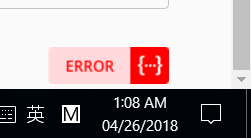
and i am pretty sure that this error is because "swagger" is trying to validate the schema with their online validator.. but because it is a localhost (perhaps it would auto skip if it detects it's a localhost hostname) and the path is / relative it may not be able to detect.... then it is passing the wrong URL to the online validator ?url=/documentation/swagger.json when it should be something like ?url=https://my-domain.com/documentation/swagger.json

milewski
on 25 Apr 2018
Fixed :)
Romakita
on 30 Apr 2018
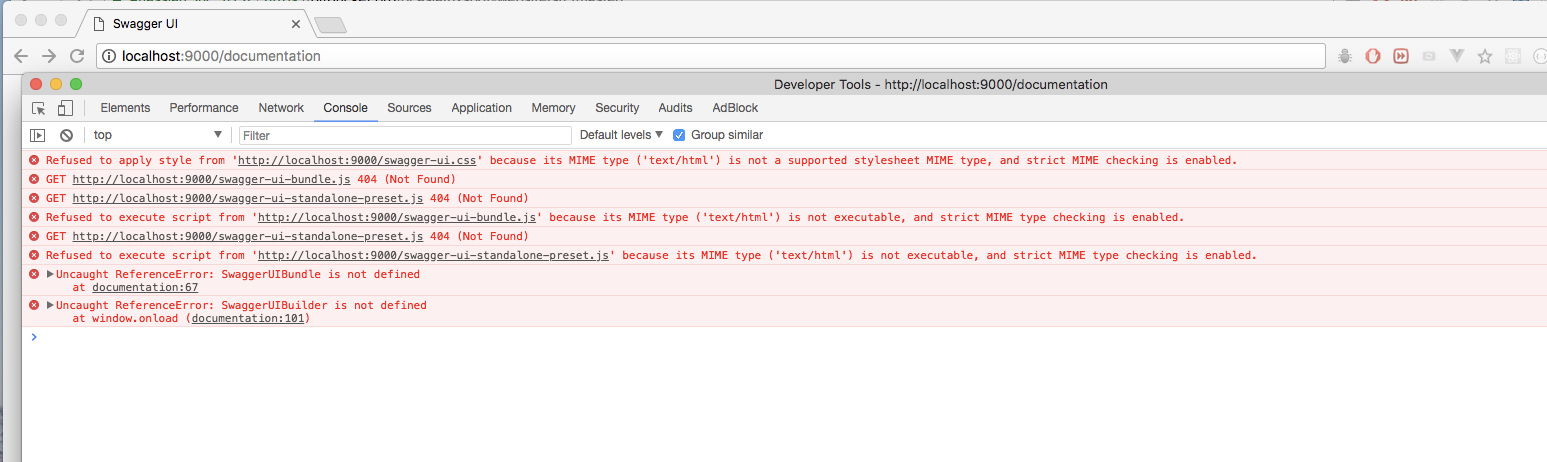
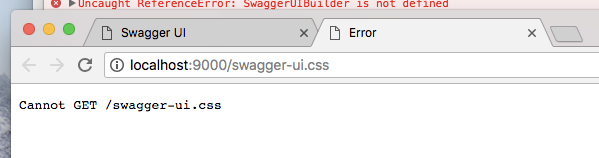
broken here 😮
milewski
on 2 May 2018
Yes. Just a problem with the url. Add a slash in your browser "http://localhost:9000/documentation/".
I don't know why I don't see that... I'll check with swagger-ui-express how he manage the url with "/" and without "/".
See you
Romakita
on 2 May 2018
Maybe express has changed the behavior with the "/" trailing. I fixed the problem with a middleware.
See you,
Romain
Romakita
on 2 May 2018
Fixed :)
Romakita
on 2 May 2018
confirmed working ! thanks again 👍
milewski
on 2 May 2018
Related issues
 vorph1
·
6Comments
vorph1
·
6Comments
 tobiasmuecksch
·
6Comments
tobiasmuecksch
·
6Comments
 yangukmo
·
5Comments
yangukmo
·
5Comments
 teusemanuel
·
4Comments
teusemanuel
·
4Comments
 royibernthal
·
3Comments
royibernthal
·
3Comments
Most helpful comment
released !