Information
- Version: 5.12.1
- Type: Question
Description
Nowhere in the docs it's described how to deploy a project to a server. I've assumed that I should run npm run build and then put the contents of the dist folder on the server.
But when I run node index.js or node server.js an error occurs.
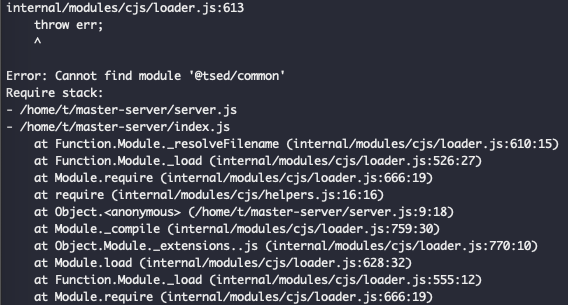
What is the correct way to deploy a project to a server?
[INFO] npm run start works perfectly
 tobiasmuecksch
All 6 comments
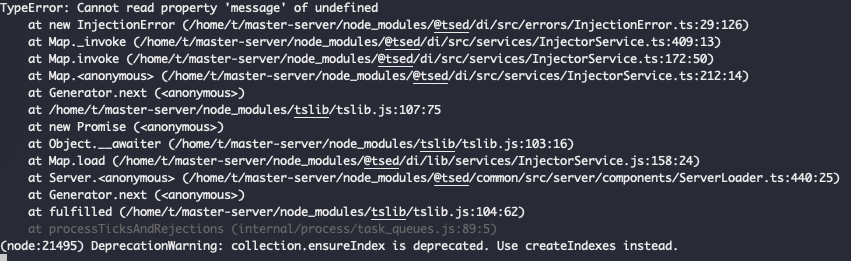
I found out that the error changes, if I build the project on the destination machine:
tobiasmuecksch
on 28 May 2019
Hello @tobiasmuecksch
I reproduce the bug. So I'll fix that ASAP (high priority ;))
See you
Romain
 Romakita
on 28 May 2019
Romakita
on 28 May 2019
Hello @tobiasmuecksch
I found the issue.
Tsconfig if incorrectly configured in the getting-started example.
Here the right tsconfig:
{
  "compilerOptions": {
    "baseUrl": ".", // add baseUrl
    "outDir": "./dist",
    "target": "es2016",
    "lib": [
      "es2016",
      "dom"
    ],
    "typeRoots": [
      "./node_modules/@types"
    ],
    "module": "commonjs",
    "moduleResolution": "node",
    "experimentalDecorators": true,
    "emitDecoratorMetadata": true,
    "sourceMap": true,
    "declaration": false,
    "allowSyntheticDefaultImports": true,
    "resolveJsonModule": true // add this options if you required json file in your code
  },
  "include": [
    "./src/**/*.ts"
  ],
  "exclude": [
    "node_modules",
    "./public",
    "dist",
    "test" // exclude test
  ]
}
And in your package.json add this line:
"start:prod": "npm run build && cross-env NODE_ENV=production node dist/index.js"
Tell me if it works :)
See you
Romakita
on 29 May 2019
In my case start:dev doesn't work either, it doesn't reload the server when I make a change
 chiqui3d
on 6 Jun 2019
chiqui3d
on 6 Jun 2019
@chiqui3d Hot reload works as expected in getting-started example. But if you have a problem, see the right configuration with nodemon project :)
Romakita
on 10 Jun 2019
@Romakita With the corrected tsconfig it works. Thank you for the great support.
tobiasmuecksch
on 8 Jul 2019
Related issues
 teusemanuel
·
4Comments
teusemanuel
·
4Comments
 RickStanley
·
6Comments
RickStanley
·
6Comments
 ITninja04
·
3Comments
ITninja04
·
3Comments
 Ionaru
·
5Comments
Ionaru
·
5Comments
 yangukmo
·
5Comments
yangukmo
·
5Comments
Most helpful comment
Hello @tobiasmuecksch
I reproduce the bug. So I'll fix that ASAP (high priority ;))
See you
Romain