Ts-node-dev: compile error is not printed out
Sometimes when I run with a syntax error, I get this output:
> looop@ be /home/capaj/work-repos/looop/project-alpha
> cd ./back-end && NODE_ENV=development LOOOP_ENVIRONMENT=dev DEBUG=looop*,knex:query,knex:bindings ts-node-dev --transpileOnly src/server.js

Using ts-node version 8.1.0, typescript version 3.4.5
  looop:knexfile dbName:  looop +0ms
  looop:aws mocking aws.SES +0ms
  looop:aws mocking aws.SQS +0ms
[ERROR] 20:05:54 ⨯ Unable to compile TypeScript:
would be nicer if it showed an error
 capaj
capaj
All 17 comments
I have the exact same issue. ts-node-dev becomes pretty much useless since I don't know why the build fails.
 JMLX42
on 20 Aug 2019
JMLX42
on 20 Aug 2019
I've seen this behavior too, but usually, I don't look at the console while dev
All the errors are shown in IDE, and to go console only when something doesn't work. And often use transpileOnly option to speed things up. So I had no chance to suffer from this bug. -)
@promethe42
Does it work usually, and breaks only on specific cases?
 wclr
on 21 Aug 2019
wclr
on 21 Aug 2019
My whole build/run env is in Docker (Compose) using the node:10-alpine image.
Just now I had typing errors showing as expected in the console after removing the transpileOnly flag.
JMLX42
on 21 Aug 2019
So I believe there should be no TS error if transpile only is used.
wclr
on 22 Aug 2019
So I believe there should be no TS error if transpile only is used.
But as stated by OP, the console says:
[ERROR] 20:05:54 ⨯ Unable to compile TypeScript:
even when transpileOnly is used. But without printing the actual errors.
JMLX42
on 22 Aug 2019
what does ts-node outputs for this case?
wclr
on 22 Aug 2019
For me, it prints the actual error:
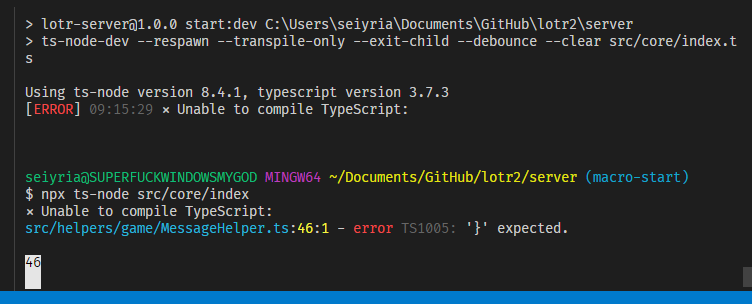
 seiyria
on 20 Dec 2019
seiyria
on 20 Dec 2019
This issue probably relates to running with docker (docker-compose).
Use ts-node's --pretty flag it fixes the error output with docker-compose.
wclr
on 22 Dec 2019
I'll try that, but I'm not using docker so I'd wager that isn't the problem here. Unless ts-node-dev is using it under the hood, but I don't think that's the case either(?)
seiyria
on 22 Dec 2019
@seiyria in your case you should not use --transpile-only to see TS error.
wclr
on 22 Dec 2019
That's gonna be pretty rough for reload speed though (right?), and that's kinda why I'm using the tool. Are there any other flags I should pass or not pass?
seiyria
on 22 Dec 2019
That's gonna be pretty rough for reload speed though
No for large codebase it will only affect the first startup time. This is what ts-node-dev was made for.
wclr
on 22 Dec 2019
what the... I don't get errors in the console too. What happened? ts-node and tsc show errors correctly
 IonelLupu
on 23 Mar 2020
IonelLupu
on 23 Mar 2020
Did anyone figure out how to solve this?
 heivo
on 6 May 2020
heivo
on 6 May 2020
what the... I don't get errors in the console too. What happened?
ts-nodeandtscshow errors correctly
I'm having the same issue, no TS errors displayed in the console when running:
ts-node-dev --respawn src/index.ts
ts-node-dev --respawn --transpile-only src/index.ts
version: "ts-node-dev": "^1.0.0-pre.44",
 DarkLite1
on 8 Jun 2020
DarkLite1
on 8 Jun 2020
@whitecolor I see you closed this. Is it fixed?
IonelLupu
on 13 Jun 2020
@IonelLupu
I believe it should be, if it was due https://github.com/whitecolor/ts-node-dev/issues/119.
wclr
on 13 Jun 2020
Related issues
 timsuchanek
·
6Comments
timsuchanek
·
6Comments
 Chnapy
·
6Comments
Chnapy
·
6Comments
 sveyret
·
4Comments
sveyret
·
4Comments
 maxpain
·
6Comments
maxpain
·
6Comments
 JaLe29
·
9Comments
JaLe29
·
9Comments
Most helpful comment
what the... I don't get errors in the console too. What happened?
ts-nodeandtscshow errors correctly