Ts-node-dev: Doesn't kill child process
A simple script like this:
import { spawn } from 'child_process'

const child = spawn('./bin.js')
child.stdout.on('data', data => {
  console.log(data.toString())
})
will not be killed properly and on every reload another child will be spawned.
Reproduction: https://github.com/timsuchanek/ts-node-dev-child
A couple of thoughts:
- I just tried it out, it was already broken in
node-dev. - I highly recommend removing the non-standard behavior of not exiting, as soon as you add a process.on('SIGTERM') -> It took us about 2 weeks to find that weird behavior out. https://github.com/fgnass/node-dev#graceful-restarts
- I don't know if this is a limitation by design based on the require stuff, but it doesn't happen with
nodemon.
tsc-watch uses this approach: listing the child processes and killing them.
We're heavily relying on this with Prisma and really like ts-node-dev so far, so if you need a PR for this or any help, let us know.
 timsuchanek
All 6 comments
you mean child process of running process is not killed? btw try --tree-kill option (which is kind of experimental)
There is also a notion about using process.on('SIGTERM', () => process.exit()) in ts-node-dev docs
 wclr
on 21 Jun 2019
wclr
on 21 Jun 2019
Thanks, that's exactly what I meant! I'll try the --tree-kill out. In my testing the SIGTERM process.exit didn't kill the child process of the running process properly.
Optimally we don't have to add any process.on('SIGTERM') to keep our examples clean, as when people see that, they'll copy that stuff over into their production code.
timsuchanek
on 22 Jun 2019
--tree-kill works perfectly 👍
So if you add it to the README, we can close this.
I would still consider rethinking this:
https://github.com/whitecolor/ts-node-dev/blob/24813393769d23da9e585c157b3375f594ecba5e/lib/wrap.js#L26
As there is already the IPC option.
timsuchanek
on 22 Jun 2019
@whitecolor I'm using the following options but it doesn't kill the process running the --inspect with --tree-kill
# npm run script
cross-env-shell DEBUG=app* ts-node-dev  --tree-kill --no-deps --clear --transpileOnly --debounce=5000 --watch=config --nolazy --inspect=9259 -- index.js
So when I end the process and try to start again, it throws the following error
$ npm run debug

> cross-env-shell DEBUG=app* ts-node-dev  --tree-kill --no-deps --clear --transpileOnly --debounce=5000 --watch=config --nolazy --inspect=9259 -- index.js

Using ts-node version 8.3.0, typescript version 3.6.2
Starting inspector on 127.0.0.1:9259 failed: address already in use
npm ERR! code ELIFECYCLE
npm ERR! errno 12
npm ERR! [email protected] debug: `cross-env-shell DEBUG=app* ts-node-dev  --tree-kill --no-deps --clear --transpileOnly --debounce=5000 --watch=config --nolazy --inspect=9259 -- index.js`
npm ERR! Exit status 12
npm ERR!
npm ERR! Failed at the [email protected] debug script.
npm ERR! This is probably not a problem with npm. There is likely additional logging output above.

npm ERR! A complete log of this run can be found in:
npm ERR!     /home/bigapp/.npm/_logs/2019-09-10T13_15_50_167Z-debug.log
So then, I've to list the processes and kill it manually
$ lsof -i :9259

COMMAND  PID   USER   FD   TYPE DEVICE SIZE/OFF NODE NAME
node    3272 bigapp   23u  IPv4 732230      0t0  TCP localhost:9259 (LISTEN)
$ kill -9 3272
 abhisekp
on 10 Sep 2019
abhisekp
on 10 Sep 2019
Need repro example if the problem persists.
wclr
on 15 Jun 2020
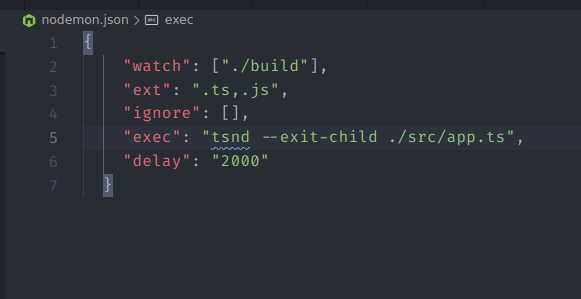
Solved with --exit-child
 joemags-apps
on 3 Feb 2021
joemags-apps
on 3 Feb 2021
Related issues
 pvtri96
·
10Comments
pvtri96
·
10Comments
 gipcompany
·
8Comments
gipcompany
·
8Comments
 Sytten
·
7Comments
Sytten
·
7Comments
 Derya
·
6Comments
Derya
·
6Comments
 maxpain
·
6Comments
maxpain
·
6Comments
Most helpful comment
you mean child process of running process is not killed? btw try
--tree-killoption (which is kind of experimental)There is also a notion about using
process.on('SIGTERM', () => process.exit())ints-node-devdocs