Ts-node-dev: TypeScript Slow Restarting Time
When I start app ts compile very fast, but when I change some file It take to long to restart, in which may be problem ?
./node_modules/.bin/tsc -project ./tsconfig.json --diagnostics
Files:           403
Lines:         64126
Nodes:        237079
Identifiers:   83972
Symbols:       67964
Types:          7966
Memory used: 112027K
I/O read:      0.04s
I/O write:     0.09s
Parse time:    0.89s
Bind time:     0.28s
Check time:    0.66s
Emit time:     0.45s
Total time:    2.28s
tsconfig.json
{
  "compilerOptions": {
    "target": "es6",
    "module": "commonjs",
    "lib": ["es6", "es2017"],
    "sourceMap": true,
    "outDir": "./dist",
    "moduleResolution": "node",

    "removeComments": true,
    "noImplicitAny": true,
    "strictNullChecks": true,
    "strictFunctionTypes": true,
    "noImplicitThis": true,
    "noUnusedLocals": true,
    "noUnusedParameters": true,
    "noImplicitReturns": true,
    "noFallthroughCasesInSwitch": true,
    "allowSyntheticDefaultImports": true,
    "skipLibCheck": true,
    "emitDecoratorMetadata": true,
    "experimentalDecorators": true
  },
  "exclude": ["node_modules"],
  "include": ["src"]
}
 ghost
ghost
All 35 comments
Not to do a "me too" post, but it takes about 2 minutes between the restarting message and actually restarting.
[2019-02-11T11:44:17.653Z] TRACE BlockProcessor:       | BlockProcessor | 8996 | 4970314 | 0 transactions found
[INFO] 12:44:19 Restarting: /Users/roderik/Development/mint/dapi/src/server.ts has been modified
[2019-02-11T11:44:21.623Z] TRACE BlockProcessor:       | BlockProcessor | 8996 | 4970315 | 0 transactions found
[2019-02-11T11:44:25.628Z] TRACE BlockProcessor:       | BlockProcessor | 8996 | 4970316 | 0 transactions found
[2019-02-11T11:44:31.004Z] TRACE BlockProcessor:       | BlockProcessor | 8996 | 4970317 | 0 transactions found
[2019-02-11T11:44:37.637Z] TRACE BlockProcessor:       | BlockProcessor | 8996 | 4970318 | 0 transactions found
[2019-02-11T11:44:42.102Z] TRACE BlockProcessor:       | BlockProcessor | 8996 | 4970319 | 0 transactions found
[2019-02-11T11:44:46.529Z] TRACE BlockProcessor:       | BlockProcessor | 8996 | 4970320 | 0 transactions found
[2019-02-11T11:44:52.032Z] TRACE BlockProcessor:       | BlockProcessor | 8996 | 4970321 | 0 transactions found
[2019-02-11T11:44:57.632Z] TRACE BlockProcessor:       | BlockProcessor | 8996 | 4970322 | 0 transactions found
[2019-02-11T11:45:00.008Z] INFO  ContractMirror:       | ContractMirror | 8996 | Mirrored 0 contracts/s
[2019-02-11T11:45:00.009Z] INFO  BlockProcessor:       | BlockProcessor | 8996 | Processing 0.2 blks/s
[2019-02-11T11:45:00.010Z] INFO  TransactionProcessor: | TransactionProcessor | 8996 | Processing 0 tx/s
[2019-02-11T11:45:00.012Z] INFO  BlockWatcher:         | BlockWatcher | 8996 | 12 new blocks added to the chain in the last minute
[2019-02-11T11:45:00.013Z] INFO  EventProcessor:       | EventProcessor | 8996 | Decoded the events for 0 tx/s
[2019-02-11T11:45:01.974Z] TRACE BlockProcessor:       | BlockProcessor | 8996 | 4970323 | 0 transactions found
[2019-02-11T11:45:07.084Z] TRACE BlockProcessor:       | BlockProcessor | 8996 | 4970324 | 0 transactions found
[2019-02-11T11:45:10.669Z] TRACE BlockProcessor:       | BlockProcessor | 8996 | 4970325 | 0 transactions found
[2019-02-11T11:45:17.686Z] TRACE BlockProcessor:       | BlockProcessor | 8996 | 4970326 | 0 transactions found
[2019-02-11T11:45:22.033Z] TRACE BlockProcessor:       | BlockProcessor | 8996 | 4970327 | 0 transactions found
[2019-02-11T11:45:27.026Z] TRACE BlockProcessor:       | BlockProcessor | 8996 | 4970328 | 0 transactions found
[2019-02-11T11:45:33.662Z] TRACE BlockProcessor:       | BlockProcessor | 8996 | 4970329 | 0 transactions found
[2019-02-11T11:45:37.667Z] TRACE BlockProcessor:       | BlockProcessor | 8996 | 4970330 | 0 transactions found
[2019-02-11T11:45:41.983Z] TRACE BlockProcessor:       | BlockProcessor | 8996 | 4970331 | 0 transactions found
[2019-02-11T11:45:45.904Z] TRACE BlockProcessor:       | BlockProcessor | 8996 | 4970332 | 0 transactions found
[2019-02-11T11:45:52.073Z] TRACE BlockProcessor:       | BlockProcessor | 8996 | 4970333 | 0 transactions found
[2019-02-11T11:45:57.690Z] TRACE BlockProcessor:       | BlockProcessor | 8996 | 4970334 | 0 transactions found
[2019-02-11T11:46:00.004Z] INFO  ContractMirror:       | ContractMirror | 8996 | Mirrored 0 contracts/s
[2019-02-11T11:46:00.006Z] INFO  BlockWatcher:         | BlockWatcher | 8996 | 12 new blocks added to the chain in the last minute
[2019-02-11T11:46:00.008Z] INFO  EventProcessor:       | EventProcessor | 8996 | Decoded the events for 0 tx/s
[2019-02-11T11:46:00.010Z] INFO  BlockProcessor:       | BlockProcessor | 8996 | Processing 0.2 blks/s
[2019-02-11T11:46:00.012Z] INFO  TransactionProcessor: | TransactionProcessor | 8996 | Processing 0 tx/s
[2019-02-11T11:46:01.685Z] TRACE BlockProcessor:       | BlockProcessor | 8996 | 4970335 | 0 transactions found
Using ts-node version 8.0.2, typescript version 3.3.3
Debugger listening on ws://0.0.0.0:9222/3b1aa591-9fe3-4d41-a719-0e591b134966
For help, see: https://nodejs.org/en/docs/inspector
[2019-02-11T11:46:06.164Z] INFO  Mint:                  Locating Misplaced Calculations
{
  "compilerOptions": {
    "module": "commonjs",
    "esModuleInterop": true,
    "target": "ES2017",
    "noImplicitAny": true,
    "suppressImplicitAnyIndexErrors": true,
    "moduleResolution": "node",
    "sourceMap": true,
    "outDir": "dist",
    "baseUrl": ".",
    "skipLibCheck": true,
    "paths": {
      "*": ["node_modules/*", "src/types/*"]
    }
  },
  "include": ["src/**/*"],
  "exclude": ["dist/**/*"]
}
 roderik
on 11 Feb 2019
roderik
on 11 Feb 2019
Me too, only just start happening recently though?
 JClackett
on 16 Feb 2019
JClackett
on 16 Feb 2019
I've been facing this issue as well. A normal stop + start of the server using ts-node takes a second, while when I use ts-node-dev, it detects a file change instantly, but post that it takes about 5 seconds to issue a server restart.
I'm using ts-node-dev like so -
ts-node-dev --no-notify --respawn --transpileOnly src/index.ts
 pastelsky
on 27 Mar 2019
pastelsky
on 27 Mar 2019
doesn't restart at all for me, I think it's related
change is detected, because I see [INFO] 23:39:05 Restarting: /Users/shook/Development/sHooKDT-task-2018/src/index.ts has been modified in terminal, but nothing happens even after 15 minutes
 schibrikov
on 24 Apr 2019
schibrikov
on 24 Apr 2019
My solution with nodemon:
Install nodemon
npm i nodemon -D
Create nodemon.json config
{
  "watch": ["src"],
  "ext": "ts",
  "ignore": ["src/**/*.spec.ts"],
  "exec": "npm start"
}
Start script
"start": "ts-node -r tsconfig-paths/register src/index.ts",
ghost
on 26 Apr 2019
@mrkode It's not really a solution, but an alternative. I'm using nodemon too now, but it takes a few seconds to recompile the project, which bother me. ts-node-dev should resolve this issue, but unfortunately just doesn't work for some reason.
schibrikov
on 27 Apr 2019
@sHooKDT
but nothing happens even after 15 minutes
Is this issue specific to all the projects you tried? What about just launching one single file (in a separate folder)?
 wclr
on 3 May 2019
wclr
on 3 May 2019
@whitecolor it takes a long time to restart even when watching a single index.ts file, with a console.log in it
JClackett
on 3 May 2019
What is your setup? OS, typescript, ts-node version.
wclr
on 3 May 2019
@whitecolor MacOS, [email protected], [email protected]
JClackett
on 3 May 2019
Also, try --debug flag, and post the output.
wclr
on 3 May 2019
so start up is very quick, but when restarting after saving a file i get...
[INFO] 23:53:15 Restarting: /Users/<me>/<long-path-to-project-and-file>.ts has been modified
it stays on this for about 45 seconds, as you can see from the time.
Then this runs.
[DEBUG] 23:54:03 Child is still running, restart upon exit
[DEBUG] 23:54:03 Disconnecting from child
[DEBUG] 23:54:03 Sending SIGTERM kill to child
[DEBUG] 23:54:03 Child exited with code 0
Using ts-node version 8.0.3, typescript version 3.4.3
[DEBUG] 23:54:03 Starting child process -r /var/folders/9r/fjpzdr5d6p76vtl2gldf3zh40000gn/T/ts-node-dev-hook-19235789589911567.js /Users/<user>/<path-to>/node_modules/ts-node-dev/lib/wrap.js src/index.ts
Apologies for not being able to provide that much info on this issue, i'm not "good" enough to debug this kind of package :)
the thing i find strange is when i first installed this package it was blazingly fast, and then every time i used it on another project, it got slower and slower, and now it's slow to restart every time i use it, hope this helps ??
JClackett
on 4 May 2019
@JClackett
An ts-node (which is under the hood) is working ok?
You could try to debug it and understand where it stucks, start from there:
https://github.com/whitecolor/ts-node-dev/blob/master/lib/index.js#L52
Just insert some outputs inside the code of node_modules/ts-node-dev
wclr
on 4 May 2019
I have the same problem and just did some debugging as @whitecolor advised.
This is what I found
This line: https://github.com/whitecolor/ts-node-dev/blob/master/lib/index.js#L55 (watcher.removeAll()) takes 31 seconds to execute.
Upon further investigation, it turns out that watcher.list() contains a whopping 1323 elements, which includes mainly the files in node_modules.
Solution
Include the --ignore-watch node_modules flag in your dev script. Mine now looks like this:
ts-node-dev --respawn --transpileOnly --ignore-watch node_modules ./app/app.ts
watcher.list() now only contains my 27 source files, and restarting my app is done in about 1 second again.
 FlorianPfisterer
on 9 May 2019
FlorianPfisterer
on 9 May 2019
I will probably look into it, not sure maybe need to replace watcher, I usually use it with --poll in docker, and didn't experience anything like that.
wclr
on 9 May 2019
I've only just had it since updating to TS 3.4. I believe there were performance regression issues mentioned and could be related?
 intellix
on 30 May 2019
intellix
on 30 May 2019
I still have it on my maching the restart took forever after 5 minutes I stoped ts-node-dev restarted it manually I fixed it with @FlorianPfisterer response.
 nicolae536
on 5 Jun 2019
nicolae536
on 5 Jun 2019
@FlorianPfisterer Thanks for your reply! Works perfectly now.
 Martinnord
on 15 Jun 2019
Martinnord
on 15 Jun 2019
I had the same problem where Removing all watchers from files hung for a very long time on restarts, I gave up waiting. (If relevant: on MacOS and Activity Monitor showed fseventsd using a lot of CPU.)
Solution
Include the
--ignore-watch node_modulesflag in your dev script.
Adding this argument --ignore-watch node_modules was the solution for me also.
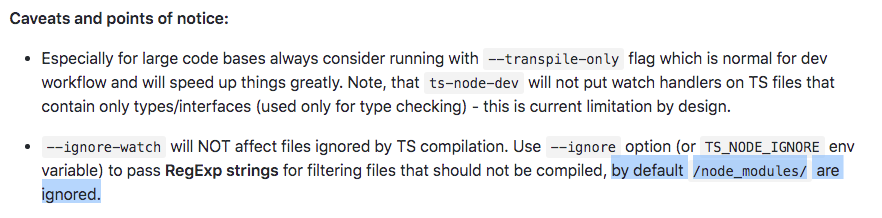
From reading the README.md I thought this was the default, but maybe I misunderstood?
 sgarner
on 25 Jun 2019
sgarner
on 25 Jun 2019
@sgarner default node_modules ignore refers to TS complication, not watching.
wclr
on 25 Jun 2019
Ah, right. Perhaps it should be the default for watching too, then?
If I do an npm install it will change package.json which will trigger a restart, so I don't see what the use case would be for watching node_modules.
sgarner
on 25 Jun 2019
If I do an
npm installit will changepackage.jsonwhich will trigger a restart, so I don't see what the use case would be for watchingnode_modules.
ts-node-dev watches only for required files, it won't watch for package.json/lock files.
wclr
on 26 Jun 2019
If I do an
npm installit will changepackage.jsonwhich will trigger a restart, so I don't see what the use case would be for watchingnode_modules.ts-node-dev watches only for required files, it won't watch for package.json/lock files.
I just realised I am actually requiring the package.json file in one of my scripts, so that will explain why I am getting this behaviour.
sgarner
on 26 Jun 2019
I got same problem and --ignore-watch node_modules resolved it too.
And I found --no-deps also works as node-dev README says
By default node-dev will watch all first-level dependencies, i.e. the ones in the project's node_modulesfolder.
--no-deps Watch only the project's own files and linked modules (via npm link)
a little simpler ...?
 yokomotod
on 17 Jul 2019
yokomotod
on 17 Jul 2019
Sure --ignore-watch node_modules works but it's one of the reasons I'm using ts-node-dev. I'm linking core/common libs and when changing them I'd like to restart alongside changes to src libs.
The change is detected quickly (meaning the watch wasn't affected by large amount of files) but the actual restarting basically doesn't work. What has --ignore-watch got to do with restarting?
--no-deps doesn't seem to detect changes to linked modules for me
intellix
on 28 Aug 2019
@intellix I'm not sure this would help you, but take a look at this lib: https://www.npmjs.com/package/patch-package
I'm thinking you could use --ignore-watch node_modules and still reload the server by using this lib. Besides, it's a nice lib if you didn't know it yet :)
 jpenna
on 6 Oct 2019
jpenna
on 6 Oct 2019
Passing the --poll argument to ts-node-dev fixed the hang on Removing all watchers from files for me without ignoring anything (on OSX).
 GriffinSchneider
on 8 Dec 2019
GriffinSchneider
on 8 Dec 2019
I've been stuck on this for a long time. Somehow my ts-node keeps watching js files in the node_modules directory and it simply ignores all settings and suggestions given in this thread.
 sebastiaandegeus
on 17 Dec 2019
sebastiaandegeus
on 17 Dec 2019
--no-deps or --ignore-watch node_modules should definitely be enabled by default
 probil
on 3 Mar 2020
probil
on 3 Mar 2020
For others finding this, I had to also --ignore-watch several other directories to get things going speedy like dist, .next and .history.
Of course, this depends on the specifics of your environment but I guess the main point is to ignore any large directories that aren't relevant to the code you're editing.
 nickyhajal
on 20 Apr 2020
nickyhajal
on 20 Apr 2020
Nothing mentioned above has worked for me. Sometimes restart can be quick, but most of the times it takes from 20 to 90 seconds.
I had to use this @ghost's alternative with nodemon which is not perfect but much faster for me.
 lub0v
on 25 Oct 2020
lub0v
on 25 Oct 2020
// tsconfig.json
{
  "ts-node": {
     "transpileOnly": true
  },
  "compilerOptions": {...}
}
 sm-hejazi
on 10 Dec 2020
sm-hejazi
on 10 Dec 2020
--transpileOnly is deprecated. Use --transpile-only instead
 andresribeiro
on 31 Dec 2020
andresribeiro
on 31 Dec 2020
// tsconfig.json
{
  "ts-node": {
     "transpileOnly": true
  },
  "compilerOptions": {...}
}
Thank you very much !!!!!
I've tried everything in this thread, and your tsconfig change fix it for me.
 markuspxpx
on 30 Mar 2021
markuspxpx
on 30 Mar 2021
Related issues
 timsuchanek
·
6Comments
timsuchanek
·
6Comments
 Chnapy
·
6Comments
Chnapy
·
6Comments
 capc0
·
5Comments
capc0
·
5Comments
 Derya
·
6Comments
Derya
·
6Comments
 n1ru4l
·
3Comments
n1ru4l
·
3Comments
Most helpful comment
I have the same problem and just did some debugging as @whitecolor advised.
This is what I found
This line: https://github.com/whitecolor/ts-node-dev/blob/master/lib/index.js#L55 (
watcher.removeAll()) takes 31 seconds to execute.Upon further investigation, it turns out that
watcher.list()contains a whopping 1323 elements, which includes mainly the files innode_modules.Solution
Include the
--ignore-watch node_modulesflag in your dev script. Mine now looks like this:watcher.list()now only contains my 27 source files, and restarting my app is done in about 1 second again.