Truffle: "truffle init" get Error: Error making request. Please check the format of the requested resource: https://raw.githubusercontent.com/truffle-box/bare-box/master/truffle.js
use "truffle init" command, and get error:
truffle init
Downloading...
Error: Error making request. Please check the format of the requested resource: https://raw.githubusercontent.com/truffle-box/bare-box/master/truffle.js
    at Request._callback (/usr/local/lib/node_modules/truffle/build/cli.bundled.js:314206:23)
    at self.callback (/usr/local/lib/node_modules/truffle/build/cli.bundled.js:285576:22)
    at emitOne (events.js:116:13)
    at Request.emit (events.js:211:7)
    at Request.onRequestError (/usr/local/lib/node_modules/truffle/build/cli.bundled.js:286268:8)
    at emitOne (events.js:116:13)
    at ClientRequest.emit (events.js:211:7)
    at TLSSocket.socketErrorListener (_http_client.js:387:9)
    at emitOne (events.js:116:13)
    at TLSSocket.emit (events.js:211:7)
I am using truffle 4.0.5 on mac 10.13.2
 daneric
All 31 comments
@daneric, @gnidan inserted an error logging line to debug this problem in the latest Truffle release 4.0.6. If you have a chance could you install it, try again, and report the (hopefully different) error you see?
 cgewecke
on 1 Feb 2018
cgewecke
on 1 Feb 2018
I got the same problem. I am using truffle 4.0.6 on windows 10.
 gz65555
on 12 Feb 2018
gz65555
on 12 Feb 2018
Same error with v 4.0.6 on osx 10.12.6
Downloading...
Error: Error making request to https://raw.githubusercontent.com/truffle-box/bare-box/master/truffle.js. Got error: self signed certificate in certificate chain. Please check the format of the requested resource.
    at Request._callback (/Users/bsaphier/.nvm/versions/node/v8.9.4/lib/node_modules/truffle/build/webpack:/~/truffle-box/lib/utils/unbox.js:42:1)
    at self.callback (/Users/bsaphier/.nvm/versions/node/v8.9.4/lib/node_modules/truffle/build/webpack:/~/request/request.js:186:1)
    at emitOne (events.js:116:13)
    at Request.emit (events.js:211:7)
    at Request.onRequestError (/Users/bsaphier/.nvm/versions/node/v8.9.4/lib/node_modules/truffle/build/webpack:/~/request/request.js:878:1)
    at emitOne (events.js:116:13)
    at ClientRequest.emit (events.js:211:7)
    at TLSSocket.socketErrorListener (_http_client.js:387:9)
    at emitOne (events.js:116:13)
    at TLSSocket.emit (events.js:211:7)
 ben-nyllabs
on 12 Feb 2018
ben-nyllabs
on 12 Feb 2018
@ben-nyllabs The error is: self signed certificate in certificate chain. Looking around various Github threads it seems like it might be firewall related. Is there anything about your local environment that would cause it to fake SSL certs?
Possibly helpful discussion at this issue.
cgewecke
on 12 Feb 2018
@cgewecke YES, there is! Should have been obvious, thank you! I just manually created the files/folders that truffle init makes, which only took like 30 seconds anyways... and now all is good
ben-nyllabs
on 12 Feb 2018
@daneric It's now clear this error results from local network permissions / behavior. @lazaridiscom has suggested we stop depending on network connectivity to manage truffle init and we all agree that's probably the best remedy. Tracking this problem at #108 and closing here.
Thanks for reporting,
cgewecke
on 13 Feb 2018
Same error on Windows 7
D:\DOC_ANT_CRY\ETHEREUM\TEST\casino-ethereum>truffle init
Downloading...
Error: Error making request to https://raw.githubusercontent.com/truffle-box/bare-box/master/truffle.js. Got error: connect ETIMEDOUT 151.101.0.133:443. Please check the format of the requested resource.
at Request._callback (D:\DOC_ANT_CRY\ETHEREUM\SOFTWARE\NODEJS\node_modules\truffle\build\webpack:\~\truffle-box\lib\utils\unbox.js:42:1)
at self.callback (D:\DOC_ANT_CRY\ETHEREUM\SOFTWARE\NODEJS\node_modules\truffle\build\webpack:\~\request\request.js:186:1)
at Request.emit (events.js:160:13)
at Request.onRequestError (D:\DOC_ANT_CRY\ETHEREUM\SOFTWARE\NODEJS\node_modules\truffle\build\webpack:\~\request\request.js:878:1)
at ClientRequest.emit (events.js:160:13)
at TLSSocket.socketErrorListener (_http_client.js:389:9)
at TLSSocket.emit (events.js:160:13)
at emitErrorNT (internal/streams/destroy.js:64:8)
at process._tickCallback (internal/process/next_tick.js:152:19)
Would you explain to me how to solve?
Thanks
 0pay
on 16 Feb 2018
0pay
on 16 Feb 2018
@0pay In your case the error looks different - the connection timed out which suggests you weren't able to connect to GitHub because of .a weak internet connection or your computer can't reach Github for some other reason. Could you verify that you are able to clone a GitHub repository at the command line (outside of truffle) by running:
git clone https://github.com/trufflesuite/truffle-init-bare.git
It's also possible you would see this error if you are behind a proxy / vpn.
cgewecke
on 16 Feb 2018
@cgewecke
I've done and this is the result
Cloning into 'truffle-init-bare'...
fatal: unable to access 'https://github.com/trufflesuite/truffle-init-bare.git/': Received HTTP code 407 from proxy after CONNECT
I 'm behind a proxy.
How can I manage this problem?
0pay
on 16 Feb 2018
@lazaridiscom
what is it?
How can I manage that?
Thanks
0pay
on 19 Feb 2018
I' ve tried to compile launching the command
truffle compile
but I received the the Jscript runtime error
module is undefined
800A1391
0pay
on 19 Feb 2018
@0pay There's a note on StackExchange here which suggests you can get around this by setting local environment variables that ask the request module not to proxy / tunnel certain calls. More on that here.
You can also just fetch the zip as @lazaridiscom has advised or clone truffle-init-bare as suggested here
cgewecke
on 20 Feb 2018
I got the same problem on my machine. It caused by poor network.Thx!@cgewecke
By the way,when l execute truffle unbox react,the new problem have emerged..
$ truffle unbox react
Downloading...
Unpacking...
Setting up...
Error: stdout maxBuffer exceeded
at Socket.onChildStdout (child_process.js:328:14)
at emitOne (events.js:116:13)
at Socket.emit (events.js:211:7)
at addChunk (_stream_readable.js:263:12)
at readableAddChunk (_stream_readable.js:246:13)
at Socket.Readable.push (_stream_readable.js:208:10)
at Pipe.onread (net.js:597:20)
But when i retry to do it ,it actually successed..It really amzing..
 mokeychan
on 1 Jun 2018
mokeychan
on 1 Jun 2018
I also got the same error. and there is fishy about my local environment that would cause it to fake SSL certs. how could i resolve that?
E:\solidity-experiments>truffle init
Downloading...
Error: Error making request to https://raw.githubusercontent.com/truffle-box/bare-box/master/truffle.js. Got error: unable to verify the first certificate. Please check the format of the requested resource.
at Request._callback (C:\Users\Vijay\AppData\Roaming\npm\node_modules\truffle\build\webpack:\~\truffle-box\lib\utils\unbox.js:45:1)
at self.callback (C:\Users\Vijay\AppData\Roaming\npm\node_modules\truffle\build\webpack:\~\request\request.js:186:1)
at Request.emit (events.js:182:13)
at Request.onRequestError (C:\Users\Vijay\AppData\Roaming\npm\node_modules\truffle\build\webpack:\~\request\request.js:878:1)
at ClientRequest.emit (events.js:182:13)
at TLSSocket.socketErrorListener (_http_client.js:382:9)
at TLSSocket.emit (events.js:182:13)
at emitErrorNT (internal/streams/destroy.js:82:8)
at emitErrorAndCloseNT (internal/streams/destroy.js:50:3)
at process._tickCallback (internal/process/next_tick.js:63:19)
E:\solidity-experiments>truffle init
 sugalivijaychari
on 7 Jun 2018
sugalivijaychari
on 7 Jun 2018
@sugalivijaychari If you're behind a firewall that limits your git access, you can download the init template to your desktop via the browser by clicking this link:
https://github.com/trufflesuite/truffle-init-bare/archive/master.zip
cgewecke
on 7 Jun 2018
https://stackoverflow.com/questions/10888610/ignore-invalid-self-signed-ssl-certificate-in-node-js-with-https-request
truffle init uses request to check the url availability, which throw an error as the above stackoverflow thread mentioned
 leapming
on 2 Oct 2018
leapming
on 2 Oct 2018
I got the same problem when I use "truffle init " commond. I am using truffle5.0 on ubuntu16.
Downloading...
Error: Truffle Box at URL https://github.com/truffle-box/bare-box.git doesn't exist. If you believe this is an error, please contact Truffle support.
at Request._callback (/usr/local/lib/node_modules/truffle/build/webpack:/packages/truffle-box/lib/utils/unbox.js:50:1)
at Request.self.callback (/usr/local/lib/node_modules/truffle/build/webpack:/~/request/request.js:185:1)
at Request.emit (events.js:182:13)
at Request.
at Request.emit (events.js:182:13)
at IncomingMessage.
at Object.onceWrapper (events.js:273:13)
at IncomingMessage.emit (events.js:187:15)
at endReadableNT (_stream_readable.js:1094:12)
at process._tickCallback (internal/process/next_tick.js:63:19)
 cantaloupeJinJin
on 20 Dec 2018
cantaloupeJinJin
on 20 Dec 2018
@cantaloupeJinJin I think there is currently something wrong with truffle init in version 4. If you upgrade to version 5 it should fix the problem.
npm uninstall -g truffle
npm i -g truffle
 eggplantzzz
on 20 Dec 2018
eggplantzzz
on 20 Dec 2018
@cantaloupeJinJin I think there is currently something wrong with
truffle initin version 4. If you upgrade to version 5 it should fix the problem.
npm uninstall -g truffle
npm i -g truffle
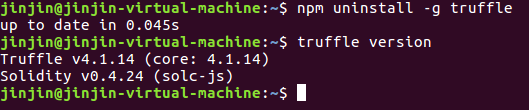
I usednpm uninstall -g truffle,then I usetruffle versionto check,but the truffle doesn't be uninstall,
jinjin@jinjin-virtual-machine:~$ npm uninstall -g Truffle
up to date in 0.045s
jinjin@jinjin-virtual-machine:~$ truffle version
Truffle v4.1.14 (core: 4.1.14)
Solidity v0.4.24 (solc-js)
How could I solve the problem?
Thanks
cantaloupeJinJin
on 25 Dec 2018
@cantaloupeJinJin check your capitalization, that might be the problem.
 gnidan
on 25 Dec 2018
gnidan
on 25 Dec 2018
@gnidan sorry,I wrote a wrong word ,actually I use it like this.
cantaloupeJinJin
on 26 Dec 2018
@cantaloupeJinJin
I got this error when I use truffle init:
Downloading...
Error: Error making request to https://raw.githubusercontent.com/truffle-box/bare-box/master/truffle.js. Got error: connect ETIMEDOUT 10.0.0.1:443. Please check the format of the requested resource.
    at Request._callback (/usr/local/lib/node_modules/truffle/build/webpack:/packages/truffle-box/lib/utils/unbox.js:45:1)
    at self.callback (/usr/local/lib/node_modules/truffle/build/webpack:/~/request/request.js:185:1)
    at Request.emit (events.js:182:13)
    at Request.onRequestError (/usr/local/lib/node_modules/truffle/build/webpack:/~/request/request.js:877:1)
    at ClientRequest.emit (events.js:182:13)
    at TLSSocket.socketErrorListener (_http_client.js:392:9)
    at TLSSocket.emit (events.js:182:13)
    at emitErrorNT (internal/streams/destroy.js:82:8)
    at emitErrorAndCloseNT (internal/streams/destroy.js:50:3)
    at process._tickCallback (internal/process/next_tick.js:63:19)
I upgrade to 4.1.15 and it works fine, it seems that 4.1.14 has some bugs, maybe you can try too.
npm uninstall -g truffle // If you already have truffle installed
npm install -g [email protected]
 lesley-tw
on 28 Dec 2018
lesley-tw
on 28 Dec 2018
@wanching Thanks,but I still can't solve the problem,but now I use truffle in win10.😀
cantaloupeJinJin
on 28 Dec 2018
- i try to upgrade version,but not resolve this problem.
- i try to ping the address, but no response.
- i try to vpn, but invalid.
√ Preparing to download
× Downloading
RequestError: Error: connect ETIMEDOUT 69.171.234.48:443
Truffle v5.0.43 (core: 5.0.43)
Node v10.16.3
正在 Ping 69.171.234.48 具有 32 字节的数据:
请求超时。
请求超时。
请求超时。
 loo41
on 3 Nov 2019
loo41
on 3 Nov 2019
Starting unbox...
✔ Preparing to download box
✖ Downloading
Unbox failed!
✖ Downloading
Unbox failed!
RequestError: Error: connect ECONNREFUSED 151.101.228.133:443
at new RequestError (/usr/lib/node_modules/truffle/build/webpack:/node_modules/request-promise-core/lib/errors.js:14:1)
at Request.plumbing.callback (/usr/lib/node_modules/truffle/build/webpack:/node_modules/request-promise-core/lib/plumbing.js:87:1)
at Request.RP$callback [as _callback] (/usr/lib/node_modules/truffle/build/webpack:/node_modules/request-promise-core/lib/plumbing.js:46:1)
at self.callback (/usr/lib/node_modules/truffle/build/webpack:/node_modules/request/request.js:185:1)
at Request.emit (events.js:223:5)
at Request.onRequestError (/usr/lib/node_modules/truffle/build/webpack:/node_modules/request/request.js:881:1)
at ClientRequest.emit (events.js:223:5)
at TLSSocket.socketErrorListener (_http_client.js:415:9)
at TLSSocket.emit (events.js:223:5)
at emitErrorNT (internal/streams/destroy.js:92:8)
at emitErrorAndCloseNT (internal/streams/destroy.js:60:3)
at processTicksAndRejections (internal/process/task_queues.js:81:21)
Truffle v5.1.13 (core: 5.1.13)
Node v12.15.0
 kroim
on 17 Feb 2020
kroim
on 17 Feb 2020
I solved this error using "sudo npm install -g request"
kroim
on 17 Feb 2020
Or you can use "sudo truffle init"
kroim
on 17 Feb 2020
Starting unbox...
✔ Preparing to download box
✖ Downloading
Unbox failed!
✖ Downloading
Unbox failed!
RequestError: Error: connect ECONNREFUSED 151.101.228.133:443
at new RequestError (/usr/lib/node_modules/truffle/build/webpack:/node_modules/request-promise-core/lib/errors.js:14:1)
at Request.plumbing.callback (/usr/lib/node_modules/truffle/build/webpack:/node_modules/request-promise-core/lib/plumbing.js:87:1)
at Request.RP$callback [as _callback] (/usr/lib/node_modules/truffle/build/webpack:/node_modules/request-promise-core/lib/plumbing.js:46:1)
at self.callback (/usr/lib/node_modules/truffle/build/webpack:/node_modules/request/request.js:185:1)
at Request.emit (events.js:223:5)
at Request.onRequestError (/usr/lib/node_modules/truffle/build/webpack:/node_modules/request/request.js:881:1)
at ClientRequest.emit (events.js:223:5)
at TLSSocket.socketErrorListener (_http_client.js:415:9)
at TLSSocket.emit (events.js:223:5)
at emitErrorNT (internal/streams/destroy.js:92:8)
at emitErrorAndCloseNT (internal/streams/destroy.js:60:3)
at processTicksAndRejections (internal/process/task_queues.js:81:21)
Truffle v5.1.13 (core: 5.1.13)
Node v12.15.0
i got same error. but i can not solve with your answer
 DwGoingJiang
on 2 Mar 2020
DwGoingJiang
on 2 Mar 2020
@Dwgoing, If you got fails from "sudo npm install -g request" and "sudo truffle init", you can get success from

I solved from this when I got fails from the 2 cases all.
kroim
on 2 Mar 2020
@Dwgoing, If you got fails from "sudo npm install -g request" and "sudo truffle init", you can get success from
I solved from this when I got fails from the 2 cases all.
i will have a try again,thanks
DwGoingJiang
on 2 Mar 2020
@Dwgoing, If you got fails from "sudo npm install -g request" and "sudo truffle init", you can get success from
I solved from this when I got fails from the 2 cases all.i will have a try again,thanks
i got same error. but i can not solve with your two method.
 BITEEEE
on 30 Apr 2020
BITEEEE
on 30 Apr 2020
Related issues
 jleeh
·
3Comments
jleeh
·
3Comments
 maximilianh
·
3Comments
maximilianh
·
3Comments
 bmmpxf
·
3Comments
bmmpxf
·
3Comments
 TOMOAKI12345
·
3Comments
TOMOAKI12345
·
3Comments
 ferittuncer
·
3Comments
ferittuncer
·
3Comments
Most helpful comment
I got the same problem. I am using truffle 4.0.6 on windows 10.