After installing truffle, and trying to launch it with truffle init, I get the following errors:
m@888@m:~/dmc/truffleTest$ npm rebuild node-sass

> [email protected] install /home/m/dmc/node_modules/node-sass
> node scripts/install.js


> [email protected] postinstall /home/m/dmc/node_modules/node-sass
> node scripts/build.js

` /home/m/dmc/node_modules/node-sass/vendor/linux-x64-46/binding.node ` exists.
 testing binary.
Binary is fine; exiting.
[email protected] /home/m/dmc/node_modules/node-sass
m@888@m:~/dmc/truffleTest$ truffle init
Error: The `libsass` binding was not found in /home/m/npm-global/lib/node_modules/truffle/node_modules/node-sass/vendor/linux-x64-46/binding.node
This usually happens because your node version has changed.
Run `npm rebuild node-sass` to build the binding for your current node version.
  at Object.sass.getBinaryPath (/home/m/npm-global/lib/node_modules/truffle/node_modules/node-sass/lib/extensions.js:158:11)
  at Object.<anonymous> (/home/m/npm-global/lib/node_modules/truffle/node_modules/node-sass/lib/index.js:16:36)
  at Module._compile (module.js:435:26)
  at Module._extensions..js (module.js:442:10)
  at Object.require.extensions.(anonymous function) [as .js] (/home/m/npm-global/lib/node_modules/truffle/node_modules/babel/node_modules/babel-core/lib/api/register/node.js:214:7)
  at Module.load (/home/m/npm-global/lib/node_modules/truffle/node_modules/coffee-script/lib/coffee-script/register.js:45:36)
  at Function.Module._load (module.js:311:12)
  at Module.require (module.js:366:17)
  at require (module.js:385:17)
  at Object.<anonymous> (/home/m/npm-global/lib/node_modules/truffle/lib/processors/scss.es6:3:12)
  at Module._compile (module.js:435:26)
  at normalLoader (/home/m/npm-global/lib/node_modules/truffle/node_modules/babel/node_modules/babel-core/lib/api/register/node.js:199:5)
  at Object.require.extensions.(anonymous function) [as .es6] (/home/m/npm-global/lib/node_modules/truffle/node_modules/babel/node_modules/babel-core/lib/api/register/node.js:216:7)
  at Module.load (/home/m/npm-global/lib/node_modules/truffle/node_modules/coffee-script/lib/coffee-script/register.js:45:36)
  at Function.Module._load (module.js:311:12)
  at Module.require (module.js:366:17)
  at require (module.js:385:17)
  at Object.gather (/home/m/npm-global/lib/node_modules/truffle/lib/config.es6:227:38)
  at /home/m/npm-global/lib/node_modules/truffle/truffle.es6:150:23
  at /home/m/npm-global/lib/node_modules/truffle/node_modules/deasync/index.js:35:6
  at runTask (/home/m/npm-global/lib/node_modules/truffle/truffle.es6:55:5)
  at Object.<anonymous> (/home/m/npm-global/lib/node_modules/truffle/truffle.es6:347:14)
  at Module._compile (module.js:435:26)
  at normalLoader (/home/m/npm-global/lib/node_modules/truffle/node_modules/babel/node_modules/babel-core/lib/api/register/node.js:199:5)
  at Object.require.extensions.(anonymous function) [as .es6] (/home/m/npm-global/lib/node_modules/truffle/node_modules/babel/node_modules/babel-core/lib/api/register/node.js:216:7)
  at Module.load (module.js:356:32)
  at Function.Module._load (module.js:311:12)
  at Function.Module.runMain (module.js:467:10)
  at Object.<anonymous> (/home/m/npm-global/lib/node_modules/truffle/node_modules/babel/lib/_babel-node.js:144:25)
  at Module._compile (module.js:435:26)
  at Object.Module._extensions..js (module.js:442:10)
  at Module.load (module.js:356:32)
  at Function.Module._load (module.js:311:12)
  at Function.Module.runMain (module.js:467:10)
  at startup (node.js:134:18)
  at node.js:961:3
Note that before launching truffle, I did npm rebuild node-sass , but still get the corresponding error.
Please help
 m888m
m888m
All 44 comments
It looks to me like truffle wasn't properly installed (i.e., an npm issue). Do an npm uninstall -g truffle and then an npm install -g truffle and see if that solves it.
 tcoulter
on 29 Oct 2015
tcoulter
on 29 Oct 2015
Thanks a lot Tim! Solved it :+1:
m888m
on 30 Oct 2015
Hi Tim,
I am new to truffle and trying to build my first dApp. I have an Ubuntu 15.04 VM setup with Nodejs 5.10 and testrpc ethereum client installed as instructed on the website ( http://truffle.readthedocs.io/en/latest/getting_started/project/ ).
After running $ npm install -g truffle when I execute truffle init, it does not seem to do anything at all . I am not able to understand what the problem is. Could you please tell me a few things that I could try. Thanks.
 parvez99
on 4 Jun 2016
parvez99
on 4 Jun 2016
Hi Tim, Please share your screenshot. Also truffle creates the project folders and files in the directory you run the truffle initcommand. For example if I navigate to Documents using cd Documents in my terminal and run the truffle initcommand, It will create the project files in Documents folder
 Akiiki
on 4 Jun 2016
Akiiki
on 4 Jun 2016
Hi, Thanks for the response. I have it resolved. There were some persmission issues with the folder where I was executing truffle init command. But there's one thing that I notice different. I am follwing https://www.youtube.com/watch?v=GPP6uAq15d8 video where, at 1:54 there's a file called 'app.json' explained as very important for configuration purposes.. But after initializing truffle, I accessed the project in atom and do not see the file called app.json . Also there's no config folder instead there's an environment folder. Is this an upgrade change or am I missing something. please comment as it'd be helpful. Thanks
parvez99
on 4 Jun 2016
I had a similar problem. I ran npm i -g truffle and then when I tried to run truffle init I got an error: zsh: command not found: truffle. What solved it for me is to create a local node_modules with truffle installed in it, and then run that copy.
- run
npm initand make a new npm project - run
npm i truffle - run
./node_modules/.bin/truffle initand it should work
unfortunately, with this method, you'd have to call all commands by prepending ./node_modules/.bin/truffle to the command
 danielrussellLA
on 23 Oct 2017
danielrussellLA
on 23 Oct 2017
@danielrussellLA thanks for something that works, turned that into an alias so I could pretend that I was directly running the truffle command like a real boy.
 drewesk
on 9 Nov 2017
drewesk
on 9 Nov 2017
Glad it worked for you @drewesk!
danielrussellLA
on 9 Nov 2017
I had a problem with truffle init. I end up having an error
Downloading...
Error: Error making request to https://raw.githubusercontent.com/truffle-box/bare-box/master/truffle.js. Got error: connect ETIMEDOUT 151.101.20.133:443. Please check the format of the requested resource.
    at Request._callback (C:\Users\vrapolu\Work\tools\nodejs\.npm-global\node_modules\truffle\build\webpack:\~\truffle-box\lib\utils\unbox.js:45:1)
    at self.callback (C:\Users\vrapolu\Work\tools\nodejs\.npm-global\node_modules\truffle\build\webpack:\~\request\request.js:186:1)
    at emitOne (events.js:116:13)
    at Request.emit (events.js:211:7)
    at Request.onRequestError (C:\Users\vrapolu\Work\tools\nodejs\.npm-global\node_modules\truffle\build\webpack:\~\request\request.js:878:1)
    at emitOne (events.js:116:13)
    at ClientRequest.emit (events.js:211:7)
    at TLSSocket.socketErrorListener (_http_client.js:387:9)
    at emitOne (events.js:116:13)
    at TLSSocket.emit (events.js:211:7)
I have tried uninstalling and installing truffle as @tcoulter mentioned, but now luck.
 vamshirapolu
on 27 Feb 2018
vamshirapolu
on 27 Feb 2018
@vamshirapolu There's more about this problem over at #766. At the moment init requires a working internet connection that can connect to github over https. If you're behind a proxy, you might see additional errors although there some work arounds suggested in that thread.
Ultimately we should remove any network connectivity requirements for truffle init. Opening an issue to that effect right now.
 cgewecke
on 27 Feb 2018
cgewecke
on 27 Feb 2018
Thanks @cgewecke for the quick reply. As suggested, I did a git clone of truffle-init-default, now its working fine.
vamshirapolu
on 27 Feb 2018
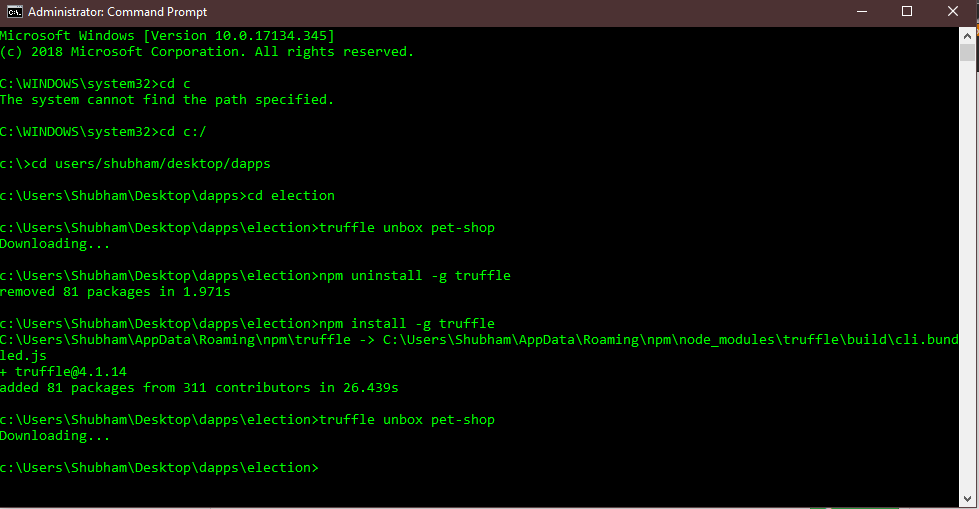
I tried to unbox pet-shop (screenshot attached).It's says downloading... but the folder remains empty.
 0sk11
on 10 Nov 2018
0sk11
on 10 Nov 2018
I am getting stuck at the unbox command, any ideas would be much obliged:

 RaynHarr
on 28 Mar 2019
RaynHarr
on 28 Mar 2019
Hey @RaynHarr, can you see if npx [email protected] unbox pet-shop works?
 CruzMolina
on 28 Mar 2019
CruzMolina
on 28 Mar 2019
Wow, @CruzMolina ! That worked, thanks! What did I do exactly?
RaynHarr
on 28 Mar 2019
Nice. Have you tried uninstalling and installing truffle? (npm uninstall -g truffle && npm i -g [email protected])
npx is a package runner that temporarily downloads an npm package into a local cache and runs your package from there (https://www.npmjs.com/package/npx)
CruzMolina
on 28 Mar 2019
Some users have reported issues in the past after using sudo to install and uninstall truffle, although maybe that's not something you've done.
Are you using a node version manager like nvm or n? Just trying to think off hand would else could be causing your issue.
CruzMolina
on 28 Mar 2019
I did try to uninstall and reinstall, but was getting same result. 'Sudo' and 'nvm' or even 'n' are all not in my lexicon at this point, to show you how green I am. I must be missing something really basic and fundamental because I can't find anything on google about this and you're the first and only person to reach out after hours of scouring for some sort of clue. I really appreciate the quick fix!
RaynHarr
on 29 Mar 2019
Huh. What version of node & npm are you using?
I can tell you're on a MacBookPro (I am too! macOS High Sierra 10.13.6), although I doubt what you're encountering is OS-specific.
Meanwhile, instead of having to use npx to download & then run truffle every time, you should be able to npm i [email protected] locally and then run npx truffle <whateverCommand>. Actually, I'd be interested in seeing if that works. It shouldn't download truffle again before running, instead it should just access what you locally installed in your local node_modules folder.
CruzMolina
on 29 Mar 2019
node 10.15.3 and npm is 6.4.1. Using Sierra 10.12.6. I'm not entirely postiive I understand how to do it locally, but here's what I just tried, hopefully this provides some insight:
RaynHarr
on 29 Mar 2019
Thanks for sharing that!
Looks like saving locally w/ npm & accessing the local node_modules truffle works.
I suspect something is incorrectly configured w/ npm global installations.
This troubleshooting tutorial _might_ be what you need: https://medium.com/@jagatjyoti.1si13cs040/npm-g-install-npm-package-not-working-as-desired-why-why-why-19795abf0b59
This should get you back on track and make npm i -g truffle work so you can just run truffle commands normally w/o npx (otherwise you would have to install truffle locally in every different truffle project directory 😭 )
CruzMolina
on 29 Mar 2019
I'm a little confused. (a lot really) I'm staring at the 'compilation failed' script at the bottom. Am I missing something? Or is that where the article link you provided is supposed to help troubleshoot me out? I have to admit, the article is also going way over my head. Wondering if there's a more basic tutorial I should be going through to have a better understanding of what exactly is going on here? I'm trying to learn through these DAPP University videos, but only moving an inch before I hit yet another wall. Any advice would be greatly appreciated, I'm already so grateful for the time you've put in thus far @CruzMolina !
RaynHarr
on 30 Mar 2019
No problem @RaynHarr !
I should have clarified, that compilation error you saw at the bottom of your screenshot has to do with a missing semi-colon at the end of a statement in the smart contract you're trying to migrate.
I was more just trying to troubleshoot why truffle isn't working for you globally once you npm i -g truffle.
I'm assuming you've taken a look at the pet shop tutorial (https://truffleframework.com/tutorials/pet-shop)?
CruzMolina
on 30 Mar 2019
@CruzMolina Ahh yes, a true newb mistake. I also ran into another issue where the tutorial was having me name a function the same as the contract it resides in, which apparently Solidity doesn't allow anymore? I think I just need to find a better tutorial. I appreciate your walking me through this. Cheers!
RaynHarr
on 2 Apr 2019
Hmm, I believe the tutorial I linked has the contract code updated to not include a function of the same name. Maybe it's missing the expected constructor function for solidity 0.5.0 and above. I'll take a look.
Thanks for not giving up with this! This is valuable feedback. We really want to make it as easy as possible for newcomers to pick things up and get started.
CruzMolina
on 2 Apr 2019
Oh no! I meant the DAPP University tutorial I've been going through, I haven't walked through the entirety of the link you sent, I will give that a try and let you know how it goes!
RaynHarr
on 2 Apr 2019
Ah, I wondered that. Yeah, I just tested the tutorial code and it compiles fine on my end. Let me know if it's otherwise on yours.
CruzMolina
on 2 Apr 2019
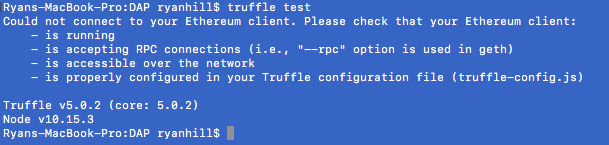
ok @CruzMolina so I was moving along swimmingly until I hit the 'truffle test' command where I ran into this error. I've done everything up to this point that the instructions asked. Any ideas?
RaynHarr
on 3 Apr 2019
@RaynHarr do you have Ganache running in the background?
CruzMolina
on 3 Apr 2019
Ay aya ay, another embarrassing mistake. Ya looks like it crashed on me in the background, I had it going for about a week so I'm not surprised. Would have helped to check to before throwing up another issue on here. Thanks @CruzMolina !
RaynHarr
on 3 Apr 2019
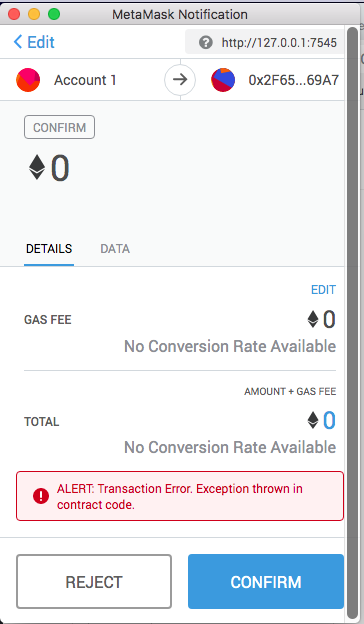
Ok, I think I've scrubbed all the newb errors up to this point. I've gotten the page up and running with all the dog pictures, however when hitting the adopt button, I'm getting these errors:
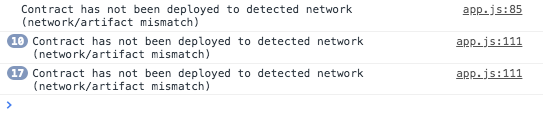
This look familiar?
RaynHarr
on 4 Apr 2019
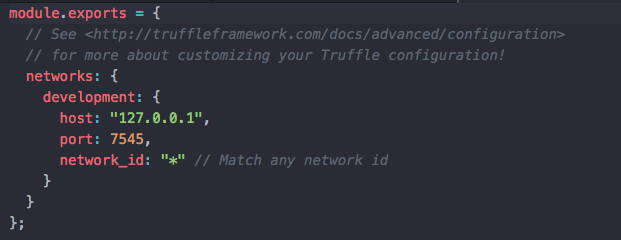
What's your truffle-config.js settings? Are you using truffle console, truffle develop, do you have Ganache running in the background? Metamask connected to the proper network?
CruzMolina
on 4 Apr 2019
Ganache is running, Metamask hooked to port 7545, i'm using npm run dev. Truffle-config was untouched by me, but is showing same as metamask network:
RaynHarr
on 4 Apr 2019
Ah, so I believe you need to specify Metamask to connect to network_id 5777 (Ganache's default) in the Metamask settings somewhere.
If that doesn't work, try changing the truffle-config.js network_id to 5777 instead of "*". (This shouldn't be the problem though).
Oh, so this probably means we need to update the Metamask screenshots to show the new Metamask UI!
CruzMolina
on 4 Apr 2019
Hmm I'm getting the same error after trying both of those solutions. Is it related that my URL is 'localhost:3000' and not 127.0.1.7545 (shootin' in the dark here hahah)
RaynHarr
on 4 Apr 2019
Also, I'm using the Brave browser, not sure if that has any significance...
RaynHarr
on 4 Apr 2019
Hmm, no the local server being run on 3000 shouldn't be an issue.
With Ganache running, you could try doing a migrate --reset. Might be that you have artifact files that were migrated to an older instance/network of Ganache that you've since cleared (would happen by closing down Ganache).
CruzMolina
on 4 Apr 2019
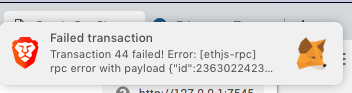
Ok! Slowly but surely, truffle migrate --reset worked. but now Im getting a failed transaction:
RaynHarr
on 4 Apr 2019
Hmm, hard to say without seeing your completed contract code.
Can you make sure your contract code is the same as the tutorials? I'm also assuming you were able to import your Ganache wallet key correctly and have ether to transact with.
CruzMolina
on 4 Apr 2019
Ok, I did it finally! I'm not entirely sure what the fix was, I'm pretty sure it had to do with my Metamask setup though. Somewhere between me switching to the main network and back to 7545 and selecting this Account 2 that I'm fairly certain wasn't there prior.
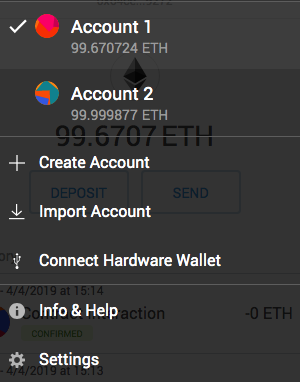
Didn't touch the code really, left Ganache alone, and my Account1 had Ether in it the entire time. Regardless this is has been a really good lesson on how everything interacts with each other, I appreciate the hand-holding until the end!
RaynHarr
on 4 Apr 2019
No problem, congrats!
CruzMolina
on 4 Apr 2019
Hi to all,
don't know if this is a truffle init issue but I get this...
When I try to migrate my Token smart contract (using Openzeppelin ERC20) I want to migrate using a custom script for initializing constructor parameter but I get stuck somewhere:
2_initial_migration.js
Deploying 'myToken'
Error: Error: Error: * Deployment Failed *
"myToken" hit a require or revert statement somewhere in its constructor. Try:
- Verifying that your constructor params satisfy all require conditions.
- Adding reason strings to your require statements.
at Object.run (/usr/lib/node_modules/truffle/build/webpack:/packages/truffle-migrate/index.js:92:1)
at process._tickCallback (internal/process/next_tick.js:68:7)
Truffle v5.0.25 (core: 5.0.25)
Node v10.15.3
FYI I can't find webpack anywhere nor truffle-migrate (locally or unders /usr/lib/...)
I have upgraded to Truffle 5.0.25 and I got this issue already with previous installed version (5.0.19)
and I use Node v10.15.3 while coding in Ubuntu Virtual machine with Virtual Box.In this case I use Ganache Gui (or cli depends on which VM i work).
This is the constructor of myToken...
constructor (uint _quantity, uint _price, uint _ethconv, uint _fees, address payable _codex, address payable _to) public {

    owner =  msg.sender;
    codex = _codex;
    quantity = _quantity;
    price = _price;
    ethconv = _ethconv;
    seller = _to;
    fees = _fees;

    initialSupply = _quantity;
    ethPrice = _price * _ethconv;

    transfer(msg.sender, initialSupply);
}
And this is the migration script:
var myToken = artifacts.require("myToken");
let quantity = 100;
let price = 50;
let ethconv = 1;
let fees = 45;
owner = "0xbFe32eD630d3dBEFFa7Fa1dc38aA3108B8df840c";
codex = "0x36373E9d3A70c971D4D04b09697DA7d337204CDa";
seller = "0x3F3dEeA4877D97c98f610b5BE580DdA83dBC5C36";
module.exports = function(deployer) {
deployer.deploy(myToken, quantity, price, ethconv, fees, codex, seller, {from: owner});
};
 alexandreValente
on 28 Jun 2019
alexandreValente
on 28 Jun 2019
I had a similar problem. I ran
npm i -g truffleand then when I tried to runtruffle initI got an error:zsh: command not found: truffle. What solved it for me is to create a localnode_moduleswith truffle installed in it, and then run that copy.
- run
npm initand make a new npm project- run
npm i truffle- run
./node_modules/.bin/truffle initand it should workunfortunately, with this method, you'd have to call all commands by prepending
./node_modules/.bin/truffleto the command
can you tell me how to make a new npm project
 vinay1011998
on 9 Aug 2019
vinay1011998
on 9 Aug 2019
I had a similar problem. I ran
npm i -g truffleand then when I tried to runtruffle initI got an error:zsh: command not found: truffle. What solved it for me is to create a localnode_moduleswith truffle installed in it, and then run that copy.
- run
npm initand make a new npm project- run
npm i truffle- run
./node_modules/.bin/truffle initand it should workunfortunately, with this method, you'd have to call all commands by prepending
./node_modules/.bin/truffleto the commandcan you tell me how to make a new npm project
@vinay1011998 I hope this answers your question: First you'll need to install nodejs at https://nodejs.org/en/. I would go for the LTS version. Npm comes with nodejs - it's nodejs's package manager software. Once installed, go into a folder and type npm init and hit enter a bunch of times on the prompts. There you go - you've created a new npm project. You'll see that a package.json file has been created in your folder - this is a file that you can use to manage your dependencies for your npm project. At that point you can install truffle with npm i truffle --save - you'll see that your package.json file has a new block called dependencies with truffle in it. There will also be a node_modules folder with the files for truffle library in it. then run ./node_modules/.bin/truffle init to start truffle at that point. see more here https://docs.npmjs.com/cli/init
danielrussellLA
on 18 Aug 2019
Related issues
 oed
·
3Comments
oed
·
3Comments
 hefgi
·
3Comments
hefgi
·
3Comments
 EmanHerawy
·
3Comments
EmanHerawy
·
3Comments
 mezrin
·
3Comments
mezrin
·
3Comments
 Katsu1991
·
3Comments
Katsu1991
·
3Comments
Most helpful comment
I had a similar problem. I ran
npm i -g truffleand then when I tried to runtruffle initI got an error:zsh: command not found: truffle. What solved it for me is to create a localnode_moduleswith truffle installed in it, and then run that copy.npm initand make a new npm projectnpm i truffle./node_modules/.bin/truffle initand it should workunfortunately, with this method, you'd have to call all commands by prepending
./node_modules/.bin/truffleto the command