Trilium: Hide that trilium is on port 8080
What I want to do:
- Run trilium on port 8080
- Use Nginx reverse proxy so requests to http://mydomain/service run the app on port 8080, but serve it in response to requests for http://mydomain/service on port 80.
- Thus, any visitors to the site will not know it is on port 8080, and preferably just get a "connection refused" if they try to connect directly to port 8080.
Although I got this working with a simple test page, I can't seem to get it working with Trilium, and I was hoping to get some insight into how to do this.
This is the last configuration I tried:
/etc/nginx/sites-available/mydomain.com
server {
        listen [::]:443 ssl ; # managed by Certbot
        listen 443 ssl; # managed by Certbot
        root /var/www/html/start;
        index index.html;
        server_name mydomain.com www.mydomain.com;
        include /etc/nginx/includes/location_basic.conf;
        location /service {
                 proxy_pass https://127.0.0.1:8181/;
                 proxy_http_version 1.1;
                 proxy_set_header Upgrade $http_upgrade;
                 proxy_set_header Connection 'upgrade';
                 proxy_set_header Host $host;
                 proxy_cache_bypass $http_upgrade;
}
    include /etc/nginx/includes/ssl.conf;
}
/etc/nginx/sites-available/notes.mydomain.com
server {
        listen [::]:8181 ssl; # managed by Certbot
        listen 8181 ssl; # managed by Certbot
        server_name notes.mydomain.com;
                location /trilium/ {
                 proxy_pass http://127.0.0.1:8080/;
                 proxy_http_version 1.1;
                 proxy_set_header Upgrade $http_upgrade;
                 proxy_set_header Connection 'upgrade';
                 proxy_set_header Host $host;
                 proxy_cache_bypass $http_upgrade;
        }
        include /etc/nginx/includes/ssl.conf;
}
With these configurations, going to mydomain.com:8080 brings up the Trilium start page, but mydomain.com/service just gives me the nginx default page.
I tried making a simple example serving a test page via port 8080 and that worked, but I am not sure why setting up Trilium with the same logic did not. I am guessing it has two do with the two proxies (on 8080 and 8181), but I am not sure how to adapt the example from the wiki to what I am doing
Here is how I did my test:
cat<<EOF>/var/www/html/test_index.html
<!doctype html>
<head>
  <meta charset="utf-8">
  <title>Test Page</title>
</head>
<body>
  <h1><center>The top index is loading correctly</center></h1>
</body>
</html>
EOF

cat<<EOF>/var/www/html/testservice/service.html
<!doctype html>
<head>
  <meta charset="utf-8">
  <title>Test Page</title>
</head>
<body>
  <h1><center>This is ***supposed*** to be on port 8080, but proxied</center></h1>
</body>
</html>
EOF


cat<<'EOF'>/etc/nginx/sites-available/testsite
server {
        listen 80 default_server;
        listen [::]:80 default_server;
        root /var/www/html;
        index test_index.html;
        server_name xxx.xxx.x.xx;

        location / {
                # First attempt to serve request as file, then
                # as directory, then fall back to displaying a 404.
                try_files $uri $uri/ =404;
        }
        location /service {
            root /var/www/html/testservice;
            index service.html
                proxy_pass http://127.0.0.1:8080/;
                proxy_http_version 1.1;
                proxy_set_header Upgrade $http_upgrade;
                proxy_set_header Connection 'upgrade';
                proxy_set_header Host $host;
                proxy_cache_bypass $http_upgrade;
    }
}


cat<<'EOF'>/etc/nginx/sites-available/testservice
server {
        listen 8080 default_server;
        listen [::]:8080 default_server;
        root /var/www/html/testservice;
        index service.html;
        server_name _;

        location / {
                # First attempt to serve request as file, then
                # as directory, then fall back to displaying a 404.
                try_files $uri $uri/ =404;
        }
}
This got me where I wanted with my test page. How can I do this with Trilium?
 jbhanks
All 22 comments
I also tried the configuration described in this thread: https://github.com/zadam/trilium/issues/404
I am now getting "bad gateway" errors, which I know is not a Trilium problem, but any advice on how I may have misconfigured nginx would be appreciated.
My most recent attempt gets some sort of communication going on with the Trilium app, but the response is not what I want: {"message":"Router not found for request /trilium"}
This is my current config, which gave the above response:
upstream notes.myserver.com  {
      server 127.0.0.1:8181; #Trilium
}

server {
        listen [::]:443 ssl;
        listen 443 ssl;
        include /etc/nginx/includes/ssl.conf;
        server_name notes.myserver.com;
        root /var/www/html/start/;
        # Add index.php to the list if you are using PHP
        index index.html index.htm index.nginx-debian.html;
        # Path to the root of your installation


        location /trilium {
                proxy_set_header X-Real-IP $remote_addr;
                proxy_set_header X-Forwarded-For $proxy_add_x_forwarded_for;
                proxy_set_header Host $http_host;
                proxy_set_header X-NginX-Proxy true;
                proxy_http_version 1.1;
                proxy_set_header Upgrade $http_upgrade;
        proxy_set_header Connection "Upgrade";
                proxy_redirect off;
                proxy_set_header        X-Forwarded-Proto $scheme;
                proxy_read_timeout 86400;
                proxy_pass https://notes.myserver.com;
                add_header   Front-End-Https   on;
        }
}
On the backend, this is what trilium showed:
Listening on port 8181
Error: Router not found for request /trilium
    at /home/james-admin/trilium-linux-x64-server/src/app.js:69:17
    at Layer.handle [as handle_request] (/home/james-admin/trilium-linux-x64-server/node_modules/express/lib/router/layer.js:95:5)
    at trim_prefix (/home/james-admin/trilium-linux-x64-server/node_modules/express/lib/router/index.js:317:13)
    at /home/james-admin/trilium-linux-x64-server/node_modules/express/lib/router/index.js:284:7
    at Function.process_params (/home/james-admin/trilium-linux-x64-server/node_modules/express/lib/router/index.js:335:12)
    at next (/home/james-admin/trilium-linux-x64-server/node_modules/express/lib/router/index.js:275:10)
    at Layer.handle [as handle_request] (/home/james-admin/trilium-linux-x64-server/node_modules/express/lib/router/layer.js:91:12)
    at trim_prefix (/home/james-admin/trilium-linux-x64-server/node_modules/express/lib/router/index.js:317:13)
    at /home/james-admin/trilium-linux-x64-server/node_modules/express/lib/router/index.js:284:7
    at Function.process_params (/home/james-admin/trilium-linux-x64-server/node_modules/express/lib/router/index.js:335:12) {
  status: 404
How, trilium by default listens on all hosts, if you want to restrict it, you can change host in config.ini:
[Network]
# host setting is relevant only for web deployments - set the host on which the server will listen
host=127.0.0.1
with this trilium will listen only on localhost IP and not on the public IP.
 zadam
on 19 Oct 2020
zadam
on 19 Oct 2020
Thanks, that takes care of the title question, but I still have something wrong with my reverse prxy. When I go to the path that I am trying to route Trilium to (mydomain.com/trilium), I still get the above errors from Trilium and a page with
{"message":"Router not found for request /trilium"}
I am trying to figure this out with a minimal example so that I can actually understand what is going on. Should any configuration that works for a node.js "Hello World" app work the same for Trilium?
jbhanks
on 19 Oct 2020
Unfortunately I'm not knowledgeable in nginx configs but the problem seems to be that nginx is forwarding the request including the /trilium prefix but it should actually strip it.
zadam
on 19 Oct 2020
For what its worth here is my nginx reverse proxy config. I have a google sub domain redirecting permanently to my public IP. My router forwards port 443 to my nginx container. I'm using letsencrypt
server{
listen 443 ssl;
server_name [my sub domain];
ssl_certificate [path to my fullchain.pem]
ssl_dhparam [path to ssl-dhparams.pem];
ssl_certificate_key [path to key.pem];
ssl on;
location / {
proxy_set_header Host $host;
proxy_set_header X-Real-IP $remote_addr;
proxy_set_header Upgrade $http_upgrade;
proxy_set_header Connection "upgrade";
proxy_pass http://my tilium server instance local ip:8080
proxy_redirect off;
}
 Engr-AllanG
on 20 Oct 2020
Engr-AllanG
on 20 Oct 2020
Unfortunately now I am getting "502 Bad Gateway" with this config
upstream mylittlestashbox.com  {
      server 127.0.0.1:8181; #Trilium
}

server {
        listen [::]:443 ssl;
        listen 443 ssl;
        include /etc/nginx/includes/ssl.conf;
        server_name mydomain.com;
        root /var/www/html/start/;
        # Add index.php to the list if you are using PHP
        index index.html index.htm index.nginx-debian.html;
         client_max_body_size 0;
         ssl on;

        location /trilium {
                proxy_pass http://127.0.0.1:8181;
                proxy_set_header Host $host;
                proxy_set_header X-Real-IP $remote_addr;
                proxy_set_header Upgrade $http_upgrade;
                proxy_set_header Connection "upgrade";
                proxy_redirect off;
        }
}
However, if I run a hello world nodejs app on the same port of the same machine, it loads as expected. Is there something special I need to know about how trilium communicates with nginx?
jbhanks
on 20 Oct 2020
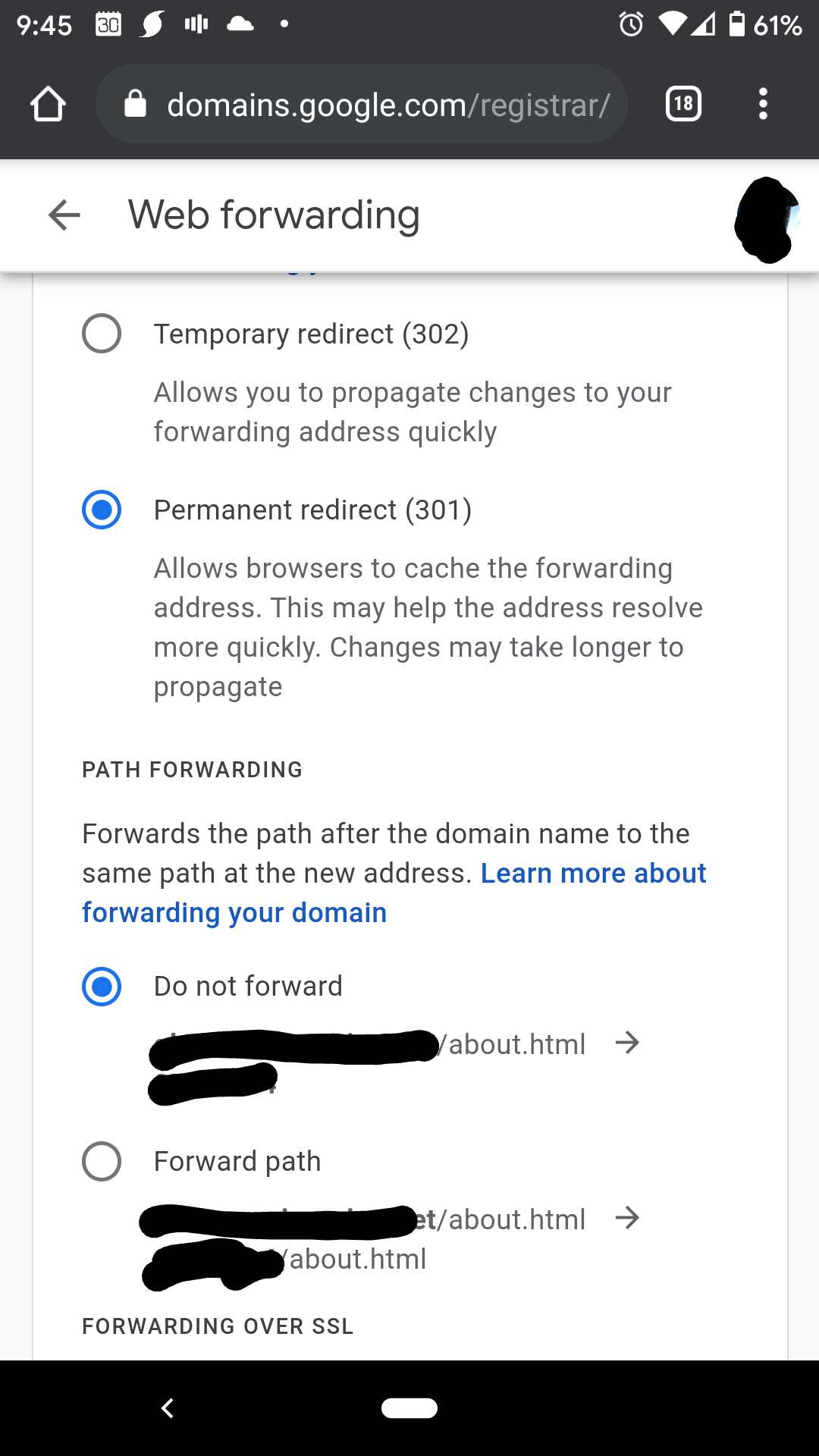
To zadams point, make sure your domain redirect is not including the path. I use google domains and have "path forwarding" off.
I don't think I have the upstream section in my config
Engr-AllanG
on 20 Oct 2020
google domains and have "path forwarding
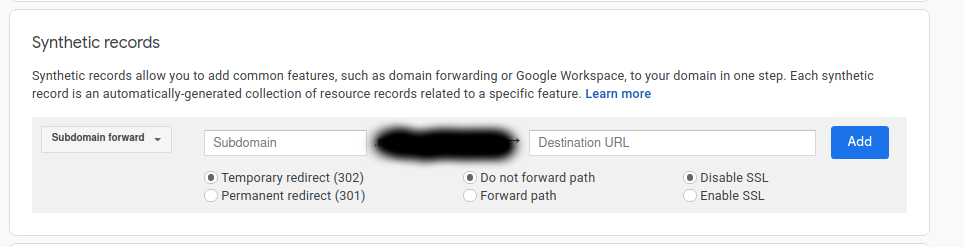
I have google domains too. If my "synthetic records" section is empty, that means there is no path forwarding, right?
jbhanks
on 20 Oct 2020
I'm not sure, all of mine are synthetic records. Here is a screenshot of my subdomain I have for trillium
Your nginx config location is /trilium. So is your intent to have domain.com/trilium and have it go to 127.0.0.1:8081? If so then I think the path forwarding may be part of the issue
Engr-AllanG
on 20 Oct 2020
I simply don't have any entries there.
What you say is what I am trying to do, although I don't particularly care that the path is /trilium. I did try it with / as the path, I get the same 502 error if I go to mydomain.
jbhanks
on 20 Oct 2020
So how is your domain forwarding to your server? A custom resource record (@ type A?) ?
Engr-AllanG
on 20 Oct 2020
Yes. And all the subdomains are CNAME records. I am using DigitalOcean nameservers however (and also have identical A records set there).
jbhanks
on 20 Oct 2020
hmm. I'm not sure how else to help. My home server is just a side hobby and I don't understand many of the details in great depth. I would suggest creating a specific synthetic record for your Trilium subdomain and see if not forwarding the path yields any results
Engr-AllanG
on 20 Oct 2020
Well, thank you for your help. I at least have some new ideas about what to read up on. I tried adding a synthetic domain, now I don't get the bad gateway error, but just the nginx default page. I don't need to have the port in there, do I? And do these changes take as long to propagate as the initial DNS record creation? Maybe I need to wait longer.

My most recent configuration is in two files, like this:
etc/nginx/sites-available/mydomain.com
server {
        listen [::]:443 ssl;
        listen 443 ssl;
        include /etc/nginx/includes/ssl.conf;
        server_name mydomain.com;
        root /var/www/html/start/;
        # Add index.php to the list if you are using PHP
        index index.html index.htm index.nginx-debian.html;
        # Path to the root of your installation
}
/etc/nginx/sites-available/notes.mydomain
server {
        listen [::]:443 ssl;
        listen 443 ssl;
        include /etc/nginx/includes/ssl.conf;
        server_name notes.mydomain.com;
         client_max_body_size 0;

        location / {
                proxy_pass http://127.0.0.1:8181;
                proxy_set_header Host $host;
                proxy_set_header X-Real-IP $remote_addr;
                proxy_set_header Upgrade $http_upgrade;
                proxy_set_header Connection "upgrade";
                proxy_redirect off;
        }
}
@zadam what I don't get is that a simple hello world js works as expected, but trilium does not. Is there something unique about how trilium communicates with nginx that wouldn't be in a minimal nodejs example? I started an SO thread if you want to add anything there: https://serverfault.com/questions/1039238/reverse-proxy-works-for-test-app-but-not-the-one-i-want-to-use
jbhanks
on 20 Oct 2020
It seems that turning off ssl in config.ini is sufficient to make it work. As I still am using ssl on the frontend, this is no decrease in security, right?
jbhanks
on 21 Oct 2020
Yes, if trilium is frontend by reverse proxy then SSL on trilium itself is not necessary.
zadam
on 21 Oct 2020
If I am way paranoid that something on my backend might try to snoop in Trilium, is it possible to encrypt the backend?
jbhanks
on 21 Oct 2020
There are protected notes which are encrypted: https://github.com/zadam/trilium/wiki/Protected-notes
zadam
on 21 Oct 2020
Thanks. Sorry to press the issue, but can you please tell me if there is any reason why backend encryption between trilium and nginx would not be expected to work? Or should it act the same as any encrypted nodejs backend?
jbhanks
on 21 Oct 2020
you mean TLS? I don't see a reason why it wouldn't work, most probably there was some config issue.
zadam
on 21 Oct 2020
Related issues
 hrzboy
·
5Comments
hrzboy
·
5Comments
 thbkrshw
·
4Comments
thbkrshw
·
4Comments
 gerroon
·
6Comments
gerroon
·
6Comments
 PwnFunction
·
3Comments
PwnFunction
·
3Comments
 sambbaron
·
3Comments
sambbaron
·
3Comments