I guess this issue must have been brought up before. But I couldn't find it in issue list. So here it is.
Having a inline note creation feature will definitely increase the productivity, because first we have to create a new note, fill it with content & then go back in parent note and then create a link to that newly created note.
This is little time consuming.
Instead with inline note creation, we would the going back to parent and then creating a link step.
Having Inline Note Creation, would definitely be helpful.
 a22a-dev
All 19 comments
Hi, yes, this was brought up before. There's a question of where should be the new note created in the tree - there isn't any correct answer to that, but perhaps just creating it right after the current note on the same level would be OK.
 zadam
on 16 Sep 2020
zadam
on 16 Sep 2020
It could be created as child note, because if we are creating a new note, while working on a current note, then it has a high chance of being relevant to it as a child note.
Also, once the note is created as child, a "clone to" dialog could appear asking where to clone it. Just like when we press Ctrl+Shift+C.
This would make sure notes get created at a fixed location and then gives user the power to put it anywhere they want.
Or even better, create a new note as a daynote (Ctrl + Alt +P) & then have a "clone to" dialog appear. And if they don't want to clone it anywhere else, they could just press ESC.
a22a-dev
on 16 Sep 2020
I recently started using Trilium and missing this really stuck out at me too.
Ideal UX to me would be being able to create a link to a new page (without any dialog box popping to interrupt the flow) using the existing inline page link mechanism '@'pagename
 egalanos
on 20 Sep 2020
egalanos
on 20 Sep 2020
@egalanos you mean like creating a note and linking to it, but not writing anything to it, at that moment, but later at your time?
a22a-dev
on 20 Sep 2020
@egalanos you mean like creating a note and linking to it, but not writing anything to it, at that moment, but later at your time?
@terra9 Yes, exactly.
The essential idea is that the UI provide the ability to create a page inline without interrupting the writing flow (i.e not having to take your hands off of the keyboard or click on any prompt) with the default being to create a link to an empty page whilst staying on the same page. Switch to the new page should just require a left arrow and enter.
A good example of this is what Roam Research does: https://www.youtube.com/watch?v=yYFdZkv-9Ek&list=PLwXSqDdn_CpE934BjXMgmzHnlwXMy41TC&index=6
egalanos
on 21 Sep 2020
@egalanos but the dialog could be exited just by clicking ESC, so you are not taking hands off your keyboard and it will also enable us to control where clone of note is created.
a22a-dev
on 21 Sep 2020
@terra9 Sure, but from a design perspective, it's best to do the right thing automatically as much as possible without prompting rather than trying to accommodate every possibility.
egalanos
on 21 Sep 2020
My thinking aligns more with @egalanos
I'm currently experimenting with the implementation.
I also found related issues - #844, #939, #1143
zadam
on 21 Sep 2020
@egalanos you are right. But we could have another feature like recent changes, which would only have newly created notes with their time and date of creation timestamp, instead of opening a prompt while creating a inline note.
It would be automatic enough and still nudge the user about the notes he is supposed to organize.
It will also be useful in other scenarios where for taking quick notes we create new notes using Ctrl + Alt + P, but would need to put it somewhere else at a later time.
a22a-dev
on 21 Sep 2020
+1. This would be a fantastic feature addition! Here are a few thoughts:
- Use the same pop-up window as the normal link "@" window dialog for creating a link, but add a top most option for "new note". that way, you could still create a new note that has the same name as another. This may be a less used behavior, but occasionally I have duplicate named notes.
- Next, I think it would be great if the default location is a child note, but have another window that appears right after that behaves just like the "@" dialogue that is a "move to location" window. If you don't want to move it, you just hit esc and it it goes to the default location (child of the current note).
- Last thought is that a two-word name needs to be considered. Currently, the "@" command exits once you type a space. Of course, it finds two word notes but only by entering one word. If this command is going to be used to create a new note inline, IMHO it must be able to handle two word note names
 Engr-AllanG
on 21 Sep 2020
Engr-AllanG
on 21 Sep 2020
It would also be nice if the new blank note automatically opened in a new tab, but focus remained on the current note
Engr-AllanG
on 21 Sep 2020
See the demo of the feature:
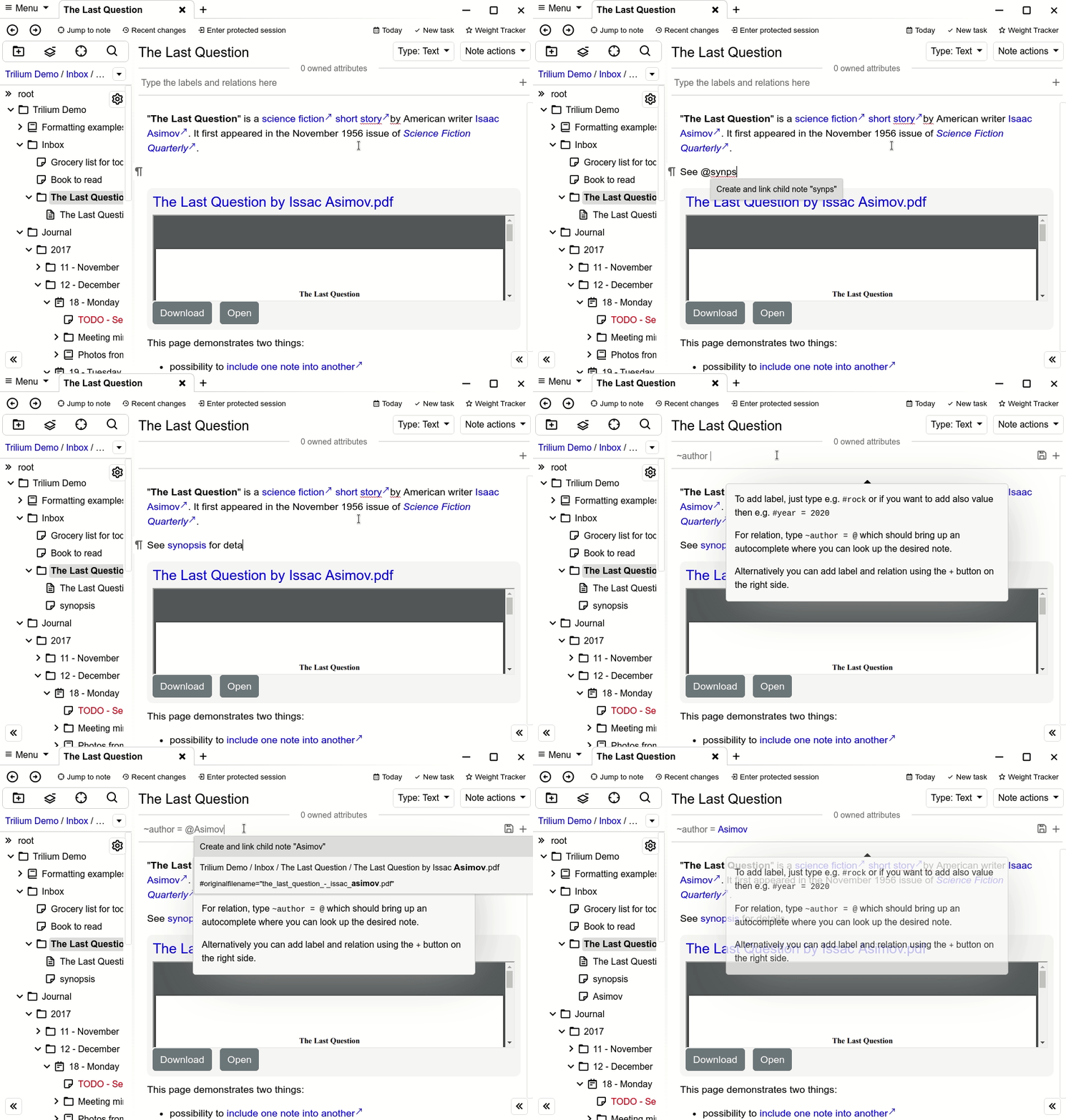
Some notes:
- note is created as a child note of the current note
- inline autocomplete generally works only with single words and for that reason it's possible to only create one word notes from the autocomplete. This is a limitation of CKEditor.
zadam
on 21 Sep 2020
@zadam having a button like Recent Changes, but for only newly created note with their time-date stamp, could handy for organizing notes.
a22a-dev
on 22 Sep 2020
@zadam this is great - will you be adding this to the next beta release?
Engr-AllanG
on 23 Sep 2020
@zadam Looks great! Is the cursor being immediately after the link rather than one space over a CKEditor limitation too?
egalanos
on 23 Sep 2020
@Engr-AllanG yes, it's in master so part of next beta (or stable) release.
Is the cursor being immediately after the link rather than one space over a CKEditor limitation too?
So you'd want an extra space after link insertion? This could be useful in some cases, but annoying in others, e.g. when link is at the end of a sentence then comma or full stop should follow but without a space.
zadam
on 23 Sep 2020
Is the cursor being immediately after the link rather than one space over a CKEditor limitation too?
So you'd want an extra space after link insertion? This could be useful in some cases, but annoying in others, e.g. when link is at the end of a sentence then comma or full stop should follow but without a space.
I was thinking out loud a bit. No, I think the current behaviour of no space is the correct way of least surprise and consistency with the way other formatting elements work.
egalanos
on 24 Sep 2020
Released in 0.44.4
zadam
on 25 Sep 2020
@zadam This is beautiful. Thank you.
 fivestones
on 16 Oct 2020
fivestones
on 16 Oct 2020
Related issues
 PwnFunction
·
3Comments
PwnFunction
·
3Comments
 gerroon
·
5Comments
gerroon
·
6Comments
gerroon
·
5Comments
gerroon
·
6Comments
 munavirch
·
5Comments
munavirch
·
5Comments
 sambbaron
·
3Comments
sambbaron
·
3Comments
Most helpful comment
See the demo of the feature:
Some notes: