Treestyletab: Tree structure is lost after restoring a session with the Tab Session Manager addon
Short description
The tree structure is lost after restoring a session with latest Debian and Firefox with the Tab Session Manager (TSM) addon.
I don't know if this is more/only an issue with the TSM.
I'm using this addon as I found Firefox' built-in session restore management unreliable, sometimes losing sessions. (Furthermore, the TSM addon also allows storing a lot of backups and tagging them for keeping them longer.)
Probably the tree structure could or should be stored by TST in a way that allows recreating the tree structure _after_ the TSM addon restored the tabs of the session without the tree structure.
Steps to reproduce
- Start Firefox with clean profile.
- Install TST.
- Install Tab Session Manager
- Create a tree structure
- Close the browser, reopen it and restore a session with Tab Session Manager
Expected result
The tree strucure should be restored.
Actual result
Only the flat structure of tabs is restored.
Environment
- Platform (OS): Debian 10 stable
- Version of Firefox: 78.5
- Version (or revision) of Tree Style Tab: 3.6.2
 mYnDstrEAm
All 16 comments
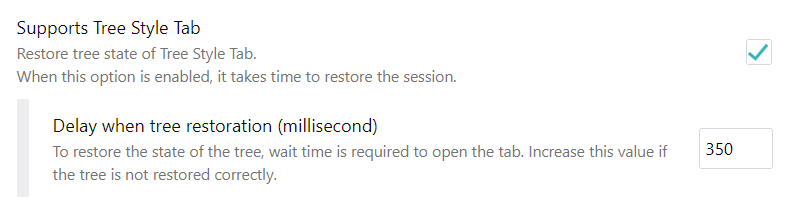
Did you enable support in TSM for TST and set a reasonable delay?
 irvinm
on 1 Dec 2020
irvinm
on 1 Dec 2020
Pretty sure I did but it looks like the setting was lost (or I changed it back for some reason but I doubt that). I guess the issue can be closed and I'd delete it.
One thing that would be nice is if the addon automatically enabled that setting if it detects that the addon is installed or if it prompted the user about it.
That restoration delay is for the entire tree, not per tab, right?
mYnDstrEAm
on 1 Dec 2020
It is "per tab". You can see in my case, I do about 3 tabs restored per second. I used to have it before somewhere between 100-200ms (10 to 5 tabs per second) but I remember seeing some problems with my tree structure when I did it that fast. I am ok with waiting 175 seconds (~3 minutes) to restore a 500 tab session. [Better safe than sorry]
irvinm
on 1 Dec 2020
One thing that would be nice is if the addon automatically enabled that setting if it detects that the addon is installed or if it prompted the user about it.
I think you should post the request to the TSM project side.
 piroor
on 2 Dec 2020
piroor
on 2 Dec 2020
That would indeed be better. I'll post an issue there.
The tree structure was not restored with a reasonably high delay. I think it would be more important to automatically set the delay depending on e.g. how many tabs are to be restored or if it detects that restoring the tree structure did not work. Alternatively, there probably should at least be some guidance in the settings about which value to enter there instead of requiring users to find the right setting by trial and error. I created an issue about that - also mentioning automatic enabling of TST support - here: https://github.com/sienori/Tab-Session-Manager/issues/662
mYnDstrEAm
on 2 Dec 2020
Are you sure this is an issue of TSM? It doesn't restore most tree structures despite of a high delay.
mYnDstrEAm
on 5 Jan 2021
Ok, I admit I haven't had to restore a session with TSM for quite a while, so I tried a few scenarios. (Thankfully, my machine and Firefox have been very stable and just really use TSM as a safety blanket)
I tried to restore a 450 tab session and using 350ms and 500ms each resulted in some of the early tabs restoring the tree structure, but at some point everything then gets put at the root level. Finally, I tried 1000ms (1 second per tab) and that restore worked fine. I know at some point 350ms worked fine on my machine, but that might have been more than a year ago.
So ... it does seem that things are a bit more sensitive to how quickly tabs are being restored in order to keep the tree structure.
Can you try a bigger number like 1000 or 2000 just to see if that works? (I would also think that the performance of the machine could also play a factor into all of this.)
irvinm
on 5 Jan 2021
I already tried a delay of about 5 seconds for about 200 tabs and it still didn't restore all tree structures. I still have it above 2000 and it didn't restore all. I could try to experiment a bit to find if something works but it would be useful if I knew which other settings and configs and setup might be relevant for this. Trying to restore tabs in multiple windows in parallel would probably be one thing to test but it also didn't restore all when only restoring one window at a time. I don't think it was a problem of CPU or memory but next time I'll check that. Maybe the level of nesting was too deep - did you try with nesting of a depth of over 5 levels?
mYnDstrEAm
on 5 Jan 2021
@mYnDstrEAm just an FYI that I don't think @piroor was saying there wasn't necessarily an issue, but that the "enhancement" to automatically detect if TST is installed should be done on the TSM side. In terms of this issue, there is something different going on but it could also be Firefox related as well.
In terms of my session and options, it does look I had a few trees that were 5 deep and they worked ... but nothing deeper. As for options, as you know TST has a lot of them.
I then thought maybe it was Debian related and tried to install it using Hyper-V under Windows and have to say that I couldn't get the GUI running at all. (I've gotten Ubuntu, Fedora, CentOS all working before)
I believe there are quite a few users of both TST and TSM, but the permutations are almost endless. This behavior seems fairly reproducible under Windows and @piroor will probably have to debug what is going on to recommend solutions.
irvinm
on 6 Jan 2021
After some trials I've understood that sometimes the combination of TST and TSM fails to restore relations of tabs from a session data. Here is a testcase session data:
267-tabs.zip
This testcase contains three sessions, there are 267 tabs in each session.
- "267 tabs with regular URL": All tabs in this session have URLs like
http://localhost/#tabXXX.
- This session can be restored successfully for me.
- But the restoration fails if all Firefox windows are unfocused. This is due to a bug of TST itself: newly opened tabs are unexpectedly detected as "opened from an external application" even if they have any
openerTabIdinformation. The commit 12c95ab3c should fix it.
- "267 tabs with not-loadable URL": All tabs in this session have URLs like
about:config#tabXXX.
- This session cannot be restored for me.
- When Firefox tells an event about a restored tab for
tabs.onCreatedlisteners, the notified tab object has noopenerTabIdproperty. TSM looks to fail to restore theopenerTabIdinformation while its internal operation to replace the URL of the tab to a safe version.
- "267 tabs with regular and not-loadable URL": Most tabs in this session have URLs like
http://localhost/#tabXXX, but tabs prefixed with the number "2" have URLs likeabout:config#tabXXX.
- This session cannot be restored for me. Only some tabs are restored with a tree structure but tabs prefixed with the number "2" are restored as flat tabs, because they have no
openerTabIdproperty.
- This session cannot be restored for me. Only some tabs are restored with a tree structure but tabs prefixed with the number "2" are restored as flat tabs, because they have no
I think TSM should restore openerTabId for a tab even if it has a not-loadable URL, for better compatibility with other tab addons not only TST.
piroor
on 7 Jan 2021
The problem I commented at https://github.com/piroor/treestyletab/issues/2774#issuecomment-755996615 has been fixed by TSM. Wow!
@mYnDstrEAm Does your case match to the condition I commented at the above comment?
piroor
on 7 Jan 2021
I think it also didn't restore all tree structures when the window was focused. But maybe it always got unfocused for a while and then focused again. I'll try...that's the only testcase that might match my case. Maybe it's a problem of how the TSM session was saved and not one of the restoration process. (The restoration of a window with many trees works fine if it was not changed since the last restoration.)
mYnDstrEAm
on 7 Jan 2021
I tried it by changing the tree structures of my current session (including adding some deeply nested ones) and letting it restore in an unfocused window. Seems like it restored all tree structures there. So this seems to only occur when it matters: when I had to restart my computer or the browser crashed and things like that.
I can't see the intended tree structures from within TSM so I can't check whether or not they were restored properly.
I'll investigate this further next time this occurs (and until now that was basically every time that I restored a session). Do you have a link to docs of how tree-structured tabs are supposed to look like in the TSM's session file/s so that I can also check if the files have the correct tree structure (in that case it would be an entirely TSM-related issue)?
mYnDstrEAm
on 7 Jan 2021
I don't know the existence of any document about TSM's session data format, but I read the session data (JSON) exported by TSM. It has a format like:
[
    {
        "windows": {
            "1": {
                "1": {
                    "id": 1,
                    "index": 2,
                    ...
                    "openerTabId": 2,
                    "url": "http://localhost/#tab265",
                    "title": "tab265",
                    "favIconUrl": "about:blank"
                },
                "2": {
                    "id": 2,
                    "index": 0,
                    ...
                    "url": "http://localhost/#tab0",
                    "title": "tab0",
                    "favIconUrl": "about:blank"
                },
                "3": {
                    "id": 3,
                    "index": 1,
                    ...
                    "openerTabId": 2,
                    "url": "http://localhost/#tab1",
                    "title": "tab1",
                    "favIconUrl": "about:blank"
                }
            }
        },
        ...
    }
]
In this example, there are three tabs index.
The tab openerTabId. The value equals to the id of the parent tab. Please note that it is a one-direction reference. A child tab knows what tab is its parent, but a parent tab doesn't know which tab is its children.
piroor
on 8 Jan 2021
@mYnDstrEAm is there any reason to leave this open any more? I just tried restoring a session and everything was working well for me now. If working for you now, can you close this item?
irvinm
on 8 Feb 2021
Since recently it's not happening anymore for me either (same for the issue with the sidebar randomly becoming blank). Maybe it was related to an addon that I used and/or that change related to special URLs or was fixed in a Firefox update. If it occurs again I'll comment - seems to be fixed now. Thanks.
mYnDstrEAm
on 8 Feb 2021
Related issues
 array
·
4Comments
array
·
4Comments
 Lej77
·
4Comments
Lej77
·
4Comments
 mreppen
·
3Comments
mreppen
·
3Comments
 azizLIGHT
·
4Comments
azizLIGHT
·
4Comments
 mikeaustin
·
3Comments
mikeaustin
·
3Comments
Most helpful comment
Since recently it's not happening anymore for me either (same for the issue with the sidebar randomly becoming blank). Maybe it was related to an addon that I used and/or that change related to special URLs or was fixed in a Firefox update. If it occurs again I'll comment - seems to be fixed now. Thanks.