Treestyletab: [Feature request] More options to finetune animation settings
Hi, I noticed that the current settings only allow for changing the animation speed when opening a new tab. Would it be possible to have further settings to customize e.g. animation speed for closing tabs, tab burst effect, throbber and such? Hope you will consider! And thank you for your work these past 10 or so years, TST remains the most indispensable addon for FF alongside uBO.
 mimecry
All 17 comments
There are hidden options for some animations:
- burstDuration
- indentDuration
- collapseDuration (used for opening and closing tabs also)
- outOfViewTabNotifyDuration
You'll see them under TST options => Development => All Configs.
The throbber animation is controlled with CSS completely:
You can override it with custom user style.
Currently I have no plan to add more UI to customize them. There are some reasons:
- They look too trivial.
- Opening/closing animation should have the duration same to Firefox's animation for safety. Careless changing of animation duration can introduce troublesome behaviors.
 piroor
on 24 Nov 2020
piroor
on 24 Nov 2020
ooh, i totally missed those settings, as I was searching for them using the keyword "animation" rather than "duration" and only found "newTabAnimationDuration". appreciate the tip on how to use CSS to customize the throbber as well, i'll look further into it. thank you again!!
mimecry
on 24 Nov 2020
@piroor can you help me take a quick look at this CSS? it should be working but isn't
:root.blocking-throbber #blocking-screen .throbber::before,
#tabbar tab-item:not(.collapsed).loading .throbber::before {
  -moz-context-properties: fill;
  background: url("chrome://global/skin/icons/loading.png") no-repeat;
}

:root.simulate-svg-context-fill.blocking-throbber #blocking-screen .throbber::before,
:root.simulate-svg-context-fill #tabbar tab-item:not(.collapsed).loading .throbber::before {
  mask: url("chrome://global/skin/icons/loading.png") no-repeat left center / 100%;
}

#master-throbber {
  background: url("chrome://global/skin/icons/loading.png") no-repeat left center;
}

:root:not(.throbber-synchronizing) tab-item:not(.collapsed).loading:not(.throbber-unsynchronized) .throbber::before,
:root:not(.throbber-synchronizing).have-loading-tab #master-throbber,
:root.have-loading-tab #sync-throbber,
:root.blocking-throbber #blocking-screen .throbber::before {
  animation: unset;
}
@mimecry, @piroor added supported for low animation effects which changed some of the scope. Try this:
:root.animation #conductor-throbber {
  background-image: url("chrome://global/skin/icons/loading.png");
}

:root.animation:not(.throbber-synchronizing) tab-item:not(.collapsed).loading:not(.throbber-unsynchronized) .throbber::before,
:root.animation:not(.throbber-synchronizing).have-loading-tab #conductor-throbber,
:root.animation.have-loading-tab #sync-throbber,
:root.animation.blocking-throbber #blocking-screen .throbber::before {
  animation: unset;
}
 irvinm
on 24 Nov 2020
irvinm
on 24 Nov 2020
aw yes, perfecto. thank you very much for both your help
mimecry
on 24 Nov 2020
@irvinm sorry to bother you again, but i have a couple of questions regarding the CSS customization in TST, that don't seem like they should warrant a new thread:
- how can i replace the 'no favicon' globe icon with a different image, perhaps one of my own choosing? the following code is provided in the wiki but no longer seems to work
/* TST 2.4.17 - Fix for #1822 - Fix for Photon themed new tab favicon */
#tabbar tab-item:not(.loading) tab-favicon .favicon-image[src^="moz-extension://"][src$="/resources/icons/globe-16.svg"] {
  display: none;
}
#tabbar tab-item:not(.loading) tab-favicon .favicon-image[src^="moz-extension://"][src$="/resources/icons/globe-16.svg"] ~ .favicon-default::before {
  display: inline-block !important;

  background: url("chrome://branding/content/icon32.png") no-repeat center / 100% !important;
  mask: none !important;
}
#tabbar tab-item:not(.loading)[data-current-uri="about:privatebrowsing"] tab-favicon .favicon-image[src^="moz-extension://"][src$="/resources/icons/globe-16.svg"] ~ .favicon-default::before {
  background: url("chrome://browser/skin/privatebrowsing/favicon.svg") no-repeat center / 100% !important;
}

/* TST 2.4.17 - Fix for #1822 - Fix for Photon themed default favicon */
tab-item:not(.group-tab):not([data-current-uri^="chrome:"]):not([data-current-uri^="about:addons"]):not([data-current-uri^="about:preferences"])
tab-favicon .favicon-default::before {
  background: url("/sidebar/styles/icons/moon.svg") no-repeat center / 100% !important;
  mask: none !important;
}
- in the same vein, how can i specify a different throbber animation of my own choosing? i tried replacing the link in irvinm's code with an absolute path
background-image: url("file:///C:\path\to\new throbber.png");
but no dice
mimecry
on 25 Nov 2020
I can answer the second one now as I already do this. I believe that an add-on can not have access to the direct file system, so specifying a local URL will not work. The animated PNG must either be inside the addon or Firefox, a public URL, or it can be a base64 encoded APNG passed into TST via CSS. I use this last method to override the throbber with a custom APNG. https://developer.mozilla.org/en-US/docs/Web/HTTP/Basics_of_HTTP/Data_URIs
I would need to spend a little more time to see why the first doesn't work any more.
irvinm
on 25 Nov 2020
@mimecry the favicon globe looks like it is working fine. The same rules would apply to this situation. The new item would need to be inside TST or Firefox, a public URL, or passed in as an encoded file via CSS.
Just keep in mind there is a very limited amount of information that can be synchonized for addons. Even with only 1 APNG in my TST CSS (along with a fair amount of general CSS), it pushes me close to that limit.
irvinm
on 25 Nov 2020
@irvinm great tips, thank you
i must be going insane, been fiddling with the code all day to try and make it work and only now it does.. in fact it had been sitting in my CSS for so long before this
yes it works!! although i'm confused as to why TST doesn't render the throbber in its original color, but only in black (this is the case for every throbber option i've tried thus far)
mimecry
on 25 Nov 2020
Here is my TST CSS section for using an encoded APNG along with how to change the color. This might give you some ideas.
irvinm
on 25 Nov 2020
i'll look into it, highly appreciated.
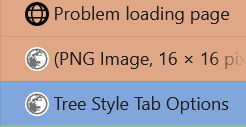
i also noticed where i went wrong with 1.: it is not applied to the "Problem loading page" page. all this time, i was tweaking under the assumption that the code will affect that page as well
mimecry
on 25 Nov 2020
It is due to some mixed reasons.
- The error page has its custom favicon. https://searchfox.org/mozilla-central/rev/f081504642a115cb8236bea4d8250e5cb0f39b02/browser/base/content/aboutNetError.xhtml#27
- In old days I saw some security error when I directly embed
chrome://...URL as favicon. To avoid such ugly errors TST now redirects such dangerous URLs to its builtin globe icon: https://github.com/piroor/webextensions-lib-tab-favicon-helper/blob/f96164e110f0635a9280c7f7ecca7757de7db17d/TabFavIconHelper.js#L174-L177 This is the reason why error pages has the builtin globe favicon. - Dark color SVG favicons are not visible in the dark mode, but we cannot apply the color same to tab labels to SVG favicons. So TST contains a hack to hide such SVG favicons and replace with builtin SVG images. https://github.com/piroor/treestyletab/blob/trunk/webextensions/sidebar/styles/favicon.css
- The error page favicon was not covered by the hack because there was no hint to detect error pages from their URL.
With the commit 6ad67b9 now TST replaces the favicon of error pages with the builtin warning icon and now TST renders it with the color same to tab labels.
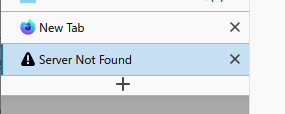
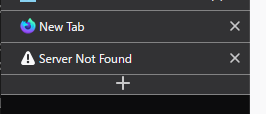
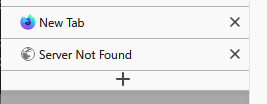
And, as a side effect now it is replaceable with your CSS:
piroor
on 26 Nov 2020
@irvinm your code works perfectly, really appreciate it. i discovered two things while i was experimenting with it:
- a large CSS file can absolutely wreck TST speed, and i think the UI speed in general. this is what happened when i copied your entire CSS into my TST :D
- static favicons can be in many sizes and they'll all get scaled to the appropriate size, but for the throbbers, anything larger than 16x16 will not be scaled down and will result in the image overflowing. not sure if this is a TST or FF behavior, or whether it's a bug or working as intended. i'm guessing theres no built in algo to autoresize animations because it's significantly more complicated than resizing a static image?
@piroor thank you for the detailed explanation and for the commit, very much looking forward to the next release
mimecry
on 26 Nov 2020
- a large CSS file can absolutely wreck TST speed, and i think the UI speed in general. this is what happened when i copied your entire CSS into my TST :D
I guess my machine is fast enough I don't really even notice it. (Although my machine is 6 years old - i7-4790k, 32GB ram, SSD)
- static favicons can be in many sizes and they'll all get scaled to the appropriate size, but for the throbbers, anything larger than 16x16 will not be scaled down and will result in the image overflowing. not sure if this is a TST or FF behavior, or whether it's a bug or working as intended. i'm guessing theres no built in algo to autoresize animations because it's significantly more complicated than resizing a static image?
This is true. You can either deal the size outside of Firefox (preferred - Ex: https://ezgif.com/resize) or you might be able to apply a scaling factor. [Ex: transform: scale(1.1);] I don't think this would be a good idea even if it worked due to the performance hit. Many sites that deal with APNG allow you to download them in the size that you want to use.
irvinm
on 26 Nov 2020
Many sites that deal with APNG allow you to download them in the size that you want to use.
yep this is what i went for.
I guess my machine is fast enough I don't really even notice it. (Although my machine is 6 years old - i7-4790k, 32GB ram, SSD)
i wonder if you notice a sizeable performance hit when opening/loading a large number of tabs at once? like 8+ or so. throbber starts stuttering, clicking on a tab takes over half a second for it to open (the latter remains true even when animation is disabled). my specs is i7-7700hq, 32gb ram and SSD also, 1440p panel @ 150% scaling. doesn't affect me because that's not my use case, but thought you should know about it if it's something out of the ordinary
mimecry
on 26 Nov 2020
I don't see any issues with the throbbers themselves. However, Firefox definitely pushes my CPU hard when loading a large number of tabs.
irvinm
on 26 Nov 2020
FYI: It is impossible to expand the allowed storage size to save large CSS. Remote images uploaded to your repository or gist will become a workaround.
piroor
on 28 Nov 2020
Related issues
 ksulli
·
49Comments
ksulli
·
49Comments
 theres-waldo
·
95Comments
theres-waldo
·
95Comments
 cebas
·
29Comments
cebas
·
29Comments
 skarmoutsosv
·
30Comments
skarmoutsosv
·
30Comments
 zekeblue
·
39Comments
zekeblue
·
39Comments