Treestyletab: F1 stopped toggling the side panel with firefox 76.0.1
Short description
On Fedora 32 with Firefox 76.0.1, the F1 key has stopped toggling the side pane with all the tree style tabs.
Steps to reproduce
Hit F1 and it doesn't work.
Expected result
F1 key should toggle open and closed the side panel.
Actual result
It doesn't work.
Environment
- Platform (OS): Fedora 32
- Version of Firefox: 76.0.1
- Version (or revision) of Tree Style Tab: 3.5.4
 eriknelson
All 11 comments
I observed this as well but noticed that it did not appear in all of my profiles.
Also, the "Refresh Firefox..." feature from about:support does resolve it.
I was not able to isolate it any further yet.
 SebiderSushi
on 29 May 2020
SebiderSushi
on 29 May 2020
I observed this as well but noticed that it did not appear in all of my profiles.
Also, the "Refresh Firefox..." feature from about:support does resolve it.
I was not able to isolate it any further yet.
This worked for me, although I did have to reconfigure my custom profile settings. Leaving this open since this is a work around rather than fixing a root cause.
eriknelson
on 29 May 2020
Also a problem for me on Debian Bullseye with Firefox 76.0.1. I'd really rather not wipe my customizations if possible - does anyone know if downgrading Firefox solves the issue?
 DangerOnTheRanger
on 29 May 2020
DangerOnTheRanger
on 29 May 2020
Guys, just curious, but if you had something else in the sidebar does F1 still work? (Bookmarks, history, etc.)
 irvinm
on 29 May 2020
irvinm
on 29 May 2020
No, Ctrl+B or Ctrl+H and then F1 did not work for me.
SebiderSushi
on 29 May 2020
TST's shortcuts can be cleared accidentally sometimes. Please check the list of shortcuts at the add-ons manager (the gear button => Manage Extension Shortcuts) and set shortcuts manually if they are blank.
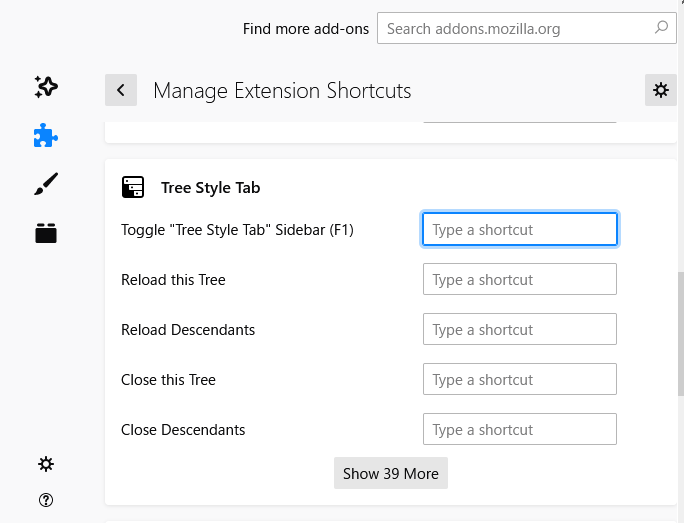
I think this problem is caused from a hack for the bug https://bugzilla.mozilla.org/show_bug.cgi?id=1475043 . Firefox 73 and olders disallow an addon to unset default shortcuts defined in the manifest.json, so TST doesn't define any default shortcut and initializes them as user-defined shortcuts on the initial startup time. But such user-defined shortcuts are sometimes lost accidentally on my environment, especially after trying uninstallation and installation again and again.
Currently Firefox ESR68 is still alive so I cannot remove the hack. After Firefox ESR78 is released I'll redefine default shortcuts statically, so such an accidental unassignment of default shortcuts will disappear.
 piroor
on 31 May 2020
piroor
on 31 May 2020
Thank you for this wordy and in-depth insight!
SebiderSushi
on 31 May 2020
I can close TST with F1 but not open it again when it's closed. 78.0.1 (64-bit) on Ubuntu. The shortcut is still set. Opening history then pressing F1 does not work. Setting the shortcut to something else does not work either.

 thomastoye
on 9 Jul 2020
thomastoye
on 9 Jul 2020
Because Firefox ESR78 has been released, I've removed hacks around keyboard shortcuts with the commit 1207f34, so now default shortcuts are defined in the manifest.json statically. I hope it reduces unexpected clearing of default shortcuts...
@thomastoye TST toggles the sidebar based on the tracked status, so if the internal status is still "open" after you close the sidebar, the F1 key won't open the sidebar. This sometimes happens because TST sometimes fails to track current open state of the sidebar. On such situations reloading of TST (disabling and re-enabling) possibly fixes the problem. Could you try that?
piroor
on 10 Jul 2020
@piroor Looks like that works, thanks!
thomastoye
on 10 Jul 2020
@eriknelson is there any reason to keep this open at this point? If not, will you close it?
irvinm
on 15 Jul 2020
Related issues
 viking2
·
3Comments
viking2
·
3Comments
 emceekain
·
3Comments
emceekain
·
3Comments
 Keith94
·
3Comments
Keith94
·
3Comments
 hotsphink
·
4Comments
hotsphink
·
4Comments
 thomasetter
·
3Comments
thomasetter
·
3Comments
Most helpful comment
TST's shortcuts can be cleared accidentally sometimes. Please check the list of shortcuts at the add-ons manager (the gear button => Manage Extension Shortcuts) and set shortcuts manually if they are blank.

I think this problem is caused from a hack for the bug https://bugzilla.mozilla.org/show_bug.cgi?id=1475043 . Firefox 73 and olders disallow an addon to unset default shortcuts defined in the manifest.json, so TST doesn't define any default shortcut and initializes them as user-defined shortcuts on the initial startup time. But such user-defined shortcuts are sometimes lost accidentally on my environment, especially after trying uninstallation and installation again and again.
Currently Firefox ESR68 is still alive so I cannot remove the hack. After Firefox ESR78 is released I'll redefine default shortcuts statically, so such an accidental unassignment of default shortcuts will disappear.