Treestyletab: Feature Request: "Title Tabs" as tree parents
In grouping my tabs into various trees, I find that while many pages naturally form groups, there is often no natural parent. I have been adding tabs with Google search results as the parent as kind of a "dummy" tab.
I would love to have the option to create a dummy tab with a custom title/header and no content to act as a parent to a tree or sub-tree.
For example, if I am storing recipe pages, I might have a summy title tab called "Recipes", then sub-tabs called "Chicken Recipes" and "Vegetable Recipes" and the actual pages under those parents.
 Sherris
All 15 comments
Just put this in the URL bar: "about:treestyletab-group?Recipes"
 irvinm
on 13 Mar 2015
irvinm
on 13 Mar 2015
As irvinm said, TST already has a feature like "dummy tab" with the URI "about:treestyletab-group". Title given as a query parameter will be used as the title. It is originally introduced to create natural tree for tabs opened from a bookmark folder.
 piroor
on 13 Mar 2015
piroor
on 13 Mar 2015
I'd like to second the Op. It'd be nice if the was some kind of a menu to discover this functionality - as it's quite useful but very hard do discover.
 Drag0nR3b0rn
on 9 Apr 2015
Drag0nR3b0rn
on 9 Apr 2015
Does this still happen with the latest development build?
http://piro.sakura.ne.jp/xul/xpi/nightly/
Note: if you cannot install the development build with "unsigned" error, you'll have to disable the signature check. Go to about:config and turn xpinstall.signatures.required to false. The preference won't available on released versions of Firefox 44 and later, so you'll have to use Firefox Developer Edition or Nightly to try the development build of TST.
piroor
on 6 Nov 2015
I have also wanted this for some years, and only today discovered, that it's already there! It would be nice if it was mentioned in the documentation. Also the suggestion to bookmark "about:treestyletab-group?New" to easily create a folder tab. Thanks.
 sumyungguy
on 12 Jun 2016
sumyungguy
on 12 Jun 2016
The about:treestyletab-group?Recipes doesn't seem to work in FF57dev.
A easy(er) to create dummy would be awesome - one that you could rename easily. There is the "New Container Tab", which could to extended/changed so that clicking on it creates a dummy tab and selects it's title for editing. The current Container tab functionality isn't that helpful for me as I normally have multiple sets of tabs open for work and for personal use, so just being able to create the dummy tab easily name it would be awesome. BTW, you have kept me using Firefox, so 👍 awesome peeps, keep up the good work!
 bytesnz
on 18 Oct 2017
bytesnz
on 18 Oct 2017
The new method with TST 2.x is different but still not obvious.
Just enter into the URL:
Check https://github.com/piroor/treestyletab/issues/1353 for more info.
irvinm
on 19 Oct 2017
Ah cool. Works once you have the correct __ID for the extension
moz-extension://<Unique plugin id>/resources/group-tab.html?title=<title>&temporary=true
Had to get it by opening a folder of bookmarks and copying it from the folder tab that was created. Is it worth merging / closing one of these two issues (this and #1353) as they are talking about the same thing?
bytesnz
on 19 Oct 2017
As a temporary measure, I made a bookmark with the link
javascript:window.location = `moz-extension://<INSERT_YOUR_TREE_STYLE_ID_HERE>/resources/group-tab.html?title=${prompt('Name%20of%20group?')}&temporary=true`;, which works wonders when you open it in a new tab (though it doesn't name the title correctly in the inbuilt tab bar).
bytesnz
on 20 Oct 2017
Just a quick note to say that the easiest way I can find to get the bookmark URL is:
- Open about:debugging
- Copy the internal UUID from Tree Style Tabs
- The URL you need to use for creating folders is moz-extension://UUID/resources/group-tab.html?title=Github&temporary=true
But it would be great if you could add an "Add Folder..." option to the context menu.
 MikeRatcliffe
on 26 Oct 2017
MikeRatcliffe
on 26 Oct 2017
By recent commits, now TST automatically redirects "about:treestyletab-group" to the internal "moz-extension:" URL, so you'll open new group tab more easily.
piroor
on 7 Nov 2017
A keyword search can be used for this functionality and better usability, too.
See http://kb.mozillazine.org/Using_keyword_searches
I created one bookmark with address "about:treestyletab-group?%s" and keyword "tg".
By entering "tg example" (without quotation marks) in the url bar a tab named "example" in TST is now created,
 sfleiter
on 11 Nov 2017
sfleiter
on 11 Nov 2017
@sfleiter Great tip thanks.
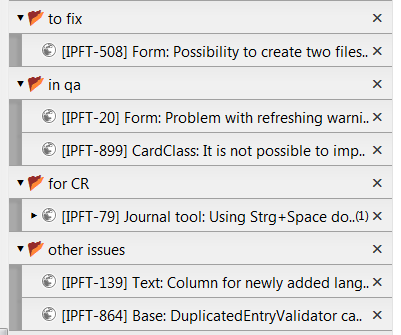
I think it would be useful to add option in _Additional Context Menu Item_ to add tab group which would just ask for name and add new tab.
I use tab groups like this:
 kkot
on 24 Nov 2017
kkot
on 24 Nov 2017
I'm using Firefox 67.0a1 and it doesn't look like about:treestyletab-group?foo works for me. Is this still supported?
EDIT: Just found "Group tab" link in preferences. Sorry for the comment!
 HarrisonB
on 6 Feb 2019
HarrisonB
on 6 Feb 2019
I close this because this is too old and not match to the latest maintained version of TST.
piroor
on 1 May 2019
Related issues
 stapuft
·
48Comments
stapuft
·
48Comments
 SimonSapin
·
53Comments
SimonSapin
·
53Comments
 clampittsti
·
44Comments
clampittsti
·
44Comments
 sim642
·
34Comments
sim642
·
34Comments
 azizLIGHT
·
33Comments
azizLIGHT
·
33Comments
Most helpful comment
A keyword search can be used for this functionality and better usability, too.
See http://kb.mozillazine.org/Using_keyword_searches
I created one bookmark with address "about:treestyletab-group?%s" and keyword "tg".
By entering "tg example" (without quotation marks) in the url bar a tab named "example" in TST is now created,