Treestyletab: Firefox theme color suddenly used for TST
Short description
Today, somehow, TST started using Firefox theme colors in the sidebar but it never did before. I've always had the theme, previously TST just used the default colors, which the TST theme selection pictures also show.
Unfortunately the Firefox theme colors don't look good on the TST sidebar and I'd like to have it look as it did before, exactly as the TST theme pictures show, without removing the Firefox theme. I have "Apply theme color to the toolbar button" disabled but it makes no difference so I guess that's not the option for it.
How can I stop TST from using Firefox theme colors again? I can't find any option for this and the 2.8.7 changelog doesn't mention this changing either, so I'm confused why it is suddenly different.
Environment
- Platform (OS): Linux
- Version of Firefox: 65.0.1
- Version (or revision) of Tree Style Tab: 2.8.7
 sim642
All 34 comments
I've noticed something odd going on with regard to theme colors also. Mixed, Vertigo, and Plain show up as entirely black -- black text on black background. However, High Contrast, Metal, Sidebar, and Dark all seem to work well enough.
 waynr
on 21 Mar 2019
waynr
on 21 Mar 2019
I can confirm this started happening to me today too. I've disabled my custom theme for now.
 Tzarnal
on 21 Mar 2019
Tzarnal
on 21 Mar 2019
I can also confirm this. I reverted back to 2.8.6 manually via a backup of [email protected] I happened to have on-hand, but the errant color scheme persisted even doing that.
2.8.7 and Firefox 66 were behaving as expected yesterday and some of today, this just recently occurred seemingly out of the blue without even restarting the Browser. Switching back to a default theme is the only thing that revers TST back to the standard color scheme.
 natenate19
on 22 Mar 2019
natenate19
on 22 Mar 2019
Can you try to press F1 to close the sidebar and again F1 to reopen it? For me this fixes most of my problems.
 Tragen
on 22 Mar 2019
Tragen
on 22 Mar 2019
Sidebar has already been closed and reopened multiple times, no change. Browser restarted, caches cleared, etc., no change. Interestingly, TST appears for a second or two with the classic default theme color scheme before inheriting the active theme color scheme when freshly opening the sidebar.
natenate19
on 22 Mar 2019
Did you try the option?:
TST Options => Development => Debug mode => Color scheme => Photon
 piroor
on 22 Mar 2019
piroor
on 22 Mar 2019
No change with that Debug option other than red wireframe overlaid on TST:
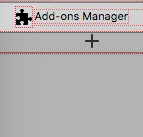
This is what TST 2.8.7 looks like with my custom theme on Firefox 66:

This is what it used to look like (default Color scheme, matches the Preview in TST Preferences):

No idea what changed, but it used to look fine (default Color scheme) on Firefox 66 and TST 2.8.7 until earlier today. To be honest I've just switched to another custom theme that uses lighter shades of grey, and that's a fine workaround. There are some custom themes that just result in black text on black background in TST now though, and obviously that's completely unusable.
natenate19
on 22 Mar 2019
The preview screenshot was taken on Windows 10, so basically it is different to the actual appearance on Linux. On my Ubuntu 16.04LTS with the "ambient" theme, TST's sidebar is shown as following screenshot:
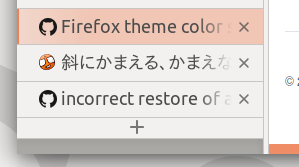
(Note that I'm using the "Mixed" skin of TST itself.)
The screenshot attached at https://github.com/piroor/treestyletab/issues/2197#issuecomment-475468396 has different appearance: the "+" button has unexpected background color. Currently I don't know what introduces such a difference...
piroor
on 22 Mar 2019
I'm seeing this happen on OSX High Sierra, but not on Win10, same versions of Firefox and TST on both (66.0, 2.8.7), both with the same (very old) firefox theme, both using the mixed TST theme.
 gotyaoi
on 22 Mar 2019
gotyaoi
on 22 Mar 2019
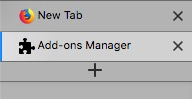
My screenshots are from Firefox 66 on macOS 10.14.3, Mixed TST skin. Everything in TST inherits the current theme's color scheme (background color, etc.):
This is how it used to look regardless of active Firefox theme:
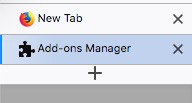
Not sure what introduced this change either, but it wasn't 2.8.7 or Firefox 66, the new behavior just seemed occur today without any user-initiated change.
Thanks.
natenate19
on 22 Mar 2019
Ah, and after a few hours on Win10, it is also now exhibiting this color discrepancy. I can't say I noticed it when it happened, but I just looked over and there it was.
gotyaoi
on 22 Mar 2019
Activating remote debugging shows this in the console:
Security Error: Content at chrome://browser/skin/browser.css may not load or link to moz-extension://7deb83b6-f733-413d-991a-b97b42ea38d1/kimonogirlpersonapaint.jpg.
the about:debugging page show this for TST:
Reading manifest: Error processing variable_color_icons: An unexpected property was found in the WebExtension manifest.
and this for my theme:
Reading manifest: Error processing theme.colors.accentcolor: Please use <em>theme.colors.frame</em>, this alias will be removed in Firefox 69.
Reading manifest: Error processing theme.colors.textcolor: Please use <em>theme.colors.tab_background_text</em>, this alias will be removed in Firefox 69.
Reading manifest: Error processing theme.images.headerURL: Please use <em>theme.images.theme_frame</em>, this alias will be removed in Firefox 69.
When debugging TST, the following rules are included inline:
    :root {
    --face-highlight-lighter: rgba(156, 198, 231, 1);
    --face-highlight-more-lighter: rgba(192, 216, 235, 1);
    --face-highlight-more-more-lighter: rgba(216, 228, 238, 1);
    --face-gradient-start-active: rgba(240, 240, 240, 0.4);
    --face-gradient-start-inactive: rgba(240, 240, 240, 0.2);
    --face-gradient-end: rgba(240, 240, 240, 0);
  }
    :root {
      --browser-background:      rgba(229,230,232,1);
      --browser-bg-base:         rgba(229, 230, 232, 1);
      --browser-bg-less-lighter: rgba(236, 236, 238, 1);
      --browser-bg-lighter:      rgba(239, 240, 241, 1);
      --browser-bg-more-lighter: rgba(249, 249, 249, 1);
      --browser-bg-lightest:     rgba(253, 253, 253, 1);
      --browser-bg-less-darker:  rgba(206, 207, 209, 1);
      --browser-bg-darker:       rgba(172, 173, 174, 1);
      --browser-bg-more-darker:  rgba(115, 115, 116, 1);
      --browser-fg:              #000;
      --browser-fg-active:       #000;
      --browser-border:          rgba(0, 0, 0, 0.4);
      --browser-header-url: url("moz-extension://7deb83b6-f733-413d-991a-b97b42ea38d1/kimonogirlpersonapaint.jpg")
    }
disabling them all makes TST look normal again.
gotyaoi
on 22 Mar 2019
@piroor The photon color scheme option makes no difference (I had it enabled before anyway).
I inspected the TST sidebar too, like @gotyaoi has described, and found a similar set of inline styles for my theme. What I don't understand is where they suddenly appeared from.
sim642
on 22 Mar 2019
With the commit b56d833 I've introduced new option: TST Options => Development => Debug mode => Apply Browser Theme. When it is unchecked, TST just uses default theme color.
I think this "problem" is caused by updated third party themes or Firefox itself. I did nothing change around theme color mechanism at recent versions of TST.
piroor
on 22 Mar 2019
I'd lean towards either firefox change, something breaking old themes, or some automated update process of the theme, as the one I'm using is listed as last being updated 9 years ago.
gotyaoi
on 22 Mar 2019
I've been looking into this a little bit more.
After playing around with the firefox color extension for a little bit, it appears that the accentcolor property of the theme is being applied to both the tabs in TST and the space to the left of nested tabs and below the new tab button, giving it a very flat look. This is obviously not a problem the native tabs have to deal with, though I don't know how the default theme gets away with two colors there.
My operating theory of why this happened suddenly is that they rolled out something that applies all the theme color properties to themes that didn't have them , and they're getting some default values, though based on what, I'm not sure, as my TST looks different that @natenate19's.
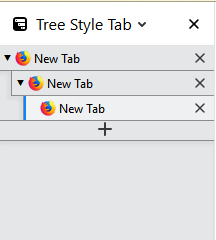
That being produced by this tiny colors block in my theme: "colors": {"accentcolor": "rgba(229,230,232,1)", "textcolor": "#000"}
It's not touching the native tabs though, because the theme uses a fully opaque image at the top, which after testing in firefox color, goes in front of the color properties, z-wise.
gotyaoi
on 23 Mar 2019
1472740 - Remove aliased property names from themes
https://bugzilla.mozilla.org/show_bug.cgi?id=1472740
Due to changes introduced by this bug, toolbar_text is deprecated and bookmark_text is alternatively recommended. On the other hand, TST only uses toolbar_text as https://github.com/piroor/treestyletab/blob/b236d330c717d198b61d38108b9a94770bc64e1f/webextensions/sidebar/sidebar.js#L336
The change was introduced 4 month ago, and it is now released as a part of Firefox 66. I think this is the reason why this problem suddenly appears.
piroor
on 24 Mar 2019
The change was introduced 4 month ago, and it is now released as a part of Firefox 66. I think this is the reason why this problem suddenly appears.
Except it already appeared in Firefox 65.0.1, as I originally reported, before upgrading to Firefox 66.
sim642
on 24 Mar 2019
And why does it only happen once a day for me and the rest of the time,
everything looks normal?
Tragen
on 24 Mar 2019
Anyway I've introduce a change to apply bookmark_text as the foreground color of tabs. Could you try the development build?: https://github.com/piroor/treestyletab/blob/master/README.md#development-builds
And, if you use any theme distributed under addons.mozilla.org, please write the URL of the theme also. It may help debugging by me.
piroor
on 27 Mar 2019
I tried the dev build and the problem is still there :( (macOS, FF v66.0.1)
I'm using this theme: https://addons.mozilla.org/en-US/firefox/addon/plain-brushed-metal/
Weirdly, in my "themes" it says it has last been updated on 22 March. However, on the theme page, it has last been updated 9 years ago.
 cipri-tom
on 27 Mar 2019
cipri-tom
on 27 Mar 2019
I've investigated details of this "problem".
This is a screenshot taken at today, Firefox 60.6 + TST 2.7.6 ("Mixed") + "Plain Brushed Metal", on Windows 10:
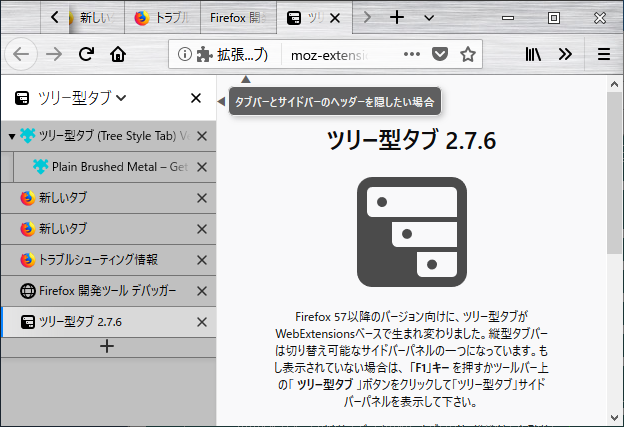
Please note that the version of Firefox and TST: both versions are old, so I think that this means: the appearance is not a "new" problem.
The color of background tabs is rgba(192, 192, 192, 1) = #c0c0c0, and it is a part of the theme itself (theme.colors.accentcolor). Thus the current appearance is what it should be. In other words, if background tabs had different color in your environment, it was an unexpected result.
piroor
on 27 Mar 2019
Oh wow... ok. Sorry to have put you through this trouble :(
Indeed, before the theme was ignored and the colors were based on the Light theme of Firefox. I have no idea what/how that has suddenly changed.
I gave up the theme now, as TST is much more important to me. Thanks a lot for your efforts!
cipri-tom
on 27 Mar 2019
As I commented at https://github.com/piroor/treestyletab/issues/2197#issuecomment-475529998 I added a new option to ignore the theme color (it will be available on the next release), so I hope it help you.
piroor
on 27 Mar 2019
would it be possible to do the exact oppisite of this? i have a dark theme, and i like the color choice of the "plain dark" theme, but the style of the "sidebar theme" better, i tried doing this myself, but i have no idea where the files to do this are, or what they are called.
 stapuft
on 30 Mar 2019
stapuft
on 30 Mar 2019
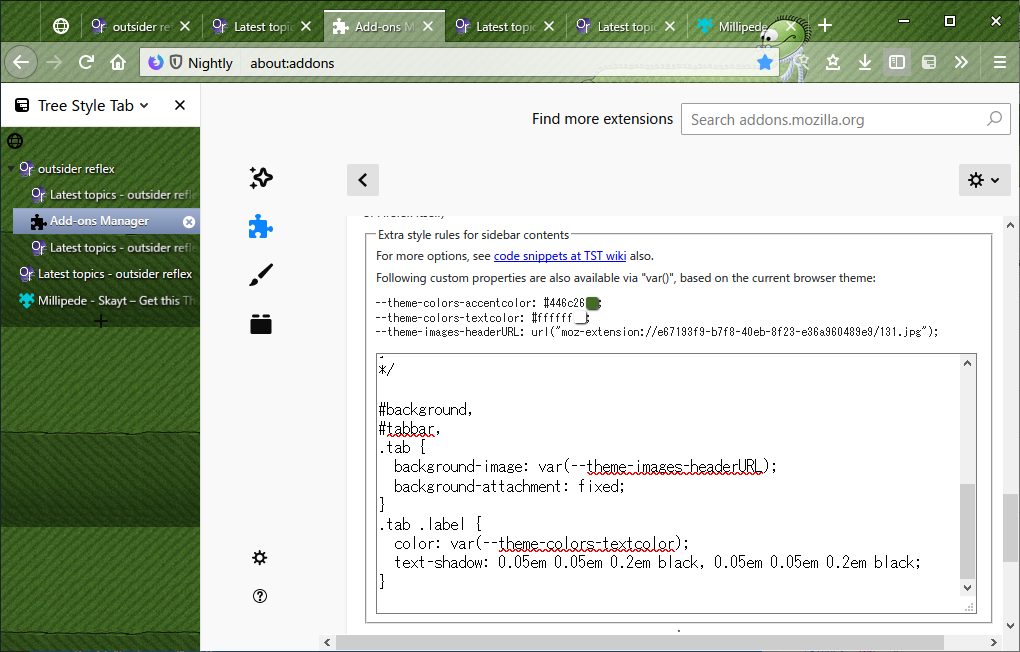
@stapuft I've introduced more changes for user stylesheets. With the next release, you'll be able to use colors of the browser theme, like this screenshot:
piroor
on 30 Mar 2019
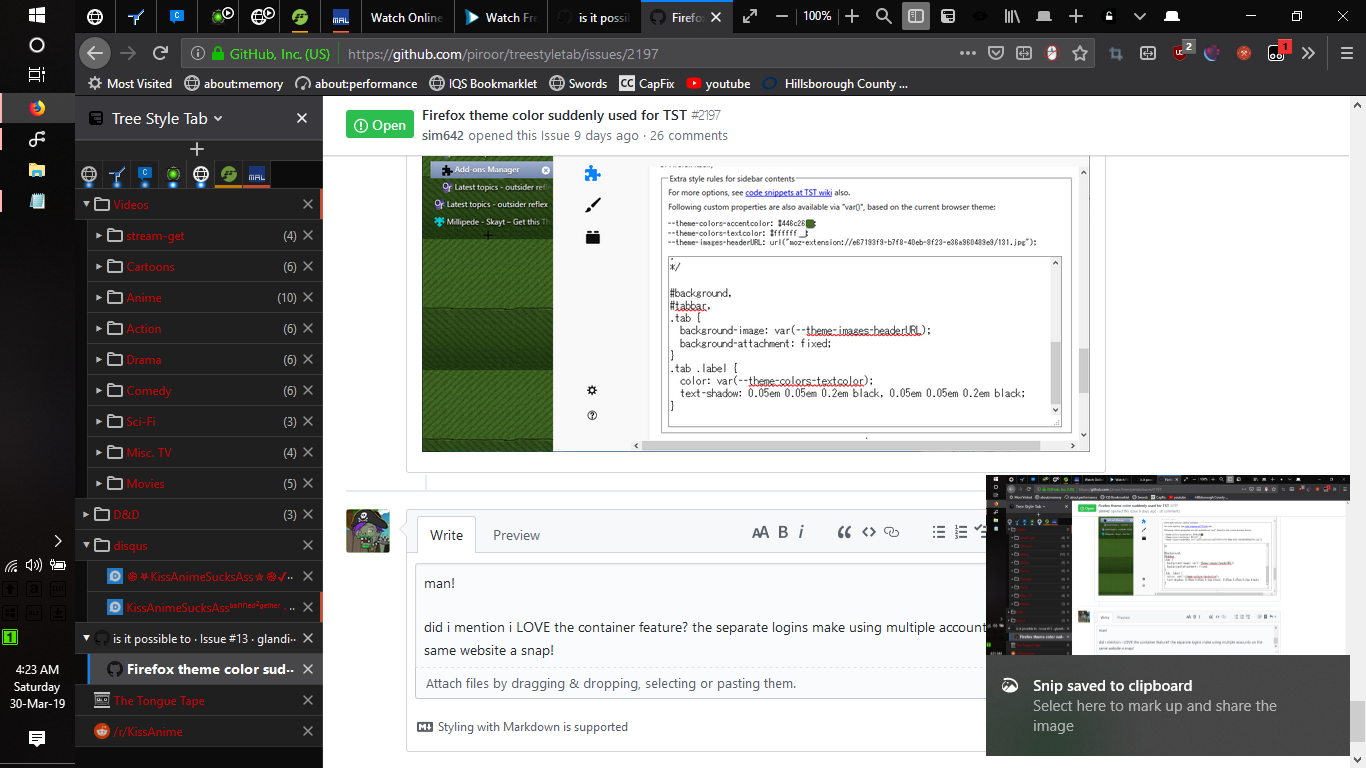
oh bery cool! you rule man, i just found this extension today and its already changed the way i surf, being to organize my tabs, hide the ones im not using now to free up memory, and still have them organized the same way, is frikking awesome, not to mention being able to one click bookmark/backup my entire organization is a lifesaver for when bad things happen i honestly dont care that i have been fiddling with the fine tuning and stuff most of my free time tonight, that last little bit of theming is the cherry on top man!
did i mention i LOVE the container feature? the separate logins make using multiple accounts on the same website a snap!
stapuft
on 30 Mar 2019
With the commit b56d833 I've introduced new option: TST Options => Development => Debug mode => Apply Browser Theme. When it is unchecked, TST just uses default theme color.
Thanks 👍
 obligaron
on 2 Apr 2019
obligaron
on 2 Apr 2019
So has anyone actually resolved this issue? The "apply browser theme" under Appearance is already off, but it still happens. Even toggling it doesn't fix that.
 Inari-Whitebear
on 15 Apr 2019
Inari-Whitebear
on 15 Apr 2019
@Inari-Whitebear Could you take a screenshot of the "Appearance" secion of TST's options? If TST unexpectedly applies browser theme, colors from the theme will be listed above the input field of the user stylesheet.
piroor
on 16 Apr 2019
Edit: Oh... I think I see the checkbox now :P I had been using the "Apply theme color to the toolbar" one ^^" Sorry! Works now
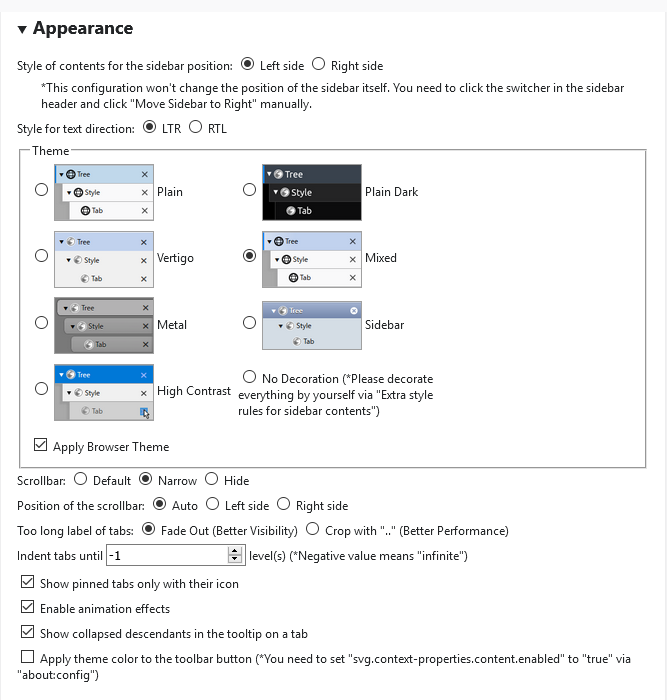
Inari-Whitebear
on 16 Apr 2019
Sorry I did a typo: "Advanced", not "Appearance". Anyway, I've realized that those confusing checkbox should be updated for better discoverability.
piroor
on 17 Apr 2019
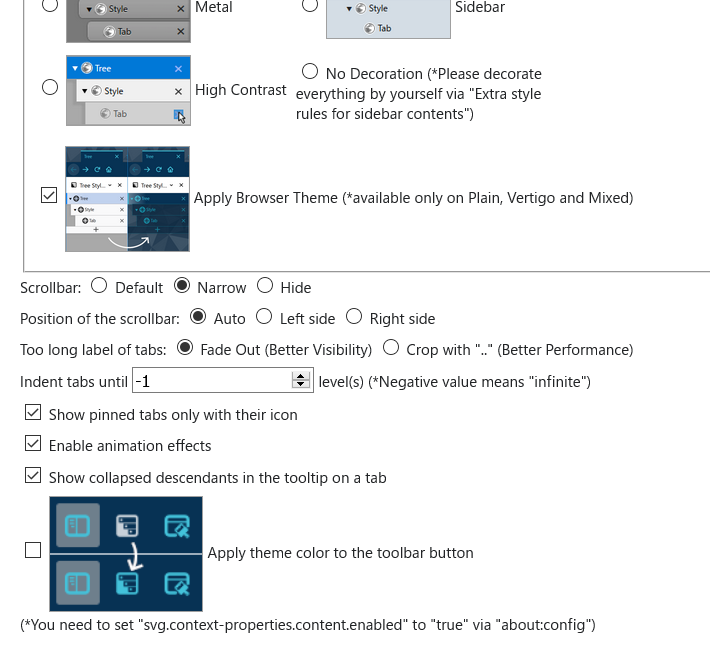
I've added screenshots beside these checkboxes.
piroor
on 17 Apr 2019
I close this because outdated.
piroor
on 1 May 2019
Related issues
 Lej77
·
4Comments
Lej77
·
4Comments
 mikeaustin
·
3Comments
mikeaustin
·
3Comments
 Andrade
·
3Comments
Andrade
·
3Comments
 ElhemEnohpi
·
4Comments
ElhemEnohpi
·
4Comments
 emceekain
·
3Comments
emceekain
·
3Comments
Most helpful comment
With the commit b56d833 I've introduced new option: TST Options => Development => Debug mode => Apply Browser Theme. When it is unchecked, TST just uses default theme color.
I think this "problem" is caused by updated third party themes or Firefox itself. I did nothing change around theme color mechanism at recent versions of TST.