Treestyletab: Drag to reorder does nothing, leaves tab in "dragging" style
Short description
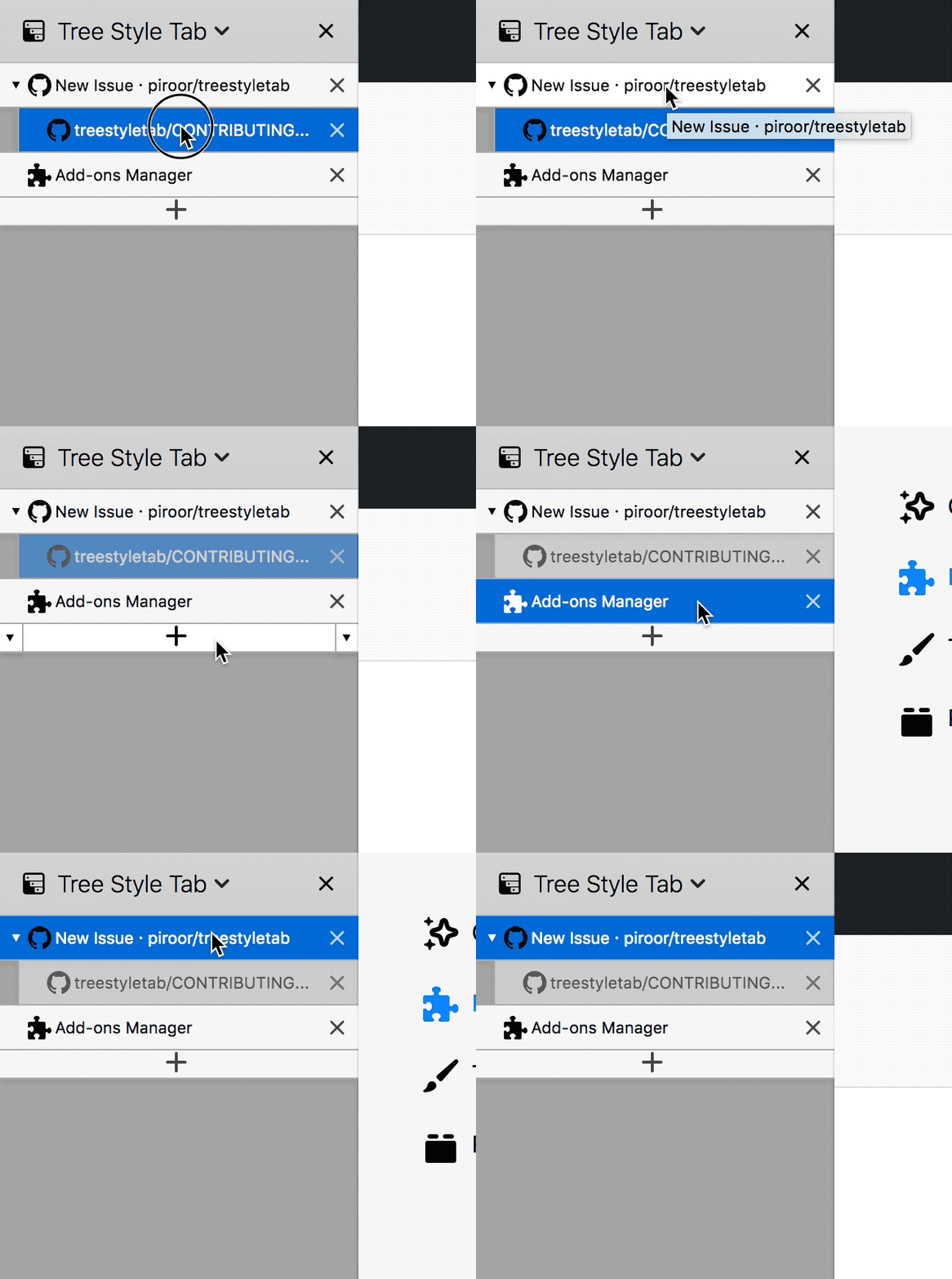
With my main profile, I have noticed in the last few days that dragging to reorder tabs in TST somehow stopped working. When I try to drag tabs in the tree, they do not move. Instead, they get locked into the "dragging" (grayed out) style. The styling can be reset by closing and reopening TST. Still though, I am unsure how to restore tab dragging functionality.
Steps to reproduce
(So far, I cannot reproduce with a clean profile. I have tried copying TST settings and prefs.js to a clean profile, but still the issue doesn't occur. I am not yet sure why it happens in my main profile. I am happy to try any additional debugging tips to resolve this.)
- Open Firefox with my main profile and TST installed
- Try to drag a tab in TST to reorder the tree
Expected result
The tab should move as you drag and allow you to drop it somewhere else.
Actual result
The tab doesn't move at all while dragging. It only changes style to "dragging" mode forever:
Environment
- Platform (OS): macOS 10.13.3
- Version of Firefox: Nightly 2018-04-06
- Version (or revision) of Tree Style Tab: 2.4.18
 jryans
All 13 comments
Hmm, I have now restarted my computer and it's back to working... This is especially confusing because I had previously tried restarting Firefox. I'll keep updating here if the issue comes back.
jryans
on 6 Apr 2018
@jryans I have found this a viable workaround:
- disable TST as an add-on;
- restart Firefox;
- re-enable TST.
Does this still happen to you? Does the above help?
 veox
on 25 Apr 2018
veox
on 25 Apr 2018
I haven't been able to reproduce it lately, but I will give that a try next time I see it happen.
jryans
on 1 May 2018
TST is designed to clear the appearance for "dragging" by dragend event.
https://developer.mozilla.org/en-US/docs/Web/Events/dragend
It is described as: notified on the end of drag-and-drop operation always, so this problem is very odd. It means that dragend event is not listened by TST...
By the commit 324c583, now TST tries to listen the dragend event in the capturing phase. I hope it solves the problem...
 piroor
on 11 May 2018
piroor
on 11 May 2018
This is issue seems to still be happening for me. I am currently using Nightly 2018-06-13 with TST 2.4.24.
If I enable TST debug mode and try to click and drag a tab, I see "selectTabInternally" logged when clicking, but "onDragEnd" is not logged.
jryans
on 15 Jun 2018
Just wanted to chime in and say this is happening to me as well. I can temporarily fix it by quitting and restarting FireFox, but it still happens about once a day.
It also appears that after restarting FF to fix the issue, my tabs are all mixed up and the hierarchy is wrong. Maybe this is being caused by the actual tab order somehow becoming out of sync from what the TST extension expects it to be?
OS Version: macOS 10.13.5 (17F77)
FireFox Version: Beta 61.0b4 (64-bit)
Extension Version: 2.4.24
 chazmaniandinkle
on 21 Jun 2018
chazmaniandinkle
on 21 Jun 2018
I hope this has been fixed in recent development builds. Please add a comment if you still see the problem with the latest development build.
piroor
on 5 Jul 2018
I was having problems like in this bug:
drag and drop didn't work relieably or at all
and tabs stayd gray (like in bug #1921)
I solved it following this work around https://github.com/piroor/treestyletab/issues/1854#issuecomment-384425058
now drag and drop works and there are no more stuck gray tabs.
I uncertainly believe that my windows install fixed itself, but I had to do the work around to fix my mac installation
 naringas
on 20 Jul 2018
naringas
on 20 Jul 2018
This problem just started happening to me yesterday immediately after Firefox updated to 61.0.1.
I'm using version 2.4.24 (not yet the latest dev build) on Mac OS X 12.6. Thanks.
 genovese
on 2 Aug 2018
genovese
on 2 Aug 2018
Happened to me as well. Fix for me: restart Firefox.
 timpulver
on 30 Aug 2018
timpulver
on 30 Aug 2018
This has been happening to me for a long time as well. Happens at least once a day and the only way to fix it is to disable the app and restart Firefox
 felipeauol
on 30 Oct 2018
felipeauol
on 30 Oct 2018
FYI: If you see this problem on macOS (like the initial reporter) it may be caused by a bug of Firefox itself. See also: https://bugzilla.mozilla.org/show_bug.cgi?id=1476195
piroor
on 29 Nov 2018
I close this because outdated.
piroor
on 1 May 2019
Related issues
 sim642
·
34Comments
sim642
·
34Comments
 nyanpasu
·
28Comments
nyanpasu
·
28Comments
 SimonSapin
·
53Comments
SimonSapin
·
53Comments
 TempSpas
·
54Comments
TempSpas
·
54Comments
 zekeblue
·
39Comments
zekeblue
·
39Comments