I'm submitting a...
[ ] Regression (a behavior that used to work and stopped working in a new release)
[ ] Bug report
[ ] Performance issue
[ ] Feature request
[ ] Documentation issue or request
[x] Support request
[ ] Other... Please describe:
Current behavior
I am not sure if it's a bug or I am missing something, but I can't get it working, even I have read the readme multiple times - getTranslation() in loader is never called. Loader's constructor is initialized.
I've tried in multiple ways:
- If
*transloco="let t"is used, Angular just ignores the ng-container and it is not rendered at all, without any error messages. - Injcting
TranslocoServiceinto component works, buttranslate(key)returns an empty string.
Here is an injected translation service:

Expected behavior
It should work :)
Minimal reproduction of the problem with instructions
For bug reports please provide the _STEPS TO REPRODUCE_ and if possible a _MINIMAL DEMO_ of the problem, for that you could use our stackblitz example
What is the motivation / use case for changing the behavior?
Environment
Angular version: 8.2.4


Browser:
- [x] Chrome (desktop) version XX
- [ ] Chrome (Android) version XX
- [ ] Chrome (iOS) version XX
- [ ] Firefox version XX
- [ ] Safari (desktop) version XX
- [ ] Safari (iOS) version XX
- [ ] IE version XX
- [ ] Edge version XX

For Tooling issues:
- Node version: v12.4.0
- Platform:  Windows

Others:
 zygimantas
All 24 comments
@zygimantas can you share the complete example?
 shaharkazaz
on 4 Sep 2019
shaharkazaz
on 4 Sep 2019
Not so easily. The app is quite complex. Here are few additional observations which may not make sense at all, but maybe it will help you to give me some directions:
- The path to translation files is not default, so I used a custom
transloco.loader.ts(constructor initialized,getTranslation(langPath: string)was not called) - I have noticed that loader is optional in transloco.service.ts so I removed my loader from AppModule and expected an error of missing translation files. No errors.
- With default loader I expected at least HTTP call to fetch translation. It didn't happened.
--
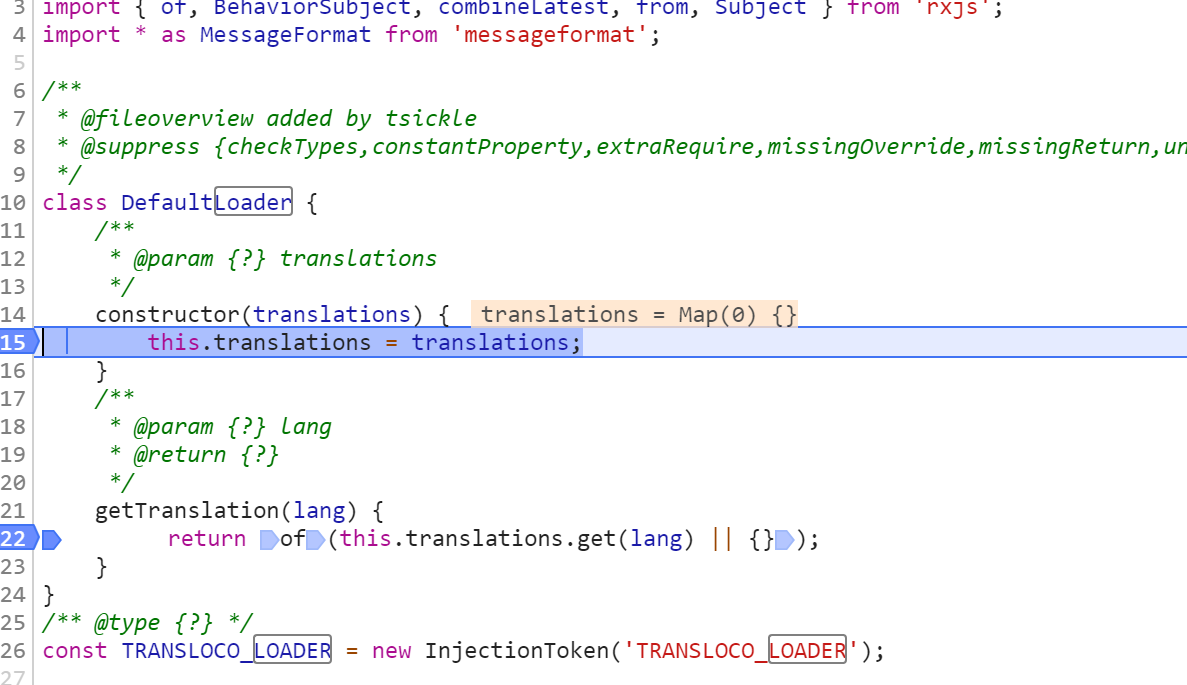
I am continue working on my side and I will update this issue if I will find anything related.
zygimantas
on 4 Sep 2019
@zygimantas The default loader does nothing. It's for developers that want to manually use setTranslation.
You should use the HTTP loader that comes with our schematics.
shaharkazaz
on 4 Sep 2019
Right. Well, one step back then, HTTP loader from the schematics does nothing for me either.
Should getTranslation() be called lazily or on application start? Automatically, I suspect?
zygimantas
on 4 Sep 2019
It doesn't even for me with a blank app. Reproduction steps:
ng new test3
? Would you like to add Angular routing? Yes
? Which stylesheet format would you like to use? CSS
ng --version

     _                      _                 ____ _     ___
    / \   _ __   __ _ _   _| | __ _ _ __     / ___| |   |_ _|
   / △ \ | '_ \ / _` | | | | |/ _` | '__|   | |   | |    | |
  / ___ \| | | | (_| | |_| | | (_| | |      | |___| |___ | |
 /_/   \_\_| |_|\__, |\__,_|_|\__,_|_|       \____|_____|___|
                |___/


Angular CLI: 7.3.8
Node: 12.4.0
OS: win32 x64
Angular:
...

Package                      Version
------------------------------------------------------
@angular-devkit/architect    0.13.8
@angular-devkit/core         7.3.8
@angular-devkit/schematics   7.3.8
@schematics/angular          7.3.8
@schematics/update           0.13.8
rxjs                         6.3.3
typescript                   3.2.4
ng add @ngneat/transloco
Installing packages for tooling via npm.
npm WARN optional SKIPPING OPTIONAL DEPENDENCY: [email protected] (node_modules\fsevents):
npm WARN notsup SKIPPING OPTIONAL DEPENDENCY: Unsupported platform for [email protected]: wanted {"os":"darwin","arch":"any"} (current: {"os":"win32","arch":"x64"})

+ @ngneat/[email protected]
added 33 packages from 35 contributors and audited 43373 packages in 8.867s
found 0 vulnerabilities

Installed packages for tooling via npm.
? 🌍 Which languages do you need? en, es
? 🚀 Are you working with server side rendering? No
? ✍ Which folder will contain the translation files? src/assets/i18n/
CREATE src/assets/i18n/en.json (66 bytes)
CREATE src/assets/i18n/es.json (66 bytes)
CREATE src/app/transloco.loader.ts (531 bytes)
UPDATE src/app/app.module.ts (967 bytes)
npm start

> [email protected] start C:\Projects\experiments\i18n1\test3
> ng serve

** Angular Live Development Server is listening on localhost:4200, open your browser on http://localhost:4200/ **

Date: 2019-09-04T10:30:14.271Z
Hash: 56f34792457e3db9ec66
Time: 9046ms
chunk {es2015-polyfills} es2015-polyfills.js, es2015-polyfills.js.map (es2015-polyfills) 285 kB [initial] [rendered]
chunk {main} main.js, main.js.map (main) 14.9 kB [initial] [rendered]
chunk {polyfills} polyfills.js, polyfills.js.map (polyfills) 236 kB [initial] [rendered]
chunk {runtime} runtime.js, runtime.js.map (runtime) 6.08 kB [entry] [rendered]
chunk {styles} styles.js, styles.js.map (styles) 16.3 kB [initial] [rendered]
chunk {vendor} vendor.js, vendor.js.map (vendor) 3.97 MB [initial] [rendered]
i 「wdm」: Compiled successfully.

Add console log to loader:
import { HttpClient } from '@angular/common/http';
import { Translation, TRANSLOCO_LOADER, TranslocoLoader } from '@ngneat/transloco';
import { Injectable } from '@angular/core';


@Injectable({ providedIn: 'root' })
export class HttpLoader implements TranslocoLoader {
  constructor(private http: HttpClient) {
    console.log("TranslocoLoader_ctor");
  }

  getTranslation(langPath: string) {
    console.log("TranslocoLoader_getTranslation");
    return this.http.get<Translation>(`/assets/i18n/${langPath}.json`);
  }
}

export const translocoLoader = { provide: TRANSLOCO_LOADER, useClass: HttpLoader };
Inject service into app component:
import { Component } from '@angular/core';
import { TranslocoService } from '@ngneat/transloco';

@Component({
  selector: 'app-root',
  templateUrl: './app.component.html',
  styleUrls: ['./app.component.css']
})
export class AppComponent {
  title = 'test3';

  constructor(public service: TranslocoService) {
    console.log("AppComponent_ctor 1", service);
    console.log("AppComponent_ctor 2", service.translate("title"));
  }
}

Expected output:
TranslocoLoader_ctor
AppComponent_ctor 1, {TranslationService}
TranslocoLoader_getTranslation
AppComponent_ctor 1, "transloco en"
zygimantas
on 4 Sep 2019
It's highly unlikely that service.translate("title") would work in constructor of your root component. Most likely it's not even loaded yet.
Try
service.selectTranslate('title').subscribe(console.log);
You can postpone app initialization as is described here https://github.com/ngneat/transloco#prefetch-the-user-language or get the translation asynchronously https://github.com/ngneat/transloco#programmatical-translation or just use the structural directive.
 fxck
on 4 Sep 2019
fxck
on 4 Sep 2019
I've oversimplified an example, so that's why I used a constructor.
It does matter actually - I have took a sample code from readme "Programmatical Translation" part where OnInit was used, so here is an updated version of my component:
import { Component, OnInit } from '@angular/core';
import { TranslocoService } from '@ngneat/transloco';

@Component({
  selector: 'app-root',
  templateUrl: './app.component.html',
  styleUrls: ['./app.component.css']
})
export class AppComponent implements OnInit {
  title = 'test3';

  constructor(public service: TranslocoService) {
    console.log("AppComponent_ctor", service);
  }

  ngOnInit() {
    console.log("AppComponent_ngOnInit", this.service.translate("title"));
  }
}
There issue (getTranslation is not called on loader) still exists:

zygimantas
on 4 Sep 2019
As @fxck said, most likely it doesn't work since you tried to get the translation before the translation files have loaded.
you could change your code as following for it to work:
  constructor(public service: TranslocoService) {
    this.service.events$.pipe(filter(e => e.type === 'translationLoadSuccess')).subscribe(() => {
      console.log("AppComponent_ctor 1", service);
      console.log("AppComponent_ctor 2", service.translate("title"));
    });
  }
 itayod
on 4 Sep 2019
itayod
on 4 Sep 2019
Doesn't matter if you use ngOnInit or constructor, both are called essentially at the same time, one right after another, it still doesn't guarantee you that translations are already loaded.
fxck
on 4 Sep 2019
@itayod thanks, I have replaced the constructor with
  constructor(public service: TranslocoService) {
    this.service.events$.pipe(filter(e => e.type === 'translationLoadSuccess')).subscribe(() => {
      console.log("AppComponent_ctor 1", service);
      console.log("AppComponent_ctor 2", service.translate("title"));
    });

    console.log("AppComponent_ctor 3");
  }
and I get
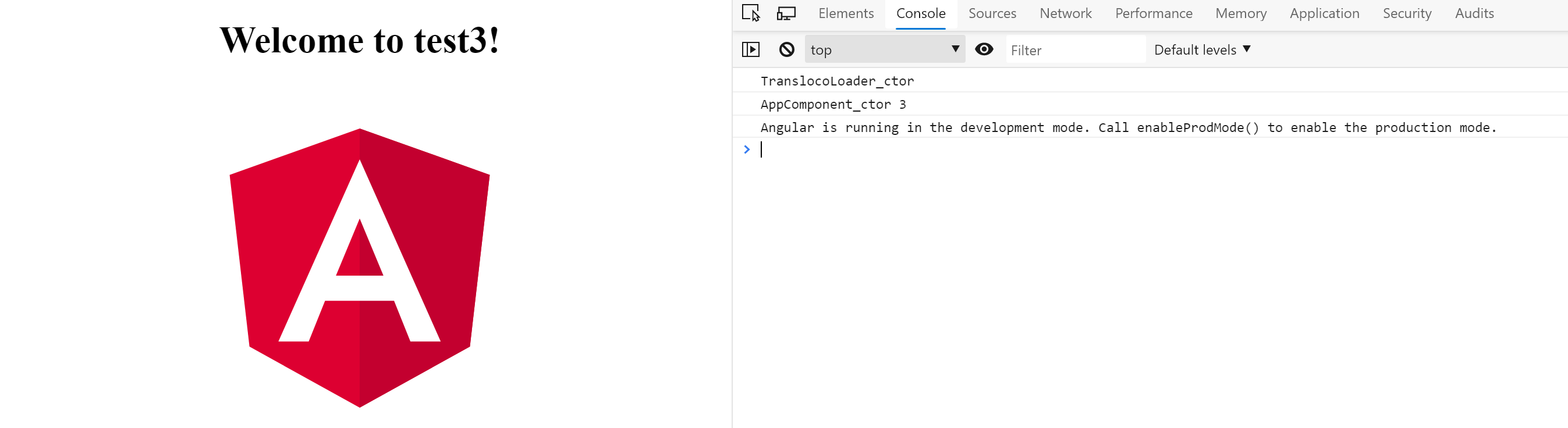
No getTranslation() calls.
zygimantas
on 4 Sep 2019
Give me some time to create a example in stackblitz
zygimantas
on 4 Sep 2019
@zygimantas it will not work as service.translate("title") doesn't invoke loader.getTranslation. It just returns it from the cache. In your case, you didn't load any language either by using APIs such as selectTranslate, directive, or pipe, so there is nothing in the cache.
 NetanelBasal
on 4 Sep 2019
NetanelBasal
on 4 Sep 2019
@NetanelBasal yes, that's the problem!
  constructor(public service: TranslocoService) {
    this.service.selectTranslate('title').subscribe(value => console.log(value));
    this.service.selectTranslation().subscribe(translation => console.log(translation));
  }
gave me what I was expecing to get. But it was confusing for a newcomer who just used schematics and expected to see something :) While I understand that's not an option to modify and inject this code into AppComponent using schematics, it leaves a gap in the smooth onboarding process.
Let's get back to the root issue why I've chosen a programmatic path first to test how the transloco works. It's because *transloco="let t" was giving me nothing:
What may be wrong with the app, that the structural directive *transloco breaks the rendering and the container is not displayed at all, without any errors and does not trigger getTranslations()?
At least now I know that translation files are in the correct place and are loaded using programmatic approach and transloco configuration should not be an issue. I have also noticed similar behaviour of "no errors in console" with mistakes in angular animation triggers in HTML.
zygimantas
on 4 Sep 2019
While I understand that's not an option to modify and inject this cod into AppComponent using schematics, it leaves a gap in the smooth onboarding process.
It's not related to the library. It's how the browser works. An HTTP request is async, and therefore you don't have any guarantee that it will be resolved when you call the sync translate method.
What may be wrong with the app, that the structural directive *transloco breaks the rendering and the container is not displayed at all, without any errors and does not trigger getTranslations()?
First, check if you see an HTTP request in the dev-tools. Then, check that you indeed import TranslocoModule in your code. That's very basic stuff. It works for everyone right away.
NetanelBasal
on 4 Sep 2019
@NetanelBasal
I can confirm that TranslocoModule is imported in component because the service.selectTranslate works.
But now I've imported it in specific feature module, and got it working using declarative syntax. So, importing in AppModule was not enough. Yes, the basic stuff I've missed while following the installation guide.
Thank you guys for helping me, I hope this thread will be indexed by Google and will useful for other users!
By the way, schematics also failed for my existing app, so I had to do it manually:
ng add @ngneat/transloco
**Specified module path src/Website/Areas/Pwa/app does not exist**
I know, my project structure is not very standard:
/ (angular.json, package.json etc)
/src/Website/Areas/Pwa/ (main.ts)
/src/Website/Areas/Pwa/modules/ (appComponent.ts, appModule.ts)
/src/Website/Areas/Pwa/modules/feature1/ (feature1Component.ts)
Yes, the basic stuff I've missed while following the installation guide.
We assume that everyone knows Angular 😀
Thanks. I'm glad it finally works. The schematics is only for Angular CLI projects.
NetanelBasal
on 4 Sep 2019
It's a Angulat CLI project. Don't assume it's a basic "hello world" app and the project contains 1 app only inside the app folder ;) Good project, the Angular community needed it!
zygimantas
on 4 Sep 2019
While my memory is fresh, I will dump my observations here of what may be improved from the UX side. I know, that some things for you, who are working on a project for a longer time, may be obvious, but not for a person, who is starting with transloco.
Installation
ng add @ngneat/transloco
Which languages do you need? (en, es)
OK, I understand (en, es) is default, or an example? Will both languages will be enabled, or do I have to provide a list. I decided, that I need 2 languages, English and Lithuanian, so I tried to type en, lt Console input worked weird - blinking cursor is in wrong position, after deleting one letter and typing another, the previous letter appears (tried on ps/windows and bash/wsl). Finally, I was able to write en, lt as an answer.
Are you working with server side rendering? (y/N)
Clear enough, so the whole text between (...) was not a default option, N is default. Enter.
Which folder will contain the translation files?
The console works as expected with time, it's easy to type. Oh, I have two apps (multi-project angular cli project). And I don't have assets folder, it's called resources in my case and the path is configured in angular.json projects/pwa/architect/build/options/assets section. It's a little bit confusing, but I accept that there may be many edge cases and it's not easy to extract that path from angular.json
So, I have typed the path where my assets of specific app is stored.
Specified module path src/Website/Areas/Pwa/app does not exist
The error I have mentioned in previous posts. OK, schematics does not work for me, let's do it by hand.
It should be easy, because there is a comprehensive readme file.
It wasn't mentioned, but experience tells me that I should start with npm install @ngneat/transloco
To get started, I have created en.json and es.json files in my assets folder and copied the content from the readme file.
Updated the AppModule as described in readme. May I skip Config Options? I am fine with defaults for a start. No, I can't - I must create HttpLoader. It's not optional.
I created the loader class, copied the content from readme and updated the assets path. Easy.
How to see it is working? The recommended way is to use Structural Directive. I have added *transloco="let t" and {{t.title}} to my home component and expected that I will see instant results. But now, the whole container was missing and I was staring to the blank space in the middle of the component. Have I made a mistake? Checked the console, nothing, no errors.
OK, the second recommended way to get starting is to use Programmatic Translation.
I have opened my home component, added import, injected the service into constructor and ngOnInit() method as shown in readme. I've noticed that AppComponent in readme does not implement OnInit, so I decided it's an mistake in example and implemented it. Now I should see something.
At that moment, by HomeComponent looked like this:
export class HomeComponent implements OnInit {
  constructor(private service: TranslocoService) {}

  ngOnInit() {
    console.log(this.service.translate('title'));
  }
}
Is it working? No, no output at all. Is my configuration wrong because I can't get it working with structural directive way and programmatic way?
At this point you helped me to figure it out that the translations are not loaded yet and instead of some error that translations are not loaded yet, I was getting an empty values. If I need to call a translate() method which returns string, I expect to be deterministic and not to return empty because of internal implementation.
After testing this:
this.service.selectTranslate('title').subscribe(value => console.log(value));
I have learned that everything is fine with the configuration. Programmatic translation section should have a clearer example to implement such method:
getButtonText() {
  return (...);
}
Do I have to subscribe for each button, or I can subscribe in constructor and what if translations are not loaded yet once I need to create a text for a button? Confusing.
At this moment I am happy to know that my transloco configuration has no mistakes and translation service works in general, I decided to think about programatic way later and go back to the structural directive. Why it's not working, even I have completed all the steps, as described in readme.
Few hours later, I realize that an example way oversimplified and for the directive to work in a feature module, TranslocoModule should also be imported in a feature module. Now it's clear, but it was not so clear while following the intructions in readme.
Now, the structural directive works as expective, it's time to get back to the programmatic way, and there are a lot of unanswered questions how to get translations in multiple methods, but I expect to learn it soon using the trial and error method.
--- end
The project is very nice, flexible, has many good features, timely created and it will be very appreciated by the community. Just, make a life for newcomers a little bit easier by providing better UX by expecting that user knows nothing about how to implement translations in his app.
zygimantas
on 4 Sep 2019
I appreciated your feedback. There are some things we can't control, such as schematics stuff ( cursor, etc..) which are built-in in Angular.
I realize that an example way oversimplified and for the directive to work in a feature module, TranslocoModule should also be imported in a feature module.
That's what I meant when I was saying, "We assume that everyone knows Angular". It's a well-known fact in Angular that when you want to use a component or a directive in a module, you need to import it.
Anyway, I will take your feedback into account. I will create a dedicated "Getting Started" section that walks you through the process of how to start with Transloco without using the schematics.
@itayod will also improve the path functionality.
Thanks!
NetanelBasal
on 4 Sep 2019
If it's ok, I am reusing the same thread to show additional gaps in documentation.
Here is one more:
getBrowserLang() is used to get the language with the highest priority of browser. Clear.
But how to pass getBrowserLang() result to transloco configuration? It's may be a realistic use case when an app does not store user language in database, does not provide language drop-downs and relies on the browser.
Most developers will try:
{
  "provide": TRANSLOCO_CONFIG,
  "useValue": {
    "defaultLang": getBrowserLang() || "en",
     "fallbackLang": "en",
  } as TranslocoConfig,
},
and will feel annoyed after getting:
Error during template compile of 'AppModule'
Function calls are not supported in decorators but 'getBrowserLang' was called.
I am not sure if the correct anwer is to use:
export const language = getBrowserLang() || "en";

[...]
"defaultLang": language,
[...]
but, I guess, a lot of developers will face such problem and will have to spend their time on Google.
zygimantas
on 4 Sep 2019
service.setActiveLang(getBrowserLang() || "en")
NetanelBasal
on 4 Sep 2019
But my guess is that getBrowserLang will always return a lang.
NetanelBasal
on 4 Sep 2019
Are you sure? What is "service" in AppModule?
@NgModule({...});
export class AppModule {}
And if you are refering to a component, what if I use structural directives only? How about multiple components?
Most intuitive action would be to pass a browser's language to a transloco configuration, as I mentioned in the previous comment.
The second action the developer would try after getting the "Function calls are not supported in decorators" error, is to configure language like this:
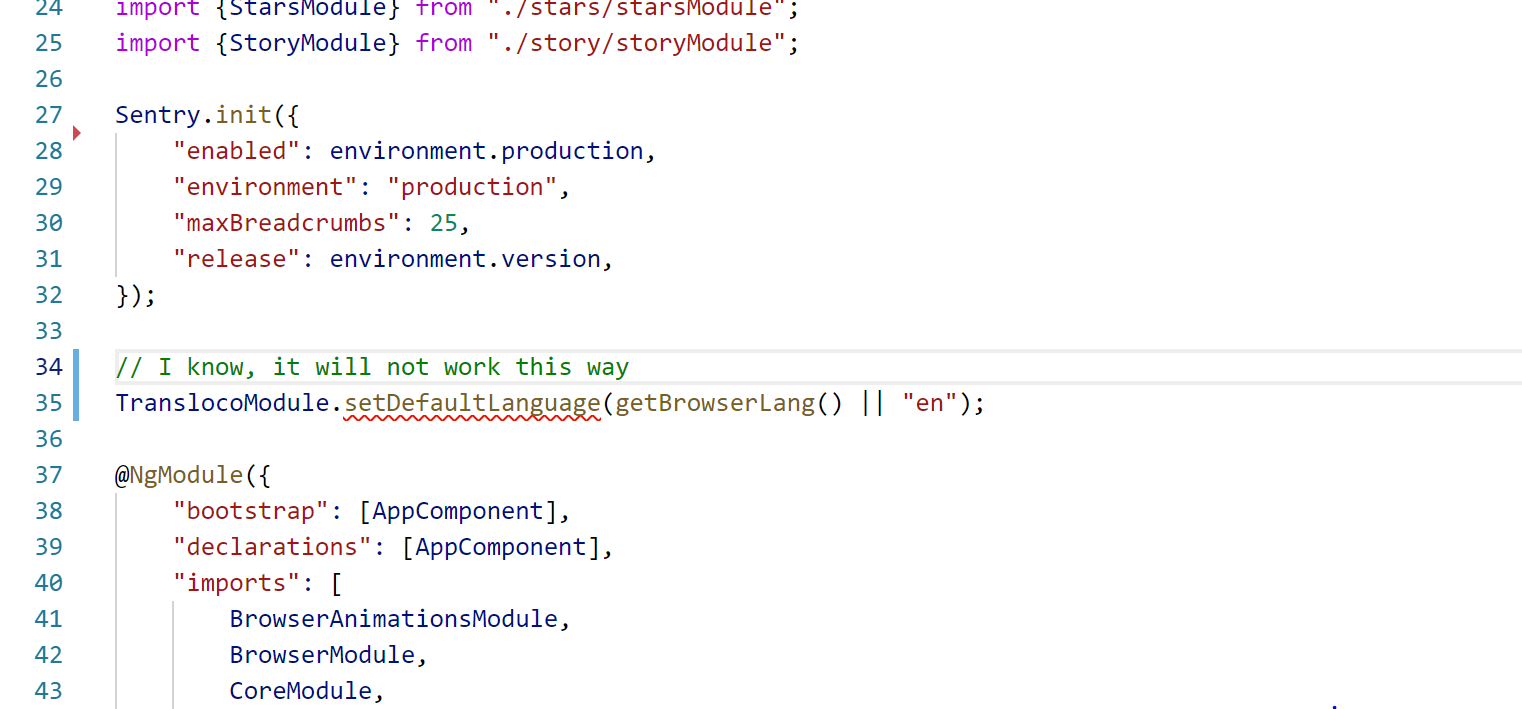
Update 1: quite accidentaly I have learned that this works in app.module.ts:
{"provide": TRANSLOCO_LANG, "useFactory": () => getBrowserLang() || "en"},
I meant inject TranslocoService into AppComponent and call TranslocoService.setActiveLang. I wouldn't use getBrowserLang() as default, as my guess that you don't have a translation file for each language that exists.
NetanelBasal
on 5 Sep 2019
Related issues
 FallenRiteMonk
·
8Comments
FallenRiteMonk
·
8Comments
 siddharth1903
·
9Comments
siddharth1903
·
9Comments
 KrisHaney
·
5Comments
KrisHaney
·
5Comments
 ftischler
·
9Comments
ftischler
·
9Comments
 philjones88
·
6Comments
philjones88
·
6Comments
Most helpful comment
It's a Angulat CLI project. Don't assume it's a basic "hello world" app and the project contains 1 app only inside the app folder ;) Good project, the Angular community needed it!