Transgui: Feature request: preview video from GUI
if possible to add a media player to preview what is downloaded of an unfinished torrent.
or launch mpc on the .part file ?
 rd1
rd1
All 20 comments
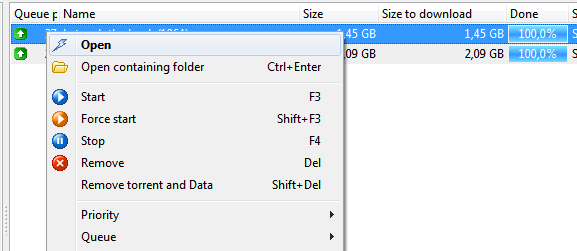
"Open" ?
 leonsoft-kras
on 25 Feb 2018
leonsoft-kras
on 25 Feb 2018
sigh, this is for finished torrents. please amigo, re-read my text and please pay attention. i said for unfinished torrents.
it is possible in other programs. for example for videos all we need is a bit of the beginning and the end for codec information.
Emule (yes some of us still use it) can open an unfinished download and play it with mpc. this lets me know what i'm downloading.
Even tough i download from a reputable torrent site, i still want to be able to see what is downloading.
So even just a few minutes as a preview would be helpful,
rd1
on 25 Feb 2018
Of course, I see that it's about unfinished torrents. But you understand that it downloads a transmission, not a TRG. All you can do is open the file.
To provide a preview, the transmission must download the file in a certain way (as far as I know).
leonsoft-kras
on 25 Feb 2018
same as other programs, as long that the header and footer are in and a bit of the data, it could work.
is there a beta test thread or site to try it out ?
rd1
on 25 Feb 2018
what is the problem?
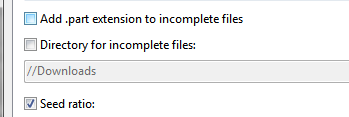
1) uncheck "add .part".
2) execute the command "open".
leonsoft-kras
on 25 Feb 2018
@rd1 you need to read well and pay attention to what @leonsoft-kras says...
TransGUI and Transmission are two different programs.
TransGUI has NO CONTROL how Transmission download the files... so your request is not for ours besides for Transmission Forum
edit: sorry I closed this by mistake.
 antekgla
on 25 Feb 2018
antekgla
on 25 Feb 2018
Antekgla, this feature is not a backend thing, it's a frontend thing.
The frontend is the user interface. So it is a TRG feature.
Think big, we have more than 1 computer. we can run TRG on any of them, hell even a tablet runs it !
So you put Transmission on just 1 that is connected 24/7 (server) and TRG on the others.
You see where i'm going with this ?
So the frontend, TRG, must be the program that shows this preview to the user.
So... thanks for your input.
As for Leon, dude, i tried you suggestion, no go. i just get an error message saying Unable to execute "x:\bla\bla\bla.mp4"
My TEMP is on D: and X: is the final destination.
But you do understand that TRG knows all this information right ? It knows where the temp folder is. So let's go with logic here. instead it should just look in the temps since it's an unfinished torrent. Why is it showing me an error message with a finished path instead of a temp path ?
Not only that, but what if the torrent isn't just 1 file, then what ?
TRG has to look at the files, choose the best one to open, not just pick a 100% one because for movies/tv shows they aren't the main file to open, they're mostly filler in torrent (like text files, or subs or garbage).
Logically it would be the biggest file and preferably whether or not it has the ",part" it can just show the preview in a popup, or launch mpc if it's an option.
See where i'm going with this ?
Just add a media preview window, when we click Open or rather Preview because Open doesn't do anything but throw an error, TRG would choose the biggest file and read the data, the codecs will do the rest.
if there's a smart fast forward button, it will look in the torrent, identify the downloaded blocks and play those in the preview.
All this information is available right in TRG. The back end won't even know it's hapenning.
That would make it a smart & cool feature to have.
rd1
on 26 Feb 2018
But did not you understand why you got a mistake?
I specifically wrote to remove the addition of ".part" to the file name.
In the current version of the program your offer is already working under the following conditions:
- a mapping of paths is configured
- The file is downloaded to the same folder and with the same name that is displayed on the main screen of the program.
If you need this feature, use it now. I checked - it works.
leonsoft-kras
on 26 Feb 2018
@leonsoft-kras a third condition is need for this to work. Like you note in your screenshot
- You have to un-check Directory for incomplete files.
That way the file would be downloaded already in X:
The problem for @rd1 now is that the file is started in D: and only moved to X: when is completed.
antekgla
on 26 Feb 2018
Leon: of course i did that.
the path mappings in TRG are as follow:
D:\=D:\
G:\=G:\
H:\=H:\
They are like that because the Transmission server is on another computer and these are the mapped network drive letters from that other computer onto all my computers, tablet, etc.
D: is the where the Temp folder is on the server and G or H are the final destination drives on a NAS.
The problem is that the path displayed in the error popup from TRG showed the FINISHED path not the TEMP path where the unfinished torrents still resides. So of course TRG can't find the files, they are still in TEMP. There must be a way to check if the files are in either place before starting the action.
TRG just wants to open in the wrong place. There is missing code to check the STATUS of a torrent and the setting for , if UNFINISHED then test the TEMP path. Otherwise try the Final path, but not before.
So you see, this takes quite a bit of work on the user's part just to get working, especially with all the different configurations possible out there. It might just be simpler to add a preview window with media player buttons and just handle all that in the program ?
i mean you suggested a simple solution (remove .part and click open) and it didn't work.
Might just be time to admit it's simpler to code it.
rd1
on 26 Feb 2018
Antekgla is right, that 3rd setting is important since it will also change the paths that TRG has to look in.
so that is the reason the error popped up, Leon, you need to check that setting so you can know where to look before trying to open the file in TRG.
Thank you Antekgla.
rd1
on 26 Feb 2018
To clarify some concepts:
The Menu Option: Open is designed by the original author (v 5.0.1) to open a 100% dowloaded file. To me is a very logic call.
So to open a fully downloaded file TransGUI search in the final destination path (not the temporary folder). Besides that if you have checked add .part extension to incomplete files another problem appears, the open command looks for the final file (what not have the .part extension).
So to achieve your goal @leonsoft-kras and I suggest what uncheck that 2 options. Like is done in Alexander screenshot.
So, that way when you add a new download is added in his final destination (X: in your case) and the .part extension is not added so when you open the file the file is there maybe not complete but in his final destination with his final name. So now is MPC job to play that file when the info dowloaded so far, maybe sometimes work but other not because for example in the .mp4 files you have to have the first and last part of the file (the dowloaded part order is job of Transmission Daemon and TransGUI cannot do ANYTHING about that).
antekgla
on 26 Feb 2018
I'll add.
Of course, you need to work out the question of opening files in a temporary folder and with a temporary name.
leonsoft-kras
on 27 Feb 2018
oh forget it, inovation is dead here.
rd1
on 27 Feb 2018
If you'd like to send a pull request to implement it, we're happy to help review and test, innovation is not dead here.
 PeterDaveHello
on 27 Feb 2018
PeterDaveHello
on 27 Feb 2018
@rd1 less emotion and everything will be fine.
Before anything is done, a discussion is under way.
Here they wrote what you can do now in the current version of the program.
Here it is not told anywhere that this will definitely not be done.
leonsoft-kras
on 27 Feb 2018
In my opinion opening incomplete files in any way has nothing to do with TRGUI. TRGUI does its part by pointing to the right folder. Go there and use VLC or some other 'forgiving' media player that can handle incomplete files. Please let the GUI do what it is meant to do without any dumb 'media' features. There's uTorrent for that.
 Tharn
on 21 Jul 2018
Tharn
on 21 Jul 2018
In my opinion opening incomplete files in any way has nothing to do with TRGUI. TRGUI does its part by pointing to the right folder. Go there
that's my point exactly, its TRG's job to know these things, since i double-clicked the torrent. so wether its downloading or finished, trg knows the folder. it just has to open an explorer window and i'll do the rest.
i don't like vlc, i hate it's icon, the traffic cone, we have tons of traffic cones all over the province year round, idk what the government is doing, but anyway i use Media player HD that comes with k-lite.
but like i said, TRG knows all this information and it can easily check where the file is, the associations are made for that, its the same thing as when a torrent is finished, we double click on it and trg opens it. but it would work for the temp folder. if the temp folder is in the path associations then there is nothing stopping TRG from opening it or its folder.
rd1
on 21 Jul 2018
Sorry if I misunderstood. I agree that TRGUI 'open containing folder' should always work, as long as the daemon runs locally.
Tharn
on 21 Jul 2018
no, no need for it to be installed anywhere else than on the server.
think about it, TRG displays all the necessary info in the info panel down at the bottom and has the path associations in its local options. it has all that it needs to figure it out.
So what's the problem ?
1st check path associations and report if the temp folder's drive letter is not in the assocs which would mean having an extra share connected but so what.
So if al is good then let's start:
Check the temp for the torrent's folder (or file)
if exist in temp then use path associations and then
open it.
Elseif check final destination, (if yes) then open.
else popup error.
Simple, no ? it's not perfect but quite simple. All on the local machine.
rd1
on 21 Jul 2018
Related issues
 LYCX2015
·
11Comments
LYCX2015
·
11Comments
 volo-thomas
·
11Comments
volo-thomas
·
11Comments
 Fytch
·
8Comments
Fytch
·
8Comments
 elisimpson
·
11Comments
elisimpson
·
11Comments
 Dustie
·
11Comments
Dustie
·
11Comments