Tornadofx: How to reassign primitive type when run async completes
Hi,
I have been battling with run async for days now. My code looks like this
var items = SimpleObjectProperty<ObservableList<Item>>()
var itemsTotal = SimpleObjectProperty<Int>()

init {
   runAsync {

                updateMessage("Loading patients")
                updateProgress(0.4, 1.0)
                db.getAll().toList().observable()
            } ui {
                items.set(it)
                itemsTotal.value = it.size // or any value
                itemsTotal.setValue(it.size)
            }
}
Only the value of items changes while itemsTotal remains null. How can I get items total or reassign a var that is not an observable?
 bnlambert
All 19 comments
Your ui{} block looks good, but I'd move the observable() which references JavaFX inside the runAsync{}. This is to prevent any JavaFX from being run off the FX Thread.
Return db.getAll().toList() from runAsync{} and set the items variable, size variable, and any other variable that you need for the rest of the UI.
 bekwam
on 2 Aug 2018
bekwam
on 2 Aug 2018
Also, I think you want this in the onDock() method. At that point, there is a Stage and the UI is showing which will be able to pair a visible Label with updateMessage() and a ProgressBar with updateProgress.
bekwam
on 2 Aug 2018
@bekwam thank you for the response. I have updated my code but do not still get the desired result. The value of any var except for observables remain thesame even when I reassign it in the ui{} block. I really need help. I do not know what I am doing wrong.
bnlambert
on 2 Aug 2018
Please provide a minimal, runnable code sample. Either include Item or remove the reference :)
 edvin
on 2 Aug 2018
edvin
on 2 Aug 2018
class StaffList : View() {
    val db: Db by inject()
    val model = StaffModel(StaffObj())
    var stafflist = SimpleObjectProperty<ObservableList<StaffObj>>()//listOf(Staff()).observable()
    var staffTotal = SimpleObjectProperty<Int>()

    override val root = borderpane {

        subscribe<StaffAdded> {

            runAsync {

                updateMessage("Loading staff")
                updateProgress(0.4, 1.0)
                db.getAll(it.category).toList()
            } ui {
                stafflist.set(it.observable()) // always updates
                staffTotal.value = it.count() // does not update
            }
        }

        top(Top::class)
        center {

            vbox(20) {

                hbox(10) {

                   vbox {
                       label("Staff total ${staffTotal.value}") //staffTotal.value is always null even after runAsync
                   }


                }
                tableview(stafflist) {
                    column("Matricule", StaffObj::clientIdProperty)
                    column("Title", StaffObj::titleProperty)
                    column("First Name", StaffObj::firstNameProperty)
                    column("Last Name", StaffObj::lastNameProperty)
                    column("Date of Birth", StaffObj::dobProperty)
                    column("Category", StaffObj::staffTypeProperty)


                    model.rebindOnChange(this) { selectedStaff ->

                        var staff = selectedStaff ?: StaffObj()

                    }


                }

            }


        }


    }

    init {
        title = "Staffs"

    }


    override fun onDock() {
        super.onDock()

        runAsync {
            println("refresh called")
            updateMessage("Loading staff")
            updateProgress(0.4, 1.0)
            db.getAll().toList()
        } ui {
            stafflist.set(it.observable())
            staffTotal.setValue(it.count()) // this is always null I do not know why

        }


    }
}
If you need more code please let me know
bnlambert
on 2 Aug 2018
This is not runnable, nor minimal :) Db, StaffModel, StaffAdded, StaffObj are missing.
edvin
on 2 Aug 2018
I created a minimal sample app, and I can confirm that this is working as expected. The following sample will show a label with the value 3 after the async function has completed:
class StaffList : View() {
    var items = SimpleListProperty<String>()
    var itemsTotal = SimpleObjectProperty<Int>()
    override val root = label(itemsTotal)

    init {
        runAsync {
            updateMessage("Loading patients")
            updateProgress(0.4, 1.0)
            listOf("P1", "P2", "P3").observable()
        } ui {
            items.set(it)
            itemsTotal.value = it.size
        }
    }
}
I think your problem lies elsewhere, but that's hard to tell without a working minimal sample.
edvin
on 2 Aug 2018
Here is also a more idiomatic way of writing that same code, using a binding instead of doing double work in the reciever function:
class StaffList : View() {
    val items = SimpleListProperty<String>()
    val itemsTotal = items.integerBinding { it?.count() ?: 0}

    override val root = label(itemsTotal)

    init {
        runAsync {
            updateMessage("Loading patients")
            updateProgress(0.4, 1.0)
            listOf("P1", "P2", "P3").observable()
        } ui {
            items.set(it)
        }
    }
}
If you don't need to update the task, you could even go with asyncItems to further reduce the code:
class StaffList : View() {
    val items = SimpleListProperty<String>()
    val itemsTotal = items.integerBinding { it?.count() ?: 0}

    override val root = label(itemsTotal)

    init {
        items.asyncItems {
            listOf("P1", "P2", "P3")
        }
    }
}
(I just committed support for calling updateMessage and updateProgress in asyncItems as well :)
edvin
on 2 Aug 2018
Don't forget to use onDock() if you want to see the updateProgress() and updateMessage() settings while the task is running.
bekwam
on 2 Aug 2018
Good point @bekwam. I just copied his code to check that it works. We should also mention that it makes no sense to defined observable properties as var when they are never overwritten (and shouldn't be). This code works perfectly well on non observable primitives as well of course:
class StaffList : View() {
    val items = SimpleListProperty<String>()
    var itemsTotal = 0

    override val root = label("...")

    init {
        runAsync {
            listOf("P1", "P2", "P3").observable()
        } ui {
            items.value = it
            itemsTotal = it.size
        }
    }
}
Thank you all for the effort. I am going to investigate my code again and revert.
bnlambert
on 2 Aug 2018
Please post back when you figure out what was wrong or if you need more help :)
edvin
on 2 Aug 2018
Sure :)
bnlambert
on 2 Aug 2018
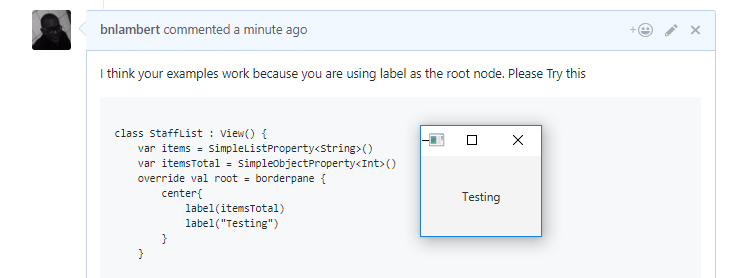
I think your examples work because you are using label as the root node. Please Try this
class StaffList : View() {
    var items = SimpleListProperty<String>()
    var itemsTotal = SimpleObjectProperty<Int>()
    override val root = borderpane {
        center{
            label(itemsTotal)
            label("Testing")
        }
    }


    init {
        runAsync {
            updateMessage("Loading patients")
            updateProgress(0.4, 1.0)
            listOf("P1", "P2", "P3").observable()
        } ui {
            items.set(it)
            itemsTotal.value = it.size
        }
    }
}
This code does not work for me. I am having borderpane and not label as my root. I think if you make my code work or a way around with borderpane as the root it will solve my problem. Thanks.
bnlambert
on 2 Aug 2018
No, your problem is that you've added two components to the center of the borderpane. Each section of a borderpane can only hold a single component, so when you add the Testing label, you kick out the itemsTotal label. Wrap them both in a vbox or any other container that can hold multiple components and it will show up.
edvin
on 2 Aug 2018
@edvin you have saved me again. Thank you very much. I will share this app with you once it is ready. It is my first desktop app. Also please add me to the stack community please. [email protected]. Thank you very much.
bnlambert
on 2 Aug 2018
Great! I sent you an invite now :)
edvin
on 2 Aug 2018
Related issues
 Stars-One
·
6Comments
Stars-One
·
6Comments
 Mosch0512
·
4Comments
Mosch0512
·
4Comments
 ThraaxSession
·
3Comments
ThraaxSession
·
3Comments
 Leo-Thura
·
6Comments
Leo-Thura
·
6Comments
 arslancharyev31
·
7Comments
arslancharyev31
·
7Comments
Most helpful comment
Don't forget to use onDock() if you want to see the updateProgress() and updateMessage() settings while the task is running.