Tornadofx: TypeSafeCss cant init minWidth = (-1).px
After doing the following in the TypeSafeCss kotlin code it wont be used.
If i do the same inside an css file it will work.
minWidth = (-1).px
But if you open the Layout Debugger it is going to be used.

Code for Reproduction:
import tornadofx.*

class TestView : View("My View") {
    override val root = borderpane {
        center {
            vbox {
                anchorpane {
                    menubar {
                        anchorpaneConstraints {
                            leftAnchor = 0.0
                            bottomAnchor = 0.0
                            topAnchor = 0.0
                        }
                        menu("One Very Big Menu")
                        menu("Two Very Big Menu")
                        menu("Three Very Big Menu")
                    }
                }
            }
        }
    }
}

class TestApp : App(TestView::class, TestStyle::class)

class TestStyle : Stylesheet() {
    companion object {
        val menuButton by cssclass()
    }
    init {
        s(menuButton) {
            minWidth = (-1).px
        }
    }
}
TornadoFX Version: 1.7.18
 Mosch0512
All 4 comments
The type safe css you posted will render to the following, and will be applied in exactly the same way as if you wrote it manually in a text file:
.menu-button {
    -fx-min-width: -1px;
}
Also note that you don't need to define the menuButton CSS class as it already comes with the framework.
Not sure I understand exactly what you expect to happen, but I can assure you it has nothing to do with any behavior of the type safe css :)
For completeness, here is the type safe stylesheet using best practices/syntax:
class TestStyle : Stylesheet() {
    init {
        menuButton {
            minWidth = -1.px
        }
    }
}
 edvin
on 14 Mar 2019
edvin
on 14 Mar 2019
Thx for the hint :+1:
Hmm i expect that the menuButtons are resized after changing minWidth to -1 in .css or .kt code.
But you are right it is correct.
But why is the behavior changing when the Layout Debugger is opened?
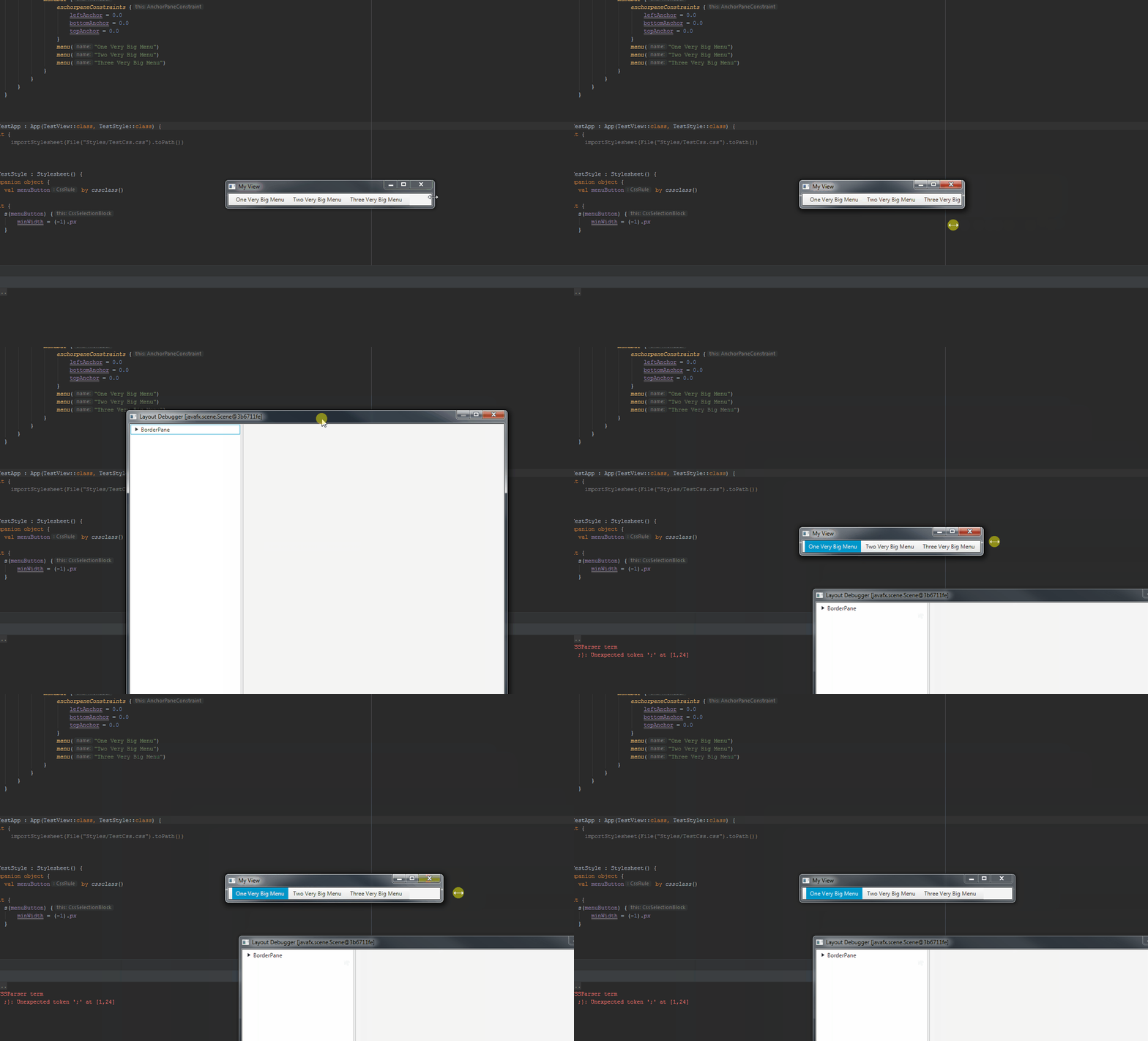
Shortened code with best practice/syntax:
import tornadofx.*

class TestView : View("My View") {
    override val root = anchorpane {
        menubar {
            menu("One Very Big Menu")
            menu("Two Very Big Menu")
            menu("Three Very Big Menu")
        }
    }
}

class TestApp : App(TestView::class, TestStyle::class)

class TestStyle : Stylesheet() {
    init {
        s(menuButton) {
            minWidth = (-1).px
        }
    }
}
It's changing because the LayoutDebugger actually takes the whole root and embeds it inside a stackpane to be able to overlay the nodes as you select them in the tree. This changes the resize behavior :)
edvin
on 14 Mar 2019
Thx men i was thinking sth like that :D
Mosch0512
on 14 Mar 2019
Related issues
 chinzen
·
7Comments
chinzen
·
7Comments
 jordaorodolfo
·
6Comments
jordaorodolfo
·
6Comments
 Bastercall
·
3Comments
Bastercall
·
3Comments
 AlbRoehm
·
3Comments
AlbRoehm
·
3Comments
 eibens
·
4Comments
eibens
·
4Comments
Most helpful comment
The type safe css you posted will render to the following, and will be applied in exactly the same way as if you wrote it manually in a text file:
Also note that you don't need to define the
menuButtonCSS class as it already comes with the framework.Not sure I understand exactly what you expect to happen, but I can assure you it has nothing to do with any behavior of the type safe css :)
For completeness, here is the type safe stylesheet using best practices/syntax: