Tools: Console output error breaks build on Windows 10
Description:
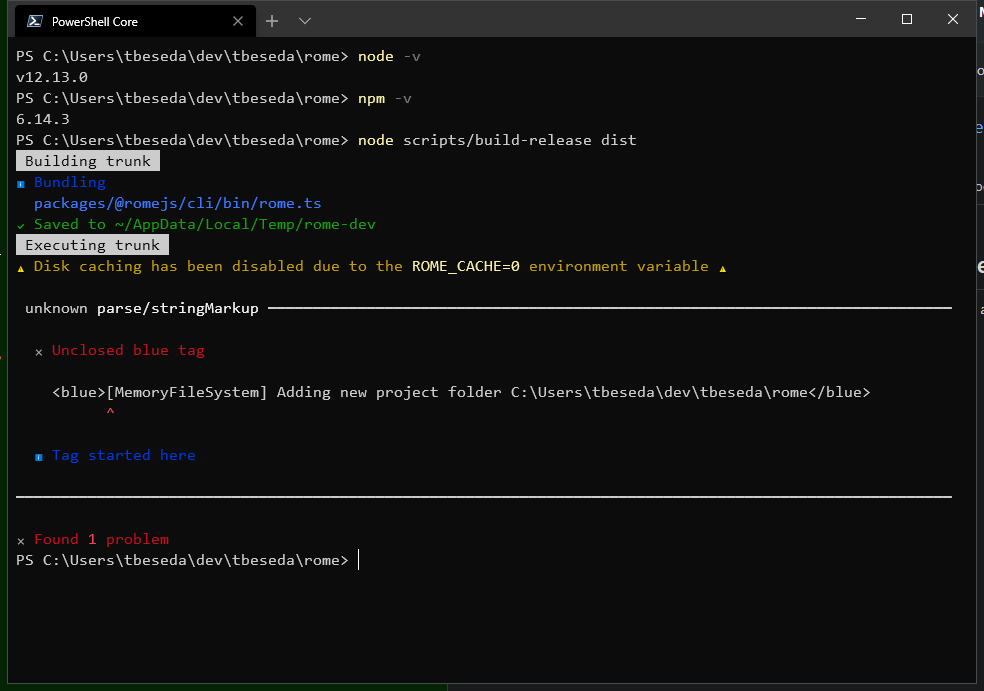
Running build-release on Win 10 Pro, PowerShell 7, Node 12.13.0 throws an error and stops the build
unknown parse/stringMarkup
✖ Unclosed blue tag
Steps To Reproduce:
Using these instructions:
- clone rome
- run build-release
- get console output seen above
Expected Results
build-release to finish successfully
Seems to be an issue with the library that formats and prints to the console during build. Specifically the square brackets _inside_ the <blue> tag.
Let me know if I can provide more detail or try something different to solve.
 tbeseda
All 8 comments
Hey @tbeseda could you check if https://github.com/facebookexperimental/rome/pull/242 would fix your issue?
 Lagily
on 2 Apr 2020
Lagily
on 2 Apr 2020
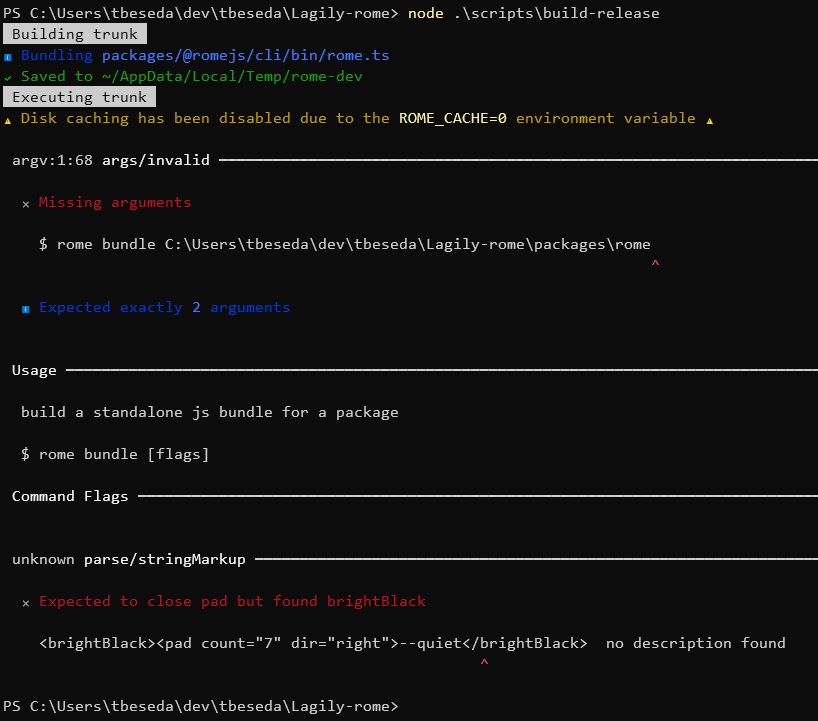
@Lagily It does progress further in the build, but I get this error
✖ Expected to close pad but found brightBlack
<brightBlack><pad count="7" dir="right">--quiet</brightBlack>  no description found
tbeseda
on 2 Apr 2020
Can you try again @tbeseda?
Lagily
on 2 Apr 2020
@Lagily I'm able to build and install Rome. Some of the console output is a bit off, but I think that would be a different issue/scope:

tbeseda
on 2 Apr 2020
I see, looks like I broke something with the backslash escaping, I'll have a look
Lagily
on 2 Apr 2020
the pull request should now also not break the output in your console
Lagily
on 3 Apr 2020
 node ./scripts/build-release ./dist
 Building trunk
ℹ Bundling packages/@romejs/cli/bin/rome.ts
✔ Saved to ~/AppData/Local/Temp/rome-dev
 Executing trunk
⚠ Disk caching has been disabled due to the ROME_CACHE=0 environment variable ⚠

 unknown parse/stringMarkup ━━━━━━━━━━━━━━━━━━━━━━━━━━━━━━━━━━━━━━━━━━━━━━━━━━━━━━━━━━━━━━━━━━━━━━━━━━━━━━━━━━━━━━━━━━━━

  ✖ Expected token Word but got Slash

  > 1 │   \\\[MemoryFileSystem] Adding new project folder C:\Users\myUserName\rome\\\\
      │                                                                              ^
    2 │         <red><emphasis>^</emphasis></red>

━━━━━━━━━━━━━━━━━━━━━━━━━━━━━━━━━━━━━━━━━━━━━━━━━━━━━━━━━━━━━━━━━━━━━━━━━━━━━━━━━━━━━━━━━━━━━━━━━━━━━━━━━━━━━━━━━━━━━━━━

✖ Found 1 problem
what can I do?
OS: windows 10
 YMaster
on 11 Apr 2020
YMaster
on 11 Apr 2020
This, along with other Windows improvements, were fixed in #260.
 sebmck
on 12 Apr 2020
sebmck
on 12 Apr 2020
Related issues
sebmck
·
5Comments
 yoshixmk
·
4Comments
yoshixmk
·
4Comments
 ematipico
·
4Comments
sebmck
·
3Comments
ematipico
·
4Comments
sebmck
·
3Comments
 shirshak55
·
3Comments
shirshak55
·
3Comments