Toggldesktop: User cannot log into desktop app
💻 Environment
Platform: Windows
OS Version: Windows 10
Toggl Version: 7.5.242
🐞 Actual behavior
User is unable to log into desktop app
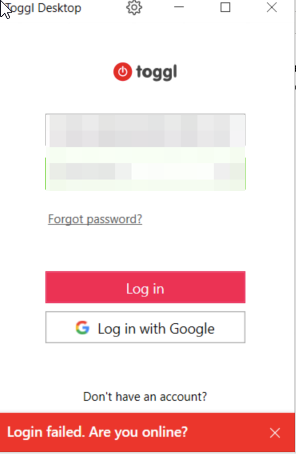
Have tried reinstall, disabling proxy, disabling VPN. Nothing has helped.
💯 Expected behavior
User should be able to log in.
🔨 Steps to reproduce
Not reproducible. Log file in case.
📦 Additional info
 nidarasheed
All 15 comments
Case reference on 7.5.249. Also tried disabling proxy, reinstalling, user isn't on an IT controlled network
 dianetoggl
on 25 Aug 2020
dianetoggl
on 25 Aug 2020
Case reference on 7.5.249, tried reinstalling, clearing cache. Not on an IT controlled network. Log file in conversation, but showing SSL errors
dianetoggl
on 26 Aug 2020
Case reference 7.5.249 - log in case.
dianetoggl
on 31 Aug 2020
Possibly related Case reference
 nicktoggl
on 4 Sep 2020
nicktoggl
on 4 Sep 2020
Case reference User is logged in, but logs show SSL error. Unable to sync
dianetoggl
on 7 Sep 2020
Case reference 7.5.260 - User has to reset their password to login on webapp, but can't use it to log in to desktop. SSL errors on log file
dianetoggl
on 10 Sep 2020
Case reference SSL issue on log
dianetoggl
on 14 Sep 2020
We can't login also.
I am in China.
 tufeikafei
on 23 Sep 2020
tufeikafei
on 23 Sep 2020
@skel35 Do we know what's causing this? Is Desktop team working on a fix?
 vedr4n
on 23 Sep 2020
vedr4n
on 23 Sep 2020
We do not fully know what's causing this.
We're going to implement a workaround shortly and we're investigating to try to find the root cause.
 skel35
on 23 Sep 2020
dianetoggl
on 24 Sep 2020
skel35
on 23 Sep 2020
dianetoggl
on 24 Sep 2020
 TheSoloJake
on 30 Sep 2020
TheSoloJake
on 30 Sep 2020
Case reference Mac app - SSL errors in log file
dianetoggl
on 6 Oct 2020
Replied to all Windows users @skel35.
I'll let you know what they come back with.
We have two Mac users in here as well that I haven't replied to as I can see this isn't an option on that platform
Case 1
Case 2
dianetoggl
on 14 Oct 2020
One user has replied that this has worked for them 😊
Sorry accidentally closed 🙈
dianetoggl
on 14 Oct 2020
Related issues
 danfarrow
·
7Comments
danfarrow
·
7Comments
 VeljkoTN
·
5Comments
VeljkoTN
·
5Comments
 tanel
·
4Comments
nidarasheed
·
5Comments
tanel
·
4Comments
nidarasheed
·
5Comments
 sojusnik
·
6Comments
sojusnik
·
6Comments