Toggldesktop: Toggl icon still appears in the Dock even when the setting is turned off
💻 Environment
Platform: macOS
OS Version: macOS 10.15.4
Toggl Version: 7.5.146
🐞 Actual behavior
In TogglDesktop preferences, the Show dock option is turned off but the Toggl still appears in the Dock.
💯 Expected behavior
If the setting for Show dock icon is turned off, Toggl shouldn't appear in the dock
🔨 Steps to reproduce
I was able to replicate it using these steps:
- Make sure that
Show recent applications in Dockis checked in Dock preferences - Go to TogglDesktop - Preferences - uncheck the option for
Show dock icon - Toggl icon will still remain in the Dock
📦 Additional info
If Show recent applications in Dock isn't checked in Dock preferences, Toggl icon will disappear as it should.
Case reference it includes the video of user replicating the issue
 zdericnina
All 13 comments
I'm having the exact same issues since the 7.5.146 release although. In my case it doesn't matter whether I have Show recent applications in Dock enabled or not.
 urbantrout
on 30 May 2020
urbantrout
on 30 May 2020
I just double-check and it's correct behavior on macOS.
If "Show recent applications in Dock" is enabled
- All apps will keep present on the dock (In the Recent Area) regardless of the "Show dock icon" setting because it's how it works.
If "Show recent applications in Dock" is disabled
- The app icon will respect show/dismiss depend on the setting "Show dock icon", except if the app is persisted in the lock area (By dragging the app to the dock, and the icon will appear even though the app is quitted).
I suppose that it's what @urbantrout encountered. Please drag it out the dock to remove it, then it will work
 NghiaTranUIT
on 5 Jun 2020
NghiaTranUIT
on 5 Jun 2020
Here's a screencast
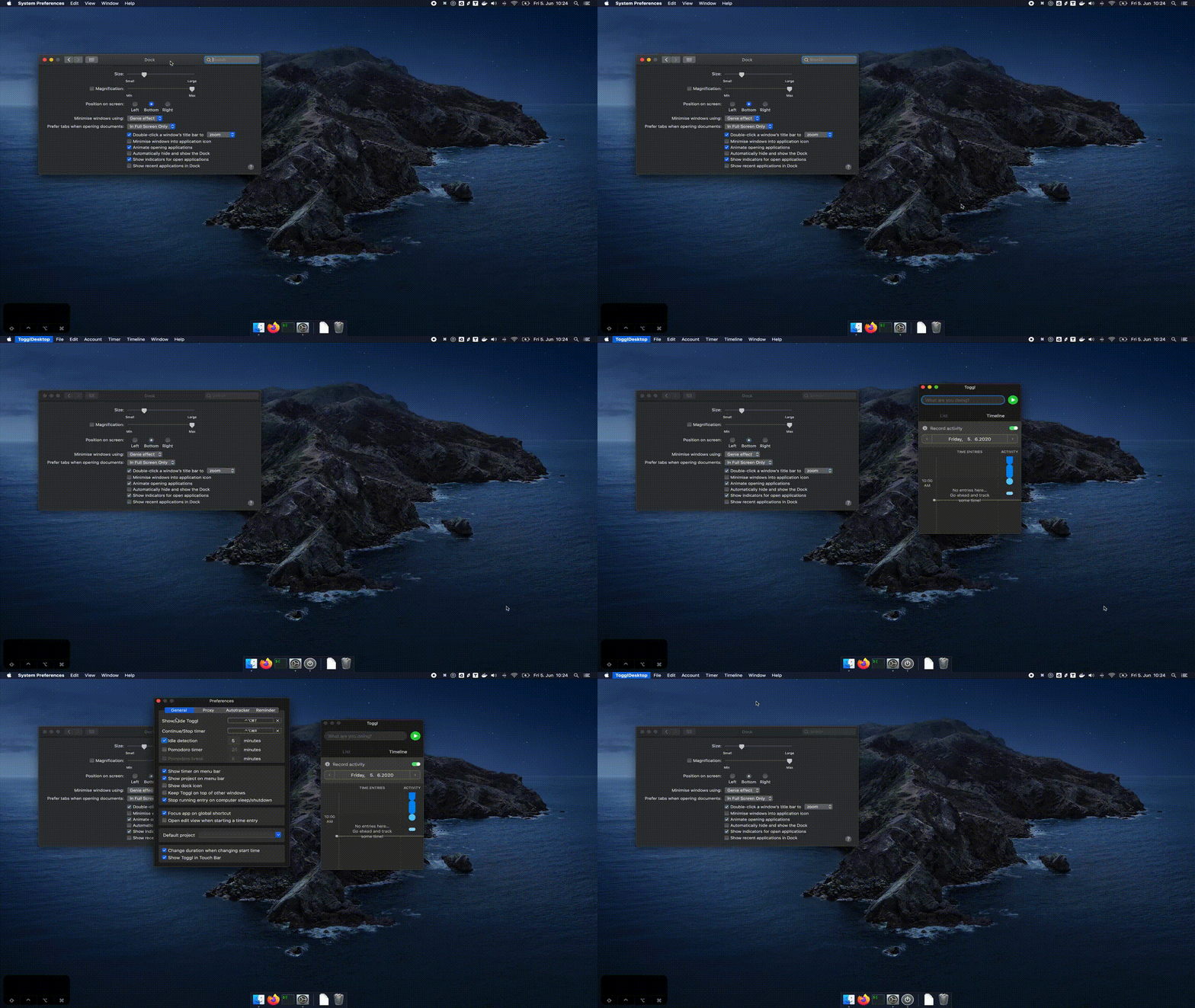
I'm using the global keyboard shortcuts to show and hide toggl (see keyboard input in the bottom left corner)
As soon as I open the toggl preferences the dock icon disappears again.
urbantrout
on 5 Jun 2020
I see, thanks for the screencast. We will investigate and fix it 👍
NghiaTranUIT
on 5 Jun 2020
Same here. I noticed that if I close the Toggle window with the x icon in the app header, it works just fine. But if I close it with the global shortcut, the app icon appears in the dock.
 Leksat
on 15 Jun 2020
Leksat
on 15 Jun 2020
 VeljkoTN
on 18 Jun 2020
VeljkoTN
on 18 Jun 2020
Same issue here. I've always had the recent apps on dock enabled and Toggl didn't show up in Dock before. The reason it's an issue is when using full screen apps on the Mac and triggering Toggl with the global shortcut, it always worked as a popup but now it switches the Desktop/space away from the full screen app because of the icon in the Dock.
 rishifter
on 21 Jun 2020
rishifter
on 21 Jun 2020
Case reference This user is also experiencing duplicating dock icons when they hide/show the Toggl application. Video in Intercom 😊
 dianetoggl
on 21 Jul 2020
dianetoggl
on 21 Jul 2020
I am also eagerly awaiting a fix for this issue. My issue is exactly the same as seen in the screencast in https://github.com/toggl-open-source/toggldesktop/issues/4117#issuecomment-639340557 above.
 freinbichler
on 22 Jul 2020
freinbichler
on 22 Jul 2020
Case reference
Referencing @dianetoggl comment, I was able to reproduce the multiple dock icons when testing this as well
 edtamayo
on 22 Jul 2020
edtamayo
on 22 Jul 2020
Did a quick fix. It's in the review but you can try it now by downloading it from https://github.com/toggl-open-source/toggldesktop/actions/runs/181238547
It works on my machine, but I'm also interested in testing it on older macOS versions. So if you have one, would be thankful for the testing 🙂
 AndrewVebster
on 24 Jul 2020
AndrewVebster
on 24 Jul 2020
@AndrewVebster It works fine here on Catalina. It shows version 7.0.0 though.
rishifter
on 24 Jul 2020
it's okay that it shows v7.0.0, it's just a test build
AndrewVebster
on 24 Jul 2020
Related issues
 IndrekV
·
7Comments
IndrekV
·
7Comments
 ghost
·
6Comments
IndrekV
·
4Comments
ghost
·
6Comments
IndrekV
·
4Comments
 jlaw9
·
4Comments
jlaw9
·
4Comments
 tomrit
·
7Comments
tomrit
·
7Comments
Most helpful comment
I see, thanks for the screencast. We will investigate and fix it 👍