Toggldesktop: Texts are unreadable in linux app using hidpi mode
 IndrekV
All 51 comments
We have no other feedback about this at the moment. Wontfix.
 tanel
on 2 Dec 2014
tanel
on 2 Dec 2014
Another report. Should look into this. How easy or hard it is to add this support.
Another case
145358
IndrekV
on 13 Feb 2015
IndrekV
on 26 Mar 2015

Another case: 259937
IndrekV
on 7 Mar 2016
Same thing on Ubuntu 15.10
 Gvidoou
on 23 Mar 2016
Gvidoou
on 23 Mar 2016
Same on Mint 17.3 with Cinnamon. I thought it had something to do with poor hidpi support of JRE on Linux, since I'm having similar issues in almost every Java application..
Toggl uses Qt however, but could it be something similar? If I look here, it doesn't mention hidpi support: http://doc.qt.io/qt-5/highdpi.html
 hugopeek
on 12 Jul 2016
hugopeek
on 12 Jul 2016
@Gvidoou , @hugopeek What is the main issue in your opinion. The font is too big or the app does not adjust properly to increase the sizes to fit the fonts. I've currently worked out a solutions that keeps the font sizes smaller.
IndrekV
on 5 Oct 2016
The issue should be fixed with latest beta.
toggldesktop_linux_x86_64-7_3_345.tar.gz
or
toggldesktop_7.3.345_amd64.deb
IndrekV
on 18 Oct 2016
@IndrekV that great, thanks! Is there a way to increase font size? On hidpi UI fixed but fonts still too small
 bnuriddin
on 18 Oct 2016
bnuriddin
on 18 Oct 2016
@bnuriddin Can you share a screenshot how the app looks for you.
IndrekV
on 18 Oct 2016

@IndrekV like this
bnuriddin
on 18 Oct 2016
Thank you. I'll take another look at this.
IndrekV
on 18 Oct 2016
Hi @IndrekV, it looks exactly as @bnuriddin posted above for me. But it's already more usable like this than how it was before, thanks!
hugopeek
on 18 Oct 2016
Toggl looks awful on HiDPI screens (I cannot see this text as it is 1mm high on my screen)
using Ubuntu Mate 16.04 on a 3k 15.4" screen with DPI set to ~180

 allanlaal
on 10 Nov 2016
allanlaal
on 10 Nov 2016
The issue is still present in the stable version (7.3.346) as well as the beta version (7.3.366). Extremely small UI, tiny, tiny font. Barely usable.
 Benedolt
on 13 Dec 2016
Benedolt
on 13 Dec 2016
Same for 7.4.7 (Mint 17.3) at 4K, other apps are fine. An option to set the font sizes ourselves would be useful.
 Perturbatio
on 25 Jan 2017
Perturbatio
on 25 Jan 2017
Subscribing. Tried setting some environment variables while launching the app and it didn't work. Same issue as the screenshots above. Thanks for your work on this.
 alexgleason
on 30 Jan 2017
alexgleason
on 30 Jan 2017
I've stopped using the Desktop app completely because of this, even though it offers infinite history
allanlaal
on 1 Feb 2017
Same problem here. Arch Linux, TogglDesktop 7.4.7. Nearly all texts in the app use extremely small font.
UPD: Exporting QT_AUTO_SCREEN_SCALE_FACTOR=1 helps in my case!
 MarSoft
on 14 Mar 2017
MarSoft
on 14 Mar 2017
In Fedora, install all required Qt5 packages with dnf and then rm toggldesktop/lib/libQt* to use the environment variables workaround.
 jopereira
on 29 May 2017
jopereira
on 29 May 2017
Same issue, Ubuntu 17.04 on a current gen Dell XPS 13 9360, i3wm, Toggl desktop 7.4.52_amd64 installed from .deb . I use xrandr to set the dpi of my monitor correctly.
I installed the entirety of Qt from https://www.qt.io/download-open-source/ (1G!), then setting QT_AUTO_SCREEN_SCALE_FACTOR=1 _triples_ the size of the fonts. But hey, at least it's legible now...
 ohthehugemanatee
on 26 Jun 2017
ohthehugemanatee
on 26 Jun 2017
exporting QT_SCALE_FACTOR=1.5 (or whatever the scaling setting is in your DE) solves the issue, at least for me on Gnome. I added env QT_SCALE_FACTOR=1.5 to /user/share/applications/toggldesktop.desktop on the "Exec" line before the executable command.
@IndrekV is there maybe a way to detect the scaling setting at install time and add this to the desktop file?
 fonorobert
on 16 Oct 2017
fonorobert
on 16 Oct 2017
Tried with KDE and Unity but was not able to see any changes when using line
export QT_SCALE_FACTOR=1.5 && /opt/toggldesktop/TogglDesktop.sh
hmm, possibly only works with the version installed with the deb installer, will test a bit more
fonorobert
on 18 Oct 2017
+1
Linux Mit 18.2 Cinnamon. Installed from DEB 7.4.71. Not usable at all :(
 gregor-rayman
on 27 Oct 2017
gregor-rayman
on 27 Oct 2017
+1
See case 581723. The trick with QT_SCALE_FACTOR didn't help.
 vedr4n
on 8 Nov 2017
vedr4n
on 8 Nov 2017
+1
Antergos (Arch Linux) with Gnome shell. The QT_SCALE_FACTOR trick did not works.
 karlos1337
on 15 Dec 2017
karlos1337
on 15 Dec 2017
On Ubuntu 17.10, QT_SCALE_FACTOR didn't work for me either. This did the trick though:
export QT_DEVICE_PIXEL_RATIO=2
 jtunison
on 6 Jan 2018
jtunison
on 6 Jan 2018
Confirmed with Ubuntu 17.10 on a Dell XPS 15 9560. As suggested by @jtunison, I can get a usable app by running:
export QT_AUTO_SCREEN_SCALE_FACTOR=2
/opt/toggldesktop/TogglDesktop.sh
Next step will be to try fixing it via the toggldesktop.desktop file so I don't have to break to the shell when I launch Toggl, but I haven't tried this yet.
 richdougherty
on 10 May 2018
richdougherty
on 10 May 2018
@richdougherty "export" commands don't work in .desktop files. Better to put export QT_AUTO_SCREEN_SCALE_FACTOR=2 in /opt/toggldesktop/TogglDesktop.sh itself.
 Trevortds
on 14 May 2018
Trevortds
on 14 May 2018
@Trevortds, I added a ~/.local/share/applications/toggldesktop.desktop file and updated the Exec line to:
Exec=env QT_DEVICE_PIXEL_RATIO=2 /opt/toggldesktop/TogglDesktop.sh
@richdougherty this worked for me with Xubuntu 18.04 on a Dell Inspiron 7000 15, now it's too big but at least usable. It didn't work with float values so I had to stick to 2. Thanks!
 letuche
on 28 Jun 2018
letuche
on 28 Jun 2018
I could look into this and see if I can find a programmatic way to solve it, if the maintainers would be interested in a PR to suit? I'm also on a Dell XPS 15 9560 w/ Ubuntu 18.04, and have had to use the workaround supplied by @jtunison above.
 liamdawson
on 1 Aug 2018
liamdawson
on 1 Aug 2018
Go for it @liamdawson . We've updates Qt version to 5.10 so the hidpi support should be available. With old qt 5.5 it was lacking.
IndrekV
on 1 Aug 2018
I'm not going to be able to get to this in a hurry, so if someone else is more available to pick it up, go for it!
liamdawson
on 13 Aug 2018
I just tested setting application attribute like suggested in this article[1] but it does not work.
Wierdly, setting environment variable QT_AUTO_SCREEN_SCALE_FACTOR=1 works, but setting attribute like this TogglApplication::setAttribute(Qt::AA_EnableHighDpiScaling); does not. Qt seems to suggest that these are equivalent[1].
Here is the change I made:
in file src/ui/linux/ToggleDesktop/main.cpp:
 int main(int argc, char *argv[]) try {
     Bugsnag::apiKey = "2a46aa1157256f759053289f2d687c2f";

+    TogglApplication::setAttribute(Qt::AA_EnableHighDpiScaling);
     TogglApplication::setQuitOnLastWindowClosed(false);

     qRegisterMetaType<uint64_t>("uint64_t");
I am running Kubuntu 18.04, compiling the master branch of toggle desktop with Qt 5.11.2.
 PowerSnail
on 15 Oct 2018
PowerSnail
on 15 Oct 2018
In Fedora, install all required Qt5 packages with dnf and then rm toggldesktop/lib/libQt* to use the environment variables workaround.
almost same for ubuntu 16.04.
First install qt > 5.5 (https://launchpad.net/~beineri/+archive/ubuntu/opt-qt-5.10.0-xenial)
then /opt/toggldesktop$ sudo cp /opt/qt510/lib/libQt* lib/
 LiSinCin
on 19 Jan 2019
LiSinCin
on 19 Jan 2019
In Ubuntu 18.04.1 setting environment variable QT_AUTO_SCREEN_SCALE_FACTOR=1 does not seem to work for me BUT @richdougherty solution seemd to have an effect. The relative sizes of scroll bars and fonts are a little weird but its usable.
 awhillas
on 21 Feb 2019
awhillas
on 21 Feb 2019
As @jtunison suggested: Changing to Exec=env QT_DEVICE_PIXEL_RATIO=2 /opt/toggldesktop/TogglDesktop.sh in /usr/share/applications/toggldesktop.desktop makes Toggl usable for my Linux Mint 19.1 Cinnamon
 mohanklein
on 17 May 2019
mohanklein
on 17 May 2019
Ubuntu 18.04 with Xfce 4.12 Desktop: the deb file mentioned on the official page did not respond to either of QT_AUTO_SCREEN_SCALE_FACTOR or QT_SCALE_FACTOR, but did respond to an integral QT_DEVICE_PIXEL_RATIO.
However, the pre-release v7.4.460 responded to fractional QT_SCALE_FACTOR as well as fractional QT_DEVICE_PIXEL_RATIO, but not to any of integral or fractional QT_AUTO_SCREEN_SCALE_FACTOR. Albeit, the font size in menu doesn't match with that in the application.
PS: My window manager is Xfwm4.
 digikar99
on 16 Jul 2019
digikar99
on 16 Jul 2019
Well let me tell you, the high DPI scaling situation in Linux is a mess. Sometimes these variables cut it, sometimes not. It depends on which WM are you using, if you're in X or Wayland, if you have set something in the environment yourself, what Qt version you have, etc, etc.
I think instead of letting you, the users, manually tweak some variables that are sometimes valid and sometimes not, I'll just add an option in the UI that will handle it right in most of the cases. How does that sound, @IndrekV ?
 MartinBriza
on 16 Jul 2019
MartinBriza
on 16 Jul 2019
If it will work right, then it should be okay. Otherwise leave open the option of letting the users tweak them manually. Or may be add a link to this page from the official page so that the ones in trouble can help themselves.
While I have no experience in this regard - perhaps, a table (filled and maintained by users/community than individual developers) documenting the compatibility corresponding to application version, window manager and other possibly relevant factors could help. I have no idea how practical this is though.
digikar99
on 16 Jul 2019
Same here not looking pretty... Pop_OS! 19.04
 vladox
on 25 Sep 2019
vladox
on 25 Sep 2019
its been almost 6 years, how about some HiDPI support?
allanlaal
on 9 Mar 2020
a command line option like --force-scaling 1.337 etc would solve everything. no need to start taking on the mess that is Linux's HiDPI support
allanlaal
on 9 Mar 2020
Qt actually provides environment variables to do exactly that. We don't have anything built in directly.
Consult either our documentation: https://support.toggl.com/en/articles/2410832-toggl-desktop-for-linux
Or official Qt docs with more in-depth info on this topic: https://doc.qt.io/qt-5/highdpi.html#high-dpi-support-in-qt
MartinBriza
on 10 Mar 2020
Still unusable with hidpi, tried all the variables provided in QT docs -- but doesn't really help with anything.
 skatkov
on 14 Apr 2020
skatkov
on 14 Apr 2020
can you share more information on your environment and how have you tried
setting these variables up please?
On Tue, 14 Apr 2020 at 23:10, Stanislav (Stas) Katkov <
[email protected]> wrote:
Still unusable with hidpi, tried all the variables provided in QT docs --
but doesn't really help with anything.—
You are receiving this because you were assigned.
Reply to this email directly, view it on GitHub
https://github.com/toggl-open-source/toggldesktop/issues/808#issuecomment-613683317,
or unsubscribe
https://github.com/notifications/unsubscribe-auth/AA6LBYDIBZZ5BAUPP4HDHH3RMTGOBANCNFSM4AVMY7SA
.
MartinBriza
on 14 Apr 2020
I'm on ArchLinux and actually managed to fix it after reading some of local comments. I modified .desktop file and injected ENV variable there.
Would be nice to have a dedicated page for this issues on a website @MartinBriza ^^ there is a lot of very useful advices in comments to this issue
skatkov
on 14 Apr 2020
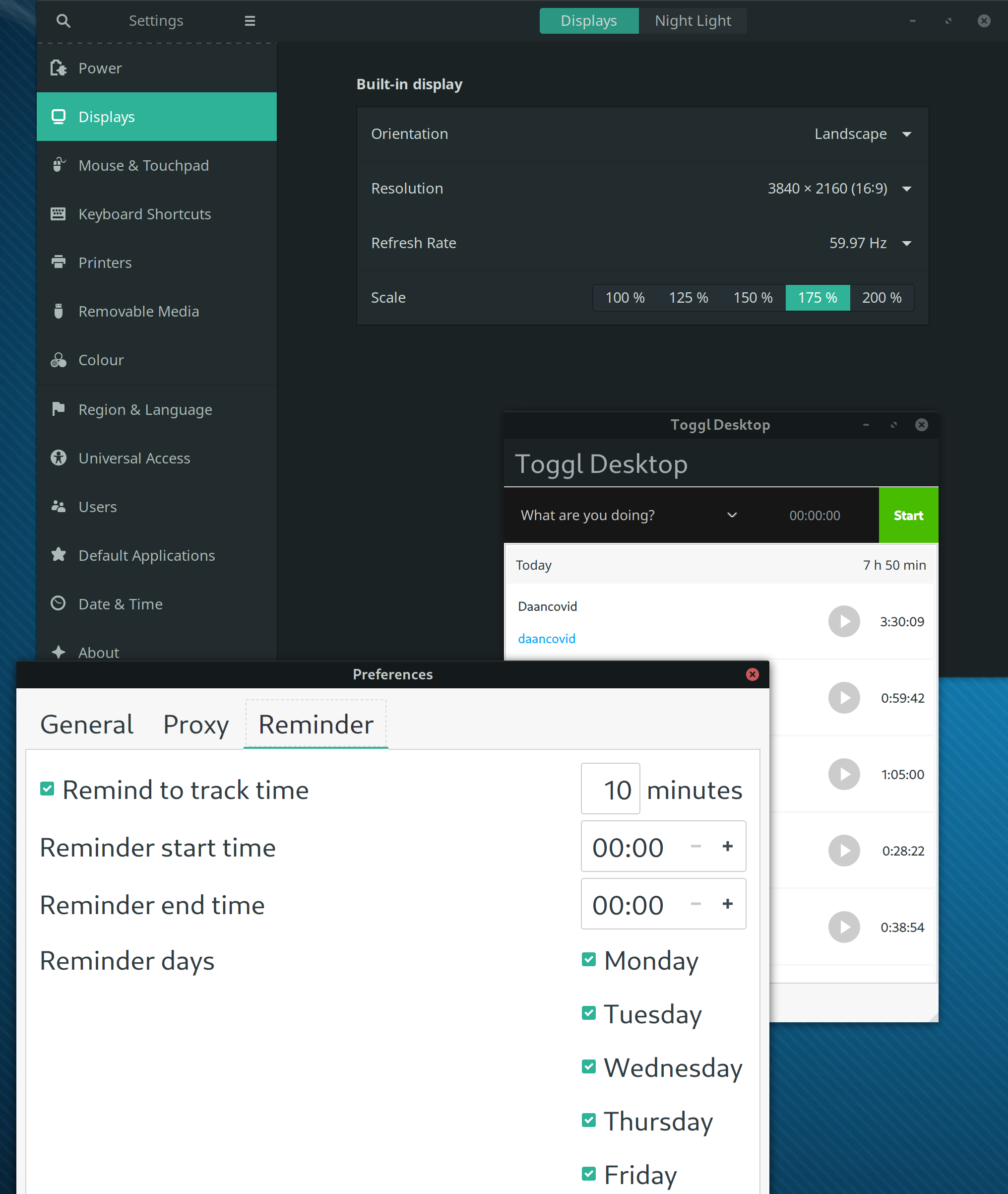
Still an issue (version 7.5.50 on gnome 3.36.2 on x11 on manjaro) - without editing .desktop file
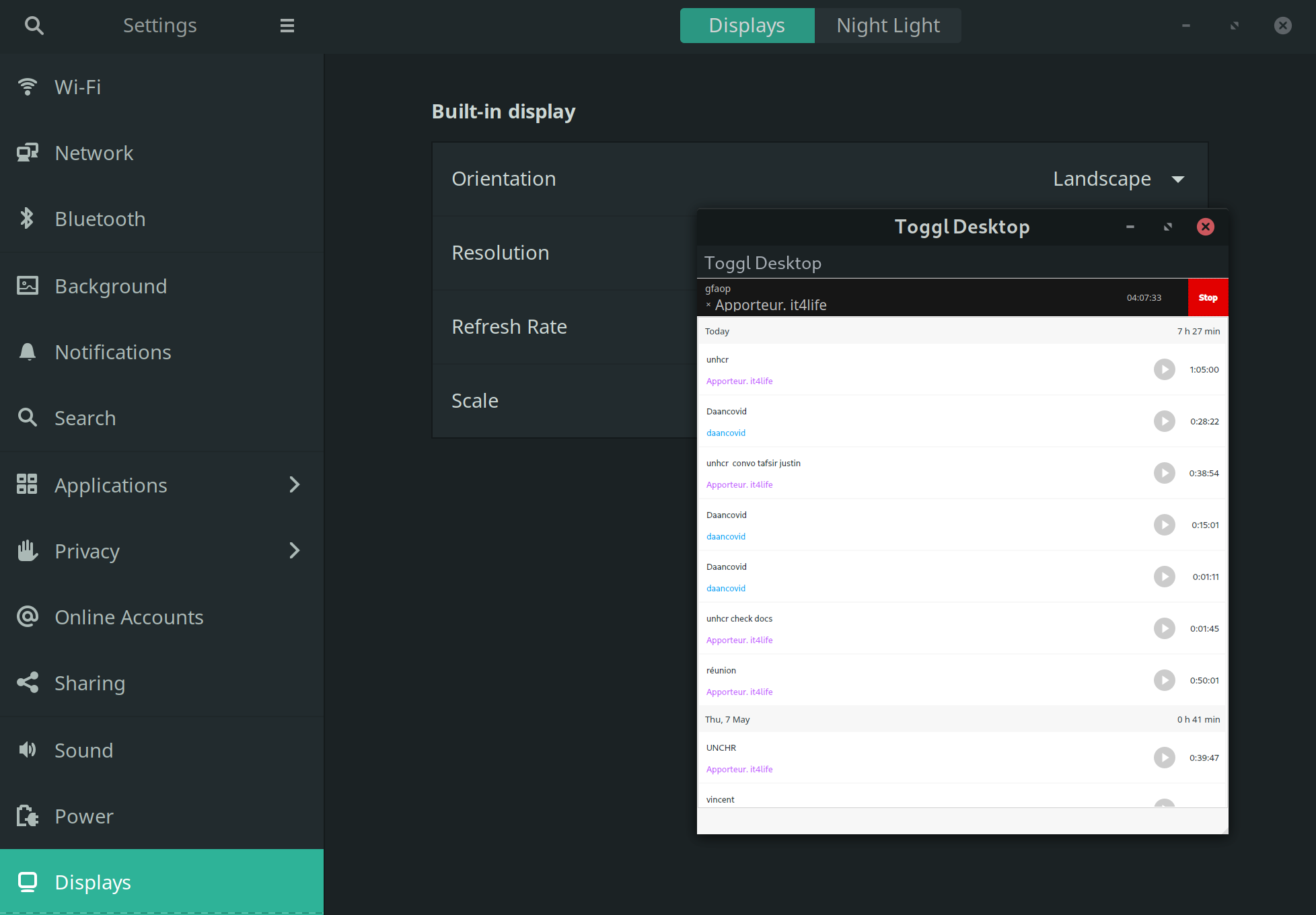
after editing .desktop file as suggested above (main UI readable but menus now too big)
 ni-ka
on 11 May 2020
ni-ka
on 11 May 2020
I'm on ArchLinux and actually managed to fix it after reading some of local comments. I modified .desktop file and injected ENV variable there.
Would be nice to have a dedicated page for this issues on a website @MartinBriza ^^ there is a lot of very useful advices in comments to this issue
@skatkov could you share your .desktop file?
ni-ka
on 2 Sep 2020
Related issues
IndrekV
·
7Comments
 shalva97
·
4Comments
shalva97
·
4Comments
 sarneeh
·
6Comments
sarneeh
·
6Comments
 ckdot
·
4Comments
ckdot
·
4Comments
 jlaw9
·
4Comments
jlaw9
·
4Comments
Most helpful comment
On Ubuntu 17.10, QT_SCALE_FACTOR didn't work for me either. This did the trick though:
export QT_DEVICE_PIXEL_RATIO=2