Toggldesktop: Unable to login on Windows Desktop App
Able to login on the toggl website just fine. Unable to login the Desktop App.
 jimmyroberts
All 24 comments
Are you using regular login (email + password) or do you login with Google?
In either case, what happens when you try to login? Does it give any error messages?
 amulware
on 23 Mar 2016
amulware
on 23 Mar 2016
It was using the regular login. The error I receive is a red banner at the
top that says, "Login failed. Are you online?"
On Wednesday, March 23, 2016, Paul Scharf [email protected] wrote:
Are you using regular login (email + password) or do you login with Google?
In either case, what happens when you try to login? Does it give any error
messages?—
You are receiving this because you authored the thread.
Reply to this email directly or view it on GitHub
https://github.com/toggl/toggldesktop/issues/1864#issuecomment-200203609
jimmyroberts
on 23 Mar 2016
Make sure Toggl Desktop is not blocked by any security software (antivirus, firewall etc) We've had reports that users needed to whitelist TogglDesktop to allow it to connect with our servers.
 IndrekV
on 23 Mar 2016
IndrekV
on 23 Mar 2016
I have the same issue and I donot have permission to change firewall setting in my company,.. How can I solve this issue?
 kickbox
on 20 May 2016
kickbox
on 20 May 2016
Hi guys,
I am facing similar problem kindly look at screenshot

 khanshakeeb
on 21 May 2016
khanshakeeb
on 21 May 2016
@khanshakeeb This error can be caused by corrupt local database. Please look at this article for instructions on how to clear local cache. https://support.toggl.com/clearing-the-local-data-from-toggl-desktop/
If the issue persists please send feedback from the app so we get more details.
IndrekV
on 23 May 2016
I have this same issue at work behind a Palo Alto firewall. I believe the issue is likely the Palo Alto device is decrypting the traffic and re-encrypting it with a certificate that my computer trusts, but Toggl does not trust. Are there any settings within Toggl that tell it to trust the certificate even if it doesn't want to?
To test this theory I installed it on a work laptop and accessed TogglDesktop on an internet only connection. This allowed me to login with no issues. When I logged out and then connected to work network, it let me login until I deleted the toggldesktop.db file and then it started giving me the "Login failed. Are you online?" message.
Edit: I just noticed that when logged in on my work network (after initially logging in off the work network), at the bottom of the window it says: "Offline, no network"
 knoxyca
on 16 Feb 2017
knoxyca
on 16 Feb 2017
I had the same issue. but I fixed it by telling it to NOT use Proxy:
Settings -> Preferences -> Proxy -> Do not use proxy -> Save
 jnunez247
on 27 Dec 2017
jnunez247
on 27 Dec 2017
https://github.com/toggl/toggldesktop/issues/1864#issuecomment-354126362
I had the same issue. but I fixed it by telling it to NOT use Proxy:
Settings -> Preferences -> Proxy -> Do not use proxy -> Save
If you can't login with Google, you can try this. It works on my machine.
 garyng
on 24 Sep 2018
garyng
on 24 Sep 2018
Closing the issue as most of the proxy bugs were fixed (#3307, #3302).
Sometimes Toggl Desktop might not be able to verify an SSL certificate, and in that case, the user can fix it by manually adding their local SSL certificate to cacert.pem for Toggl Desktop to recognize: https://github.com/toggl-open-source/toggldesktop/wiki/Getting-Toggl-Desktop-to-work-with-local-proxy.
 skel35
on 11 Mar 2020
skel35
on 11 Mar 2020
Having issues trying to connect. It was working correctly and suddenly, the app started working offline. When I try to login, the following error appears:
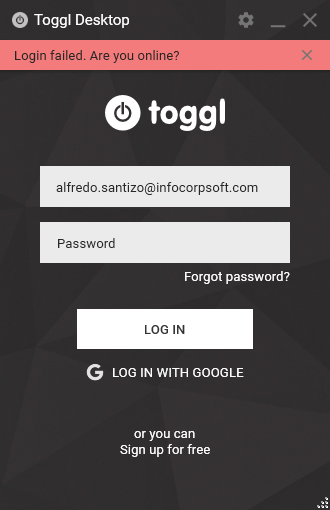
After inspecting the log file, seems like an SSL exception is not allowing the app to log me in. Any ideas?
toggldesktop.log
 netrover
on 31 May 2020
netrover
on 31 May 2020
Same issue here. It was working fine and suddenly, it is unable to connect. I even tried reinstalling the application and disabling the proxy. None of these solved the issue.
 nipunayf
on 31 May 2020
nipunayf
on 31 May 2020
Having issues trying to connect. It was working correctly and suddenly, the app started working offline. When I try to login, the following error appears:
[...]
After inspecting the log file, seems like an SSL exception is not allowing the app to log me in. Any ideas?
Exact same issue here. Yesterday the desktop app stopped syncing suddenly. I tried clearing the cache both from the menu entry and manually as per the KB, I set the preference to not use a proxy, none of these had any effect. I logged out, I can't log in again.
I am using Google to login. When I press the "LOG IN WITH GOOGLE" button, the browser shows me the correct page to select the correct Google account. When I select it, the browser window says "Received verification code. You may now close this window." and the desktop app says "Login failed. Are you online?"
Looks like someone forgot to renew a certificate?...
 FlorinI
on 31 May 2020
FlorinI
on 31 May 2020
The patched app fixes the issue.
Please download a new version of the app
64-bit: https://toggl.github.io/toggldesktop/download/windows64-stable/
32-bit: https://toggl.github.io/toggldesktop/download/windows-stable/
Most of the users can also auto-update from About view or by restarting the app.
skel35
on 31 May 2020
The patched app fixes the issue.
Please download a new version of the app
64-bit: https://toggl.github.io/toggldesktop/download/windows64-stable/
32-bit: https://toggl.github.io/toggldesktop/download/windows-stable/Most of the users can also auto-update from About view or by restarting the app.
Installed the Windows x64 version and seems to be working.
Thank you for the prompt response!
netrover
on 31 May 2020
Fixed it by selecting stable release channel instead of beta in autoupdater
 AlexanderFadeev
on 31 May 2020
AlexanderFadeev
on 31 May 2020
Same here, I lost a few days data by installing the direct link posted above
 lirankor
on 1 Jun 2020
lirankor
on 1 Jun 2020
The patched app fixes the issue.
Please download a new version of the app
64-bit: https://toggl.github.io/toggldesktop/download/windows64-stable/
32-bit: https://toggl.github.io/toggldesktop/download/windows-stable/Most of the users can also auto-update from About view or by restarting the app.
Installed the Windows x64 version and it works, all unsynced time records since last Sat are still there and synced smoothly. Thank you!!
 junzhangE3
on 1 Jun 2020
junzhangE3
on 1 Jun 2020
Same and the patched app also fixed it. New look on v7.5.162 (64-bit) is good and I love the smaller mini timer, thanks. :)
 lyno1234567
on 2 Jun 2020
lyno1234567
on 2 Jun 2020
The patched app fixes the issue.
Please download a new version of the app
64-bit: https://toggl.github.io/toggldesktop/download/windows64-stable/
32-bit: https://toggl.github.io/toggldesktop/download/windows-stable/Most of the users can also auto-update from About view or by restarting the app.
Installed 64 Bit version. Works perfect. Thanks a lot !
 kalelegs
on 2 Jun 2020
kalelegs
on 2 Jun 2020
Thanks for the fix. :)
Does anyone know, how long it usally takes, until the update is available for the Windows Store version?
 kiwirot
on 2 Jun 2020
kiwirot
on 2 Jun 2020
@kiwirot it's undergoing the Store review by Microsoft since yesterday. Their review takes "up to three business days".
skel35
on 2 Jun 2020
Now, also the Windows Store has updated my Toggl version, and it works nice and smoothly. Many thanks 😀
kiwirot
on 5 Jun 2020
I couldn't log in on the newest version. It showed the same error. Then I didn't know but somehow it recognized my network properly so I logged in. But it shows "Offline, no network" in the main UI.
I'm using a network proxy. That's unacceptable for me to not able to use a proxy. And even the "Do not use proxy" option has no effect at all.
Edit:
It seems that "Use system proxy settings" is not working. And it can't connect to where I'm living so "Do not use proxy" didn't work.
Another problem is when "Use proxy to connect Toggl" selected, the host can't be written as localhost. Changing it to 127.0.0.1 gets it to work normally.
 JiaChen-Zeng
on 2 Jan 2021
JiaChen-Zeng
on 2 Jan 2021
Related issues
 ghost
·
3Comments
ghost
·
3Comments
 danfarrow
·
7Comments
danfarrow
·
7Comments
 VeljkoTN
·
5Comments
VeljkoTN
·
5Comments
 florieger
·
5Comments
florieger
·
5Comments
 ckdot
·
4Comments
ckdot
·
4Comments
Most helpful comment
The patched app fixes the issue.
Please download a new version of the app
64-bit: https://toggl.github.io/toggldesktop/download/windows64-stable/
32-bit: https://toggl.github.io/toggldesktop/download/windows-stable/
Most of the users can also auto-update from About view or by restarting the app.