I am having a tough time trying to get #tag-style tags working properly.
Some of the tags appear without label. For example:
File1 has #tag
File2 has #tag
In the Tags-only View (for example), they appear as:
(empty label, but when clicked, goes to File1 as expected)
∨ #tag 1 (count)
#tag (when clicked goes to File2)
It should be:
∨ #tag 2
#tag (when clicked goes to File1)
#tag (when clicked goes to File2)
The matches are good (confirmed by the Output debug). I couldn't pinpoint a pattern in the files with the problem (contents/paths/multiple tags per line/etc). The same regex also works when used directly in the native editor search. I tried to include the hash in a capture/no-capture group or a lookbehind (with --pcre2), but always the same result. Again, the regex matches work elsewhere and in the Output.
I noticed that when the tag is clicked the cursor is between the first and second characters of the tag name (#t|ag) instead of at "start of todo" according to todo-tree.general.revealBehaviour. With the visible tag, it shows here (|#tag).
Any explanation? Thanks.
Windows 10
 9z0
9z0
All 17 comments
Please could you post your settings and example files, so I can try to recreate it here.
The issue might be because the file search uses ripgrep, which uses rust regexes, whereas the editor uses javascript regexss.
 Gruntfuggly
on 23 Feb 2021
Gruntfuggly
on 23 Feb 2021
I made a clean install of Code 1.53.2 with todo-tree 0.0.196.
Test1:
Folder named C:\test containing the following three files
File1.txt, File2.txt, File3.txt.
with this settings.json
{
    "todo-tree.tree.showScanModeButton": false,
    "todo-tree.general.tags": [
        "#"
    ],
    "todo-tree.regex.regex": "($TAGS)\\w+",
    "todo-tree.tree.showCountsInTree": true
}
It gave the following:
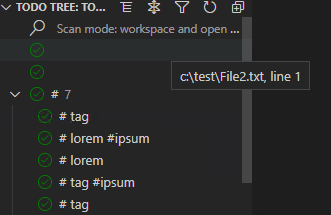
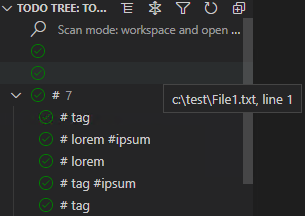
Note: when clicked, the empty rows disappeared and the (7) became a (9) (merged with the others).
Test2:
changes the three files to these:
File1.txt, File2.txt, File3.txt.
with this:
{
    "todo-tree.tree.showScanModeButton": false,
    "todo-tree.general.tags": [
        "tag",
        "ipsum",
        "lorem"

    ],
    "todo-tree.regex.regex": "#($TAGS)(?=[\\s\\r\\n])",
    "todo-tree.tree.showCountsInTree": true,
    "todo-tree.ripgrep.ripgrepArgs": "--max-columns=1000 --no-config --pcre2",
    "todo-tree.tree.labelFormat": "${tag}"
}
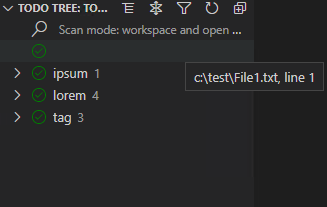
Same with "#($TAGS)(?=[\\s\\r\\n$])" to account for File2.txt
9z0
on 24 Feb 2021
The output of Test2 with only File1.txt in the folder:
00:00:12.982 Searching c:\test...
00:00:12.984 Writing pattern file:c:\Users\{snip}\AppData\Roaming\Code\User\workspaceStorage\{snip}\Gruntfuggly.todo-tree\{snip}.txt
00:00:12.985 Pattern:#(tag|lorem|ipsum)(?=[\s\r\n])
00:00:12.986 Command: "c:\{snip}\VSCode-win32-x64-1.53.2\resources\app\node_modules.asar.unpacked\vscode-ripgrep\bin\rg.exe" --no-messages --vimgrep -H --column --line-number --color never --max-columns=1000 --no-config --pcre2 -U  -f "c:\Users\{snip}\AppData\Roaming\Code\User\workspaceStorage\{snip}\Gruntfuggly.todo-tree\{snip}.txt" "c:\test"
00:00:12.997  Match (Editor):{"file":"c:\\test\\File1.txt","line":1,"column":1,"match":"#tag #lorem #ipsum"}
00:00:12.998  Match (Editor):{"file":"c:\\test\\File1.txt","line":1,"column":6,"match":"#tag #lorem #ipsum"}
00:00:12.999  Match (Editor):{"file":"c:\\test\\File1.txt","line":1,"column":13,"match":"#tag #lorem #ipsum"}
00:00:13.121 Search results:
c:\test\File1.txt:1:1:#tag #lorem #ipsum
c:\test\File1.txt:1:6:#tag #lorem #ipsum
c:\test\File1.txt:1:13:#tag #lorem #ipsum

00:00:13.137  Match (File): {"file":"c:\\test\\File1.txt","line":"1","column":"13","match":"#tag #lorem #ipsum","extraLines":[]}
00:00:13.138  Match (File): {"file":"c:\\test\\File1.txt","line":"1","column":"6","match":"#tag #lorem #ipsum","extraLines":[]}
00:00:13.138  Match (File): {"file":"c:\\test\\File1.txt","line":"1","column":"1","match":"#tag #lorem #ipsum","extraLines":[]}
00:00:13.139 Found 6 items
I also tried playing with the options like search workspace only, don't auto refresh, insensitive regex, -o for rg, etc.
9z0
on 24 Feb 2021
Hi - I think there may be a few problems here. The main one is that the ripgrep search returns the whole line that has been matched, with an offset to the start, but not the length, so the lines with multiple tags are causing issues.
The reason that they are disappearing when clicked is that the file is opened and at that point, the search is done within the editor which can then find the length of the match.
Another issue is that the using just the # without defined tags makes it harder to extract the tag properly.
Do you know what tags you want to use?
I think the way forward would be to use a regex like #($TAGS) with defined tags, e.g. ["lorem","ipsum"]. If that is a way you could use, I can make some change to improve the extraction from the line, and allow multiple tags on the same line, which isn't really a use case I had come across.
Gruntfuggly
on 28 Feb 2021
I have found a piece of code which looks wrong (from a long time ago) and removing it seems to improve things.
With these settings (and the code fix):
    "todo-tree.general.tags": [
        "lorem",
        "ipsum",
        "tag"
    ],
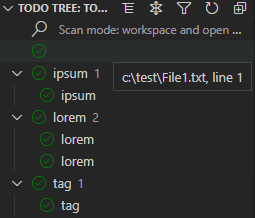
    "todo-tree.regex.regex": "#($TAGS)",
    "todo-tree.tree.labelFormat": "${tag}",
I get
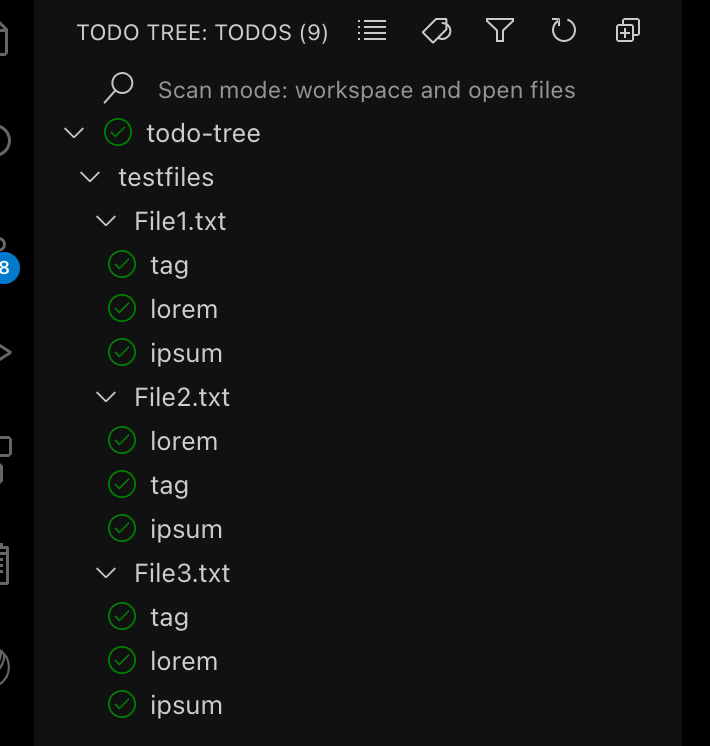
The tree is stable and clicking each one goes to the expected place in the file
Gruntfuggly
on 1 Mar 2021
I also have another fix which may help if you want to have arbitrary tags (without using "todo-tree.general.tags").
Gruntfuggly
on 1 Mar 2021
Please try the latest version (0.0.200) - I think it should now be working as expected.
Gruntfuggly
on 4 Mar 2021
Unfortunately, it is still happening as of 0.0.201 :/
9z0
on 8 Mar 2021
Could you post another screenshot please (and you current settings if they have changed at all)?
I can see that the tree reorders itself sometimes when clicking, but I think that is because the tags are on the same line and it sorts by line number only. I'll see if I can add something to sort within the line too.
Gruntfuggly
on 8 Mar 2021
OK - I found another bug in the sorting 😔 Think I need to add more unit tests for the tree code...
Gruntfuggly
on 8 Mar 2021
Assuming the jumping around was the issue, I've uploaded a new version which now sorts based on position on the line too.
Gruntfuggly
on 8 Mar 2021
I may get some other clues for a similar problem with hashtag in version 0.0.202 using Python
With the following settings,
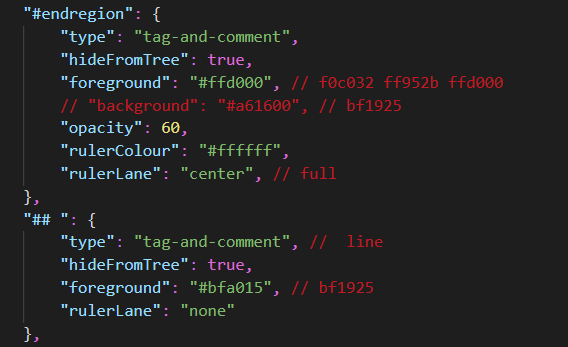
I got these in 0.0.201 and earlier versions,


which turned to those in 0.0.202


 bwnl
on 9 Mar 2021
bwnl
on 9 Mar 2021
@bwnl - Sorry, I need more context than that. If your issue is the same as @9z0 is having, then can you please post all your todo-tree settings. If it's different, please raise a new issue.
Gruntfuggly
on 9 Mar 2021
@9z0 did the latest version fix the problem? If not, please can you post your settings again.
Gruntfuggly
on 11 Mar 2021
@Gruntfuggly Thanks for the latest update, it fixed the problem I posted.
bwnl
on 12 Mar 2021
@bwnl - can you conform also please, or raise a new issue?
Gruntfuggly
on 12 Mar 2021
Sorry for the delay. Still occurs! I will post settings a bit later.
9z0
on 17 Mar 2021
Related issues
 onetrev
·
5Comments
onetrev
·
5Comments
 the-vampiire
·
6Comments
the-vampiire
·
6Comments
 rickstaa
·
5Comments
rickstaa
·
5Comments
 josbalcaen
·
5Comments
josbalcaen
·
5Comments
 emanuelenardi
·
3Comments
emanuelenardi
·
3Comments