Todo-tree: Todos in scripts without extension are not highlighted
I have some scripts without sh extension that are marked as "shell scripts" in VSCode but TODO highlighting is not working unless I rename including the sh extension.
You can reproduce this with these steps:
- create new file
- mark it as shell script or python etc…
- insert some todo (highlighting at this point works)
- save without extension (highlighting stops working)
Also the TODOs are listed fine in the tree view, but sometimes I have to hit refresh manually
 xbb
xbb
All 16 comments
Could you post your todo-tree settings? When I try this, the TODO is highlighted, but not by the extension, which makes things confusing.
 Gruntfuggly
on 4 Aug 2020
Gruntfuggly
on 4 Aug 2020
Thanks, these are my settings:
{
    "todo-tree.highlights.enabled":true,
    "todo-tree.tree.showCountsInTree":true,
    "todo-tree.tree.showScanModeButton":true,
    "todo-tree.highlights.highlightDelay":200,
    "todo-tree.regex.regexCaseSensitive":false,
    "todo-tree.highlights.defaultHighlight":{
        "type":"line",
        "background":"#000",
        "foreground":"#0a0"
    },
    "todo-tree.general.tags":[
        "BUG",
        "HACK",
        "FIXME",
        "TODO",
        "XXX",
        "@TODO"
    ]
}
Just found out if I enable "todo-tree.filtering.includeHiddenFiles" it works.
If I disable it again it stops working after I reload the file.
xbb
on 4 Aug 2020
I can't reproduce it - it seems to work correctly for me.
What OS are you using? Also, could you have a look in the developer console (Help -> Toggle Developer Tools) and see if there are any errors?
Gruntfuggly
on 4 Aug 2020
No errors in the console, but I think I found something else.
I tested both in Windows and WSL (via the remote editing feature).
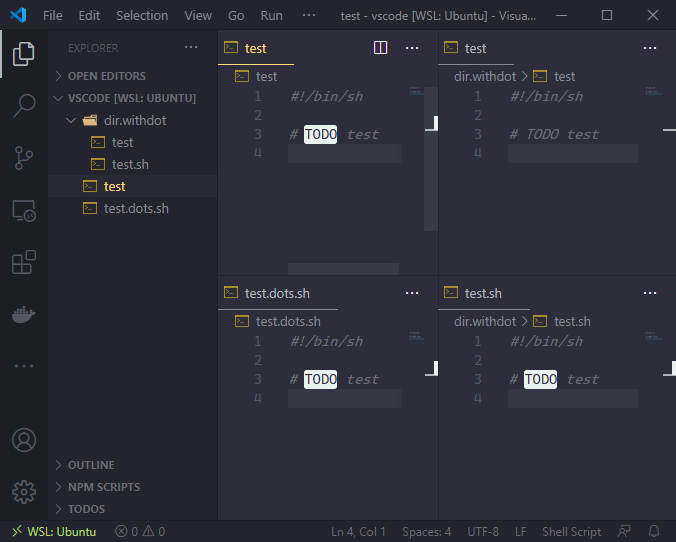
My username in Windows contains a dot… so I tested in another path and found out that it fails when the file is contained in a folder with at least a dot in the name
xbb
on 4 Aug 2020
Could you give me an exact example with username, folder name and file name. I don't have easy access to a windows machine, so it won't be very easy for me to test this unfortunately.
Also, please could you enable todo-tree.general.debug and then post the contents of the debug log from the Output Panel (select Todo Tree from the drop down).
Gruntfuggly
on 4 Aug 2020
Just in case I spun up a container with a clean environment:
- Ubuntu 20.04
- VSCode with only Todo Tree extension
You can reproduce it with:
- Create new file
#!/bin/sh

# TODO test
- Save it as shell script in: /tmp/dir/testfile
- Notice it works ok
- Save the same file in: /tmp/dir.with.dots/testfile
- Notice highlight stops working
- Enable "todo-tree.filtering.includeHiddenFiles"
- Notice highlight now works also for the file in
dir.with.dots
With the debug log enabled there is no output when there is no highlight
xbb
on 4 Aug 2020
Thats brilliant - thank you. I'll take a look this evening.
Gruntfuggly
on 4 Aug 2020
OK - I have a fix.
Gruntfuggly
on 5 Aug 2020
Should be fixed in the latest version. Please let me know if it's working.
Gruntfuggly
on 1 Oct 2020
Thank you.
It seems not working still with "includeHiddenFiles" disabled. (version v0.0.181)
xbb
on 1 Oct 2020
Hmm. OK - I had to do some rebasing - maybe I lost the change again. I'll see if I can find it.
Gruntfuggly
on 1 Oct 2020
Doh! Yes, it didn't get included. I'll add it to the next version, which should be pretty soon.
Gruntfuggly
on 1 Oct 2020
Okay thanks! I will let you know when I test it
xbb
on 1 Oct 2020
OK - latest version (182) should now include the fix. Thanks for your patience!
Gruntfuggly
on 3 Oct 2020
It's working fine now. Thank you!
xbb
on 5 Oct 2020
Related issues
 ghost
·
7Comments
ghost
·
7Comments
 the-vampiire
·
6Comments
the-vampiire
·
6Comments
 Cloud7050
·
9Comments
Cloud7050
·
9Comments
 fheinicke
·
6Comments
fheinicke
·
6Comments
 diminutivesloop
·
5Comments
diminutivesloop
·
5Comments