Todo-tree: Highlight keywords with more options
It‘s nice to have the option now to highlight specific keywords in files with colours but it would be nice to have some more options for the keywords like in https://github.com/wayou/vscode-todo-highlight.
I thought about something like that:
"todo-tree.keywords": [
  {
    "keyword": "TODO",
    "color": "#FFF",
    "backgroundColor": "#f44336",
    "icon": "check",
    "iconColor": "#f44336",
    "isWholeLine": false,
    "isActive": true
  }
]
 muuvmuuv
All 39 comments
While I agree it would be nice, some of those options wouldn't be trivial to implement.
Currently the foreground colour is determined from the background colour with an algorithm, but manually specifying it is a definite possibility.
The icon itself is difficult unfortunately, especially as applying the colour to the icon effectively modifies the icon file.
Highlighting the whole line should be fairly easy though.
I'll see what I can do...
 Gruntfuggly
on 12 Jul 2018
Gruntfuggly
on 12 Jul 2018
👍 nice.
Tip for the icon: Make the option a select option, so the user can just select between (let's say) 5 options and append them as simple inline SVG that can easily be styled with CSS.
muuvmuuv
on 12 Jul 2018
Unfortunately, there's no API for a select option (as far as I know), and you can't style them with CSS - the icons are loaded from the resources. To create custom colours, it creates a new icon on the fly, which is OK for the current icon, but would be difficult with user specified icons.
Do you have any icons you would like to use?
Gruntfuggly
on 12 Jul 2018
Ah okay. But I think you can give them options, like in this demo: https://code.visualstudio.com/docs/extensionAPI/extension-points#_example.
So VSCode loads the SVG as a file not appending the file content, right? Maybe that can be changed? We could ask the VSCode team about a solution for that.
I would like to see those icons: https://octicons.github.com/ with a circle around them (for better reading in the explorer). Or just a few of them. So I‘ll faster recognise TODOs vs ERRORs.
muuvmuuv
on 12 Jul 2018
You can specify an enumeration for the setting, but it's still effectively a list of strings - there's no way to make it a drop down. It's possible they might add it in the new settings GUI at some point but last time I tried it, for an enumerated setting it dropped out to editing the settings file manually again.
Did you know that you can set TODOs and ERRORs as different colours already though?
Gruntfuggly
on 12 Jul 2018
I've just found there's a node package which provides access to the octicons - that might allow me to add them on the fly. That would certainly add a few more options for icons... will see what I can do with it.
Gruntfuggly
on 12 Jul 2018
Yeah, I already know that. And yes there is a "drop-down" when you are in the settings page (not the new GUI) then hover with the mouse over the left bar and when the edit icon appears to click on it, some options will have multiple options instead of just "copy to settings".
muuvmuuv
on 12 Jul 2018
OK - I'll try adding the octicon list as an option.
Gruntfuggly
on 12 Jul 2018
OK - so I've got it working so you can use an octicon for the icon. At the moment, you have to manually edit the name in the configuration, e.g.
todo-tree.icons: {
"TODO": "check",
"FIXME": "bug"
}
but that gives you access to the entire set.
Try the latest version and let me know what you think.
Gruntfuggly
on 12 Jul 2018
I was thinking about the dropdown for the config setting, but I think that only works when the item is at the top level of the configuration.
Gruntfuggly
on 12 Jul 2018
Great! I‘ll test it later, thanks!
muuvmuuv
on 13 Jul 2018
Looks good! I'm looking forward to seeing the rest of my ideas for future updates. Great work! 🎉
muuvmuuv
on 30 Jul 2018
@muuvmuuv if you need a more advanced highlighter I think you might find using Highlight more appropriate than using this extension's build-in highlighter or TODO Highlight.
 fabiospampinato
on 4 Aug 2018
fabiospampinato
on 4 Aug 2018
Could there possibly be an integration between Highlight and Todo-Tree? I like using Highlight for annotating text but Todo-Tree provides a really nice overview in the sidebar.
 ghost
on 5 Aug 2018
ghost
on 5 Aug 2018
@fabiospampinato thanks! But as I mentioned in another comment: I dont want to use two and more plugins to archive sonething that can be integrated in one allready nice plugin.
@nealot thats what @Gruntfuggly and I talked about in the issue. This can be THE todo plugin for VSCode with some work. Feel free to contribute!
Sent with GitHawk
muuvmuuv
on 5 Aug 2018
Could there possibly be an integration between Highlight and Todo-Tree?
Highlight will continue to be a standalone extension, but @Gruntfuggly could just copy its code into this extension if he wanted to.
But as I mentioned in another comment: I dont want to use two and more plugins to archive sonething that can be integrated in one allready nice plugin.
IMHO the opposite is generally a better approach, maybe the reason why TODO Highlight is not so good is because it's not focused on doing only one thing. It highlights text and it finds todos, none of the two are implemented in a particularly powerful or flexible way.
fabiospampinato
on 5 Aug 2018
@nealot Did you know that todo-tree does highlights too? It's just not on by default (change todo-tree.highlight to true) as I assumed a lot of people would be using one of the other highlighting extensions as @fabiospampinato says - because they might provide more functionality. However, due to @muuvmuuv I added a few extra features to this one so it might do everything you need already... 8-)
Gruntfuggly
on 5 Aug 2018
Thanks, @fabiospampinato, but I prefer to use one plugin instead of multiple to have the same functionality. It should not hard to implement as other has this function already.
muuvmuuv
on 6 Aug 2018
@nealot I got an email reply to this thread, but the reply doesn't seem to be here? The delay before highlighting is configurable if you want it a bit quicker, but to be honest you're probably better off just using both extensions...
Gruntfuggly
on 10 Aug 2018
I've just uploaded a new version where you can set the highlight to "none", "tag", "text" or "line".
Gruntfuggly
on 22 Aug 2018
@Gruntfuggly , I must thank you for this beautiful extension.
Even with the new option, highlighting is not very flexible. I need the tags to be highlighted but in a way that does not distract from the main job, like vscode-comment-anchors does:
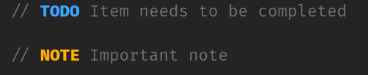
...and this is configurable:
"commentAnchors.tags": [
{
"tag": "ANCHOR",
"iconColor": "default",
"highlightColor": "#A8C023"
}
]
however, it lacks the polished interface that your extension has.
Something like that in todo-tree would be great!
 aMarCruz
on 30 Aug 2018
aMarCruz
on 30 Aug 2018
Do you mean highlighting just the foreground and no background colour?
Looks like I should modify the configuration format as @muuvmuuv originally suggested :grin:
Gruntfuggly
on 30 Aug 2018
@Gruntfuggly yes, just the tag without the background, maybe as an option.
aMarCruz
on 30 Aug 2018
@Gruntfuggly users love options 😁 Maybe make use of regex patterns that the user can specify by its own which group has which colour, like this plugin does it: https://github.com/fabiospampinato/vscode-highlight
{
"todo-tree.keywords": [
{
"isActive": true,
"icon": "check",
"iconColor": "#f44336",
"regex": {
"patter": "((?:<!-- *)?(?:#|//|/\\*+|<!--) *(?:TODO|NOTE|HINT):?)(?!\\w)((?: +[^@\n]+?)(?= *(?:[^:]//|/\\*+|<!--|@))|(?: +[^@\n]+)?)",
"style": [
{
"overviewRulerColor": "#FFD633",
"backgroundColor": "#FFD633",
"color": "#1f1f1f",
"fontWeight": "bold"
}, {
"backgroundColor": "#E6C12E",
"color": "#1f1f1f"
}
]
}
}
]
}
or simplify it:
{
"todo-tree.keywords": [
{
"isActive": true,
"icon": "check",
"iconColor": "#f44336",
"keywords": "TODO", // or ["TODO", "FIXME"]
"keywordsColor": "#1f1f1f",
"keywordsBackground": "#FFD633",
"textColor": "#1f1f1f",
"textBackground": "#E6C12E"
}
]
}
Don't forget that this extension is primarily about find the TODOs in the files, not highlighting them - so the regex really needs to take that into consideration first.
However, I agree that more options for highlights would be useful - I should never have started! :laughing:
I'll add an alternative configuration for the highlights along these lines:
todo-tree.highlight: {
   "TODO": {
     "foreground": "#rgb",
     "background": "#rgb",
     "icon": "check",
     "style": "..."        (tag, text or line)
   },
   "FIXME": {
     etc...
   }
}
I think it's probably simpler to use the foreground colour for the icon and ruler marker. I think if you want even more options, then you're better off using other extensions which are focused on highlighting. :smile:
Also, I don't think the "active" is necessary - you can just comment out the rules you don't want.
Gruntfuggly
on 30 Aug 2018
@Gruntfuggly , I like it.
Although I would include a "default" option for tags that do not have their own style and/or to not repeat them in each tag.
// assume we are using "TODO", "FIXME", "HACK", then...
todo-tree.defaults: {
    "foreground": "#3366ff",
    "background": "transparent",
    "icon": "check",
    "style": "tag"
},
todo-tree.highlight: {
    // TODO icon is "check" and highlights with no background
   "TODO": {
     "foreground": "#00ff00",
     "style": "line"
   },
    // FIXME only changes colour
   "FIXME": {
      foreground: "#ff0000"
   }
   // and HACK have the "default" settings
}
Yes, that would be sensible.
Gruntfuggly
on 30 Aug 2018
I've just uploaded a new version which supports defaultHighlight and customHighlight.
It should attempt to automatically set up the new configuration based on your old config settings.
Let me know how you get on. 😄
Gruntfuggly
on 2 Sep 2018
@Gruntfuggly ooOOH..

It does not support "transparent" :( and I need to adjust one or two colors, but otherwise it is super :exclamation::exclamation:
:thumbsup: :clap:
Thanks for your great work.
aMarCruz
on 2 Sep 2018
The original colours are what worked quite well for me - I use a black background.
How should transparent work? Do you just mean no colour?
Gruntfuggly
on 2 Sep 2018
@Gruntfuggly , no color.
I prefer discreet pastel colors, it distracts me less.
aMarCruz
on 2 Sep 2018
If you don't set "background" it should be transparent. If, not can you post your config so I can try it.
Gruntfuggly
on 2 Sep 2018
hehehe you're right, I made the adjust to that and some colors and now it is perfect!
aMarCruz
on 2 Sep 2018
Btw: The previous version the tree was not updated automatically, in this one that issue was corrected... this is a plus :+1:
aMarCruz
on 2 Sep 2018
Yes - there was a small bug. I hadn't tested what happens if a tag isn't defined in the customHighlight. :smirk:
Gruntfuggly
on 2 Sep 2018
Tested, everything is OK, the tag is shown with the defaults.
aMarCruz
on 2 Sep 2018
As we have more options now – enough to have a perfectly useable todo tool – I'll close this issue.
muuvmuuv
on 3 Sep 2018
If you don't set "background" it should be transparent. If, not can you post your config so I can try it.
Took me a while to sort it out but this only works if you specify a foreground colour:
"todo-tree.highlights.defaultHighlight": {
        "iconColour": "blue"
    },
The above still shows a dark grey background, but the following has a transparent background:
"todo-tree.highlights.defaultHighlight": {
        "iconColour": "blue",
        "foreground": "blue"
    },
 jonjonw
on 16 Dec 2020
jonjonw
on 16 Dec 2020
Yes, that's because there is a default "default", which is black on white. You can also hide the background by setting it's alpha to zero, e.g.
"todo-tree.highlights.defaultHighlight": {
        "background": "#00000000"
    },
Related issues
 onetrev
·
5Comments
onetrev
·
5Comments
 rickstaa
·
5Comments
rickstaa
·
5Comments
 bitjson
·
7Comments
bitjson
·
7Comments
 fheinicke
·
6Comments
fheinicke
·
6Comments
 diminutivesloop
·
5Comments
diminutivesloop
·
5Comments
Most helpful comment
Don't forget that this extension is primarily about find the TODOs in the files, not highlighting them - so the regex really needs to take that into consideration first.
However, I agree that more options for highlights would be useful - I should never have started! :laughing:
I'll add an alternative configuration for the highlights along these lines:
I think it's probably simpler to use the foreground colour for the icon and ruler marker. I think if you want even more options, then you're better off using other extensions which are focused on highlighting. :smile:
Also, I don't think the "active" is necessary - you can just comment out the rules you don't want.