Describe the problem
When loading a save file, a pop-up appears.
In case of construct roads, they are not placed on terrain.
They are just placed regardless of terrain.
And the error disappears after unsubscribing TM:PE
Steps to reproduce
- Just occurs after loading.
3.
Log files
Savegame?
https://steamcommunity.com/sharedfiles/filedetails/?id=2102058397
Screenshots?
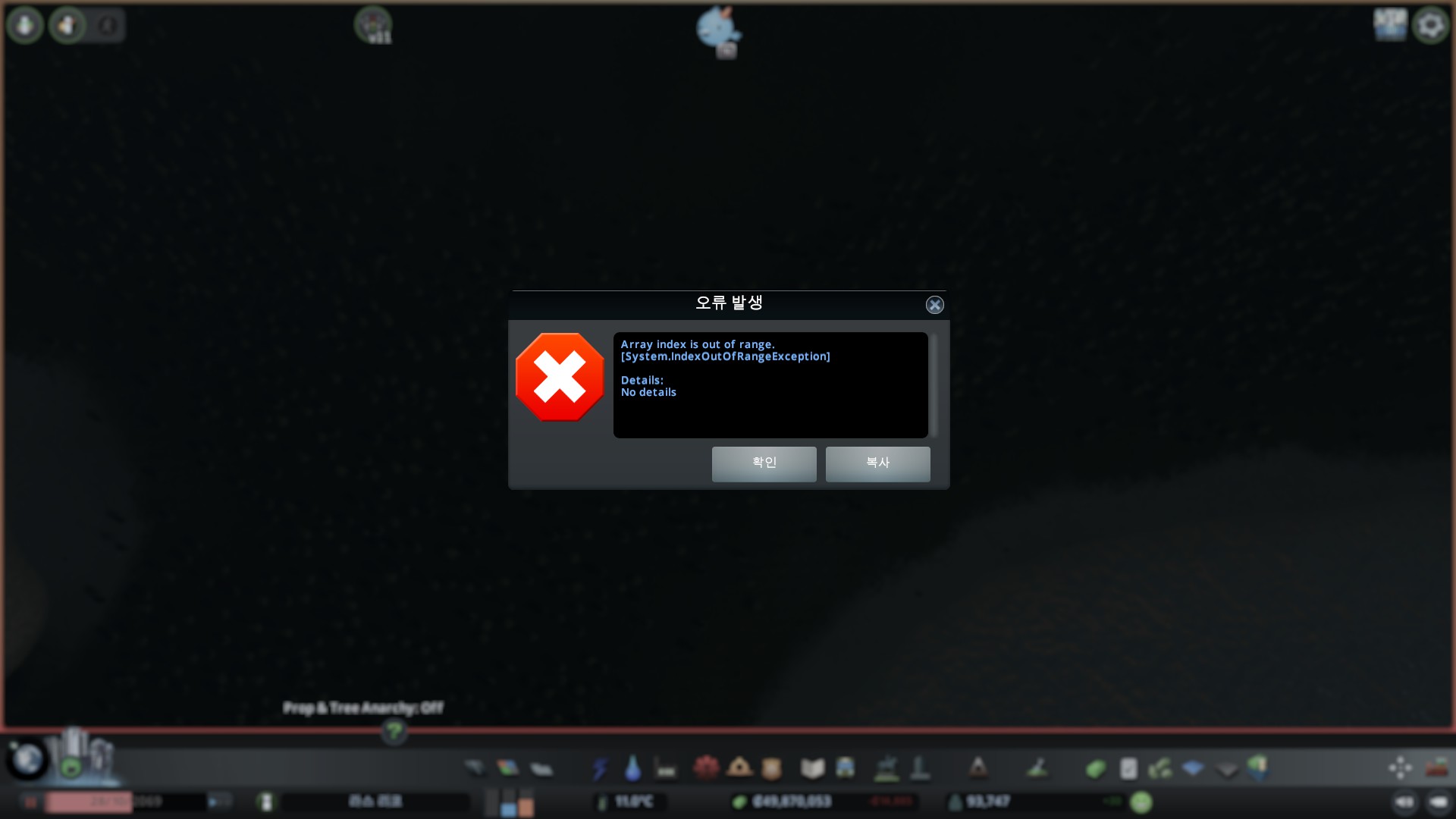
Notes or questions?
 blackeva8
All 5 comments
What other mods do you have? Why do you think this is caused by TMPE ?
 kianzarrin
on 19 May 2020
kianzarrin
on 19 May 2020
What other mods do you have? Why do you think this is caused by TMPE ?
I am using mods below.
Surface Painter
81 Tiles (Fixed for C:S 1.2+)
Building Anarchy
Network Extensions 2
Network Tiling
Extra Landscaping Tools
Extra Train Station Tracks
Advanced Stop Selection
Metro Overhaul
Prop Line Tool
Klyte's Fine Road Anarchy 2.0.2
Klyte's Fine Road Tool 2.0.4
Improved Public Transport 2 [r5.0.3]
Loading Screen Mod
Precision Engineering
Automatic Bulldoze (v3.0.7406.37321)
Prop & Tree Anarchy
Prop Snapping
Prop Precision 1.0.1
TM:PE 11.3.2 STABLE
Harmony 2.0.0.9
Random Tree Rotation
Quay Anarchy
Prefab Hook
More Network Stuff
RICO Revisited 2.0.3
Auto Repair
Lifecycle Rebalance Revisited v1.3.7
Move It 2.7.2
I found that the error was gone when I inactivated TM:PE.
I am not sure TM:PE is the cause of the problem
but I think TM:PE is related to the problem.
blackeva8
on 19 May 2020
Remove Building Anarchy mod.
https://github.com/CitiesSkylinesMods/TMPE/wiki/Array-Index---Symptom-10
Simulation error: Array index is out of range.
  at TerrainModify.ApplyQuad (Vector3 a, Vector3 b, Vector3 c, Vector3 d, Edges edges, Heights heights, System.Single[] heightArray) [0x00000] in <filename unknown>:0
  at TerrainModify.ApplyQuad (Vector3 a, Vector3 b, Vector3 c, Vector3 d, Edges edges, Heights heights, Surface surface) [0x00000] in <filename unknown>:0
  at Building.TerrainUpdated (.BuildingInfo info, UInt16 buildingID, Vector3 position, Single angle, Int32 width, Int32 length, Single minX, Single minZ, Single maxX, Single maxZ, Boolean collapsed) [0x00000] in <filename unknown>:0
  at Building.TerrainUpdated (UInt16 buildingID, Single minX, Single minZ, Single maxX, Single maxZ) [0x00000] in <filename unknown>:0
  at BuildingManager.TerrainUpdated (.TerrainArea heightArea, .TerrainArea surfaceArea, .TerrainArea zoneArea) [0x00000] in <filename unknown>:0
  at TerrainManager.Managers_TerrainUpdated (.TerrainArea heightArea, .TerrainArea surfaceArea, .TerrainArea zoneArea) [0x00000] in <filename unknown>:0
  at TerrainModify.UpdateAreaImplementation () [0x00000] in <filename unknown>:0
  at TerrainModify.UpdateArea (Int32 minX, Int32 minZ, Int32 maxX, Int32 maxZ, Boolean heights, Boolean surface, Boolean zones) [0x00000] in <filename unknown>:0
  at TerrainModify.UpdateArea (Single minX, Single minZ, Single maxX, Single maxZ, Boolean heights, Boolean surface, Boolean zones) [0x00000] in <filename unknown>:0
  at Building.UpdateBuilding (UInt16 buildingID) [0x00000] in <filename unknown>:0
  at BuildingManager.SimulationStepImpl (Int32 subStep) [0x00000] in <filename unknown>:0
  at SimulationManagerBase`2[Manager,Properties].SimulationStep (Int32 subStep) [0x00000] in <filename unknown>:0
  at BuildingManager.ISimulationManager.SimulationStep (Int32 subStep) [0x00000] in <filename unknown>:0
  at SimulationManager.SimulationStep () [0x00000] in <filename unknown>:0
  at SimulationManager.SimulationThread () [0x00000] in <filename unknown>:0   [Core]
 aubergine10
on 20 May 2020
aubergine10
on 20 May 2020
YES. It worked.
removing Building Anarchy was the answer.
thanks
A little inconvenience, but my city is saved.
blackeva8
on 20 May 2020
Plop the Growables might be a viable alternative.
aubergine10
on 21 May 2020
Related issues
aubergine10
·
5Comments
 Sayanel01
·
4Comments
kianzarrin
·
3Comments
aubergine10
·
3Comments
aubergine10
·
6Comments
Sayanel01
·
4Comments
kianzarrin
·
3Comments
aubergine10
·
3Comments
aubergine10
·
6Comments