Tm1py: Issue with data WRITE back to a cube
Hi All,
I am new to tm1py, however I`ve been facing difficulties to write data back to planning analytics cube using CSV file as a source.
Below is the simple code used in jupyter notebook:
import pandas as pd
from TM1py import TM1Service
from TM1py.Utils.Utils import build_cellset_from_pandas_dataframe
with TM1Service( base_url='xxx',user="xxxx", namespace="LDAP", password="xxxx",ssl=True, verify=True, async_requests_mode=True) as tm1:

 df = pd.read_csv("Test.csv")
cellset = build_cellset_from_pandas_dataframe(df)
tm1.cubes.cells.write_values(cube_name="Cube", cellset_as_dict=cellset)
Version
- TM1py [1.6.0]
code fails with below error message, could you please help with this error.
AttributeError Traceback (most recent call last)
8 async_requests_mode=True) as tm1:
9 df = pd.read_csv("Test.csv")
---> 10 cellset = build_cellset_from_pandas_dataframe(df)
11 tm1.cubes.cells.write_values(
12 cube_name="Profit and Loss-Forecast",
c:\python\python 3.9.1\lib\site-packages\TM1py\Utils\Utils.py in wrapper(self, args, *kwargs)
50 try:
51 import pandas
---> 52 return func(self, args, *kwargs)
53 except ImportError:
54 raise ImportError(f"Function '{func.__name__}' requires pandas")
c:\python\python 3.9.1\lib\site-packages\TM1py\Utils\Utils.py in build_cellset_from_pandas_dataframe(df)
524 split = df.to_numpy().tolist()
525 for row in split:
--> 526 cellset[tuple(row[0:-1])] = row[-1]
527 return cellset
528
c:\python\python 3.9.1\lib\site-packages\TM1py\Utils\Utils.py in __setitem__(self, key, value)
680 # Use the adjusted cased key for lookups, but store the actual
681 # key alongside the value.
--> 682 self._store[tuple([lower_and_drop_spaces(item) for item in key])] = (key, value)
683
684 def __getitem__(self, key):
c:\python\python 3.9.1\lib\site-packages\TM1py\Utils\Utils.py in
680 # Use the adjusted cased key for lookups, but store the actual
681 # key alongside the value.
--> 682 self._store[tuple([lower_and_drop_spaces(item) for item in key])] = (key, value)
683
684 def __getitem__(self, key):
c:\python\python 3.9.1\lib\site-packages\TM1py\Utils\Utils.py in lower_and_drop_spaces(item)
529
530 def lower_and_drop_spaces(item: str) -> str:
--> 531 return item.replace(" ", "").lower()
532
533
AttributeError: 'int' object has no attribute 'replace'
 ards14
All 10 comments
Hi @ards14,
I think the issue with your sample is that some columns in your data frame are integers and build_cellset_from_pandas_dataframe requires all columns to be strings, except for the last column (that should contain the value).
Here is a sample that you can use as a reference
import pandas as pd

from TM1py.Utils import build_cellset_from_pandas_dataframe

df = pd.DataFrame({
    'd1': ['e1', 'e1', 'e1'],
    'd2': ['e1', 'e2', 'e3'],
    'value': [1, 2, 3]})

cells = build_cellset_from_pandas_dataframe(df)

print(cells)
{('e1', 'e1'): 1, ('e1', 'e2'): 2, ('e1', 'e3'): 3}
import pandas as pd

from TM1py.Services.TM1Service import TM1Service
from TM1py.Utils import build_cellset_from_pandas_dataframe

df = pd.DataFrame({
    'd1': ['e1', 'e1', 'e1'],
    'd2': ['e1', 'e2', 'e3'],
    'value': [1, 2, 3]})

cells = build_cellset_from_pandas_dataframe(df)

with TM1Service(address="", port=12354, ssl=True, user="admin", password="apple") as tm1:
    tm1.cells.write(cube_name='c1', cellset_as_dict=cells)
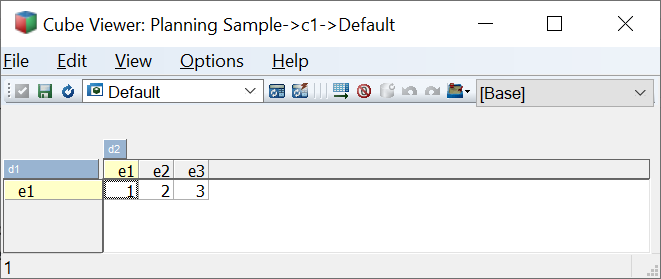
To change the type of a pandas data frame column you can do this
df['A'] = df['A'].apply(str)
In TM1py 1.6 we introduce a function that takes a data frame as an argument so that you don't have to "transform" it yourself.
This could make your code a bit easier I guess.
import pandas as pd

from TM1py.Services.TM1Service import TM1Service

df = pd.DataFrame({
    'd1': ['e1', 'e1', 'e1'],
    'd2': ['e1', 'e2', 'e3'],
    'value': [1, 2, 3]})

with TM1Service(address="", port=12354, ssl=True, user="admin", password="apple") as tm1:
    tm1.cells.write_dataframe(cube_name='c1', data=df)
 MariusWirtz
on 11 Feb 2021
MariusWirtz
on 11 Feb 2021
Hi Marius,
Thanks for the detailed explanation. I modified all the INT columns and tried to push data.
Here is my modified sample:
with TM1Service( base_url='xxx',user="xxxx", namespace="LDAP", password="xxxx",ssl=True, verify=True, async_requests_mode=True) as tm1:
df = pd.read_csv("Test.csv")
df['d1'] = df['d1'].apply(str)
df['d2'] = df['d2].apply(str)
df['d3'] = df['d3'].apply(str)
cellset = build_cellset_from_pandas_dataframe(df)
tm1.cells.write(cube_name='Profit and Loss-Forecast', cellset_as_dict=cellset)
However i am still getting below error, Non-Interactive user i am using has Admin access but couldn't Write data to cube.
TM1pyRestException Traceback (most recent call last)
21
22 cellset = build_cellset_from_pandas_dataframe(df)
---> 23 tm1.cells.write(cube_name='xxxx', cellset_as_dict=cellset)
24
25
c:\python\python 3.9.1\lib\site-packages\TM1py\Services\CellService.py in write(self, cube_name, cellset_as_dict, dimensions, increment, deactivate_transaction_log, reactivate_transaction_log, sandbox_name, use_ti, use_changeset, *kwargs)
428
429 if not dimensions:
--> 430 dimensions = self.get_dimension_names_for_writing(cube_name=cube_name, *kwargs)
431
432 values = []
c:\python\python 3.9.1\lib\site-packages\TM1py\Services\CellService.py in get_dimension_names_for_writing(self, cube_name, *kwargs)
323 from TM1py.Services import CubeService
324 cube_service = CubeService(self._rest)
--> 325 dimensions = cube_service.get_dimension_names(cube_name, True, *kwargs)
326 return dimensions
327
c:\python\python 3.9.1\lib\site-packages\TM1py\Services\CubeService.py in get_dimension_names(self, cube_name, skip_sandbox_dimension, *kwargs)
181 """
182 url = format_url("/api/v1/Cubes('{}')/Dimensions?$select=Name", cube_name)
--> 183 response = self._rest.GET(url, *kwargs)
184 dimension_names = [element['Name'] for element in response.json()['value']]
185 if skip_sandbox_dimension and dimension_names[0] == CellService.SANDBOX_DIMENSION:
c:\python\python 3.9.1\lib\site-packages\TM1py\Services\RestService.py in wrapper(self, url, data, encoding, async_requests_mode, *kwargs)
56 kwargs['headers'] = http_headers
57 response = func(self, url, data, *kwargs)
---> 58 self.verify_response(response=response)
59
60 if 'Location' not in response.headers or "'" not in response.headers['Location']:
c:\python\python 3.9.1\lib\site-packages\TM1py\Services\RestService.py in verify_response(response)
434 """
435 if not response.ok:
--> 436 raise TM1pyRestException(response.text,
437 status_code=response.status_code,
438 reason=response.reason,
TM1pyRestException: Text: '' - Status Code: 401 - Reason: 'Unauthorized' - Headers: {'Date': 'Fri, 12 Feb 2021 12:17:11 GMT', 'Server': 'Apache', 'Strict-Transport-Security': 'max-age=31536000; includeSubdomains, max-age=31536000; includeSubdomains', 'Content-Type': 'text/plain', 'Content-Length': '0', 'OData-Version': '4.0', 'WWW-Authenticate': 'CAMPassport https://xxxxx.planning-analytics.ibmcloud.com/ibmcognos/cgi-bin/cognosisapi.dll, CAMNamespace', 'Set-Cookie': 'TM1SessionId=MzWmbFqOKH5cplpUh7LDNy52n2A; Path=/tm1/api/xxxx/; HttpOnly; Secure', 'X-Content-Type-Options': 'nosniff', 'Keep-Alive': 'timeout=5, max=100', 'Connection': 'Keep-Alive'}
ards14
on 12 Feb 2021
Just a shot in the dark, but could it be that your code is not indented correctly?
At the end of the with section, TM1py will disconnect close the connection. So all the code that is interacting with TM1 must be inside the with indentation.
Like this would fail:
import pandas as pd

from TM1py.Services.TM1Service import TM1Service
from TM1py.Utils import build_cellset_from_pandas_dataframe

df = pd.DataFrame({
    'd1': ['e1', 'e1', 'e1'],
    'd2': ['e1', 'e2', 'e3'],
    'value': [1, 2, 3]})

cells = build_cellset_from_pandas_dataframe(df)

with TM1Service(address="", port=12354, ssl=True, user="admin", password="apple") as tm1:
    pass
tm1.cells.write(cube_name='c1', cellset_as_dict=cells)
Hi Marius,
Thanks for the quick response. I have modified my sample code to check if issue is due to indentation, seems like code is properly indented, print statement works fine.
WRITE operation failed with 401 - 'Unauthorized ' error message.
with TM1Service(
     base_url='https://xxx.planning-analytics.ibmcloud.com/tm1/api/xxx/',
      user="xxx",
     namespace="LDAP",
     password="xxx",
     ssl=True,
      verify=True,
    async_requests_mode=True) as tm1:
    df = pd.read_csv("Test.csv")
df['d1'] = df['d1'].apply(str)
df['d2'] = df['d2'].apply(str)
df['d3'] = df['d3'].apply(str)
print(df.head())
cellset = build_cellset_from_pandas_dataframe(df)
tm1.cells.write(cube_name='Cube', cellset_as_dict=cellset)
result:
4 Current Snapshot Amount 2022-Q2 -155500
TM1pyRestException Traceback (most recent call last)
18 print(df.head())
19 cellset = build_cellset_from_pandas_dataframe(df)
---> 20 tm1.cells.write(cube_name='Cube', cellset_as_dict=cellset)
21
22
c:\python\python 3.9.1\lib\site-packages\TM1py\Services\CellService.py in write(self, cube_name, cellset_as_dict, dimensions, increment, deactivate_transaction_log, reactivate_transaction_log, sandbox_name, use_ti, use_changeset, *kwargs)
428
429 if not dimensions:
--> 430 dimensions = self.get_dimension_names_for_writing(cube_name=cube_name, *kwargs)
431
432 values = []
c:\python\python 3.9.1\lib\site-packages\TM1py\Services\CellService.py in get_dimension_names_for_writing(self, cube_name, *kwargs)
323 from TM1py.Services import CubeService
324 cube_service = CubeService(self._rest)
--> 325 dimensions = cube_service.get_dimension_names(cube_name, True, *kwargs)
326 return dimensions
327
c:\python\python 3.9.1\lib\site-packages\TM1py\Services\CubeService.py in get_dimension_names(self, cube_name, skip_sandbox_dimension, *kwargs)
181 """
182 url = format_url("/api/v1/Cubes('{}')/Dimensions?$select=Name", cube_name)
--> 183 response = self._rest.GET(url, *kwargs)
184 dimension_names = [element['Name'] for element in response.json()['value']]
185 if skip_sandbox_dimension and dimension_names[0] == CellService.SANDBOX_DIMENSION:
c:\python\python 3.9.1\lib\site-packages\TM1py\Services\RestService.py in wrapper(self, url, data, encoding, async_requests_mode, *kwargs)
56 kwargs['headers'] = http_headers
57 response = func(self, url, data, *kwargs)
---> 58 self.verify_response(response=response)
59
60 if 'Location' not in response.headers or "'" not in response.headers['Location']:
c:\python\python 3.9.1\lib\site-packages\TM1py\Services\RestService.py in verify_response(response)
434 """
435 if not response.ok:
--> 436 raise TM1pyRestException(response.text,
437 status_code=response.status_code,
438 reason=response.reason,
TM1pyRestException: Text: '' - Status Code: 401 - Reason: 'Unauthorized' - Headers: {'Date': 'Fri, 12 Feb 2021 14:02:17 GMT', 'Server': 'Apache', 'Strict-Transport-Security': 'max-age=31536000; includeSubdomains, max-age=31536000; includeSubdomains', 'Content-Type': 'text/plain', 'Content-Length': '0', 'OData-Version': '4.0', 'WWW-Authenticate': 'CAMPassport https://xxxxx.planning-analytics.ibmcloud.com/ibmcognos/cgi-bin/cognosisapi.dll, CAMNamespace', 'Set-Cookie': 'TM1SessionId=76imwy-909Qx9nc7HSthwiF3n2A; Path=/tm1/api/xxxx/; HttpOnly; Secure', 'X-Content-Type-Options': 'nosniff', 'Keep-Alive': 'timeout=5, max=100', 'Connection': 'Keep-Alive'}
ards14
on 12 Feb 2021
I think you didn't catch Marius's point there.. when you use context manager everything should be in the same block.
Try this code:
with TM1Service(base_url='https://xxx.planning-analytics.ibmcloud.com/tm1/api/xxx/', user="xxx",
                namespace="LDAP", password="xxx", ssl=True, verify=True, async_requests_mode=True) as tm1:
    df = pd.read_csv("Test.csv")
    df['d1'] = df['d1'].apply(str)
    df['d2'] = df['d2'].apply(str)
    df['d3'] = df['d3'].apply(str)
    print(df.head())
    cellset = build_cellset_from_pandas_dataframe(df)
    tm1.cells.write(cube_name='Cube', cellset_as_dict=cellset)
If this doesn't work, then you may not have the required security access to WRITE the cube.
 rkvinoth
on 12 Feb 2021
rkvinoth
on 12 Feb 2021
Hi Vinoth,
Thanks for clarifying. i am running my code from Jupyter Notebook in the same block. All i modified is the leading spaces in few lines.
Now i see a new error, although i was able to print right data.
TM1pyRestException Traceback (most recent call last)
18 print(df.head())
19 cellset = build_cellset_from_pandas_dataframe(df)
---> 20 tm1.cells.write(cube_name='Cube', cellset_as_dict=cellset)
21
22
c:\python\python 3.9.1\lib\site-packages\TM1py\Services\CellService.py in write(self, cube_name, cellset_as_dict, dimensions, increment, deactivate_transaction_log, reactivate_transaction_log, sandbox_name, use_ti, use_changeset, **kwargs)
438 mdx = query.to_mdx()
439
--> 440 return self.write_values_through_cellset(
441 mdx=mdx,
442 values=values,
c:\python\python 3.9.1\lib\site-packages\TM1py\Services\CellService.py in wrapper(self, args, *kwargs)
101 self.end_changeset(changeset)
102 else:
--> 103 return func(self, args, *kwargs)
104
105 return wrapper
c:\python\python 3.9.1\lib\site-packages\TM1py\Services\CellService.py in wrapper(self, args, *kwargs)
76 if kwargs.get("deactivate_transaction_log", False):
77 self.deactivate_transactionlog(cube_name)
---> 78 return func(self, args, *kwargs)
79
80 finally:
c:\python\python 3.9.1\lib\site-packages\TM1py\Services\CellService.py in write_values_through_cellset(self, mdx, values, increment, sandbox_name, *kwargs)
654 changeset = kwargs.get("changeset")
655
--> 656 cellset_id = self.create_cellset(mdx=mdx, sandbox_name=sandbox_name, *kwargs)
657 if increment:
658 current_values = self.extract_cellset_values(cellset_id, delete_cellset=False, **kwargs)
c:\python\python 3.9.1\lib\site-packages\TM1py\Services\CellService.py in create_cellset(self, mdx, sandbox_name, *kwargs)
1848 'MDX': mdx
1849 }
-> 1850 response = self._rest.POST(url=url, data=json.dumps(data, ensure_ascii=False), *kwargs)
1851 cellset_id = response.json()['ID']
1852 return cellset_id
c:\python\python 3.9.1\lib\site-packages\TM1py\Services\RestService.py in wrapper(self, url, data, encoding, async_requests_mode, **kwargs)
75
76 # verify
---> 77 self.verify_response(response=response)
78
79 # response encoding
c:\python\python 3.9.1\lib\site-packages\TM1py\Services\RestService.py in verify_response(response)
434 """
435 if not response.ok:
--> 436 raise TM1pyRestException(response.text,
437 status_code=response.status_code,
438 reason=response.reason,
TM1pyRestException: Text: '{"error":{"code":"501","message":"\"2022-Q1\" : member not found (rte 81)"}}' - Status Code: 400 - Reason: 'Bad Request' - Headers: {'Content-Length': '93', 'Connection': 'keep-alive', 'Content-Encoding': 'gzip', 'Cache-Control': 'no-cache', 'Content-Type': 'application/json; charset=utf-8', 'OData-Version': '4.0'}
ards14
on 12 Feb 2021
As the error message indicates element 2022-Q1 is not present in your dimension.
rkvinoth
on 12 Feb 2021
But the element is present in the dimension, not sure what is causing the error.
ards14
on 12 Feb 2021
The column order of the dataframe should be similar to the cube's dimension order.. check that part.
rkvinoth
on 12 Feb 2021
Thank you Marius & Vinoth, I was able to write data back. Issue was with element attribute value being used in source file.
ards14
on 12 Feb 2021
Related issues
 scrambldchannel
·
6Comments
scrambldchannel
·
6Comments
 scrumthing
·
4Comments
scrumthing
·
4Comments
 cubewise-gng
·
5Comments
cubewise-gng
·
5Comments
 yyzz1010
·
3Comments
yyzz1010
·
3Comments
 user1493
·
3Comments
user1493
·
3Comments
Most helpful comment
The column order of the dataframe should be similar to the cube's dimension order.. check that part.