Tm1py: function with dataframe adding decimal place for numeric data
Describe the bug
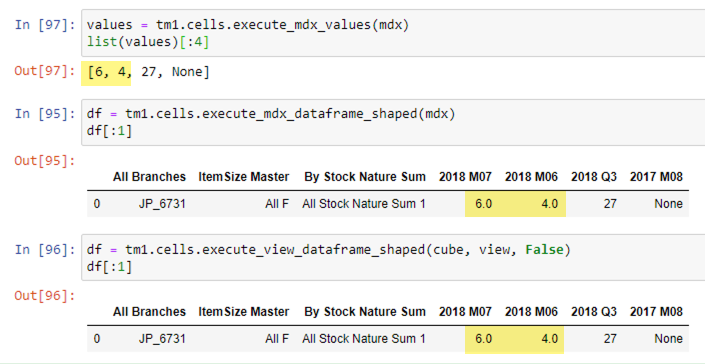
I've tried execute_mdx_dataframe_shaped and execute_view_dataframe_shaped to generate dataframe, but there is extra decimal place for numeric data, i.e. data in TM1: 6; data in dataframe: 6.0
To Reproduce
run execute_mdx_dataframe_shaped / execute_view_dataframe_shaped to generate dataframe and compare TM1 data
Expected behavior
data in dataframe exactly same as TM1 data
Version
TM1py Version: 1.5.0
TM1 Server Version: 11.8.0.33
Additional context
these functions are using same mdx/cube view
 yyzz1010
All 3 comments
I could not replicate this issue. Could you provide more details.. like the MDX, the cube structure and the measure dimension element types?
 rkvinoth
on 18 Dec 2020
rkvinoth
on 18 Dec 2020
Hi @yyzz1010,
the behavior you describe is thenatural way python/pandas works.
Pandas determines independently whether to use integers or floats for the values in the column.
I noticed that if there are no NaN or None values in the view, pandas uses integers.
However, you can overrule pandas decision-making on data-types quite easily.
Here is a sample:
``` python
import pandas as pd
from TM1py import TM1Service
with TM1Service(address="", port=12354, ssl=True, user="admin", password="apple") as tm1:
mdx = """
SELECT
{[d1].[1], [d1].[2], [d1].[3]} ON ROWS,
{[d2].[1], [d2].[2]} ON COLUMNS
FROM [c1]"""
df = tm1.cells.execute_mdx_dataframe_shaped(mdx)
print("Original:")
print(df)
df = df.fillna(0)
for col in ['1', '2']:
    df[col] = pd.to_numeric(df[col], errors='coerce').astype(int)

print("Edited:")
print(df)
it generates this output:
Original:
d1 1 2
0 1 1.0 2.0
1 2 5.0 6.0
2 3 NaN NaN
Edited:
d1 1 2
0 1 1 2
1 2 5 6
2 3 0 0
Process finished with exit code 0
```
 MariusWirtz
on 4 Jan 2021
MariusWirtz
on 4 Jan 2021
oh thx for the explanation Marius!! i was just using below as workaround:
for x in range(len(df.columns)):
    df[list(df.columns)[x]] = df[list(df.columns)[x]].astype("float", errors="ignore")

df.to_csv(path_or_buf=file_path, index=False, na_rep="0", float_format="%.f")
Related issues
 pourushgupta
·
3Comments
pourushgupta
·
3Comments
 cubewise-gng
·
3Comments
cubewise-gng
·
3Comments
 hermie64
·
3Comments
hermie64
·
4Comments
cubewise-gng
·
5Comments
hermie64
·
3Comments
hermie64
·
4Comments
cubewise-gng
·
5Comments