Hi Marius,
I know currently a single TI writes 32760 records.
But can we try testing if multi-threaded TI load improves the performance and by how much?
For example - with 1million source records.
 rkvinoth
All 15 comments
Hi @rkvinoth,
I did some tests around asnyc writing. You can find my code and a screenshot of the cube below.
I wrote 500k values on my notebook with 2 CPUs. Here are my findings:
| WORKERS | Elapsed Time |
|-----------|----------------|
| 1 WORKERS | 0:00:32.958269 |
| 2 WORKERS | 0:00:20.920744 |
| 3 WORKERS | 0:00:17.029961 |
| 4 WORKERS | 0:00:15.607609 |
The way I interpret this is that it scales quite well asynchronously.
Perhaps we could add another optional argument to the write function: max_workers to control parallelization.
import asyncio
from concurrent.futures.thread import ThreadPoolExecutor
from datetime import datetime
from itertools import islice
from typing import Dict

from TM1py import TM1Service

SIZE = 32000
WORKERS = 4


def chunks(data):
    it = iter(data)
    for i in range(0, len(data), SIZE):
        yield {k: data[k] for k in islice(it, SIZE)}


def write(tm1: TM1Service, chunk: Dict):
    try:
        tm1.cells.write(cube_name="Big Cube", cellset_as_dict=chunk, use_ti=True)
        return True
    except:
        return False


async def write_async(tm1: TM1Service, cells: Dict):
    loop = asyncio.get_event_loop()

    outcomes = []

    with ThreadPoolExecutor(WORKERS) as executor:
        futures = [
            loop.run_in_executor(executor, write, tm1, chunk)
            for chunk
            in chunks(cells)]

        for future in futures:
            outcomes.append(await future)

    return outcomes


if __name__ == '__main__':
    cells = dict()
    for num in range(1, 500_000, 1):
        element1 = str(num).zfill(6)
        element2 = str(num).zfill(6)
        element3 = str(num).zfill(6)
        element4 = str(num).zfill(6)
        element5 = str(num).zfill(6)
        element6 = "Numeric"

        cells[element1, element2, element3, element4, element5, element6] = num

    start = datetime.now()

    with TM1Service(address="", port=12354, user="admin", password="apple", ssl=True,
                    connection_pool_size=WORKERS) as tm1:
        event_loop = asyncio.get_event_loop()
        results = event_loop.run_until_complete(write_async(tm1, cells))

        print(all(results))

    print(f"Elapsed time: {datetime.now() - start}")
To create the cube you can run this
from TM1py import TM1Service, Dimension, Hierarchy, Cube

CUBE_NAME = "Big Cube"
DIMENSION_NAME = "Big Dimension "

with TM1Service(address="", port=12354, ssl=True, user="admin", password="apple") as tm1:
    dimension = Dimension(name="")
    hierarchy = Hierarchy(name="", dimension_name="")

    for elem in range(500_000):
        hierarchy.add_element(element_name=str(elem).zfill(6), element_type="Numeric")
    dimension.add_hierarchy(hierarchy)

    for num in range(1, 6):
        dimension.name = DIMENSION_NAME + str(num)
        tm1.dimensions.update_or_create(dimension)

    dimension_name = CUBE_NAME + " Measure"
    dimension = Dimension(name=dimension_name)
    hierarchy = Hierarchy(name=dimension_name, dimension_name=dimension_name)
    hierarchy.add_element("Numeric", "Numeric")
    dimension.add_hierarchy(hierarchy)

    tm1.dimensions.update_or_create(dimension)

    cube = Cube(
        name=CUBE_NAME,
        dimensions=[DIMENSION_NAME + str(num) for num in range(1, 6)] + [CUBE_NAME + " Measure"])
    tm1.cubes.update_or_create(cube)
 MariusWirtz
on 15 Jan 2021
MariusWirtz
on 15 Jan 2021
That looks promising and thanks! I'm kind of busy with stuff and couldn't perform this myself.
max_workers is the perfect argument to use in all the methods with use_ti argument. We can set the default value somewhere between 5 and 10.
I will perform couple of tests coming week and submit some results.
rkvinoth
on 15 Jan 2021
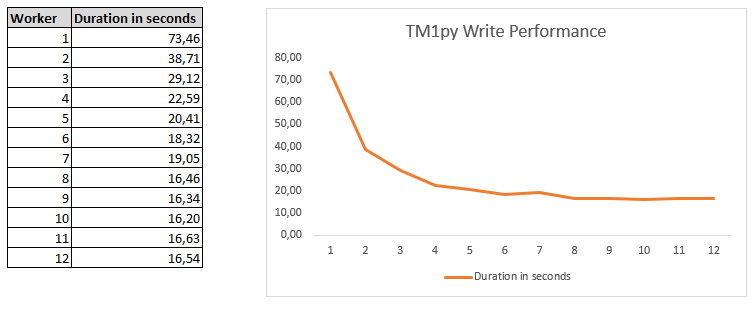
Played around with it on my local machine and got the following results. I had 6 cores and 12 logical processors at hand.
 scrumthing
on 15 Jan 2021
scrumthing
on 15 Jan 2021
With128 virtual processors (64 cores) tried the following test cases:
test case 1: with 0.5 million records
workers | Elapsed time
-- | --
1 | 01:00.8
2 | 00:39.7
3 | 00:32.7
4 | 00:29.6
5 | 00:27.0
6 | 00:27.2
7 | 00:26.4
8 | 00:27.7
9 | 00:25.9
10 | 00:26.1
test case 2: with 1 million records
workers | Elapsed time
-- | --
1 | 01:58.6
2 | 01:07.9
3 | 00:57.2
4 | 00:52.4
5 | 00:52.1
6 | 00:50.1
7 | 00:49.2
8 | 00:48.9
9 | 00:49.3
10 | 00:48.3
rkvinoth
on 15 Jan 2021
Hi, guys
Just wondering is this max_workers parameters implemented already or not? use_ti is great for the performance and if this can be done, it would be even better! Cloud functions usually have max timeout for execution. For large datasets, it would be very easy to hit the limit. Thanks.
 macsir
on 17 Mar 2021
macsir
on 17 Mar 2021
Hi, guys
Just want to share a function I wrote for writing dataframe asynchronously which basically copied @MariusWirtz code and wrapped with little modification. Works fine for me. Yes, I think size is another important factor which will determine the overall performance. Any suggestion is welcomed. Thanks.
def tm1_write_dataframe_async(tm1: TM1Service, cube_name: str, dataframe: 'pandas.DataFrame', slice_size_of_dataframe: int = 10000, max_workers: int = 14, disable_transaction_log: bool = False, increment: bool = False) -> bool:
  """
  Args:
      tm1 (TM1Service): name of the TM1 instance
      cube_name (str): name of the cube
      dataframe (DataFrame): name of the Pandas DataFrame
      slice_size_of_dataframe (int, optional): slice size of the dataframe Defaults to 10000.
      max_workers (int, optional): max number of workers. Defaults to 14.
      disable_transaction_log (bool, optional): deactivate before writing and reactivate after writing. Defaults to False.
      increment (bool, optional): increment or update cell values. Defaults to False.

  Returns:
      bool: True or False
  """
  def chunks(data):
    lst = [data.iloc[i:i+slice_size_of_dataframe] for i in range(0,data.shape[0],slice_size_of_dataframe)]
    return lst

  def write(tm1: TM1Service, chunk):
      try:
          tm1.cubes.cells.write_dataframe(cube_name=cube_name, data=chunk, increment=increment, deactivate_transaction_log=deactivate_transaction_log, reactivate_transaction_log=reactivate_transaction_log, use_ti=True)
          return True
      except:
          return False

  async def write_async(tm1: TM1Service, dataframe):
      loop = asyncio.get_event_loop()

      outcomes = []

      with ThreadPoolExecutor(max_workers) as executor:
          futures = [
              loop.run_in_executor(executor, write, tm1, chunk)
              for chunk
              in chunks(dataframe)]

          for future in futures:
              outcomes.append(await future)

      return outcomes

  if disable_transaction_log:
    deactivate_transaction_log, reactivate_transaction_log = True, True
  else:
    deactivate_transaction_log, reactivate_transaction_log = False, False

  start = datetime.datetime.now()
  try:
    results = asyncio.run(write_async(tm1, dataframe))
  except Exception as e:
    print(f"Failed to load into TM1 asynchronously and returned value:{e}")
    return False
  else:
    print(f"DataFrame slice size: {slice_size_of_dataframe}, Max workers: {max_workers}, Turn off transaction log:{disable_transaction_log}, Incremental loading:{increment}, Elapsed time: {datetime.datetime.now() - start}")
    return results
Hi @macsir,
thanks for posting the code.
High level, I think I notice one issue. The transaction log is deactivated and reactivated within the block that is executed in parallel. That's dangerous. It would be better to do both in the part of the code that's executing sequentially.
I think we may want to include the write_dataframe_async function in the CellService class.
@macsir would you be so kind to open a PR?
MariusWirtz
on 11 May 2021
Hi, @MariusWirtz
Yes, I agree with your point. Let me run some more testing to see if I can deactivated and reactivated the transaction log outside of the asynchronous functions. If it is good, I will try to merge it with a PR. I will keep you posted here. Thanks.
macsir
on 11 May 2021
Hi, @MariusWirtz
Does this piece look better? Thanks.
def tm1_write_dataframe_async(tm1: TM1Service, cube_name: str, dataframe: 'pandas.DataFrame', slice_size_of_dataframe: int = 5000, max_workers: int = 10, disable_transaction_log: bool = False, increment: bool = False) -> bool:
  """
  Args:
      tm1 (TM1Service): name of the TM1 instance
      cube_name (str): name of the cube
      dataframe (DataFrame): name of the Pandas DataFrame
      slice_size_of_dataframe (int, optional): slice size of the dataframe and change it based on your environment! Defaults to 5000.
      max_workers (int, optional): max number of workers and change it based on your environment! Defaults to 10.
      disable_transaction_log (bool, optional): deactivate before writing and reactivate after writing. Defaults to False.
      increment (bool, optional): increment or update cell values. Defaults to False.

  Returns:
      bool: True or False
  """
  def chunks(data):
    lst = [data.iloc[i:i+slice_size_of_dataframe] for i in range(0,data.shape[0],slice_size_of_dataframe)]
    return lst

  def write(tm1: TM1Service, chunk):
      try:
          tm1.cubes.cells.write_dataframe(cube_name=cube_name, data=chunk, increment=increment, use_ti=True)
          return True
      except:
          return False

  async def write_async(tm1: TM1Service, dataframe):
      loop = asyncio.get_event_loop()

      outcomes = []

      with ThreadPoolExecutor(max_workers) as executor:
          futures = [
              loop.run_in_executor(executor, write, tm1, chunk)
              for chunk
              in chunks(dataframe)]

          for future in futures:
              outcomes.append(await future)

      return outcomes

  if disable_transaction_log:
    tm1.cells.deactivate_transactionlog(cube_name)
  else:
    tm1.cells.activate_transactionlog(cube_name)

  start = datetime.datetime.now()
  try:
    results = asyncio.run(write_async(tm1, dataframe))
  except Exception as e:
    logging.info(f"Failed to load into TM1 asynchronously and returned value:{e}")
    return False
  else:
    #Enable the transaction log again by default after loading
    if disable_transaction_log:
      tm1.cells.activate_transactionlog(cube_name)

    logging.info(f"DataFrame slice size: {slice_size_of_dataframe}, Max workers: {max_workers}, Turn off transaction log:{disable_transaction_log}, Incremental loading:{increment}, Elapsed time: {datetime.datetime.now() - start}")
    return results
Hi @macsir,
sorry for the late reply. I have a couple of suggestions regarding the code.
you could use the
manage_transaction_logdecorator from theCellServiceto manage the deactivation and reactivation of the transaction log. https://github.com/cubewise-code/tm1py/blob/f751edff429e264b2d8954680cfd4499dbacdbe7/TM1py/Services/CellService.py#L55when the function is inside the
CellServicewe need to redesign the logging. TM1py doesn't do any info logging. Instead of logging the error, you could throw aTM1pyExceptionkinda like we do here. https://github.com/cubewise-code/tm1py/blob/f751edff429e264b2d8954680cfd4499dbacdbe7/TM1py/Services/CellService.py#L531
Please embed the new function in the CellService and create a Pull Request with your changes. Once we have an open MR, it would be easier to discuss on the code.
MariusWirtz
on 18 May 2021
@MariusWirtz Yes, thanks. I saw your decorator and will refactor it with exceptions when merging it into the repo. That piece above is just my local version. :)
macsir
on 18 May 2021
Hi, @MariusWirtz , @rkvinoth
After some testing by comparing ProcessPoolExecutor and ThreadPoolExecutor in the same environment using same numbers of workers and slice size, I observed overall performance of ProcessPoolExecutor is around 30% slower than ThreadPoolExecutor and it was quite consistent but CPU usage on TM1 server was slightly lighter than ThreadPoolExecutor. Thanks.
macsir
on 7 Jun 2021
@macsir When we have huge amount of data to load and a good server in which python can run, then ProcessPoolExecutor is the obvious choice. Python has to write chunks of 32K records into multiple unbound TI processes, this is CPU heavy task. Having multiple processors do this work is the real parallelization.
Whereas with Threadpool (or async), it is not real parallelization. The TI writes are never parallel, the threads will switch between the POST requests and make use of the waits on REST requests.
With less data ProcessPool is not a good choice, because spawning a process takes time compared to a thread.
rkvinoth
on 7 Jun 2021
@rkvinoth I had a basic doubt to ask
Let's say I want to create a dimension
Method 1. We can create it using the turbo integrator language used in a TI process i.e the scripting language- prolog, metadata, data, and epilog
Method 2. Using TM1py functions to create elements, dimensions, attributes
Method 3: Using unbound TI or multithreading of usual TI process with TM1py functions
Am I correct?
This issue focuses more on Method 3 right? Can I create dimensions with TI using TM1py functions?
I am looking to improve the performance of creating/updating my elements in a dimension
 pal-16
on 28 Jun 2021
pal-16
on 28 Jun 2021
Closed with #578 and #543
MariusWirtz
on 29 Jul 2021
Related issues
 pourushgupta
·
3Comments
pourushgupta
·
3Comments
 yyzz1010
·
3Comments
yyzz1010
·
3Comments
 cubewise-gng
·
5Comments
cubewise-gng
·
5Comments
 scrambldchannel
·
6Comments
scrambldchannel
·
6Comments
 ianboltz
·
5Comments
ianboltz
·
5Comments
Most helpful comment
With128 virtual processors (64 cores) tried the following test cases:
test case 1: with
0.5 millionrecordsworkers | Elapsed time
-- | --
1 | 01:00.8
2 | 00:39.7
3 | 00:32.7
4 | 00:29.6
5 | 00:27.0
6 | 00:27.2
7 | 00:26.4
8 | 00:27.7
9 | 00:25.9
10 | 00:26.1
test case 2: with
1 millionrecordsworkers | Elapsed time
-- | --
1 | 01:58.6
2 | 01:07.9
3 | 00:57.2
4 | 00:52.4
5 | 00:52.1
6 | 00:50.1
7 | 00:49.2
8 | 00:48.9
9 | 00:49.3
10 | 00:48.3