Tm1py: get_message_log_entries() argument msg_contains not working
Describe what did you try to do with TM1py
I tried using get_message_log_entries() with argument msg_contains , but no effect of filtering the text in the output.
##code executed
messagelog= tm1.server.get_message_log_entries(reverse=False,since=2020, logger='TM1.Server',level='INFO', msg_contains='TM1 Server is ready, elapsed time' )
#print(messagelog)
with open('logger.txt', 'w') as textfile:
    for message in messagelog:
        for key, value in message.items():
            textfile.write('%s:%s\n' % (key, value))
Describe what's not working the way you expect
- I was expecting only the messages with 'TM1 Server is ready, elapsed time'. But output is not filtered.
Version
- TM1py 1.5.0
- TM1 Server Version: PA 2.0.7
Additional context
NA
 nischal009
All 6 comments
Did you upgrade to the latest version? If not upgrade it using:
pip install https://github.com/cubewise-code/tm1py/archive/master.zip --upgrade
Then you should be able to query: (You don't need to pass logger and level arguments as you are already passing msg_contains)
from TM1py.Services import TM1Service
from datetime import datetime


# Pass in the required parameters here
with TM1Service() as tm1:
    # Get the message log from the TM1 server
    message_log = tm1.server.get_message_log_entries(reverse=False, since=datetime(year=2020, month=7, day=12),
                                                     msg_contains="TM1 Server is ready, elapsed time")
    # Write the results to a text file
    with open("logger.txt", "w") as file:
        for message in message_log:
            for key, value in message.items():
                file.write(f"{key}:{value}\n")
 rkvinoth
on 26 Sep 2020
rkvinoth
on 26 Sep 2020
yes upgraded , as mentioned in log trail , I am on TM1py 1.5.0.
But still same issue ..
even time filtering is not working ..
from TM1py.Services import TM1Service
import pandas as pd
import datetime
from TM1py.Utils import Utils
##53.244.251.94 port 12354
tm1=TM1Service(address='99.223.21.49',port=198768,user='user',password='password',ssl=True,namespace='Active Directory')

#messagelog= tm1.server.get_message_log_entries(reverse=False,since=2020, logger='TM1.Server',level='INFO', msg_contains='TM1 Server is ready, elapsed time' )
message_log = tm1.server.get_message_log_entries(reverse=False, since=datetime.datetime(year=2020, month=7, day=12), msg_contains="TM1 Server is ready, elapsed time")
#print(messagelog)
with open('logger1.txt', 'w') as textfile:
    for message in messagelog:
        for key, value in message.items():
            textfile.write('%s:%s\n' % (key, value))
Things are working perfectly fine for me. In your first for loop there is typo in the variable name, it should be message_log and not messagelog.
I only replaced the connection settings and that typo in your code.
If you are still not getting the result, then check your server log manually if TM1 Server is ready, elapsed time actually exists in the file tm1server.log.
Note: TM1py can only filter the contents from tm1server.log and not from the archive files (tm1server.log1, tm1server.log2,..).
from TM1py.Services import TM1Service
import pandas as pd
import datetime
from TM1py.Utils import Utils
##53.244.251.94 port 12354
tm1=TM1Service(address='99.223.21.49',port=198768,user='user',password='password',ssl=True,namespace='Active Directory')
#messagelog= tm1.server.get_message_log_entries(reverse=False,since=2020, logger='TM1.Server',level='INFO', msg_contains='TM1 Server is ready, elapsed time' )
message_log = tm1.server.get_message_log_entries(reverse=False, since=datetime.datetime(year=2020, month=7, day=12), msg_contains="TM1 Server is ready, elapsed time")
#print(messagelog)
with open('logger1.txt', 'w') as textfile:
    # use message_log instead of messagelog
    for message in message_log:
        for key, value in message.items():
            textfile.write('%s:%s\n' % (key, value))
Output I got:
ID:186407
ThreadID:7116
SessionID:0
Level:Info
TimeStamp:2020-09-07T14:46:38.132Z
Logger:TM1.Server
Message:TM1 Server is ready, elapsed time 480.00 seconds
ID:194098
ThreadID:11108
SessionID:0
Level:Info
TimeStamp:2020-09-10T08:45:55.639Z
Logger:TM1.Server
Message:TM1 Server is ready, elapsed time 648.00 seconds
Surprising !!
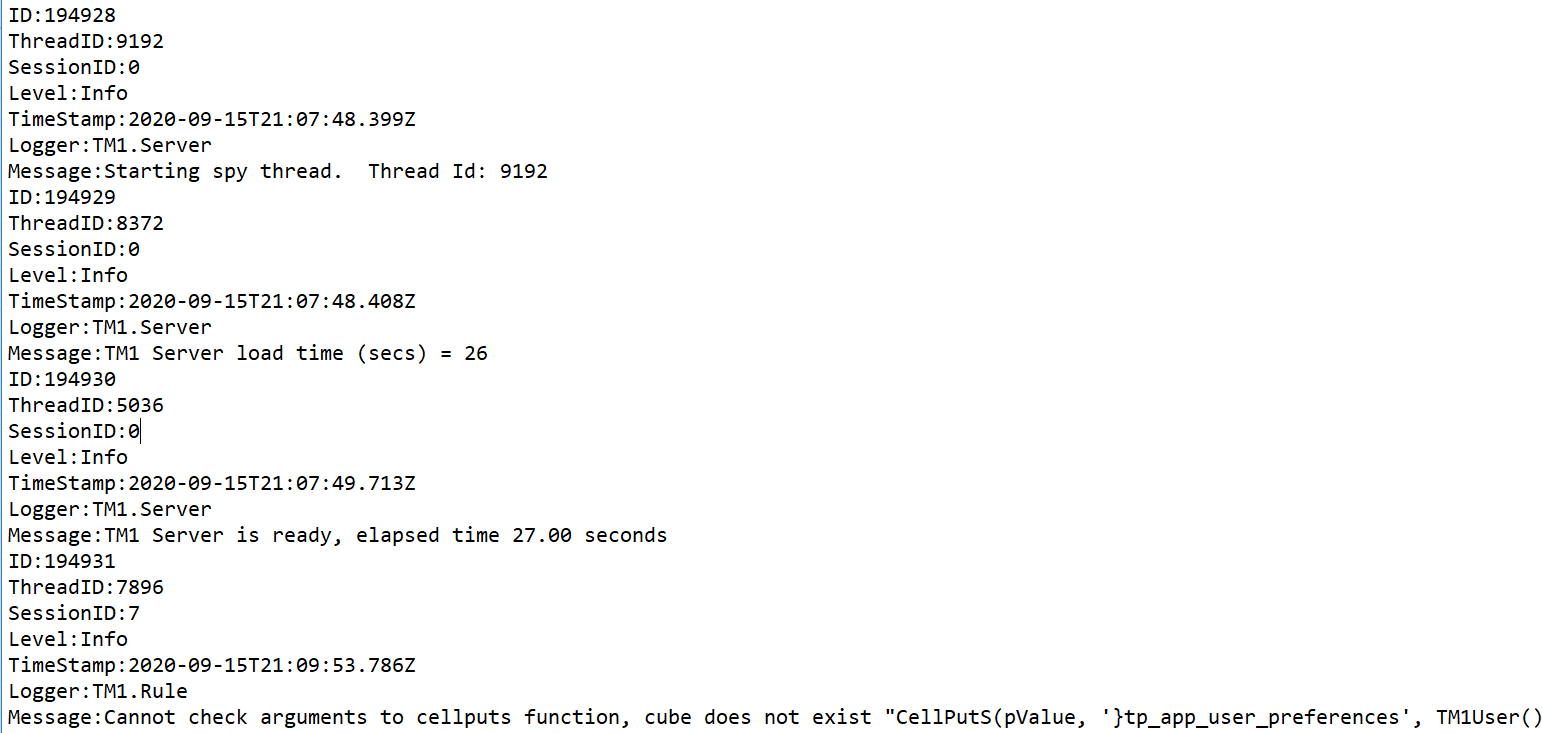
yes, message_log is the variable name . Both the statements commented one and non-commented one are still giving me the same result with out filtering .
yes , I am searching on the active TM1server.log file and it has "TM1 Server is ready, elapsed time"
Even i tried with many other string as test . but msg_contains is not working in my environment .
nischal009
on 26 Sep 2020
Hi @nischal009,
as @rkvinoth already mentioned you do need to upgrade to the current master branch from GitHub.
Version 1.5.0 is perhaps a bit misleading. Currently, the TM1py release on PyPI is version 1.5.0 and the current master is also 1.5.0 until we draft a new release.
Do you have another TM1 instance available? Can you please execute your code against a different TM1 instance?
Perhaps the log files on that instance are corrupt.
 MariusWirtz
on 27 Sep 2020
MariusWirtz
on 27 Sep 2020
Thank you Vinoth and Marius .
Earlier I have executed direct pip install tm1py --upgrade .
Now , with pip install https://github.com/cubewise-code/tm1py/archive/master.zip --upgrade
It perfectly worked.
nischal009
on 28 Sep 2020
Related issues
 yyzz1010
·
3Comments
yyzz1010
·
3Comments
 hermie64
·
3Comments
hermie64
·
3Comments
 scrumthing
·
4Comments
scrumthing
·
4Comments
 SachinAnalytics
·
3Comments
SachinAnalytics
·
3Comments
 rclapp
·
6Comments
rclapp
·
6Comments
Most helpful comment
Did you upgrade to the latest version? If not upgrade it using:
pip install https://github.com/cubewise-code/tm1py/archive/master.zip --upgradeThen you should be able to query: (You don't need to pass
loggerandlevelarguments as you are already passingmsg_contains)