Tm1py: Connection to IBM cloud using tm1py
Hi all,
I am trying to connect our TM1 database/application called 'tm1' on our cloud environment with these code:
from TM1py import TM1Service
with TM1Service(
base_url=https://cwd.planning-analytics.ibmcloud.com/tm1/api/tm1/,
namespace = LDAP,
user=user,
password=password,
ssl=True,
verify=True,
async_requests_mode=True) as tm1:
print(tm1.server.get_product_version())
Unfortunately i am getting this error message:

That problem is solved. I had to " " the base url, namespace, user and password.
But now, I am getting this error message:

I absolutely do not know what hat means. :-(
Every help is very much appreciated.
Thanks in advance.
 Andy-Hofelmeyer
All 24 comments
Hi @Andy-Hofelmeyer,
the Unauthorized error means that most likely you are providing the wrong credentials for the user.
 MariusWirtz
on 18 Sep 2020
MariusWirtz
on 18 Sep 2020
Pass the non-interactive account's credential to the user and password arguments.
 rkvinoth
on 18 Sep 2020
rkvinoth
on 18 Sep 2020
here you find an article that describes how to connect to TM1 in the IBM cloud with TM1py:
https://code.cubewise.com/tm1py-help-content/connecting-to-the-ibm-cloud-remotely-with-tm1py
MariusWirtz
on 18 Sep 2020
We are working in an IBM Cloud environment.
Do you mean that we have to set up a new user (with password) which is used to establish the connection?
Which rights do we have to give to the new user?
Andy-Hofelmeyer
on 18 Sep 2020
Contact the system Admin or the main developer in your team.. they should already know the username and passwordfor the non-interactive accounts.
Else contact the IBM support.. they should be able to provide you the details.
Non-interactive accounts are like system accounts, only using this account/accounts you can perform REST API queries (connect using TM1py)
rkvinoth
on 18 Sep 2020
We were able to create a non-interactive user. That was described in the documentation of IBM.
Now, we are getting another error message:

We provided:
address= _IPADRESS_
port= _PORTNUMBER_
user= cwd_tm1_automation
password= people
namespace = LDAP
gateway = https://cwd.planning-analytics.ibmcloud.com/ibmcognos/cgi-bin/cognosisapi.dll
ssl= True
Andy-Hofelmeyer
on 18 Sep 2020
URL should look like this:
base_url = "https://cwd.planning-analytics.ibmcloud.com/tm1/api/<server-name>"
Don't pass gateway argument, its not needed as you can't use single-sign-on anyway.
Use the below code and update the argument values as required.
from TM1py import TM1Service
with TM1Service(base_url="https://cwd.planning-analytics.ibmcloud.com/tm1/api/<server-name>", namespace= "LDAP",
user="cwd_tm1_automation", password="people", ssl=True, async_requests_mode=True) as tm1:
print(tm1.server.get_product_version())
@rkvinoth Thanks for helping me.
This is what I did and got:
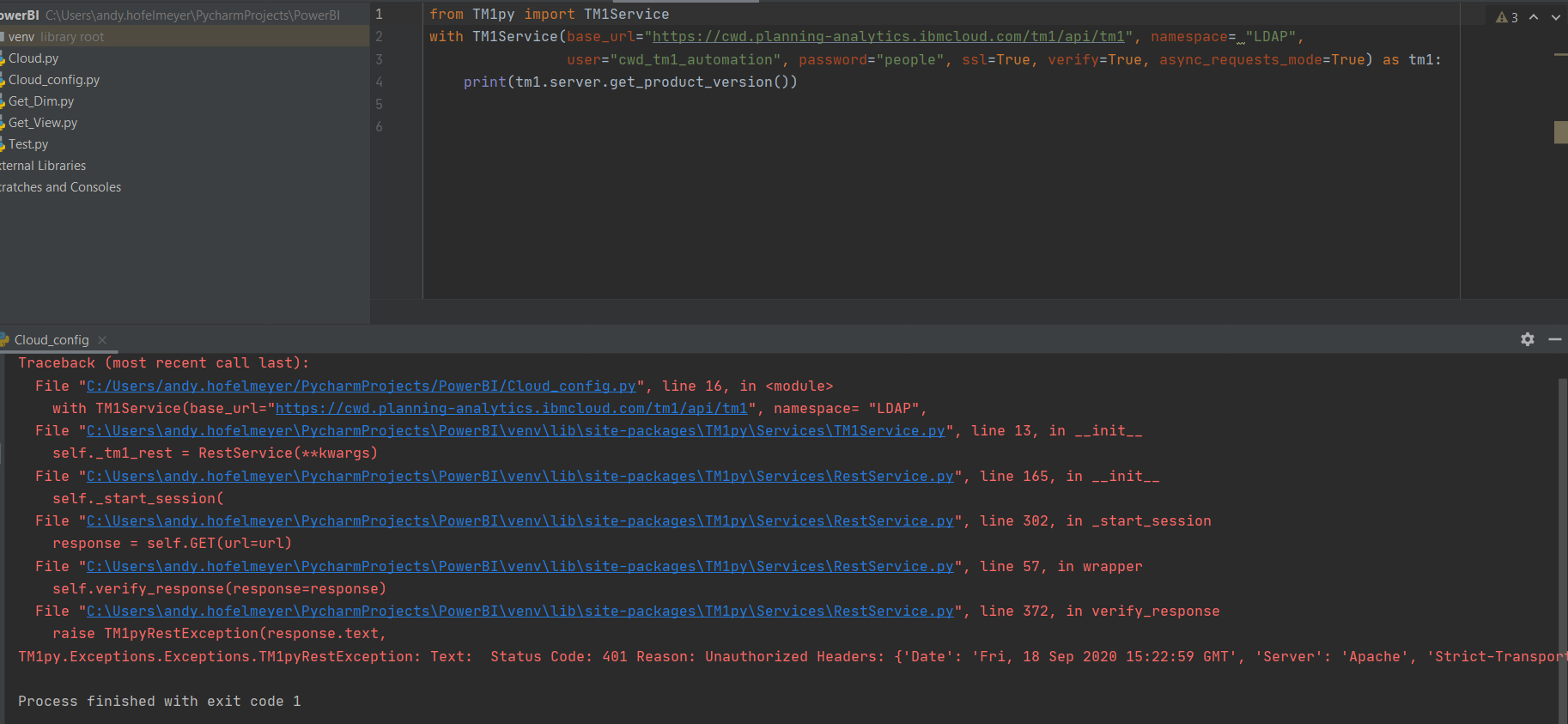
What does it mean: Unauthorized Headers?
Andy-Hofelmeyer
on 18 Sep 2020
Are you sure your tm1 automation password is "people"?
 psegal
on 18 Sep 2020
psegal
on 18 Sep 2020
We tried to override the password with 'people', because we do not know what the first one was
Andy-Hofelmeyer
on 18 Sep 2020
The IBM welcome pack pdf will have the automation password in it, or you can request a reset of it from IBM Support via a ticket. You won't get very far without the correct password.
psegal
on 18 Sep 2020
I understand, we will do that first
Andy-Hofelmeyer
on 18 Sep 2020
@Andy-Hofelmeyer
please let us know once the issue is resolved
MariusWirtz
on 22 Sep 2020
@rkvinoth Thanks for helping me.
This is what I did and got:
What does it mean: Unauthorized Headers?
@Andy-Hofelmeyer ... Is your instance name TM1?
rkvinoth
on 22 Sep 2020
@Andy-Hofelmeyer Also avoid sharing the credentials like this in public forum... IBM cloud can be accessed from anywhere!
rkvinoth
on 22 Sep 2020
Problem is not solved yet. We are waiting for the password from IBM.
@rkvinoth
yes, tm1 is the application name
Andy-Hofelmeyer
on 22 Sep 2020
Having a similar issue while connecting to the cloud. If I use the "Working Script" by supplying the connection info in the TM1Service call, everything works fine. If I move the connection info to a config file, I get the error seen in the traceback below. Not sure if I should add this into the same issue, or create a new issue. Any help is appreciated.
config.ini file:
[server]
base_url=https://cxxx1.planning-analytics.ibmcloud.com/tm1/api/tm1
user=cxxx_tm1_automation
password=xxx
namespace=LDAP
ssl=True
verify=True
async_requests_mode=True
Script:
import os
from configparser import ConfigParser
from TM1py.Services import TM1Service
cwd = os.getcwd()
config = ConfigParser()
config.read(os.path.join(cwd, 'config.ini'))
with TM1Service(**config['server']) as tm1:
print(tm1.server.get_product_version())
Traceback:
Traceback (most recent call last):
File "C:/Users/harve/PycharmProjects/garbage/test.py", line 18, in <module>
with TM1Service(**config['server']) as tm1:
File "C:\Python38\lib\site-packages\TM1py\Services\TM1Service.py", line 13, in __init__
self._tm1_rest = RestService(**kwargs)
File "C:\Python38\lib\site-packages\TM1py\Services\RestService.py", line 165, in __init__
self._start_session(
File "C:\Python38\lib\site-packages\TM1py\Services\RestService.py", line 302, in _start_session
response = self.GET(url=url)
File "C:\Python38\lib\site-packages\TM1py\Services\RestService.py", line 56, in wrapper
response = func(self, url, data, **kwargs)
File "C:\Python38\lib\site-packages\TM1py\Services\RestService.py", line 203, in GET
return self._s.get(
File "C:\Python38\lib\site-packages\requests\sessions.py", line 543, in get
return self.request('GET', url, **kwargs)
File "C:\Python38\lib\site-packages\requests\sessions.py", line 530, in request
resp = self.send(prep, **send_kwargs)
File "C:\Python38\lib\site-packages\requests\sessions.py", line 643, in send
r = adapter.send(request, **kwargs)
File "C:\Python38\lib\site-packages\requests\adapters.py", line 416, in send
self.cert_verify(conn, request.url, verify, cert)
File "C:\Python38\lib\site-packages\requests\adapters.py", line 227, in cert_verify
raise IOError("Could not find a suitable TLS CA certificate bundle, "
OSError: Could not find a suitable TLS CA certificate bundle, invalid path: True
Working Script:
import os
from configparser import ConfigParser
from TM1py.Services import TM1Service
cwd = os.getcwd()
config = ConfigParser()
config.read(os.path.join(cwd, 'config.ini'))
with TM1Service(base_url='https://cxxx1.planning-analytics.ibmcloud.com/tm1/api/tm1',
user='cxxx_tm1_automation',
namespace="LDAP",
password='xxx',
ssl=True,
verify=True,
async_requests_mode=True) as tm1:
print(tm1.server.get_product_version())
Working Traceback:
C:\Python38\python.exe C:/Users/harve/PycharmProjects/garbage/test.py
11.7.00002.1
Process finished with exit code 0
 harveyca307
on 23 Sep 2020
harveyca307
on 23 Sep 2020
@harveyca307 remove verify parameter from the config file. It's not needed and it is the one causing the issue.
[server]
base_url=https://cxxx1.planning-analytics.ibmcloud.com/tm1/api/tm1
user=cxxx_tm1_automation
password=xxx
namespace=LDAP
ssl=True
async_requests_mode=True
No no the verify is needed.
There is a problem with TM1py. When the argument comes through as True but as a string instead of a boolean, it's not properly understood.
MariusWirtz
on 23 Sep 2020
No no the
verifyis needed. Perhaps it's passed through as a str instead of a boolean?
Yeah right, getting passed as str...
moreover RestService.py needs to be corrected here.
rkvinoth
on 23 Sep 2020
We have to correct the below code:
https://github.com/cubewise-code/tm1py/blob/e9c27150e7fd82f8f178d1709e27909b0b43c2f3/TM1py/Services/RestService.py#L138
into:
if 'verify' in kwargs and kwargs['verify'] is True:
self._verify = kwargs.get('verify')
@harveyca307,
we just wrote a fix. Now verify is properly handeld also when it comes as a string.
You can upgrade to the master branch of TM1py like this:
pip install https://github.com/cubewise-code/tm1py/archive/master.zip --upgrade
If you don't want to upgrade, you can adjust your code and pass the verify argument explicitly as a boolean independently from the arguments that come from the config file.
import os
from configparser import ConfigParser

from TM1py.Services import TM1Service

cwd = os.getcwd()
config = ConfigParser()
config.read(os.path.join(cwd, 'config.ini'))

with TM1Service(**config['server'], verify=True) as tm1:
    print(tm1.server.get_product_version())
Upgraded and everything is working as expected. Thanks!
harveyca307
on 23 Sep 2020
Dear all,
our problem is solved.
Indeed, we had towait for the right password for the non-interactive user.
Thanks a lot
Andy-Hofelmeyer
on 28 Sep 2020
Related issues
 yyzz1010
·
3Comments
yyzz1010
·
3Comments
 SachinAnalytics
·
3Comments
SachinAnalytics
·
3Comments
 user1493
·
3Comments
user1493
·
3Comments
 ianboltz
·
5Comments
ianboltz
·
5Comments
 cubewise-gng
·
3Comments
cubewise-gng
·
3Comments
Most helpful comment
@harveyca307,
we just wrote a fix. Now
verifyis properly handeld also when it comes as a string.You can upgrade to the master branch of TM1py like this:
pip install https://github.com/cubewise-code/tm1py/archive/master.zip --upgradeIf you don't want to upgrade, you can adjust your code and pass the verify argument explicitly as a boolean independently from the arguments that come from the config file.