Tldr: Main tldr.sh site taken by a domain squatter
http://tldr.sh currently points to a generic domain-squatting page, and the tldr datafiles don't appear to be hosted anywhere else. Is this a known issue?
 coandco-2fa
All 42 comments
Thanks. Did not know that. tldr.sh is owned by @ostera
 agnivade
on 23 Aug 2018
agnivade
on 23 Aug 2018
I have removed the CNAME from tldr-pages.github.io. Please give some time for DNS changes to propagate.
agnivade
on 23 Aug 2018
Looks like it is propagated now. Let us keep this open until we can fix the domain.
agnivade
on 23 Aug 2018
Hello! I've resolved that the domain renewal didn't happen (a.k.a. I missed the emails) and it should be up and running now.
Sorry for any inconvenience it may have caused 🙌🏼
 ostera
on 23 Aug 2018
ostera
on 23 Aug 2018
@ostera - Can more than one person have access to the dns account ? It would be good to have more than one eye on it.
agnivade
on 23 Aug 2018
To avoid issues on my version of the client in the future I'm now just retrieving directly from github. I know it was requested somewhere in the docs not to do this, but its a PITA to have to create a new release for something like this.
If we have permanent fix in place I can simply revert the commit and re-release. But for now I released a new client build for nix/osx/win.
 k3mist
on 23 Aug 2018
k3mist
on 23 Aug 2018
Sure, the node client takes from github too. tldr.sh is just a friendly CNAME for that.
agnivade
on 23 Aug 2018
So what's the recommended URL for clients to use? My iOS app is currently broken, but I just wanna do the right thing.
 mflint
on 23 Aug 2018
mflint
on 23 Aug 2018
By default, both the official node and python apps download the entire repo from when it's requested (https://tldr-pages.github.io/assets/tldr.zip) and the python app will also use the raw github links when downloading individual pages. Given that the tldr.sh just CNAME to github, it's probably recommended to just use the github links themselves.
 MasterOdin
on 24 Aug 2018
MasterOdin
on 24 Aug 2018
The recommended url is - https://tldr-pages.github.io/assets/tldr.zip. But I have brought back the CNAME just now. Things should be back to normal in a few hours.
agnivade
on 24 Aug 2018
Follow-up question for @agnivade: https://tldr-pages.github.io/assets/tldr.zip gives me a 301 redirect to http://tldr.sh/assets/tldr.zip which, quite correctly, iOS refuses to honour.
Are there any plans to host the zip using https? (Or will I need to add a dirty http exception into my iOS app?)
mflint
on 26 Aug 2018
Hmm .. that is strange. I will have to look into github documentation. github pages just allow a CNAME to be specified. So theoretically, it should use the same protocol, given that https://tldr.sh/assets/tldr.zip works fine.
Do you have any off-hand knowledge on this ?
agnivade
on 26 Aug 2018
Do you have any off-hand knowledge on this ?
I have a site hosted with GitHub pages, and have this option in the Settings page:

I believe GitHub creates a _Let's Encrypt_ certificate if that option is selected.
Testing with curl gives this output:
curl -v https://tldr-pages.github.io/assets/tldr.zip
{some output removed}
< HTTP/2 301
< server: GitHub.com
< content-type: text/html
< location: http://tldr.sh/assets/tldr.zip
Enforcing HTTPS sounds like a good thing - and I suspect that it might fix that issue, @mflint. I've just checked, and it looks like there's a bit of a problem:
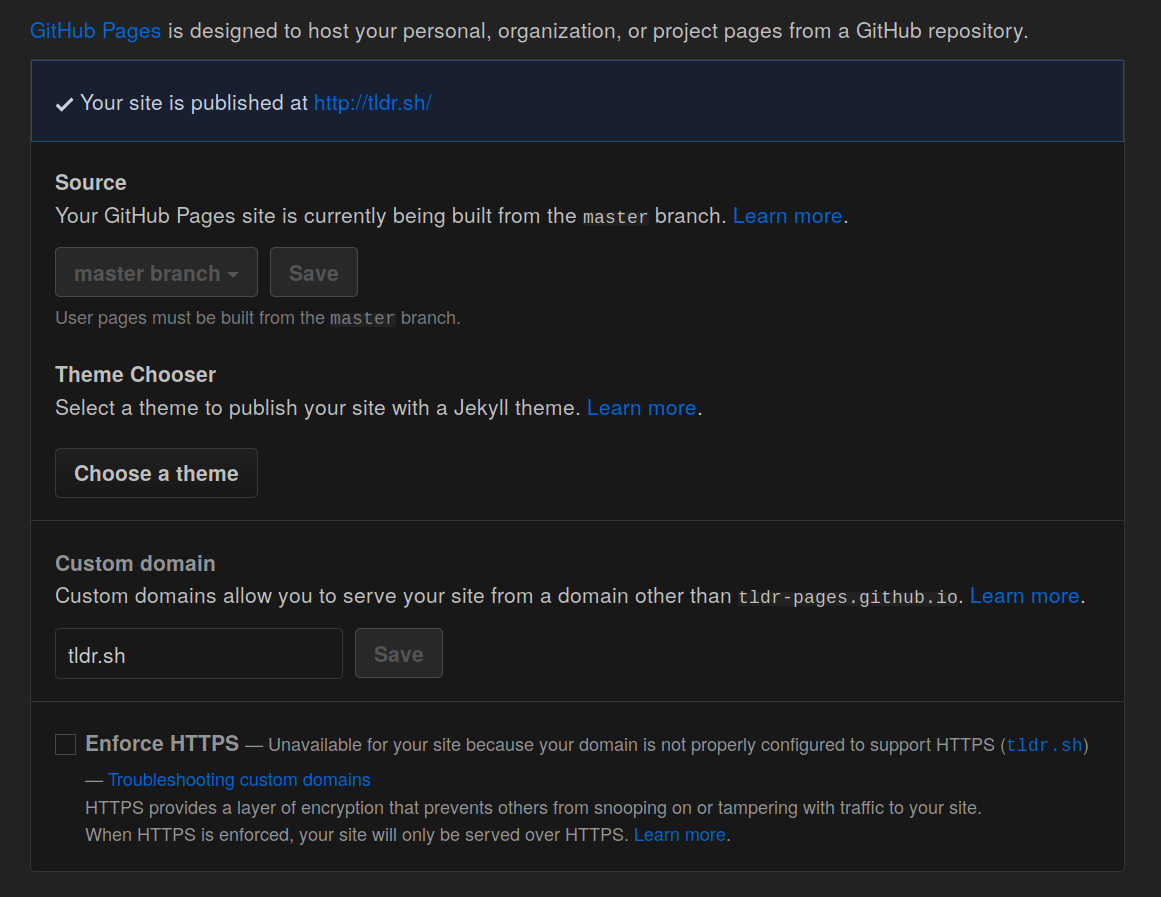
Upon investigation, GitHub's official help page says that if we're using an A record, we should point at one of these IPs:
- 185.199.108.153
- 185.199.109.153
- 185.199.110.153
- 185.199.111.153
....but doing a dig tldr.sh reveals the following:
tldr.sh.        181 IN  A   104.18.48.121
tldr.sh.        181 IN  A   104.18.49.121
Is there any reason why we can't use a CNAME instead? As I don't currently have access to the DNS record settings, I can't alter the DNS records to fix the issue. I believe @ostera to have access. Perhaps you could take a look please @ostera? (and is there any chance of another maintainer/owner of tldr-pages getting access to the DNS account to have another pair of eyes on it, just in case please?)
 sbrl
on 26 Aug 2018
sbrl
on 26 Aug 2018
Disclaimer: I'm no DNS expert.
But: you may not need to use CNAME. My (GitHub-pages, SSL) domain reports this:
{mysite}.net.   3600    IN  A   185.199.111.153
{mysite}.net.   3600    IN  A   185.199.109.153
{mysite}.net.   3600    IN  A   185.199.110.153
{mysite}.net.   3600    IN  A   185.199.108.153
Looks like the 185.199.*.153 IPs are GitHub; your 104.18.*.121 IPs are a Cloudflare front. This is getting a little beyond my area of expertise ;-)
mflint
on 26 Aug 2018
Yeah, maybe not. I think a CNAME would update automagically though?
sbrl
on 26 Aug 2018
You cannot set CNAME for root domains. It looks like we need to point to the 185.* series of addresses and then remove and add the CNAME file to trigger the process of enabling HTTPS.
https://help.github.com/articles/setting-up-an-apex-domain/
@ostera - Can we do that ?
agnivade
on 27 Aug 2018
You cannot set CNAME for root domains.
True. But some DNS operators have workarounds for it (ZoneEdit, for example). Again, that's what I'm using for my personal blog.
This is sounding like a non-trivial change - so absolutely _no pressure_ from me to do it :)
mflint
on 27 Aug 2018
I don't think setting CNAME or ALIAS is required. I have A record for my own personal blog, and it works perfectly fine.
I just did the method I mentioned in my previous comment and confirmed that it works. We just need to point to all the 4 IP addresses and do a remove and add of the CNAME file to trigger the https cert fetch.
agnivade
on 27 Aug 2018
We just need to point to all the 4 IP addresses
Maybe - but there's probably a good reason why @ostera chose to use Cloudflare.
mflint
on 27 Aug 2018
Ah, so its pointing to cloudflare. So I think we need to set ssl settings to flexible-ssl and redirect all users to https using a page rule.
agnivade
on 27 Aug 2018
The Apex record is set to Github Pages IPs

Which I took from a prior version of Github Pages documentation — it's trivial to update to the news ones. Let me know if you want to try this out today, @agnivade
ostera
on 27 Aug 2018
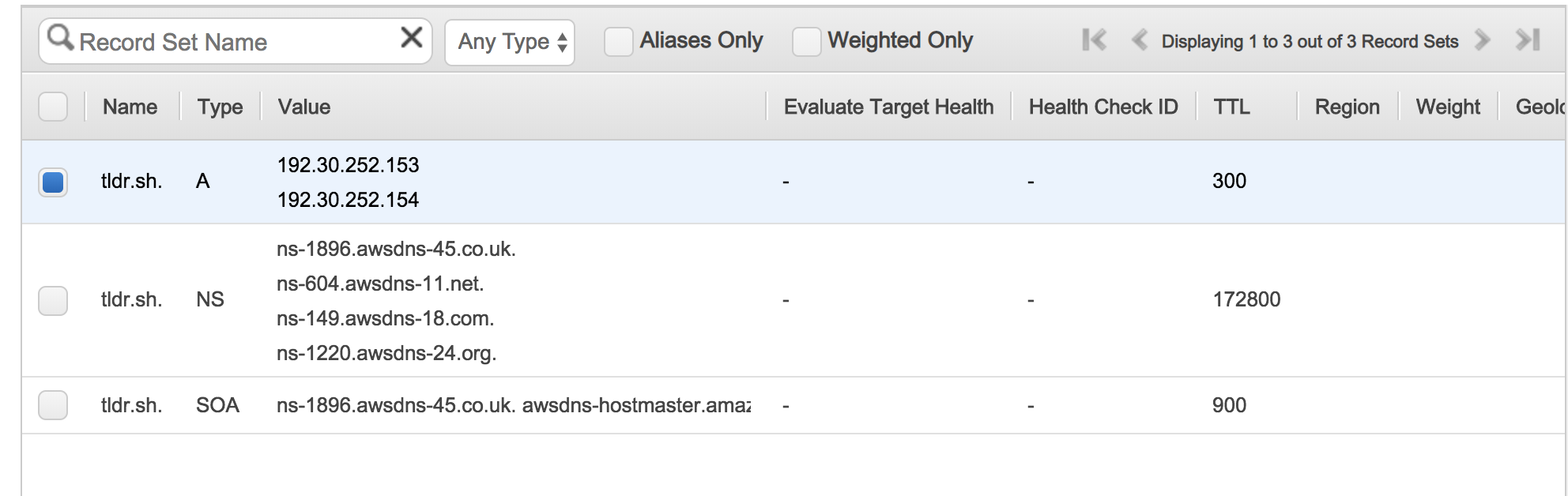
Full config for transparency.
ostera
on 27 Aug 2018
Also, I'm happy to configure the domain to someone else's DNS provider 🙌
ostera
on 27 Aug 2018
Let's change them to - 185.199.{108-111}.153. i.e. 4 IPs having 108,109,110,111 in the middle.
Also - since its in aws, could you create an IAM account with and give me access to just the dns settings ? (agniva.quicksilver <at> gmail <black point> com)
agnivade
on 27 Aug 2018
Wondering if it would've taken more time to write
185.199.108.153
185.199.109.153
185.199.110.153
185.199.111.153
Than to explain the expansion 😝 XKCD comes to mind: https://xkcd.com/1205/
IPs changed! 😄
ostera
on 27 Aug 2018
Deleted CNAME file. Will revert after a while. Stand by.
agnivade
on 27 Aug 2018
It did not work. I see that https://tldr.sh is served by a cloudflare cert. Can we set a redirect to https rule in cloudflare page settings ?
agnivade
on 27 Aug 2018
@agnivade I went in on CloudFlare and apparently I did have registered the domain there, and that's where the Name Servers are set up in Name.com.
Sent you an invite so you can handle the whole thing from there 🙌
ostera
on 28 Aug 2018
Problem solved. Setup an http to https redirect.
@ostera - I also want to enable HSTS. The only issue with that is that once setup, we cannot disable https anymore. I don't see any issue with it. Do you ?
agnivade
on 28 Aug 2018
Not from my end. Go bananas! 🐒
ostera
on 28 Aug 2018
Done. Thanks !
agnivade
on 28 Aug 2018
Awesome, thanks @ostera and @agnivade :smiley_cat:
sbrl
on 28 Aug 2018
It's still 301 to http. (I'll keep using https://tldr.sh/assets/tldr.zip for now...)
$ curl -v https://tldr-pages.github.io/assets/tldr.zip
{snip}
< HTTP/2 301
< server: GitHub.com
< content-type: text/html
< location: http://tldr.sh/assets/tldr.zip
Try adding an -L and see what happens. :)
agnivade
on 28 Aug 2018
Hmm, try adding --proto -http to explicitly disallow http ;-)
curl -v -L --proto -http https://tldr-pages.github.io/assets/tldr.zip
(Not sure how you've set this up, but if there are _any_ requests using http, then some clients will - should - fail)
This is my error from the iOS app:
Error Domain=NSURLErrorDomain Code=-1022 "The resource could not be loaded because the App Transport Security policy requires the use of a secure connection." UserInfo={NSUnderlyingError=0x604000446210 {Error Domain=kCFErrorDomainCFNetwork Code=-1022 "(null)"}, NSErrorFailingURLStringKey=http://tldr.sh/assets/tldr.zip, NSErrorFailingURLKey=http://tldr.sh/assets/tldr.zip, NSLocalizedDescription=The resource could not be loaded because the App Transport Security policy requires the use of a secure connection.}
mflint
on 28 Aug 2018
Oh I see. Well, we do not control tldr-pages.github.io. So I don't think there is much we can do to ask github to redirect to https:// when an https:// url is requested.
Let me know if you find something, am happy to do it.
agnivade
on 29 Aug 2018
@agnivade I think that we can enforce HTTPS in the GitHub Pages settings as I've mentioned above. However, when I try to do so, I'm still met with this:

...I'm confused. I thought we fixed that one?
sbrl
on 29 Aug 2018
@sbrl The DNS "A records" are still pointing to Cloudflare (104.18.*.121); GitHub requires those A records to point to GitHub (185.199.*.153).
mflint
on 30 Aug 2018
@sbrl - No we couldn't fix that one. Most probably because we are using cloudflare. What I have done is setup a redirect rule from http://tldr.sh to https://tldr.sh.
I don't know what the solution is if a custom domain is to use cloudflare.
agnivade
on 30 Aug 2018
Do you really need Cloudflare? My understanding was that it was desirable back when Github pages did not support https for custom domains, but now that it does, you're probably better off dropping cloudflare and then having all redirects be https -> https.
MasterOdin
on 30 Aug 2018
Won't a redirect like that cause a loop https -> http -> https?
sbrl
on 30 Aug 2018
Related issues
 Leandros
·
58Comments
Leandros
·
58Comments
 gingerbeardman
·
27Comments
gingerbeardman
·
27Comments
 waldyrious
·
30Comments
waldyrious
·
26Comments
sbrl
·
74Comments
waldyrious
·
30Comments
waldyrious
·
26Comments
sbrl
·
74Comments
Most helpful comment
Let's change them to - 185.199.{108-111}.153. i.e. 4 IPs having 108,109,110,111 in the middle.
Also - since its in aws, could you create an IAM account with and give me access to just the dns settings ? (
agniva.quicksilver <at> gmail <black point> com)