I installed by: sudo npm install -g tldr
But it's only black & white. How can I get colors??
 pepa65
All 16 comments
Please have a look at this- https://github.com/tldr-pages/tldr-node-client#configuration
 agnivade
on 1 Feb 2017
agnivade
on 1 Feb 2017
The instructions linked by @agnivade should solve this issue, but please confirm if not and we'll investigate further.
 waldyrious
on 1 Feb 2017
waldyrious
on 1 Feb 2017
Thanks for your help. Sorry for asking in the wrong place. So I downloaded https://raw.githubusercontent.com/tldr-pages/tldr-node-client/master/config.json to $HOME/.tldrrc but I still have no colors. I do have some italics (which I've never seen on my terminal) but I had those before copying as well. It doesn't seem to make any difference... Is there another client you can recommend?
pepa65
on 1 Feb 2017
You have to change the "theme" variable to a different one to get colors. Choose from "base16", "ocean" or "matrix". All of this is already mentioned in the link. Let me know if its still confusing.
agnivade
on 1 Feb 2017
OK, gotcha. This indeed works. I have now also installed the C++ client and the bash client, and I guess they all have different locations for their colors..? The C++ one worked out of the box with color.
pepa65
on 2 Feb 2017
Yes, each client has their own defaults (which is one of the reasons it makes sense to have multiple clients).
waldyrious
on 2 Feb 2017
I guess most of then build a pages cache in different locations as well.
pepa65
on 2 Feb 2017
@agnivade I stumbled across this because I am also not getting colors at all even when using the themes.
I tried these but nothing worked:
tldr -t ocean tar- Copied the example from here and ran both
tldr tarandtldr -t ocean tar
How can I help debug?
 kaushalmodi
on 26 May 2017
kaushalmodi
on 26 May 2017
hey @kaushalmodi - sorry this slipped under my radar.
Can you verify you are using latest tldr (tldr --version) ?
agnivade
on 16 Jun 2017
@agnivade Thanks for the follow up. At the time of posting that comment, I had freshly installed tldr using npm install -g tldr. But since it didn't work, I uninstalled it. Unfortunately I didn't record the version of tldr then.
I re-installed it and now it is working with tldr -t ocean tar. The version is 2.0.1.
Thanks!
kaushalmodi
on 16 Jun 2017
Cool.
On a side note, you uninstalled a tool just because its theming didn't work ?
agnivade
on 16 Jun 2017
@agnivade
you uninstalled a tool just because its theming didn't work?
Nope, not just that; because I found an equivalent client that works great from within emacs. But not that your app works from the terminal, I'll keep it too :)
kaushalmodi
on 16 Jun 2017
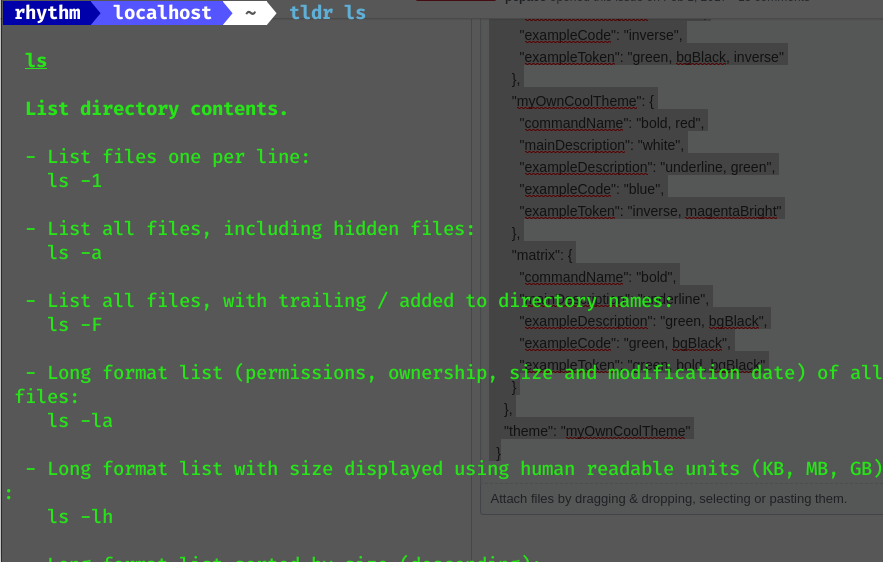
@agnivade @waldyrious I also tried adding [(.tldrrc.json) or (.tldrrc.sh) or (.tldrrc) <--tried all of them] file in HOME directory in which below code is written. I'm on 3.3.2 version, v12.18.0 node version also I'm on fedora32 using Terminal(bash).
I installed tldr using sudo npm install -g tldr && tldr --update
Please help me. 5 Attachments added
### {
    "pagesRepository": "https://github.com/tldr-pages/tldr",
    "repository": "https://tldr-pages.github.io/assets/tldr.zip",
    "themes": {
      "simple": {
        "commandName": "bold, underline",
        "mainDescription": "bold",
        "exampleDescription": "",
        "exampleCode": "",
        "exampleToken": "underline"
      },
      "base16": {
        "commandName": "bold",
        "mainDescription": "",
        "exampleDescription": "green",
        "exampleCode": "red",
        "exampleToken": "cyan"
      },
      "ocean": {
        "commandName": "bold, cyan",
        "mainDescription": "green",
        "exampleDescription": "green",
        "exampleCode": "cyan",
        "exampleToken": "dim"
      },
      "inverse": {
        "commandName": "bold, inverse",
        "mainDescription": "inverse",
        "exampleDescription": "black",
        "exampleCode": "inverse",
        "exampleToken": "green, bgBlack, inverse"
      },
      "myOwnCoolTheme": {
        "commandName": "bold, red",
        "mainDescription": "white",
        "exampleDescription": "underline, green",
        "exampleCode": "blue",
        "exampleToken": "inverse, magentaBright"
      },
      "matrix": {
        "commandName": "bold",
        "mainDescription": "underline",
        "exampleDescription": "green, bgBlack",
        "exampleCode": "green, bgBlack",
        "exampleToken": "green, bold, bgBlack"
      }
    },
    "theme": "myOwnCoolTheme"
  }



 lfsabcd7
on 9 Jun 2020
lfsabcd7
on 9 Jun 2020
ISSUE resolved by below command i.e. providing user while install as mentioned in the installing section https://www.npmjs.com/package/tldr/v/1.6.1
sudo npm install -g tldr --user=$root
lfsabcd7
on 9 Jun 2020
@lfsabcd7 Glad that you managed to fix it 👍
Word of advice, do not install node and global npm packages using sudo, use nvm or fnm instead. It will save you a lot of headaches in the long run 😉
 vladimyr
on 9 Jun 2020
vladimyr
on 9 Jun 2020
thanks @vladimyr
lfsabcd7
on 28 Jun 2020
Related issues
 amitech
·
3Comments
amitech
·
3Comments
 TobiasRoland
·
3Comments
TobiasRoland
·
3Comments
 michaeldbianchi
·
3Comments
michaeldbianchi
·
3Comments
 FukurouMakoto
·
3Comments
FukurouMakoto
·
3Comments
 schneiderl
·
3Comments
schneiderl
·
3Comments