Tiptap: Menu bubble does not appear after adding styles
Describe the bug
I am trying to recreate the example from here (with the menu bubble)
It all seems to be working okay, apart from the fact that the menu bubble just appears above the RTE, like this:
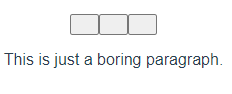
So i found some styles here and included them at the bottom of my component
Now the bubble menu does not appear by deafult, but it also doesn't appear after selecting some text
Please note that I have got no console errors, and no build errors.
Also, I am using these type definitions:
https://gist.github.com/grindpride/bc1f9e8db202c681b6d35c1055627a42
https://gist.github.com/grindpride/ce8a7b7d94f8c8d797262dc278607682
https://gist.github.com/grindpride/e436290d359b6da878b320b8ebf33446
Steps to Reproduce / Codesandbox Example
Steps to reproduce the behavior:
vue create test-project(use typescript)- Copy code below into th HelloWorld component
Expected behavior
I am expecting the bubble menu to only appear after highlighting some text in the editor
Environment
- OS: Windows 10
- Browser: Chrome, Firefox
- Mobile / Desktop: Desktop
Code
``
<template>
  <div class="editor">
      <editor-menu-bubble :editor="editor"
                          :keep-in-bounds="keepInBounds"
                          v-slot="{ commands, isActive, menu }">
        <div class="menububble"
            :class="{ 'is-active': menu.isActive }"
            :style="
left: ${menu.left}px; bottom: ${menu.bottom}px;`">
:class="{ 'is-active': isActive.bold() }"
@click="commands.bold">
      <button class="menububble__button"
              :class="{ 'is-active': isActive.italic() }"
              @click="commands.italic">
        <icon name="italic" />
      </button>

      <button class="menububble__button"
              :class="{ 'is-active': isActive.code() }"
              @click="commands.code">
        <icon name="code" />
      </button>
    </div>
  </editor-menu-bubble>

  <editor-content class="editor__content" :editor="editor" />
</div>
````
 sebasijan
All 6 comments
After inspecting the generated html I can see the bubble menu does seem to appear, but its just totally invisible and in the wrong place (normally right at the bottom of the page)
Is there some styling that I need to keep it inside the editor?
sebasijan
on 30 May 2020
I just needed to import all of those styles and now it seems to be working fine
sebasijan
on 30 May 2020
Hey @sebasijan I know this is out of scope here, but due to your comment here: https://github.com/scrumpy/tiptap/issues/54 I guess you deleted it, here is my typedef. gist again: https://gist.github.com/Chris2011/511597c9b95850e1fd08fefa93dec9fb I think I deleted it accidentally
Cheers
 Chris2011
on 31 May 2020
Chris2011
on 31 May 2020
Sry for that, I couldn't inform you in an other way :)
Chris2011
on 31 May 2020
@Chris2011 Ah no worries! I ended up using just using the type definitions I linked above and they see to be working great, but thanks for reaching out!
sebasijan
on 1 Jun 2020
Ahh ok I see, those are more powerful :). Mine was enough for me. Cheers
Chris2011
on 1 Jun 2020
Related issues
 glavdir
·
3Comments
glavdir
·
3Comments
 jetacpp
·
3Comments
jetacpp
·
3Comments
 klaasgeldof
·
3Comments
klaasgeldof
·
3Comments
 unikitty37
·
3Comments
unikitty37
·
3Comments
 nekooee
·
3Comments
nekooee
·
3Comments