Tiptap: Remove focuse outeline of editor
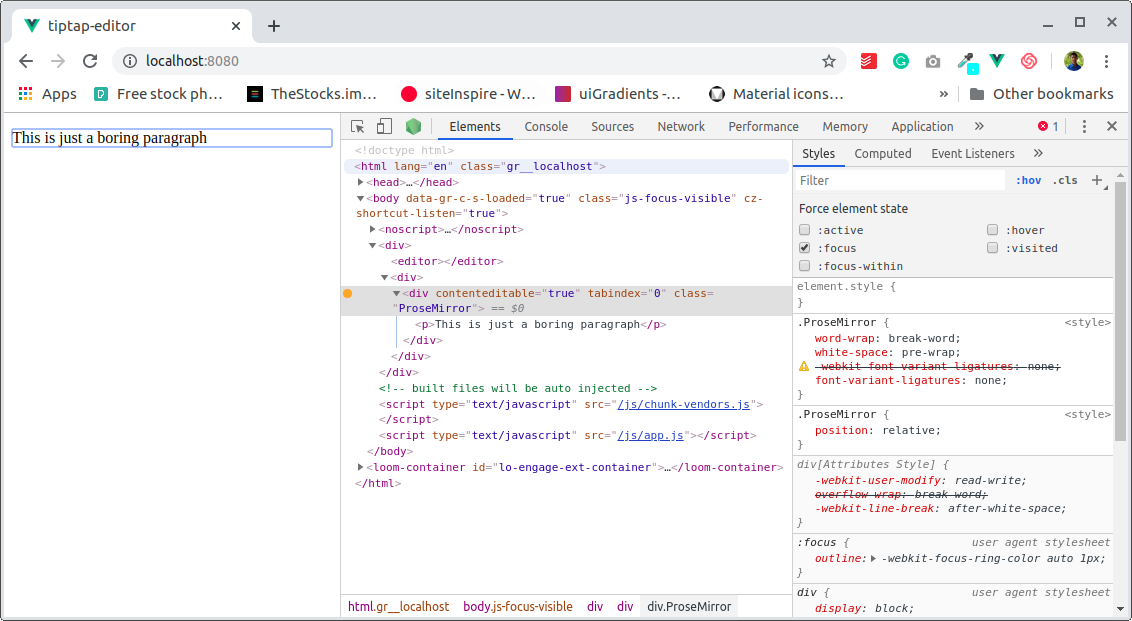
I am unable to remove the outline of the editor when clicking it.
Please help me to do this
feature request
 BiswasSuman
All 7 comments
I have the same issue, it looks like the ProseMirror-focused class gets appends when you click.
But it seems impossible to overwrite that specific :focus class.
 chkb
on 21 Nov 2019
chkb
on 21 Nov 2019
Styling is not part of tiptap. It's renderless. Removing focus is basic CSS.
.ProseMirror:focus {
    outline: none;
}
 philippkuehn
on 21 Nov 2019
philippkuehn
on 21 Nov 2019
👍6
@philippkuehn your solution does not work.
chkb
on 21 Nov 2019
👍3
Solved The Problem
@philippkuehn Thank you very much. Actually I am also tried this. The first time it not worked because I add CSS under scoped, But after adding this CSS globally it working.
@chkb Please add this code globally, it will work
<style >
.ProseMirror:focus {
    outline: none;
}
</style>
👍5
👎1
or just use /deep/ .ProseMirror:focus
 imfunniee
on 29 Jan 2020
imfunniee
on 29 Jan 2020
👍2
@BiswasSuman That worked! - Thanks!
chkb
on 6 Mar 2020
🎉1
.ProseMirror-focused:focus {
    outline: none;
}
 bill-dou
on 21 Jan 2021
bill-dou
on 21 Jan 2021
Was this page helpful?
0 / 5 - 0 ratings
Related issues
 afwn90cj93201nixr2e1re
·
3Comments
afwn90cj93201nixr2e1re
·
3Comments
 asseti6
·
3Comments
asseti6
·
3Comments
 winterdedavid
·
3Comments
winterdedavid
·
3Comments
 chrisjbrown
·
3Comments
chrisjbrown
·
3Comments
 unikitty37
·
3Comments
unikitty37
·
3Comments
Most helpful comment
Styling is not part of tiptap. It's renderless. Removing focus is basic CSS.