Tiptap: Improving link insertion/update
I decided to use tiptap in the project I'm developing. Great editor for Vue and a very creative way to implement common WYSIWYG editor. ProseMirror seems very promising, and wrapping it was a good decision :D
But, unfortunately, ProseMirror disappointed me in one thing: link creation. I believe modern WYSIWYG editors must have link insertion/update feature like Google Docs have, for example.
After reverse engineering, reading ProseMirror docs (extensively), forums and posts, I developed this code snippet:
export default class Editor extends Vue {
// [...]

  get isSelectioEmpty (): boolean {
    const { view: { state: { tr: { selection } } } } = this.getEditor()

    return selection.empty
  }

  getEditor (): Editor {
      return this.editor as Editor
  }

  setLinkUrl (command: CallableFunction, url: string) {
    const { schema, state: { tr }, view } = this.getEditor()

    if (this.isSelectioEmpty) {
      const [ link ] = tr.selection.$anchor.marks()
      const isLink = link && link.type.name === 'link'

      if (url) {
        let text = url

        if (url) {
          if (isLink) {
            if (url !== link.attrs.href) {
              const linkNode = tr.selection.$anchor.node(tr.selection.$anchor.depth)
              const resolvedPos = tr.doc.resolve(
                tr.selection.anchor - (tr.selection.$anchor.nodeBefore && tr.selection.$anchor.nodeBefore.nodeSize || 0)
              )
              tr.setSelection(new NodeSelection(resolvedPos))

              text = (tr.selection as NodeSelection).node.textContent
            }
          }

          const node = schema.text(text, [ schema.marks.link.create({ href: url }) ])
          view.dispatch(tr.replaceSelectionWith(node, false))
        }
      } else {
        if (isLink) {
          const node = tr.selection.$anchor.node(0)
          const resolvedPos = tr.doc.resolve(
            tr.selection.anchor - (tr.selection.$anchor.nodeBefore && tr.selection.$anchor.nodeBefore.nodeSize || 0)
          )

          tr.setSelection(new NodeSelection(resolvedPos))

          const { from, to } = tr.selection
          view.dispatch(tr.removeMark(from, to, link))
        }
      }
    } else {
      command({ href: url })
    }
  }
}
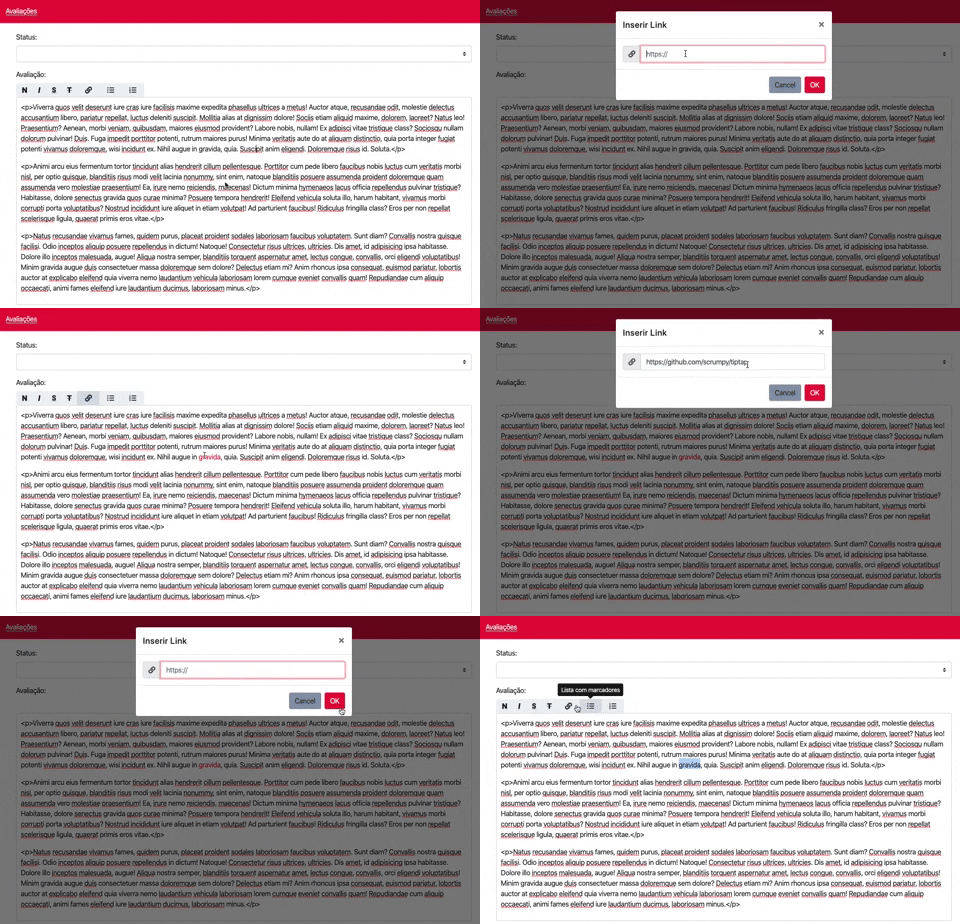
With setLinkUrl() method, is possible to:
- Select a text and create a link (common way)
- Update link without the need to select all text
- Remove link, when submit a empty url
- create link using url as text (no need to select text to create a link)
For my needs, it is perfect. But I was wondering @philippkuehn, if it is possible to improve this snippet, making better use of tiptap methods/properties 🤔
Demo
 juliovedovatto
All 8 comments
I'm facing this same issue as it is imperative all editors have this functionality. I'm thinking possibly the reason this wasn't ported from the prosemirror example setup is it's not all that featured (ie no ability to edit link). We did implement links using the menu-bubble as the tiptap examples show but found it problematic and really just want a standard link in the menu bar like this example shows and most other editors have OTB. While I want to love the fact that this is built on prosemirror it's unfortunately an undertaking trying to do the least bit of customizations.
 jeissler
on 31 Oct 2019
jeissler
on 31 Oct 2019
I would also very much see an example on how to implement this the "TipTap"-way. This is also something I'm struggling with and think needs to be basic functionality in an editor.
 svennerberg
on 13 Dec 2019
svennerberg
on 13 Dec 2019
@svennerberg It's unfortunate that this project isn't getting more attention as it could be a great solution. The docs on both parts are lacking and if someone needed all the power of prosemirror it'd probably still be advisable to use it directly IMHO. It is fortunate tho however it's not very hard to integrate a different OTB editor inside of vue. I've integrated both trix-editor and quill w/o needing any vue specific wrapper plugins. If I where to re-approach our previous tip-tap install I would go w/ raw prosemirror instead. Just my 2 cents.
jeissler
on 13 Dec 2019
Are there no plans to incorporate this into the main Tiptap editor? I think it's a pretty common use case (along with CMD+K hotkey?)
 edisonywh
on 14 Apr 2020
edisonywh
on 14 Apr 2020
@juliovedovatto nice! I was looking for this! But how do you use this in a component?
 marctaule
on 24 Apr 2020
marctaule
on 24 Apr 2020
any updates on this? would really like this in the main editor
 Stijn98s
on 26 Apr 2020
Stijn98s
on 26 Apr 2020
After looking into OPs solution
i'd like to offer my take on it the same issue a bit differently, @Stijn98s ill try to be explicit as possible
where we set up our template we pass
<button-component
        @btn:click="setUrl(commands.link)"
      />
rather than triggering the command itself we'll be passing it to our vue method
in our vue methods I created the method
    setUrl(command) {
      const state = this.editor.state

      // get marks, if any from selected area
      const { from, to } = state.selection
      let marks = []
      state.doc.nodesBetween(from, to, (node) => {
        marks = [...marks, ...node.marks]
      })

      const mark = marks.find((markItem) => markItem.type.name === 'link')

      let urlSetting = ''

      if (mark && mark.attrs.href) {
        const presetURL = mark.attrs.href
        prompt('Please update url', presetURL) // let a user see the previously set URL
      } else {
        urlSetting = prompt('Please add url', '') // a clean prompt, has had no anchor
      }

      command({ href: urlSetting })
    },
state.selection will refer to the selected content in the editor which then i parse out the marks with the type of link. This will allow you to refer to a previously set mark or, if none exists - allow you to set one via the command() method you passed via your button template
im using a basic window.prompt method to collect user input but this could be extended to custom modals, error handling components but this should get you started :)
- let me know if you're unclear on something
 kylegoines
on 27 Apr 2020
kylegoines
on 27 Apr 2020
@kylegoines Thanks!
Stijn98s
on 28 Apr 2020
Related issues
 Auxxxxlx
·
3Comments
Auxxxxlx
·
3Comments
 pk-pressf1
·
3Comments
pk-pressf1
·
3Comments
 jameswragg
·
3Comments
jameswragg
·
3Comments
 klaasgeldof
·
3Comments
klaasgeldof
·
3Comments
 winterdedavid
·
3Comments
winterdedavid
·
3Comments
Most helpful comment
After looking into OPs solution
i'd like to offer my take on it the same issue a bit differently, @Stijn98s ill try to be explicit as possible
where we set up our template we pass
rather than triggering the command itself we'll be passing it to our vue method
in our vue methods I created the method
state.selectionwill refer to the selected content in the editor which then i parse out the marks with the type of link. This will allow you to refer to a previously set mark or, if none exists - allow you to set one via thecommand()method you passed via your button templateim using a basic window.prompt method to collect user input but this could be extended to custom modals, error handling components but this should get you started :)