Tiptap: Bug after update to 1.19.0 : RangeError: Adding different instances of a keyed plugin (plugin$1)
I've updated tiptap from v1.8.0 to v1.19.0 and now I have this bug in the console :
[Vue warn]: Error in data(): "RangeError: Adding different instances of a keyed plugin (plugin$1)"
The editor does not work anymore.
 ligne13
All 36 comments
try to make a clean install (remove node_modules).
if the issue still exists, please provide a codesandbox.
 philippkuehn
on 9 May 2019
philippkuehn
on 9 May 2019
Same bug after a clean install.
I do not have the bug in a basic sandbox... maybe a conflict with another dependency on code on my project. I will let you know if I find something.
ligne13
on 9 May 2019
Hi @philippkuehn ,
the error is thrown by the prosemirror-state module, inside its EditorState.create method and the Configuration constructor, because 2 plugins have the same key (plugin$, whereas other plugins have an incremental key: plugin$1, plugin$2, etc.) : these plugins are handleTextInput and handleKeydown.
See the screenshots below :

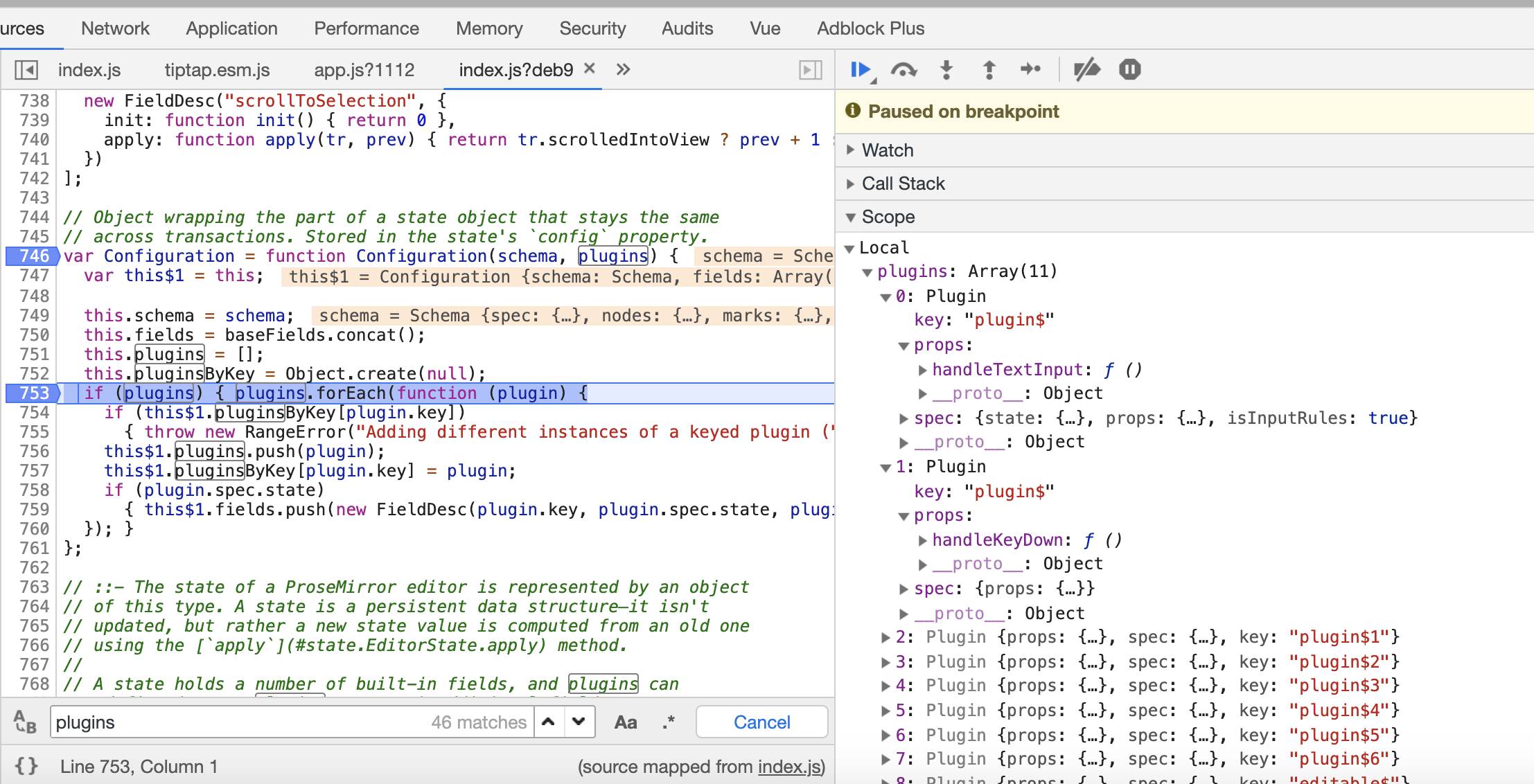
Do you have an idea of what can cause this error ?
thanks
ligne13
on 9 May 2019
do you add some custom extensions/plugins to your editor?
philippkuehn
on 9 May 2019
Well, that is strange : now it's working. I have not changed anything. Just made a few more npm installs...
Thanks anyway !
ligne13
on 9 May 2019
The
me too
 xiongxiaocui
on 10 May 2019
xiongxiaocui
on 10 May 2019
Same for me.
I've cleared the yarn cache, removed node_modules and re-run yarn install multiple times.
using: yarn
tiptap version: 1.19.1 (updated from 1.18.0)

code:
import { Editor } from 'tiptap'
//...Vue stuff...
this.editor = new Editor({
content: doc,
extensions: [],
})
 cbeninati
on 11 May 2019
cbeninati
on 11 May 2019
I found out my problem. I had manually changed the versions for tiptap and tiptap-extensions to ^1/19.1. After reverting to my latest commit and instead running yarn upgrade, it is working.
cbeninati
on 11 May 2019
I am having this same problem. It is intermittent. Clean install did not solve the problem for me...
 bbbford
on 13 May 2019
bbbford
on 13 May 2019
Try to delete node_modules and yarn.lock, after run yarn install again
 Raerten
on 13 May 2019
Raerten
on 13 May 2019
Thanks @Raerten. I deleted node_modules folder and package-lock.json, then ran npm install. That seems to have done the trick. Thank you very much!
bbbford
on 13 May 2019
I still get this error with a fresh install with:
"tiptap": "^1.26.6",
"tiptap-extensions": "^1.28.6"
Here my code:
<template>
<div class="tf-content-editor">
<client-only placeholder="Loading...">
<editor-floating-menu v-slot="{ commands, isActive, menu }" :editor="editor">
<div
class="editor__floating-menu"
:class="{ 'is-active': menu.isActive }"
:style="`top: ${menu.top}px`"
>
<button
class="menubar__button"
:class="{ 'is-active': isActive.heading({ level: 1 }) }"
@click="commands.heading({ level: 1 })"
>
H1
</button>
<button
class="menubar__button"
:class="{ 'is-active': isActive.heading({ level: 2 }) }"
@click="commands.heading({ level: 2 })"
>
H2
</button>
<button
class="menubar__button"
:class="{ 'is-active': isActive.heading({ level: 3 }) }"
@click="commands.heading({ level: 3 })"
>
H3
</button>
<button
class="menubar__button"
:class="{ 'is-active': isActive.bullet_list() }"
@click="commands.bullet_list"
>
<icon name="ul" />
</button>
<button
class="menubar__button"
:class="{ 'is-active': isActive.ordered_list() }"
@click="commands.ordered_list"
>
<icon name="ol" />
</button>
<button
class="menubar__button"
:class="{ 'is-active': isActive.blockquote() }"
@click="commands.blockquote"
>
<icon name="quote" />
</button>
<button
class="menubar__button"
:class="{ 'is-active': isActive.code_block() }"
@click="commands.code_block"
>
<icon name="code" />
</button>
</div>
</editor-floating-menu>
<editor-content class="editor__content" :editor="editor" />
</client-only>
</div>
</template>
<script>
import { Editor, EditorContent, EditorFloatingMenu } from 'tiptap'
import {
Blockquote,
BulletList,
CodeBlock,
HardBreak,
Heading,
ListItem,
OrderedList,
TodoItem,
TodoList,
Bold,
Code,
Italic,
Link,
History
} from 'tiptap-extensions'
export default {
components: {
EditorContent,
EditorFloatingMenu
},
data () {
return {
editor: null
}
},
mounted () {
this.editor = new Editor({
extensions: [
new Blockquote(),
new BulletList(),
new CodeBlock(),
new HardBreak(),
new Heading({ levels: [1, 2, 3] }),
new ListItem(),
new OrderedList(),
new TodoItem(),
new TodoList(),
new Link(),
new Bold(),
new Code(),
new Italic(),
new History()
],
content: `
<h2>
Floating Menu
</h2>
<p>
This is an example of a medium-like editor. Enter a new line and some buttons will appear.
</p>
`
})
},
beforeDestroy () {
this.editor.destroy()
}
}
</script>
I've cleared the yarn cache, removed node_modules and re-run yarn install 1000 times and also run yarn upgrade without any success...
Is it can be related to the new version of Tiptap?
 julianfox
on 19 Mar 2020
julianfox
on 19 Mar 2020
Same problem here
 latelt-j
on 19 Mar 2020
latelt-j
on 19 Mar 2020
Have the same problem, removing node_modules did not help
 homerager
on 19 Mar 2020
homerager
on 19 Mar 2020
Some further discussion on this here:
577
This appears related multiple versions of prosemirror-state being loaded. It can be worked around by adding the following (yarn) resolutions in your package.json:
"resolutions": {
    "prosemirror-model": "1.8.2",
    "prosemirror-state": "1.3.2",
    "prosemirror-transform": "1.2.2",
    "prosemirror-view": "1.13.4"
  },
To summarize, this is what I did:
Opened yarn.lock and found duplicates for every prosemirror package
For every such package, pinpointed its version in resolutions to prevent multiple versions of the same package from installing (you can try my resolutions above)
rm -rf node_modules
yarn cache clean
yarn install
 jakedolan
on 19 Mar 2020
jakedolan
on 19 Mar 2020
@jakedolan thank you good sir!! worked like a charm
 shadrachtuck
on 19 Mar 2020
shadrachtuck
on 19 Mar 2020
@jakedolan thanks! Seems like js dependency management is a total mess if one needs to do stuff like this.
 doits
on 20 Mar 2020
doits
on 20 Mar 2020
I do not understand the inner-workings deeply enough to be able to give an explanation. But I will say that removing node_modules was insufficient for me. But removing node_modules AND package-lock.json and re npm installing did the trick for me.
 lukkyjoe
on 22 Mar 2020
lukkyjoe
on 22 Mar 2020
If you encounter this issue using yarn workspace, please note that the resolution code posted by @jakedolan must be placed in your project root package.json and not in a workspace package.json.
 BinaryBrain
on 25 Mar 2020
BinaryBrain
on 25 Mar 2020
This is still happening
 mudin
on 26 Mar 2020
mudin
on 26 Mar 2020
Same problem. Doesnt work with following conditions:
"tiptap": "^1.26.6",
"tiptap-extensions": "^1.28.6",
vue": "^2.6.11"
 ozgurrgul
on 31 Mar 2020
ozgurrgul
on 31 Mar 2020
My problem is fixed. Actually I am using lerna and I removed tiptap from root package.json and keep only in single package where I use it. Maybe this will help someone who is also using lerna
mudin
on 1 Apr 2020
UPDATE: seems now tiptap and tiptap-extensions have been bumped up version-wise and it fixed the original problem for me: look a couple of posts below..
OLD:
Still happens for me after:
yarn remove tiptap && yarn remove tiptap-extensions && yarn cache clean && sudo rm -rf node_modules yarn.lock && yarn install && yarn add [email protected] && yarn add [email protected] && yarn dev
and the below in package.json:
"resolutions": {
    "prosemirror-model": "1.8.2",
    "prosemirror-state": "1.3.2",
    "prosemirror-transform": "1.2.2",
    "prosemirror-view": "1.13.4"
  },
with:
yarn list v1.22.4
├─ @vue/[email protected]
├─ [email protected]
├─ [email protected]
├─ [email protected]
├─ [email protected]
├─ [email protected]
├─ [email protected]
├─ [email protected]
├─ [email protected]
└─ [email protected]

├─ [email protected]
├─ [email protected]
│  └─ [email protected]
├─ [email protected]
└─ [email protected]

├─ [email protected]
├─ [email protected]
├─ [email protected]
├─ [email protected]
├─ [email protected]
├─ [email protected]
├─ [email protected]
├─ [email protected]
├─ [email protected]
├─ [email protected]
├─ [email protected]
├─ [email protected]
├─ [email protected]
├─ [email protected]
├─ [email protected]
│  └─ [email protected]
├─ [email protected]
│  ├─ [email protected]
│  │  ├─ [email protected]
│  │  ├─ [email protected]
│  │  └─ [email protected]
│  ├─ [email protected]
│  │  └─ [email protected]
│  ├─ [email protected]
│  └─ [email protected]
│     ├─ [email protected]
│     └─ [email protected]
├─ [email protected]
│  └─ [email protected]
└─ [email protected]
   └─ [email protected]
The problem is intermittent. For example I can change some text string (say in console.log()) in my App.vue and it'll work (my page renders and no errors in the console), and sometimes it won't. As if there's some timing issue or somesuch..
Someone on issue #577 suggested that the below warnings from yarn install may be related.. Any ideas?
warning "workspace-aggregator-55c332bc-1396-4e97-9318-7d1987769566 > tiptap-commands > [email protected]" has incorrect peer dependency "prosemirror-tables@^0.9.1"
Some of the errors (more follow afterwards but I believe they're triggered because of this first one..) I'm seeing in my console:
vue.esm.js:629 [Vue warn]: Error in data(): "RangeError: Adding different instances of a keyed plugin (plugin$1)"

found in

---> <Add> at src/views/values/Add.vue
       <Index> at src/views/values/index.vue
         <Home> at src/views/index.vue
           <App> at src/App.vue
             <Root>
warn @ vue.esm.js:629

vue.esm.js:1896 RangeError: Adding different instances of a keyed plugin (plugin$1)
    at eval (index.es.js:773)
    at Array.forEach (<anonymous>)
    at new Configuration (index.es.js:771)
    at Function.create (index.es.js:909)
    at Editor.createState (tiptap.esm.js:1174)
    at Editor.createView (tiptap.esm.js:1259)
    at Editor.init (tiptap.esm.js:1078)
    at new Editor (tiptap.esm.js:1052)
    at VueComponent.data (Add.vue?./node_modules/babel-loader/lib!./node_modules/vue-loader/lib??vue-loader-options:156)
    at getData (vue.esm.js:4749)
logError @ vue.esm.js:1896
 A-d-o-n-i-s
on 1 Apr 2020
A-d-o-n-i-s
on 1 Apr 2020
This comment on #577 fixed my issue:
https://github.com/scrumpy/tiptap/issues/577#issuecomment-600865824
ozgurrgul
on 1 Apr 2020
Thanks, but I tried it without any luck (it's all in my report above..)
A-d-o-n-i-s
on 1 Apr 2020
@A-d-o-n-i-s It appears that you are still loading multiple versions of prosemirror-state.
├─ [email protected]
│ └─ [email protected]
├─ [email protected]
│ ├─ [email protected]
│ │ ├─ [email protected]
For this workaround, you may need to investigate why your resolutions in the package.json is not enforcing the resolution to a single version of the prosemirror-state package.
jakedolan
on 1 Apr 2020
Oh! I missed that. Thank you @jakedolan!
Any thoughts if this could be affecting things?
warning "workspace-aggregator-55c332bc-1396-4e97-9318-7d1987769566 > tiptap-commands > [email protected]" has incorrect peer dependency "prosemirror-tables@^0.9.1"
This bug is currently a absolut show stopper for me. Would be nice, see a fix!
 prodigy7
on 1 Apr 2020
prodigy7
on 1 Apr 2020
Yes, TOTALLY. I'm being asked by my company to look at other editors now for a site-wide switch! This is a blow to Prosemirror and Tiptap and Vue.js...
UPDATE: seems now tiptap and tiptap-extensions have been bumped up version-wise (patch=7) and it fixed the original problem! Yey! Thank you!
Started with:
yarn remove tiptap && yarn remove tiptap-extensions && yarn cache clean && sudo rm -rf node_modules yarn.lock && yarn install && yarn add tiptap && yarn add tiptap-extensions && yarn dev
with empty "resolutions": {} in package.json
and after yarn list --pattern tiptap && yarn list --pattern prosemirror I now get:
yarn list v1.22.4
├─ [email protected]
├─ [email protected]
├─ [email protected]
└─ [email protected]

├─ [email protected]
├─ [email protected]
├─ [email protected]
├─ [email protected]
├─ [email protected]
├─ [email protected]
├─ [email protected]
├─ [email protected]
├─ [email protected]
├─ [email protected]
├─ [email protected]
├─ [email protected]
├─ [email protected]
└─ [email protected]
For me, this occurred after running npm audit fix --force. I think there is a problem with prosemirror but I didn't investigated enough. Removing node_modules AND package-lock.json and then a fresh install solved it.
 amraei
on 2 Apr 2020
amraei
on 2 Apr 2020
I had the same issue. I needed to import prosemirror-state and prosemirror-view because I had to modify some extensions. What finally worked for me was:
- Remove everything tiptap and prosemirror related from package.json
- Remove node_modules directory and package-lock.json
- Run
npm install tiptap tiptap-extensions tiptap-commands prosemirror-state prosemirror-view - Run
npm install
Somehow the 1st and 3rd step made a difference in my case.
 panayotisk
on 27 Apr 2020
panayotisk
on 27 Apr 2020
Same issue here and the @panayotisk advice worked for me as well.
 abusedmedia
on 21 May 2020
abusedmedia
on 21 May 2020
Can confirm it too, without manually editing package-lock.json or installing ProseMirror related packages:
npm remove tiptap tiptap-commands tiptap-extensionsrm -rf node_modulesnpm i -S tiptap tiptap-commands tiptap-extensions
Finally fixed this months-long bug! 😌
 nicooprat
on 25 May 2020
nicooprat
on 25 May 2020
With latest presemirror-model 1.10.0 we are back at this again, at least with yarn. It installs version 1.9.1 and 1.10.0 and there it goes.
tiptap-commands explicitly requires version 1.9.1 (why that strict?), other dependents have it required with a version range (e.g. ^1.1.0).
I fixed it by forcing 1.10.0 for all packages in package.json, which seems to work out so far:
{
  resolutions: {
    prosemirror-model: "~1.10.0"
  }
}
Got this error recently after updating dependencies. The error come from different installed versions of some prosemirror plugins.
Use yarn list --pattern prosemirror to see installed versions.
If you got something like this, several versions of the same plugin are installed:
yarn list v1.22.5
├─ [email protected]
├─ [email protected]
├─ [email protected]
├─ [email protected]
├─ [email protected]
├─ [email protected]
├─ [email protected]
├─ [email protected]
├─ [email protected]
├─ [email protected]
├─ [email protected]
├─ [email protected]
├─ [email protected]
├─ [email protected]
├─ [email protected]
│  └─ [email protected]
└─ [email protected]
   ├─ [email protected]
   └─ [email protected]
      └─ [email protected]
Here prosemirror-commands 1.1.5 and 1.1.4, prosemirror-state 1.3.4 and 1.3.3 and prosemirror-view 1.17.2 and 1.16.5 are installed.
You can resolve this by using resolutions to force the versions of each plugin in order to install one unique version of each.
For exemple :
    "resolutions": {
        "prosemirror-commands": "1.1.5",
        "prosemirror-state": "1.3.4",
        "prosemirror-view": "1.17.2"
    }
Then rm -Rf node_modules/ and yarn install / npm install.
Now, when running yarn list --pattern prosemirror, each plugin must appear once, like :
├─ [email protected]
├─ [email protected]
├─ [email protected]
├─ [email protected]
├─ [email protected]
├─ [email protected]
├─ [email protected]
├─ [email protected]
├─ [email protected]
├─ [email protected]
├─ [email protected]
├─ [email protected]
├─ [email protected]
└─ [email protected]
 maximecolin
on 26 Jan 2021
maximecolin
on 26 Jan 2021
Thanks! Seems to be the same as in #947. I’ll work on that one. ✌️
 hanspagel
on 26 Jan 2021
hanspagel
on 26 Jan 2021
Related issues
 bernhardh
·
3Comments
bernhardh
·
3Comments
 connecteev
·
3Comments
connecteev
·
3Comments
 unikitty37
·
3Comments
unikitty37
·
3Comments
 ageeye-cn
·
3Comments
ageeye-cn
·
3Comments
 asseti6
·
3Comments
asseti6
·
3Comments
Most helpful comment
Some further discussion on this here:
577
This appears related multiple versions of prosemirror-state being loaded. It can be worked around by adding the following (yarn) resolutions in your package.json: