Tiptap: Icons? How do I get them working?
Hey,
I'm in the middle of implementing Tiptap in my web app. One of the issues I'm experiencing is that I have the Icon.vue component and I've downloaded the svg assets for the icons but I don't know how to tell the Vue component where the icons are stored.
I would appreciate any help.
Thanks
 duncanmcclean
All 9 comments
Styling is not part of this package. It's for demo purposes only. Use your own workflow for adding icons.
 philippkuehn
on 6 Feb 2019
philippkuehn
on 6 Feb 2019
Hi,
As I can see that a lot of people are having issues with icons, it might be useful to change the example so it will either work out of the box, or a warning would be displayed saying that the icons are not supposed to work. Of course, I am more a fan of the first option.
However, the easiest way of making the icons work is to copy the <svg> block from the body of the example.
Not to mention that these two lines for the icon loader are not even correctly written at all and are costing users the precious time.
const __svg__ = { path: './assets/images/icons/*.svg', name: 'assets/images/[hash].sprite.svg' }
svgSpriteLoader(__svg__.filename)
I know that the purpose of the editor is to be renderless, so anybody can create his own design, but it is obvious that this issue is frustrating users and can only be bad for the overall reputation and usage of this package. And we want more people using this package, as more people usually means better package (more tested).
Overall, I am still grateful for this amazing editor package and I look forward to contributing to it :)
 papa-zulu
on 14 Feb 2019
papa-zulu
on 14 Feb 2019
@damcclean @papa-zulu I was trying to do the same as you, and found the lack of a proper out-of-the-box example made difficult to have the package working easily. While learning how to use tiptap I created an example in github and uploaded it as an npm package, maybe could be useful for others. Hope it works :D
 neverbot
on 15 Jul 2019
neverbot
on 15 Jul 2019
For those of you looking to use the icons from the examples, a quick way to get things going is to inspect the icons, then copy / paste their SVGs into your project as necessary:
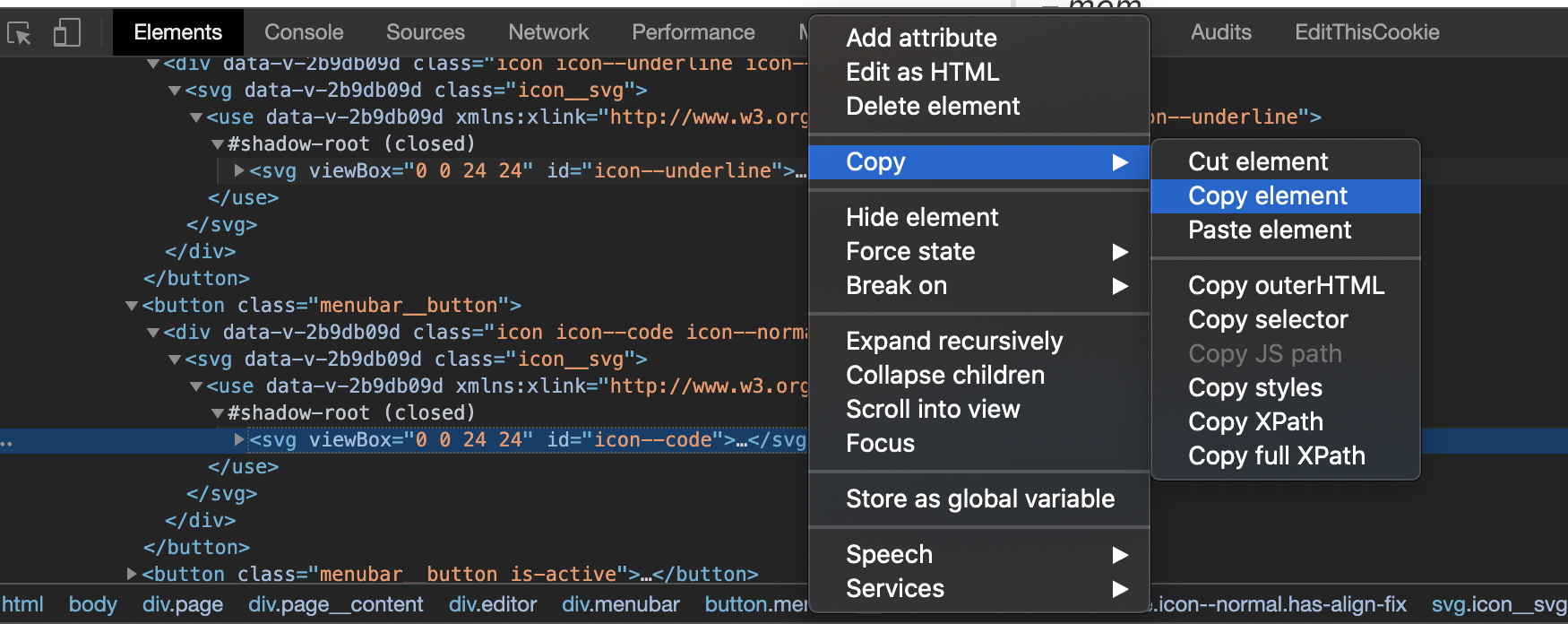
Solved the issue without forcing me to learn how the current SVG loading is set up in the example component.
 christopher4lis
on 13 Mar 2020
christopher4lis
on 13 Mar 2020
Code is meant to be used. If you don't want your code to be used don't publish it. As it stands the example section is probably the single biggest turnoff I have met since I started with Vue and that's saying something...
Either have an example page, in which case the examples need to be usable, or don't. As it stands Tiptap does NOT have an example page. It has a timewasting trap for people beginning with the tool that is mislabeled as "examples".
 JustusW
on 26 May 2020
JustusW
on 26 May 2020
@JustusW that's unnecessarily aggressive of you. Tiptap has had an examples page for quite some time (dating back to August 2018) and had one at the time of you writing your comment - https://github.com/ueberdosis/tiptap/commits/main/examples/index.html
 andreasvirkus
on 9 Oct 2020
andreasvirkus
on 9 Oct 2020
@andreasvirkus and most of the examples are broken or require extensive messing with to get working. I've had better success using github's search feature. Go compare the docs to prosemirror, there is a world of difference.
 rbrace
on 27 Oct 2020
rbrace
on 27 Oct 2020
@rbrace We made the documentation a priority for the upcoming tiptap 2 and love constructive feedback. What’s your biggest pain with the existing examples besides removing the
 hanspagel
on 27 Oct 2020
hanspagel
on 27 Oct 2020
@damcclean @papa-zulu I was trying to do the same as you, and found the lack of a proper out-of-the-box example made difficult to have the package working easily. While learning how to use tiptap I created an example in github and uploaded it as an npm package, maybe could be useful for others. Hope it works :D
The icons and the complicated build setup for the tiptap examples was giving me fits. Your much simplified example was SOOO helpful. Thank you!
 fkmiec
on 1 Jan 2021
fkmiec
on 1 Jan 2021
Related issues
 Auxxxxlx
·
3Comments
Auxxxxlx
·
3Comments
 ageeye-cn
·
3Comments
ageeye-cn
·
3Comments
 leandromatos
·
4Comments
leandromatos
·
4Comments
 unikitty37
·
3Comments
unikitty37
·
3Comments
 klaasgeldof
·
3Comments
klaasgeldof
·
3Comments
Most helpful comment
Hi,
As I can see that a lot of people are having issues with icons, it might be useful to change the example so it will either work out of the box, or a warning would be displayed saying that the icons are not supposed to work. Of course, I am more a fan of the first option.
However, the easiest way of making the icons work is to copy the
<svg>block from the body of the example.Not to mention that these two lines for the icon loader are not even correctly written at all and are costing users the precious time.
I know that the purpose of the editor is to be renderless, so anybody can create his own design, but it is obvious that this issue is frustrating users and can only be bad for the overall reputation and usage of this package. And we want more people using this package, as more people usually means better package (more tested).
Overall, I am still grateful for this amazing editor package and I look forward to contributing to it :)