Tipsi-stripe: Cannot read property 'init' of undefined
Hello,
I tried to integrate tipsi-stripe in my project and encountered the proplem, that I am always getting the error 'Cannot read property 'init' of undefined' when running the app.
I used this code in my App.js file:
import stripe from 'tipsi-stripe';

stripe.init({
  publishableKey: 'pk_test_xxx',
})
This code is exactly what is shown in the example project, except that I left out the merchantId field (Didn't work with that either)
I linked the library and added the Stripe pod to my Xcode project.
Did anyone experience similar errors or am I just missing out a mistake made by me?
Thank you in advance!
 marco-krammer
All 29 comments
Hi @CSMarco, of course, you're not the first man with this problem.
There are two related issues - https://github.com/tipsi/tipsi-stripe/issues/53 and https://github.com/tipsi/tipsi-stripe/issues/81.
I'm sure you didn't link tipsi-stripe correctly. Please, check these issues and write here after that.
 isnifer
on 14 Aug 2017
isnifer
on 14 Aug 2017
@isnifer Sadly this didn't help me with my problem. I've tried linking it manually aswell, but this didn't work either. Do you have any other ideas how to fix this problem?
marco-krammer
on 14 Aug 2017
@CSMarco so, please show me how did you link tipsi-stripe. Show me Link with binaries section in your project, also please show me your HEADER_SEARCH_PATHS section in your project
isnifer
on 14 Aug 2017
@isnifer there you go


marco-krammer
on 14 Aug 2017
@CSMarco did you install Pods?
isnifer
on 14 Aug 2017
@isnifer Yes I did.
This is my Podfile:
target 'appXXX' do
  pod 'Stripe', '~> 10.1.0'
end
@CSMarco so, one more thing in headers from our README:
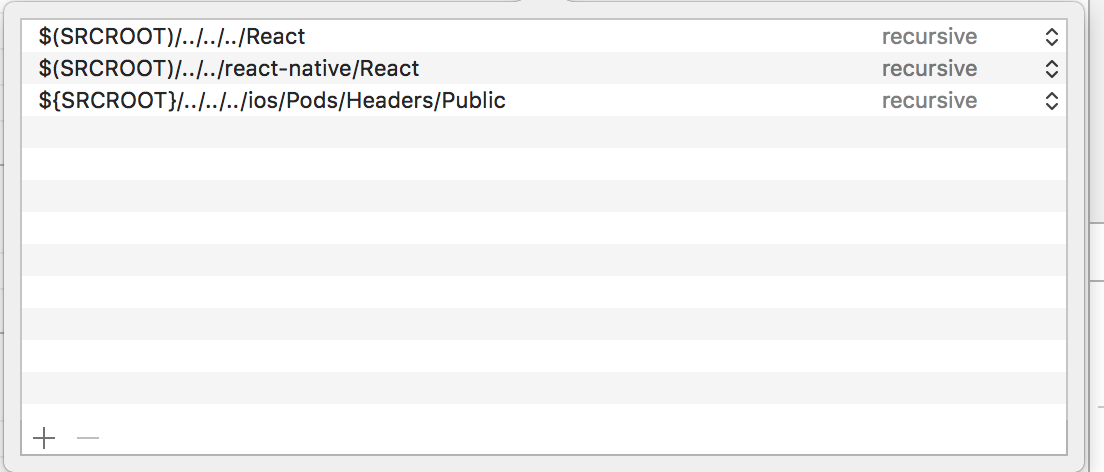
Click on TPSStripe.xcodeproj in Libraries and go the Build Settings tab. Double click the text to the right of Header Search Paths and verify that it has $(SRCROOT)/../../react-native/React as well as ${SRCROOT}/../../../ios/Pods/Headers/Public - if they aren't, then add them.
isnifer
on 14 Aug 2017
@isnifer They are already added there.
marco-krammer
on 14 Aug 2017
@CSMarco I don't see them in your screenshot
isnifer
on 14 Aug 2017
@isnifer The screenshot is from my main project, but the other two are already added in the TPSStripe.xcodeproj as you can see in this screenshot:
marco-krammer
on 14 Aug 2017
@CSMarco I think it's not enough.
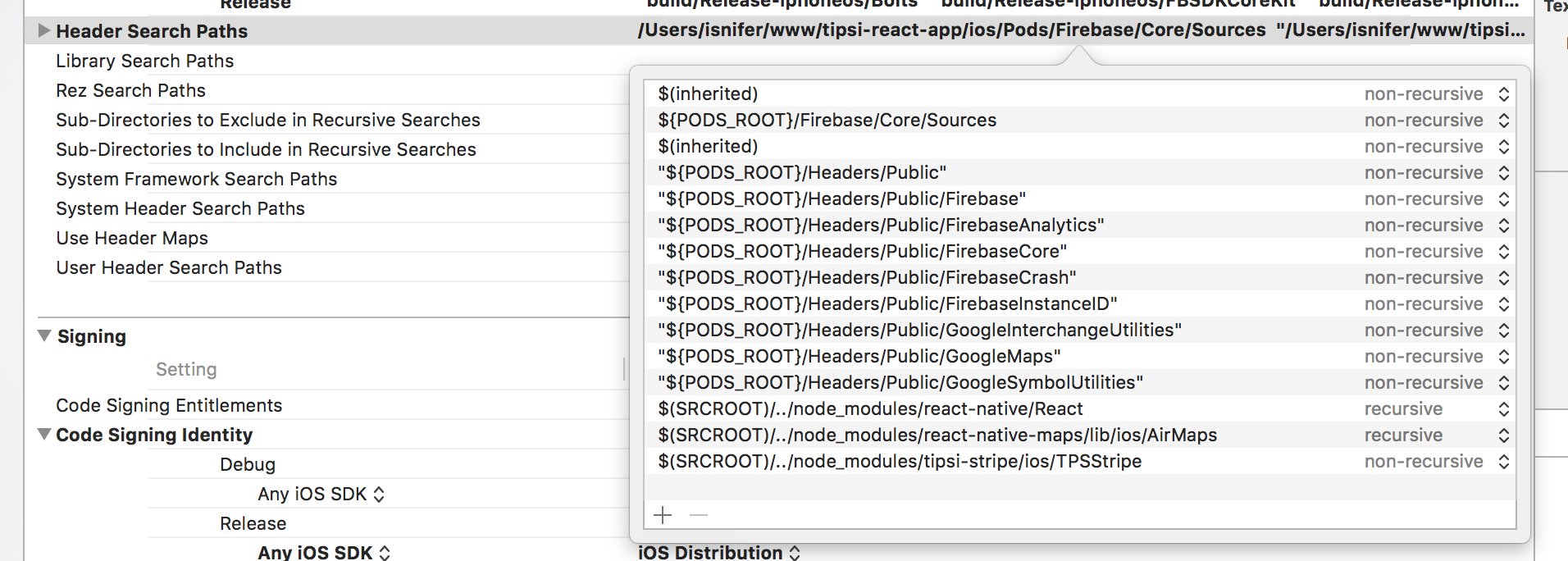
I see these HEADERS in our main project file:
isnifer
on 14 Aug 2017
@isnifer Is Firebase or Google integration necessary? Because I have tried adding these other paths, but it still doesn't work:
"$(PODS_ROOT)/Headers/Public"
$(SRCROOT)/../node_modules/react-native/React
No, we just use it in our app
isnifer
on 14 Aug 2017
@isnifer But do you have any other ideas for fixing this problem?
marco-krammer
on 14 Aug 2017
@CSMarco can you show me screenshot oh the error. Is it like in mentioned issues?
isnifer
on 14 Aug 2017
@isnifer

marco-krammer
on 14 Aug 2017
I have same error message for both example app in the package and my app
Below is the screen capture from the example app.

 JonghunYu
on 16 Aug 2017
JonghunYu
on 16 Aug 2017
My app works now after re-build in the .xcworkspace. Sorry for the mistake
JonghunYu
on 16 Aug 2017
Nice, @CSMarco how are you building your app? Via workspace?
isnifer
on 16 Aug 2017
@isnifer Yes, I am building the app via workspace, but rebuilding/completely regenerating the workspace with react-native doesn't work either
marco-krammer
on 17 Aug 2017
I fixed it:
My project was initially using Expo and I ejected it. Now I created a new project with react-native init and compared the package.json of my project and the newly created project and edited it. Then I removed node_modules and ran npm install again. After that it ran perfectly fine.
marco-krammer
on 17 Aug 2017
@CSMarco Nice. We need to update our README
isnifer
on 17 Aug 2017
I'm experiencing the same issues and none of the above fixes are working.
 dpetkevich
on 16 Aug 2018
dpetkevich
on 16 Aug 2018
At last, I was able to compile, here is what I did:
sudo gem install stripe
sudo gem install -n /usr/local/bin cocoapods
ios/Podfile:
platform :ios, '9.0'
workspace 'MyApp'
 target 'MyApp' do
 pod 'Stripe', '~> 14.0.0'
 inherit! :search_paths
end
run pod install inside ios directory
run react-native link tipsi-stripe at project root
 hopewise
on 17 Apr 2019
hopewise
on 17 Apr 2019
I am still getting this issue when running yarn test with a project that was originally expo and now bare. @MarcoKCodes What was the offending package?
 alexpchin
on 25 Sep 2019
alexpchin
on 25 Sep 2019
@alexpchin as far as I can remember there wasn't a specific package causing this issue. As stated above all I did to resolve it in my specific case was ejecting from Expo, deleting the node_modules folder and running npm install again.
marco-krammer
on 25 Sep 2019
@MarcoKCodes Does this trigger any memories? I’ve ejected and removed node_modules but still finding this a problem? https://github.com/tipsi/tipsi-stripe/issues/551
alexpchin
on 25 Sep 2019
@alexpchin Sorry, but I can't really remember any details on this issue as I encountered it more than 2 years ago. Did you find a solution in the meantime?
marco-krammer
on 15 Oct 2019
If anyone should have issues with this in 8.0.0-beta.9 then add the following to your podfile
pod 'Stripe'
pod 'tipsi-stripe', :path => '../node_modules/tipsi-stripe'
For some reason the RN autolinking doesn't work out of the box. At least for me.
My projects RN version is 0.61.5
 Sanglepp
on 29 Mar 2020
Sanglepp
on 29 Mar 2020
Related issues
 SambhavAnand
·
4Comments
SambhavAnand
·
4Comments
 benjaminreid
·
5Comments
benjaminreid
·
5Comments
 nenti
·
5Comments
nenti
·
5Comments
 sydridgmLee
·
5Comments
sydridgmLee
·
5Comments
 duro
·
3Comments
duro
·
3Comments
Most helpful comment
I'm experiencing the same issues and none of the above fixes are working.