Tilix: Broken dark mode: Terminal title stays white
With the latest update on Manjaro KDE version, the dark theme is not consistent in Tilix.
Initially, I thought that this is the theme problem, but I tried with a bunch of different ones but doesn't help - the terminal title stays white. Before the update, it worked flawlessly.
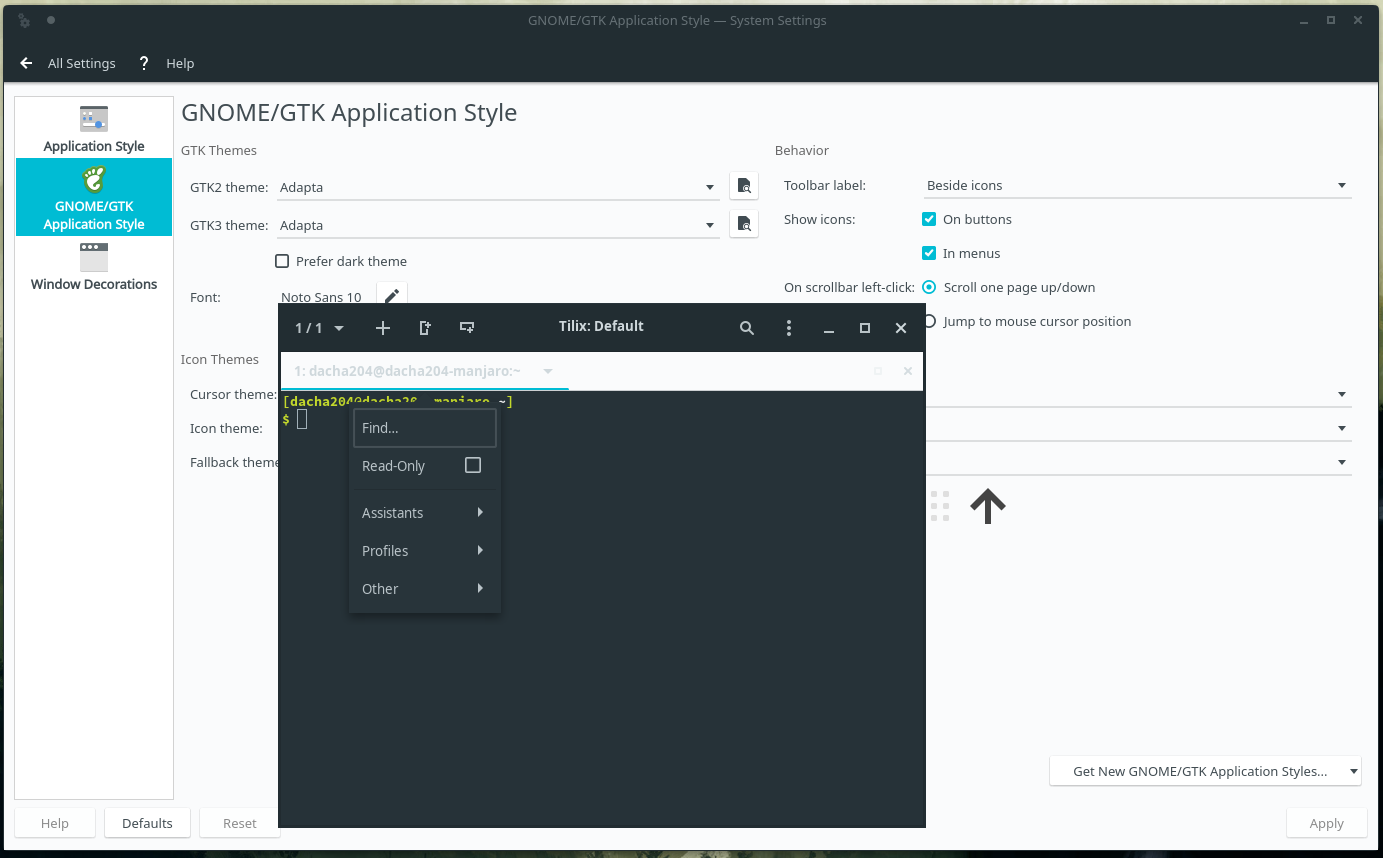
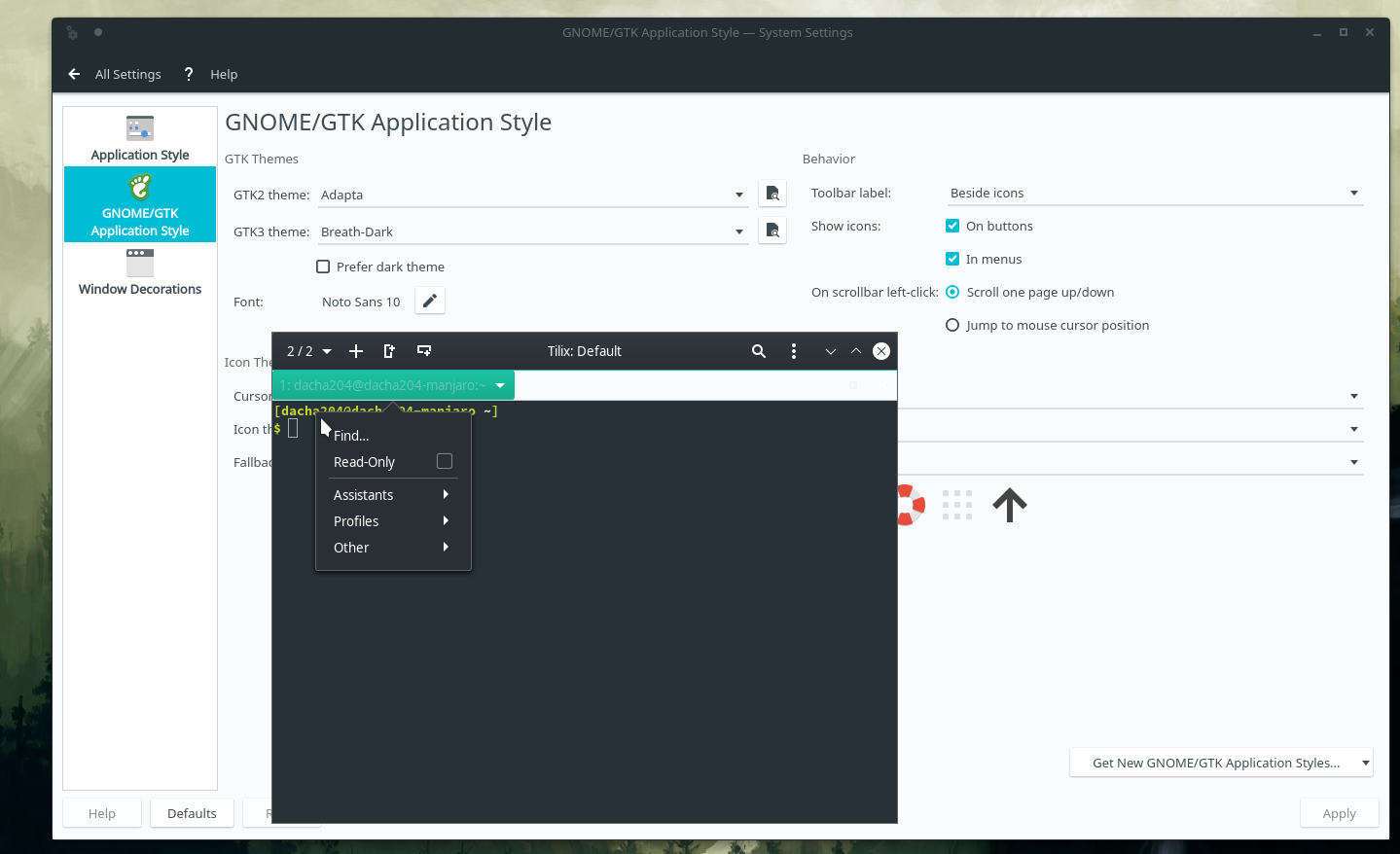
Package info (community repository)
URL | https://github.com/gnunn1/tilix
-- | --
Version | 1.9.3-4
Licenses | MPL
Depends On | libx11 gtkd vte3 dconf gsettings-desktop-schemas
Optional Deps | python-nautilus : for "Open Tilix Here" support in nautiluslibsecret : for the password manager [installed]
Download Size | 0.00 Bytes
Installed Size | 4.77 MiB
Packager | Dan Printzell <[email protected]>
Architecture | x86_64
Build Date | Friday, 13 September 2019 14:17:24 CEST
Install Reason | Explicitly installed
 Dacha204
All 5 comments
I can confirm, this issue is also visible at my side.

Changing the Application Style for GNOME/Gtk does not have any effect.
Oddly however, I was also able to change this behaviour by changing the kde Colours settings to all dark mode, in picture below I changed from Materia Light to Materia Dark and the tab changed back to dark:
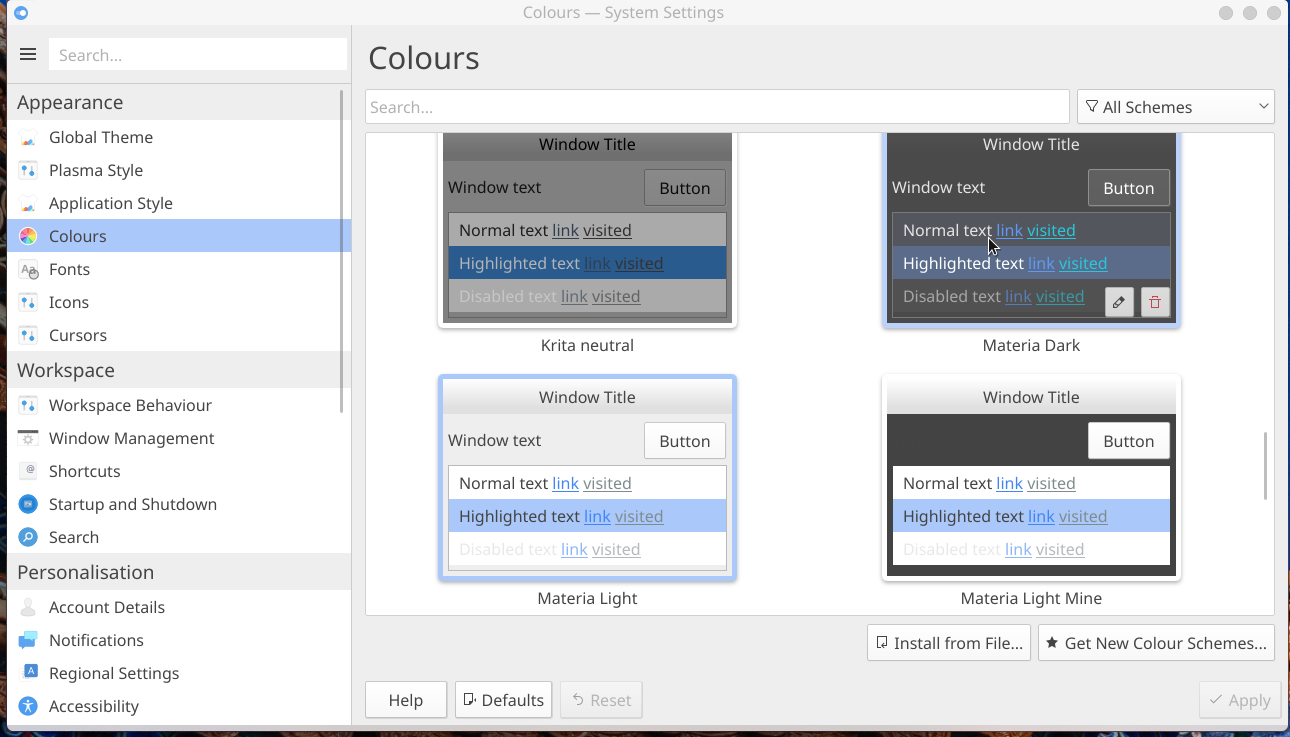

However, as Dacha204 noted, the dark mode in tilix used to work fine even with colours in kde set to light mode. Perhaps there is some issue with overriding the dark theme settings?
It's hard to establish now which update did cause this effect, however I believe it was even before Dacha204 post from November 2nd 2019. Surely in the second part of the year 2019.
Configuration:
tilix --version
Versions
Tilix version: 1.9.1
VTE version: 0.58
GTK Version: 3.24.13
Tilix Special Features
Notifications enabled=0
Triggers enabled=0
Badges enabled=1
OS and KDE:

 matplinta
on 6 Jan 2020
matplinta
on 6 Jan 2020
It's hard to establish now which update did cause this effect, however I believe it was even before Dacha204 post from November 2nd 2019.
This has been happening since Plasma 5.17 hit and has been triggering my OCD ever since. I looked around a lot back then and found some links with more info, but couldn't find them again. All I could find now is this one link
Lets hope Plasma 5.18 fixes it.
EDIT: I in fact followed the fix of the link I shared, and seems to have done the trick for me. My tilix is back to full dark theme.
 mistersister
on 6 Feb 2020
mistersister
on 6 Feb 2020
Great, in case the link expires I am putting the temporal solution presented there here:
"I got it done by commenting the line on ~/.config/gtk-3.0/gtk.css
/* @import 'colors.css'; */
"
Resolved the issue for me.
matplinta
on 19 Feb 2020
I was using Tilix (on Gnome, without Plasma installed) for long time - yesterday I needed to test something on Plasma and when I got back to Gnome, I got hit by this bug. Bug persisted even after I removed Plasma.
I confirm removing file ~/.config/gtk-3.0/gtk.css (that file had 1 line inside) solved the problem for me. Is this file being generated by Plasma (why Plasma is touching gtk theming and not cleaning up after itself)? Maybe this bug should be reported in KDE bugtracker?
 dreamer
on 16 Apr 2020
dreamer
on 16 Apr 2020
I should start by saying I experienced this issue on a test rig. It's an older laptop running PopOS that had the POP version of gnome installed. Dark mode worked fine there. I added KDE plasma from the command line. After that, launching tilix from KDE stayed stuck in light mode regardless of which setting I picked. I read this and a few other similar bug reports and for some reason I launched tilix from Konsole. It showed some errors on the Konsole command line. In particular it said there were no values for some CSS entries on lines 71, 72, 74, 75, 76, 77 in the colors.css file (last 8 or so lines...run tail on the file to see them) located in ~/.config/gtk 3.0/ I think was the path.
When I looked at those lines, the RGB values were missing sure enough. Other color values had values inside the parentheses. Next thing I did was try a few built in themes...not many ship w/ generic KDE Plasma. Only 2 were dark themes...no dice. I then used the gui theme window to install a dark theme from their online repo. That theme actually worked after I restarted tilix!! I looked at the file again with tail and sure enough, there were RGB values there now. Could there be something in the dark mode code causing those values to be removed or missing?
 rilian4
on 20 Jan 2021
rilian4
on 20 Jan 2021
Related issues
 alex285
·
3Comments
alex285
·
3Comments
 milisarge
·
3Comments
milisarge
·
3Comments
 iax7
·
4Comments
iax7
·
4Comments
 pkkid
·
3Comments
pkkid
·
3Comments
 huti26
·
3Comments
huti26
·
3Comments
Most helpful comment
I was using Tilix (on Gnome, without Plasma installed) for long time - yesterday I needed to test something on Plasma and when I got back to Gnome, I got hit by this bug. Bug persisted even after I removed Plasma.
I confirm removing file
~/.config/gtk-3.0/gtk.css(that file had 1 line inside) solved the problem for me. Is this file being generated by Plasma (why Plasma is touching gtk theming and not cleaning up after itself)? Maybe this bug should be reported in KDE bugtracker?