Tilix: Thanks for the tabs: but hard to identify the active one
As one of those who's really happy about the tab support introduced in 1.7.0 there is one thing left I can't figure out in my settings: it really hard to tell which of the tabs is the active one, see:
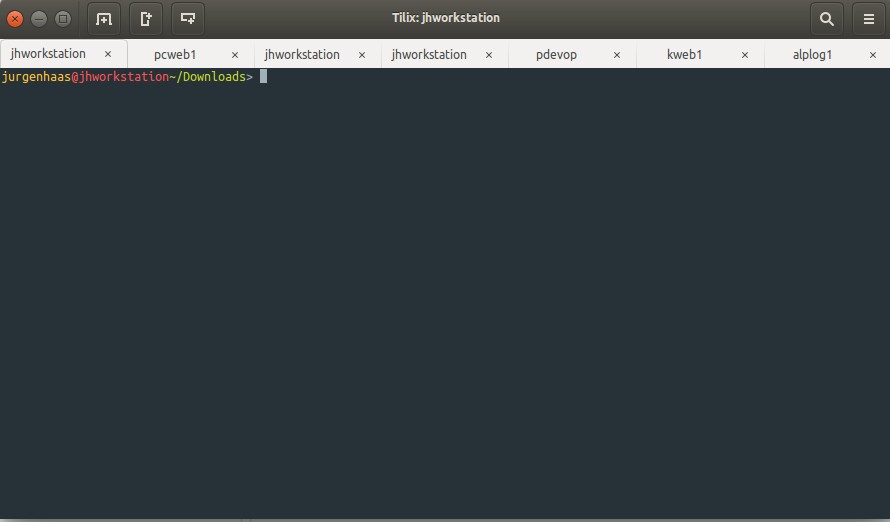
Any chance of making that more obvious?
 jurgenhaas
All 7 comments
Unfortunately I think that's more a problem with your theme than tilix, does gedit behave any differently in terms of how the active tab looks? Does tilix look better when you switch to Adwaita as your theme?
 gnunn1
on 8 Feb 2018
gnunn1
on 8 Feb 2018
You're right, gedit is just the same. So it has to do with my system settings and not with Tilix - confirmed.
But while on it, where should I change to Adwaita? In my system settings I only have Ambiance (currently active), Radience and High Contrast. Both alternatives are looking aweful.
jurgenhaas
on 8 Feb 2018
For me I use tweak UI, I'm not sure in Ubuntu what the options are as I'm on Arch.
gnunn1
on 8 Feb 2018
Sorry to bother you again with this one. I found out how to copy a theme to you user folder and make CSS changes there. For GEdit, that work just fine, but Tilix stays as is. So here is the end of similarities and I wonder what I should be doing for Tilix.
Here is what Gedit looks like after tzhe tweak:
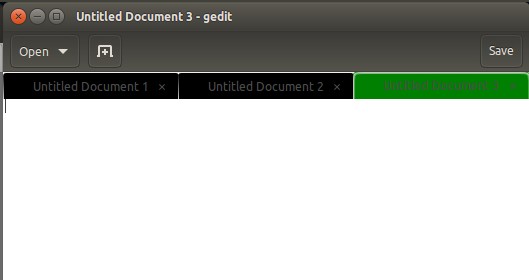
But Tilix remains the same. What I've added in themes/Ambiance/gtk-3.0/gtk-widgets.css:
.notebook tab {
background-color: black;
}
.notebook tab:active {
background-color: green;
}
I hope is it not too much aking for help here too.
jurgenhaas
on 8 Feb 2018
Hi, I was looking for the same styling and ended up adding the following css to the ~/.config/gtk-3.0/gtk.css on Ubuntu 18.04. This highlights the active tab of any gtk based app (gnome terminal, gedit, tilix etc). You may need to create the file if it doesn't exist. Thanks.
/* gnome/tilix terminal */
@define-color terminal_bg #300a24;
@define-color bg_color_active_tab #157bb7;
notebook tab,
notebook tab:hover {
background-image: -gtk-gradient (linear, left top, left bottom,
from (shade (@fg_color, 0.92)),
color-stop (0.60, shade (@fg_color, 0.9)),
to (shade (@fg_color, 0.85)));
color: @bg_color;
font-size: 10px;
font-family: monospace;
}
notebook tab:checked {
background-image: -gtk-gradient (linear, left top, left bottom,
from (shade (@bg_color_active_tab, 1.2)),
to (shade (@bg_color_active_tab, 1.12)));
color: @bg_color;
border-top-right-radius: 10px;
border-top-left-radius: 10px;
}
notebook tab .tilix-small-button {
background-color: #def;
}
 akhlak-mahmood
on 23 Apr 2019
akhlak-mahmood
on 23 Apr 2019
@jurgenhaas Thanks for sharing your setting. I have been trying to search for the CSS elements that the setting need to apply to. Your sharing helps!
I save change in the root GTK setting: ~/.config/gtk-3.0/gtk.css, and that works on Tilix.
.notebook tab {
background-color: #999
}
.notebook tab:active {
background-color: #ddd;
}
 vhquang
on 24 Jun 2019
vhquang
on 24 Jun 2019
Thank to your comments I made some config on ~/.config/gtk-3.0/gtk.css to have tabs with similar colors to Google Chrome:
/* Try to set tab color similar to Chrome */
notebook tab {
    color: white;
    background-color: #59574E;
}

notebook tab:checked {
    color: black;
    background-color: #F0F0F0;
}
My versions:
tilix --version
Versions
    Tilix version: 1.9.1
    VTE version: 0.52
    GTK Version: 3.22.30

Tilix Special Features
    Notifications enabled=0
    Triggers enabled=0
    Badges enabled=1
 jfisbein
on 6 Nov 2019
jfisbein
on 6 Nov 2019
Related issues
gnunn1
·
3Comments
 tomtobac
·
3Comments
tomtobac
·
3Comments
 huti26
·
3Comments
huti26
·
3Comments
 roadhoghook
·
4Comments
roadhoghook
·
4Comments
 alex285
·
3Comments
alex285
·
3Comments
Most helpful comment
Thank to your comments I made some config on
~/.config/gtk-3.0/gtk.cssto have tabs with similar colors to Google Chrome:My versions: