Tilix: Make quake mode window "Height percent" up to 100%
Good day.
It used to work great in old version.
Now scale is only to 90%. Makes Tilix not so comfortable (less space) and as good looking as before.


I have this problem for a number of month.
Version: tilix 1.5.6
Miscellaneous:
SDDM, X11, Plasma, KDE 5.
Arch Linux 4.10.13 x86_64
Thank you for this application.
I recommend it to my different friends.
Regards,
Anton Latukha
 Anton-Latukha
All 13 comments
As noted in previous bug reports, 100% isn't available because it causes issues with window managers. I'm travelling today and can't search for it but if you look through the issues you should be able to find it.
 gnunn1
on 8 May 2017
gnunn1
on 8 May 2017
Sorry.
I seen that discussion number of month ago.
This bothers me, because I live in it. So I pinged, maybe something changed.
On Kwin it was working truly great.
Maybe I can create fork for myself. And just change those damn 90 to 100.
Thank you.
Hope I donate in the future. I have interview today for that.
Anton-Latukha
on 8 May 2017
No worries, never hurts to check if there has been a change.
Good luck with the interview!
gnunn1
on 8 May 2017
How about 99%? Is it still causes issues?
Can 99%-100% be added as an option (with warning)?
 Mentis
on 7 Aug 2017
Mentis
on 7 Aug 2017
@Mentis Sorry, I'm not changing it since I'm the one that has to deal with bug reports about it :)
gnunn1
on 7 Aug 2017
Some supplementary info:
How to determine window manager. Or at least desktop environment. It is possible to utilize XDG_CURRENT_DESKTOP for that. From what I see most graphical environments and distributions use that variable.
There are also other variables that was invented by DEs:
https://superuser.com/questions/1074068/what-is-the-difference-between-desktop-session-xdg-session-desktop-and-xdg-cur
https://askubuntu.com/questions/72549/how-to-determine-which-window-manager-is-running
But looks like almost all use XDG_CURRENT_DESKTOP now defacto.
XDG team for themselves done determination of environment, you can see that here:
https://cgit.freedesktop.org/xdg/xdg-utils/tree/scripts/xdg-utils-common.in#n270
But I see it is not possible to get it from xdg-utils binaries. xdg-settings --list is the only option I found, and it doesn't supply that info.
P.S.
I am still looking for 8-5 work, I remember my word.
Anton-Latukha
on 8 Aug 2017
90% only is an _extremely_ annoying bug
 ser
on 16 May 2018
ser
on 16 May 2018
I've never seen a quake-mode terminal having issues with any window manager. Maybe just throw a warning when the user increases the value over 90%?
 ghost
on 15 Aug 2018
ghost
on 15 Aug 2018
I do not know if it was fixed, but I am able now to press F11 and get full screen <3
ser
on 18 Aug 2018
@ser that one hides the panel in full screen
ghost
on 18 Aug 2018
this worked well for me:
gsettings set com.gexperts.Tilix.Settings quake-height-percent 100
 grandon
on 3 Apr 2020
grandon
on 3 Apr 2020
this worked well for me:
gsettings set com.gexperts.Tilix.Settings quake-height-percent 100
Excellent solution
 shankhadevpadam
on 4 Apr 2020
shankhadevpadam
on 4 Apr 2020
The above workaround is for GTK-based environment.
For KDE Plasma
You can enforce applications obey your rules and the compositor by creating the rule in the Settings -> Window Management -> Window Rules -> New:
Rule matches for Tilix:
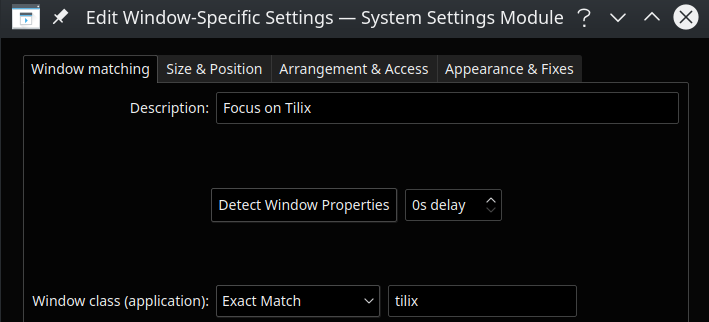
Now enforce the app to take all available vertical space:
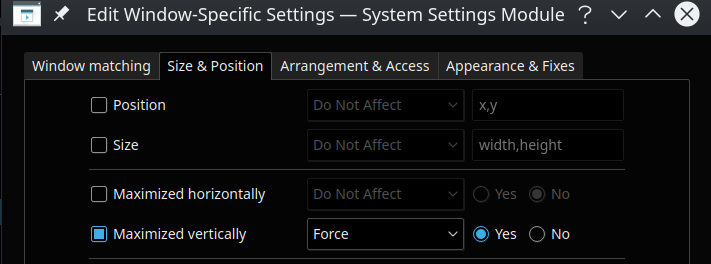
Anton-Latukha
on 4 Apr 2020
Related issues
 huti26
·
3Comments
huti26
·
3Comments
 roadhoghook
·
4Comments
roadhoghook
·
4Comments
 sirex
·
3Comments
gnunn1
·
3Comments
sirex
·
3Comments
gnunn1
·
3Comments
 wesselih
·
4Comments
wesselih
·
4Comments
Most helpful comment
90% only is an _extremely_ annoying bug