Tiddlywiki5: [BUG] Autofill tag pill in TW 5.1.23 keeps partial word input if the tiddler is deleted
Describe the bug
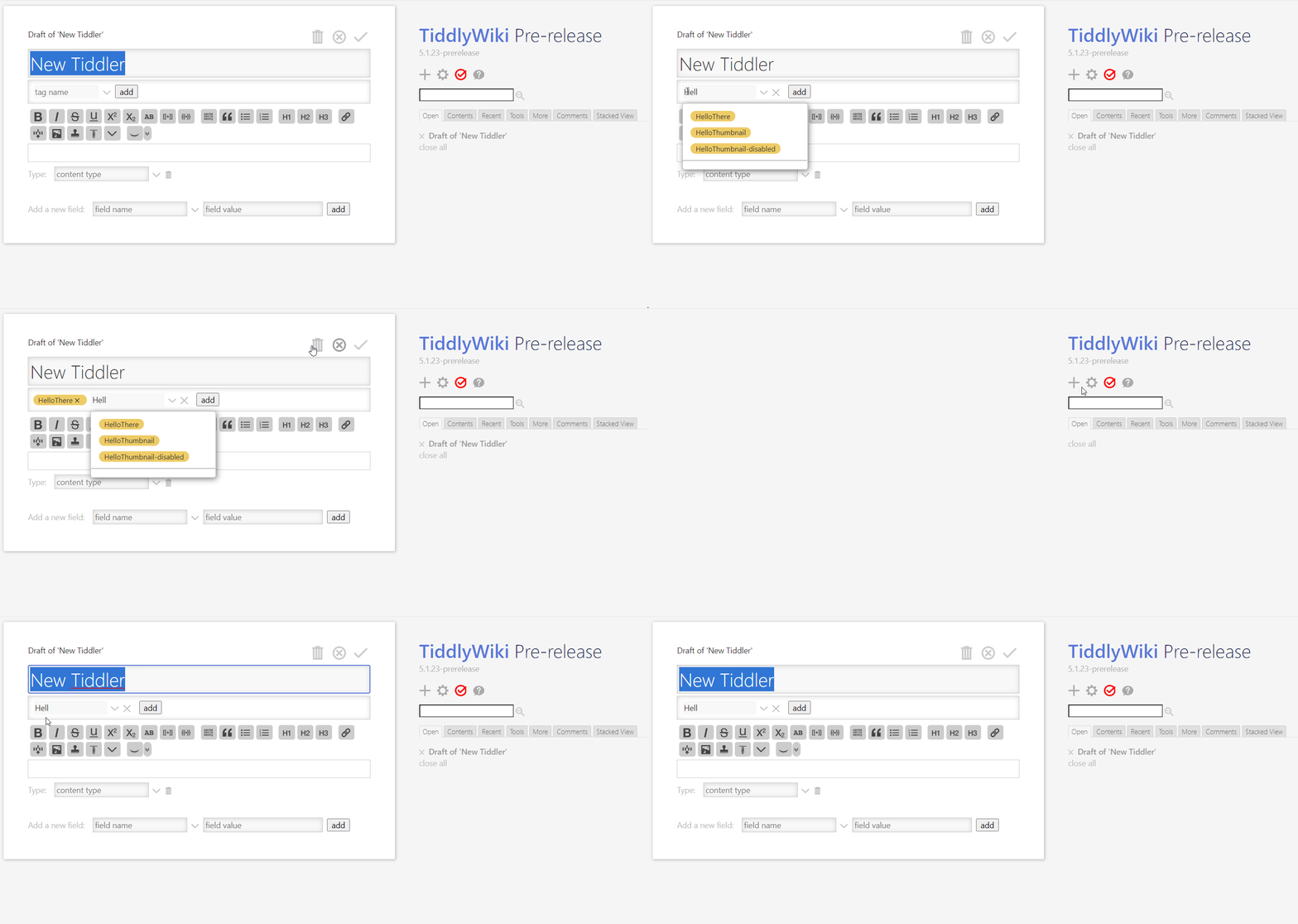
The autofill tag input keeps the partial word already used when you create a new tiddler, if you deleted the previous tiddler you used partial word in tag input. See https://github.com/Jermolene/TiddlyWiki5/pull/5032
To Reproduce
Steps to reproduce the behavior:
- Go to https://tiddlywiki.com/prerelease/
- Create a new tiddler
- In tag input type Hell
- Add the HelloThere from tag drop down
- Delete the tiddler
- Add new tiddler
- In new tiddler you see Hell already in tag input
Expected behavior
In new tiddler created the tag input shall be empty
Screenshots
Desktop (please complete the following information):
- OS: Windows 10
- Browser Chrome 86
- Version TW 5.1.23
 kookma
All 16 comments
@kookma thanks for your report. I think I'll change this behavior to how it was before
 BurningTreeC
on 15 Nov 2020
BurningTreeC
on 15 Nov 2020
@kookma - I misunderstood the OP. I'll investigate how to fix this issue. Thanks for reporting!
BurningTreeC
on 15 Nov 2020
@kookma - this issue is the same for the fieldname input and the fieldvalue input. This behavior was also in 5.1.22 ...
The fix would be a bit more complicated. I'd like to hear others if it's worth the effort
BurningTreeC
on 15 Nov 2020
@BurningTreeC Yes, it seems this is the same behavior for Fields. Okay lets see what other users say!
kookma
on 15 Nov 2020
Hi @BurningTreeC I do think the more expected behaviour would be to clear the typed input when clicking an entry in the dropdown.
 Jermolene
on 15 Nov 2020
Jermolene
on 15 Nov 2020
I do think the more expected behaviour would be to clear the typed input when clicking an entry in the dropdown.
That's fixed with #5041 ... but the OP is more about state tiddlers not being deleted after cancelling/deleting a tiddler
BurningTreeC
on 15 Nov 2020
@Jermolene Can I close this issue or it should be open for other fields?
kookma
on 15 Nov 2020
@kookma I think you can leave this issue open
BurningTreeC
on 15 Nov 2020
Hi @kookma, I believe I've fixed this issue in the following Demo:
If you have some time, you may want to test this :+1:
BurningTreeC
on 15 Nov 2020
@BurningTreeC, Thank you!
I tested the demo.
It works fine! After each tag was added the input for the next tag is clear!
kookma
on 15 Nov 2020
@kookma, it should also work for the fieldname and fieldvalue inputs!
BurningTreeC
on 15 Nov 2020
@BurningTreeC Sorry, I forgot it!
Well I tested the Demo again! It nicely clears the field input and works as expected.
Side note:
When adding a new field (field name) using the mouse click the drop down will be closed, but when you add a field name by selecting from the drop down by pressing Enter key the drop down remains open! It is like nothing was happened, but after clicking the field value or remove focus from field name input you see the field was added.
kookma
on 15 Nov 2020
When adding a new field (field name) using the mouse click the drop down will be closed, but when you add a field name by selecting from the drop down by pressing Enter key the drop down remains open! It is like nothing was happened, but after clicking the field value or remove focus from field name input you see the field was added.
@kookma - I think I don't understand what you mean. The fields that are added should always be clearly visible
BurningTreeC
on 15 Nov 2020
@kookma - I think I don't understand what you mean. The fields that are added should always be clearly visible
Yes, the fields that are added are clearly visible! So, I confirm the issue has gone!
My point was: it is good to close the drop down on Enter.
kookma
on 15 Nov 2020
Hi @kookma can this be closed?
Jermolene
on 16 Nov 2020
Thank you Jeremy!
kookma
on 16 Nov 2020
Related issues
 phenomenal11
·
5Comments
phenomenal11
·
5Comments
 dainkaplan
·
5Comments
dainkaplan
·
5Comments
 morosanuae
·
6Comments
Jermolene
·
6Comments
morosanuae
·
6Comments
Jermolene
·
6Comments
 twMat
·
5Comments
twMat
·
5Comments
Most helpful comment
Hi @kookma, I believe I've fixed this issue in the following Demo:
delete_state_tiddlers.zip
If you have some time, you may want to test this :+1: