Tiddlywiki5: [REQUEST] Add keyboard shortcuts for basic features.
Please consider adding keyboard shortcuts for following basic tasks:
- Navigate between tiddlers in the story river
- Edit the current tiddler
- Close the current tiddler
- Close all other Tiddlers except the current one
- Close all tiddlers
- Open Control Panel.
- Save Wiki (the save button on the sidebar)
- Directly enter edit area of a new tiddler (the persistent tag menu drop down and tabbing through options in editor toolbar is too annoying)
It would be extremely helpful for long focused sessions of writing in TW (e.g. in a class)
 phenomenal11
All 5 comments
Some of these features are already working with BTC's navigator plugin, that could be a good starting point for making these features into the empty tiddlywiki so that the development does not have to be started from zero.
 Adam4242
on 5 Jun 2020
Adam4242
on 5 Jun 2020
I am sorry for commenting in this thread. I couldn't find another related place for asking this to @BurningTreeC .
My request is to @BurningTreeC . Can you please update Muuritouch story river to work with TW5.1.22 or TW5.1.23. Muuritouch was one of the best interface in TW5. But i couldn't make it's keyboard shortcuts work with TW5.1.22 even after trying for weeks.
 arunnbabu81
on 19 Sep 2020
arunnbabu81
on 19 Sep 2020
Thanks @phenomenal11. Numbers 6 and 7 are straightforward to add, and we should do so. The others all require TW5 to be extended to track and highlight a "currently selected tiddler". There is some work underway on that in #4782.
 Jermolene
on 24 Sep 2020
Jermolene
on 24 Sep 2020
When writing a new tiddler it would be supremely helpful to be able to tab from the tags to the actual edit box _and not have the tag list stay open over it_.
A desirable workflow for myself would be to be something like the following with one tab/shift+tab, return/shift+return, or w/e hot key is assigned to move from one step to the next and leave nothing from the last operation interfering with the new one:
- Write title
- Start typing tags, use arrow keys to select tags from the list and
Enterto add the currently typed or selected one as a new tag - Move left or right to select an existing tag or move to the
tag namebox and delete to delete a selected tag - Start writing the article in the main edit box
Current behaviour leaves the tag list down and requires a LOT of tab's to get to the main edit box for the article. This image has the curser in the edit box for the Tiddler:
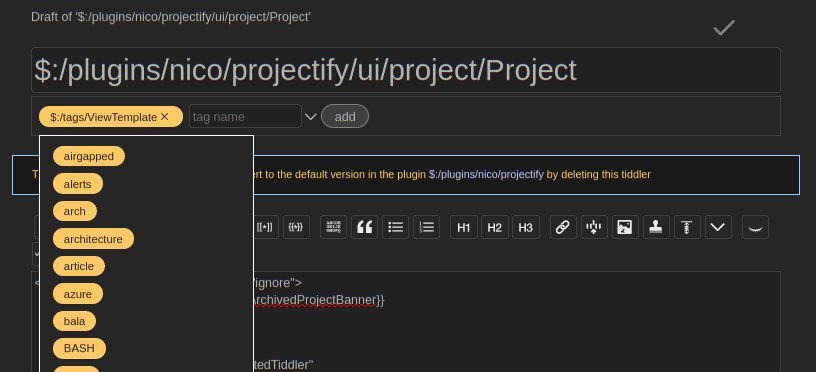
PS. There are a lot of issues on keyboard shortcuts but I've not found this mentioned anywhere so please forgive me if I missed it.
 Tejeev
on 18 Dec 2020
Tejeev
on 18 Dec 2020
@Tejeev suggest you test the pre-release version of 5.1.23 (soon to be released). Most of these issues have been resolved:
https://tiddlywiki.com/prerelease/
 saqimtiaz
on 18 Dec 2020
saqimtiaz
on 18 Dec 2020
Related issues
 ldorigo
·
5Comments
ldorigo
·
5Comments
 dainkaplan
·
5Comments
saqimtiaz
·
5Comments
saqimtiaz
·
4Comments
dainkaplan
·
5Comments
saqimtiaz
·
5Comments
saqimtiaz
·
4Comments
 twMat
·
4Comments
twMat
·
4Comments
Most helpful comment
Some of these features are already working with BTC's navigator plugin, that could be a good starting point for making these features into the empty tiddlywiki so that the development does not have to be started from zero.