Three.js: Editor: Add support for importing OBJ/MTL assets with textures.
Description of the problem
The obj format model is a very commonly used format. When importing obj and mtl, you need zip. . After importing, the geometry and material can be loaded normally, but the texture map has an error. After checking, I found that it is related to the following code. It is not useful to process the material-related pictures in the zip. . This is not necessarily a bug, but it affects the experience more.
//editor/js/Loader.js( function handleZip() )
// Poly

if ( zip.files[ 'model.obj' ] && zip.files[ 'materials.mtl' ] ) {

    var materials = new MTLLoader().parse( zip.file( 'materials.mtl' ).asText() );
    var object = new OBJLoader().setMaterials( materials ).parse( zip.file( 'model.obj' ).asText() );
    editor.execute( new AddObjectCommand( editor, object ) );

}
Three.js version
- [ ] Dev
- [ ] r118
- [ ] ...
Browser
- [x] All of them
OS
- [ ] Windows
Hardware Requirements (graphics card, VR Device, ...)

 hopepdm
All 9 comments
I'm afraid there is not easy way of fixing this. When the MTL file is extracted from the zip archive and then parsed, the loader tries to load textures from a relative path definition.
This will lead to URLs like https://threejs.org/editor/uv_grid_opengl.jpg.The following archive can be used for reproduction: Archiv.zip
 Mugen87
on 3 Jul 2020
Mugen87
on 3 Jul 2020
When importing obj and mtl, you need zip.
No you don't... 🤔
 mrdoob
on 4 Jul 2020
mrdoob
on 4 Jul 2020
No you don't... 🤔
AFAICS, it is indeed required in the editor to have the OBJ and MTL file bundled in a single archive. The files also need specific names. When inspecting the code, MTLLoader is only used here:
Mugen87
on 6 Jul 2020
i did some digging, could it be that the function that we are using from ui.three.js to load the file (UI.Texture#loadFile) doesn't support .zip? see here:
https://github.com/mrdoob/three.js/blob/c5560e5f94a9c40cba74fdb5f64b3794fecf0a4b/editor/js/libs/ui.three.js#L56
this function defines only the following cases for filetype
https://github.com/mrdoob/three.js/blob/c5560e5f94a9c40cba74fdb5f64b3794fecf0a4b/editor/js/libs/ui.three.js#L61
https://github.com/mrdoob/three.js/blob/c5560e5f94a9c40cba74fdb5f64b3794fecf0a4b/editor/js/libs/ui.three.js#L83
https://github.com/mrdoob/three.js/blob/c5560e5f94a9c40cba74fdb5f64b3794fecf0a4b/editor/js/libs/ui.three.js#L100
i could be wrong. is the event supposed to bubble up to the editor's loadFile somehow?
 johnmarinelli
on 21 Jul 2020
johnmarinelli
on 21 Jul 2020
I'm afraid ui.three.js is unrelated to this topic. I suggest you study the implementation of Loader.js where MTLLoader and OBJLoader are actually used.
Mugen87
on 24 Jul 2020
When importing obj and mtl, you need zip.
No you don't... 🤔
It is very clear about loading OBJ+MTL in the example https://threejs.org/examples/#webgl_loader_obj_mtl.
But when I try to load OBJ+MTL in Three.js Editor, it seems only OBJ is loaded but no MTL.
Thus is it possible to load OBJ+MTL in Three.js Editor?
 qizs
on 3 Aug 2020
qizs
on 3 Aug 2020
Thus is it possible to load OBJ+MTL in Three.js Editor?
Yes but only when you create a zip archive and name the files correctly (model.obj and materials.mtl)
Mugen87
on 3 Aug 2020
When I tried importing the .obj and .mtl files into the editor either separately or at the same time, the .mtl was not applied. When I created a zip file and imported the zip file, the .mtl was applied correctly.
 kylemcdonald
on 28 Nov 2020
kylemcdonald
on 28 Nov 2020
@kylemcdonald Did you mean that you didn't experience the problem observed above with the texture map after fixing your materials.mtl in the zip file?
e.g. 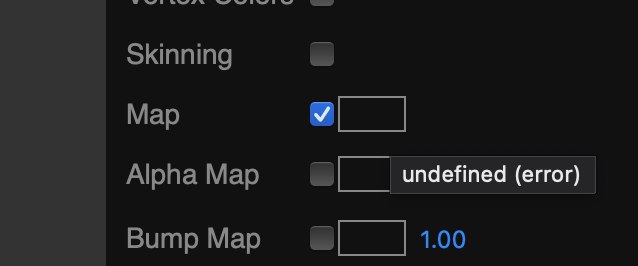
Just checking because I seemed to have the same experience as the original poster.
Note: the jpg texture map which had been in the zip file alongside the materials.mtl loads fine when uploaded one-by-one clicking on the box near that error:
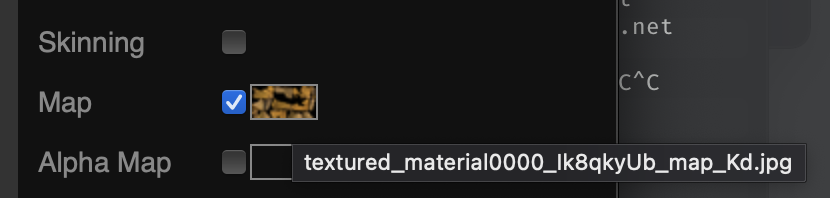
And a "File->Export OBJ" then embeds everything into one large OBJ, so it's a bit hard to know how to modify the originals to make them work.
 thadk
on 29 Nov 2020
thadk
on 29 Nov 2020
Related issues
 akshaysrin
·
3Comments
akshaysrin
·
3Comments
 alexprut
·
3Comments
alexprut
·
3Comments
 jens-duttke
·
3Comments
jens-duttke
·
3Comments
 jlaquinte
·
3Comments
jlaquinte
·
3Comments
 zsitro
·
3Comments
zsitro
·
3Comments