Three.js: 360 Browser: Failed to execute 'texImage2D' on 'WebGLRenderingContext'
Description of the problem
I got the following error when when set texture for my 3D objects:
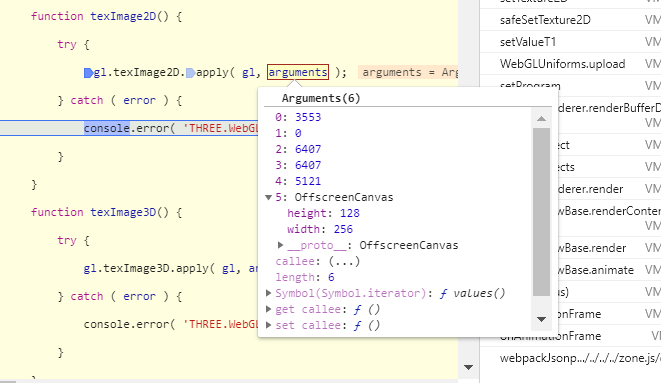
VM1084:1 THREE.WebGLState: TypeError: Failed to execute 'texImage2D' on 'WebGLRenderingContext': No function was found that matched the signature provided.

After debug I found the problem is caused by the function resizeImage in WebGLTextures. This function sometimes return me an OffscreenCanvas, which is not supported by WebGLRenderingContext.texImage2D.
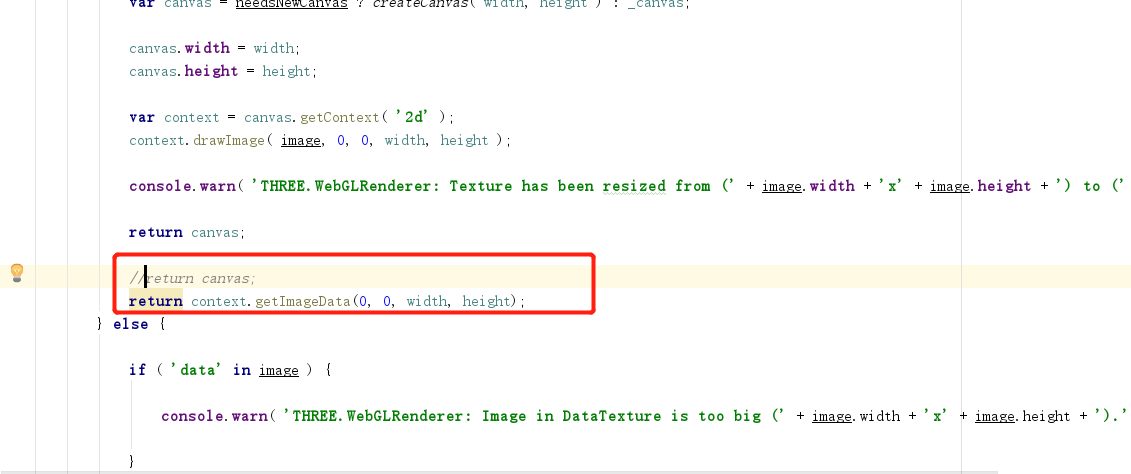
I am trying to fix this problem in function resizeImage by returning the
'return context.getImageData(0, 0, width, height);'
instead of
' return canvas;'
But I am really not sure this is the right way. Would you give me some suggestions?
Three.js version
r105
Browser
I am using a browser based on Chromium 69.0.3497.100
OS
- [ ] Windows
- [ ] macOS
Hardware Requirements (graphics card, VR Device, ...)
 xiewenling
All 8 comments
Here is my code change:
xiewenling
on 6 Nov 2019
I am using a browser based on Chromium 69.0.3497.100
What does this exactly mean? Latest browser versions of Chrome and Firefox have no problems when OffscreenCanvas is used for resizing. Besides, there is a check that ensures OffscreenCanvas is only used if it's available and a context creation possible.
OffscreenCanvas, which is not supported by WebGLRenderingContext.texImage2D.
It seems your Chromium version is just too old.
https://bugs.chromium.org/p/chromium/issues/detail?id=753483
 Mugen87
on 6 Nov 2019
Mugen87
on 6 Nov 2019
I am using the 360 browser, this browser is widely used in China. It is based on Chromium 69.0.3497.100. I have no way to push the 360 company to upgrade the Chromium version. Is there any way I can workaround this problem?
xiewenling
on 7 Nov 2019
And BTW, the same company has another browser based on 63.0.3239.132, which works pretty well for me. So this might not simply because the the Chromium too old.
xiewenling
on 7 Nov 2019
Update to the latest revision of three.js. Either use power-of-two textures, or disable mipmaps.
 WestLangley
on 7 Nov 2019
WestLangley
on 7 Nov 2019
And BTW, the same company has another browser based on 63.0.3239.132, which works pretty well for me
OffscreenCanvas is available without a flag since Chromium 69. So older versions don't have it and hence the existing checks in WebGLTextures work.
I don't think we are going to revert the code in WebGLTextures just because 360 browser uses a Chromium version with buggy OffscreenCanvas support. The workarounds to avoid resizing are easy to use.
BTW: Another way to avoid the internal resize is to use a WebGL 2 rendering context.
Mugen87
on 7 Nov 2019
Update to the latest revision of three.js. Either use power-of-two textures, or disable mipmaps.
Sure enough, I had a canvas being used as a texture with canvas dimensions not power-of-two.
The error makes no sense for an end user. Can we instead output Either use power-of-two textures, or disable mipmaps.?
 trusktr
on 18 Dec 2019
trusktr
on 18 Dec 2019
Has the same issue on Nexus 9 tablet running Android 7.1 and Chrome....
I think the WebGL error is showing as a console warning, which isn't the most helpful. The top results on google say it's a CORS issue, when it's a texture issue:
[.WebGL-0x86d0ad00]GL ERROR :GL_INVALID_OPERATION : glGenerateMipmap: Can not generate mips
251[.WebGL-0x86d0ad00]RENDER WARNING: texture bound to texture unit 0 is not renderable. It maybe non-power-of-2 and have incompatible texture filtering.
three.min.js?cache=dbbe9ec:133 THREE.WebGLRenderer: Texture has been resized from (1258x430) to (1024x256).
l @ three.min.js?cache=dbbe9ec:133
three.min.js?cache=dbbe9ec:131 THREE.WebGLState: TypeError: Failed to execute 'texImage2D' on 'WebGLRenderingContext': No function was found that matched the signature provided.
My canvas size was:
width = 104.83333333333333
height = 35.833333333333336
I fixed by rounding the canvas width and height up to the next power of two:
nextPowerOf2(n) {
  return Math.pow(2, Math.ceil(Math.log(n) / Math.log(2)));
}

canvas.width = nextPowerOf2(width);
canvas.height = nextPowerOf2(height);
 kmturley
on 15 Feb 2020
kmturley
on 15 Feb 2020
Related issues
 yqrashawn
·
3Comments
yqrashawn
·
3Comments
 boyravikumar
·
3Comments
boyravikumar
·
3Comments
 ghost
·
3Comments
ghost
·
3Comments
 scrubs
·
3Comments
scrubs
·
3Comments
 konijn
·
3Comments
konijn
·
3Comments
Most helpful comment
Update to the latest revision of three.js. Either use power-of-two textures, or disable mipmaps.