Three.js: Proposal: shader uniform to emulate polygon offset
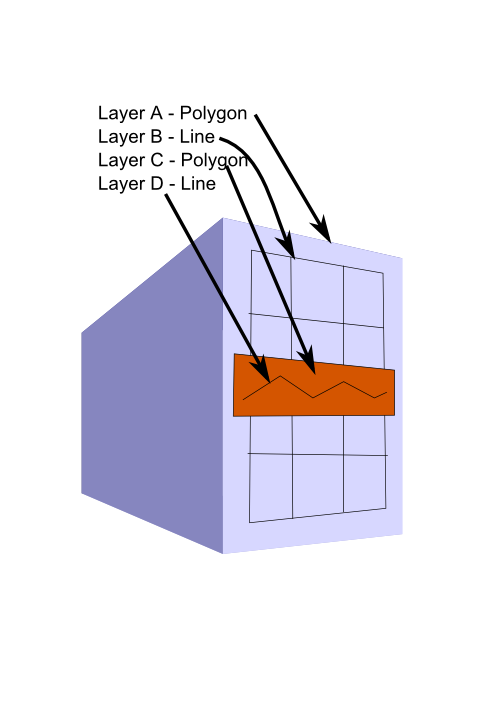
Hi. I've noticed in some (all?) WebGL implementations polygon offset doesn't work with lines. This isn't a problem if you're rendering one line layer on top of one polygon layer, but really messes things up if you have multiple coplanar layers. In my case,I have a polygon with a line decal, on top of which is a polygon decal, on top of which is yet another line decal. Rendering all of this with gl.polygonOffset proved to be impossible.
As a consequence, I propose that three.js shaders include a new shader chunk:
float _z = gl_Position[2]/gl_Position[3];
_z = _z - z_off_abs(_z);
gl_Position[2] = _z_gl_Position[3];
. . .which emulates the polygon offset functionality (albeit imperfectly).
 joeedh
All 12 comments
Do you mind providing a live example of your use case, demonstrating your proposed solution?
 WestLangley
on 11 Sep 2014
WestLangley
on 11 Sep 2014
I can't really show my use case, so I've mocked something up in InkScape. As you can see, I have a mix of lines and polygons, and no, using a texture isn't an option.
(I can't get image upload to work, which is why the image is hosted externally)
http://img.photobucket.com/albums/v287/joeedh/Mobile%20Uploads/polygonoffsetgraphic.png
joeedh
on 11 Sep 2014
Thanks, but I wanted to know if you would provide a live example of your shader, demonstrating your alternate technique.
WestLangley
on 12 Sep 2014
Btw, in one project we have switched from polygonOffset to this:
#define positionOffset 0.0001
....
#ifdef positionOffset
gl_Position.z-= positionOffset;
#endif
simply because it did not work in IE on some machine.
Now I tried to use polygonOffset with lines and it does not work at all (even not in IE) for me. Adding
gl_Position.z-= 0.0003;
in FF shader editor again does the trick for me, so it seems I am going to have to write custom line material.
Here is before:

and after:

 makc
on 11 Apr 2015
makc
on 11 Apr 2015
@WestLangley I just added "a live example" of this in #2593 for another person, but what I think would be more useful for everyone is official example in repository of how to inject custom code into standard shaders. I have done it before, but it was very hacky and unreliable because you guys change the way shaderlib and shaderchunk things work whenever you feel like, so maybe an official example could bring something people could rely on in fixing the problems like this.
makc
on 26 Jan 2017
but what I think would be more useful for everyone is official example in repository of how to inject custom code into standard shaders.
@makc Good suggestion.
Do you mean this kind of hack?
THREE.ShaderLib[ 'phong' ].fragmentShader = THREE.ShaderLib[ 'phong' ].fragmentShader.replace(

    "gl_FragColor = vec4( outgoingLight, diffuseColor.a );",

    "gl_FragColor = ( gl_FrontFacing ) ? vec4( outgoingLight, diffuseColor.a ) : vec4( diffuse, opacity );"

);
Or did you have something else in mind?
WestLangley
on 27 Jan 2017
pretty much, although ideally we should have something like matInstance.insertShaderChunkBefore/After (e g in the case of z offset you would not want the change to be global)
makc
on 27 Jan 2017
Work-around: https://github.com/mrdoob/three.js/issues/10764#issuecomment-278507889
WestLangley
on 9 Feb 2017
but what I think would be more useful for everyone is official example in repository of how to inject custom code into standard shaders.
And a pull request :)
https://github.com/mrdoob/three.js/pull/10791
Defines and preprocessor branching in chunks can only get you that far i think, attaching a custom uniform may be possible but it's probably very hard?
 pailhead
on 7 Apr 2017
pailhead
on 7 Apr 2017
attaching a custom uniform may be possible but it's probably very hard?
Good point.
WestLangley
on 8 Apr 2017
The renderer doesn't know where to look right? The only way that i can think of is to get the reference to GL context manually and go from there ... ? :cold_sweat:
pailhead
on 8 Apr 2017
Modifications of built-in shaders are now done with Material.onBeforeCompile(). IMO, the proposed technique should not be added to the built-in shaders so it's better to let users enhance them if necessary.
Hence, this issue can be closed.
 Mugen87
on 18 Mar 2020
Mugen87
on 18 Mar 2020
Related issues
 akshaysrin
·
3Comments
akshaysrin
·
3Comments
 scrubs
·
3Comments
scrubs
·
3Comments
 jens-duttke
·
3Comments
jens-duttke
·
3Comments
 donmccurdy
·
3Comments
donmccurdy
·
3Comments
 jlaquinte
·
3Comments
jlaquinte
·
3Comments
Most helpful comment
Work-around: https://github.com/mrdoob/three.js/issues/10764#issuecomment-278507889