Three.js: Reflector recursion is capped to 3 max
Description of the problem
When you set recursion level for reflectors, it is capped to three ( see the screenshot )

All side walls were replaced by reflectors following the mirror example using
            var geometry1 = new THREE.PlaneBufferGeometry( 100, 100 );
            var verticalMirror1 = new THREE.Reflector( geometry1, {
                    clipBias: 0.003,
                    textureWidth: WIDTH * window.devicePixelRatio,
                    textureHeight: HEIGHT * window.devicePixelRatio,
                    color: 0x889999,
                    recursion: 1000
                } );
                verticalMirror1.position.y = 50;
                verticalMirror1.position.z = 50;
        verticalMirror1.rotateY( Math.PI );
                scene.add( verticalMirror1 );

            var geometry2 = new THREE.PlaneBufferGeometry( 100, 100 );
            var verticalMirror2 = new THREE.Reflector( geometry2, {
                    clipBias: 0.003,
                    textureWidth: WIDTH * window.devicePixelRatio,
                    textureHeight: HEIGHT * window.devicePixelRatio,
                    color: 0x889999,
                    recursion: 1000
                } );
        verticalMirror2.position.x = - 50;
                verticalMirror2.position.y = 50;
                verticalMirror2.rotateY( Math.PI / 2 );
                scene.add( verticalMirror2 );

            var geometry3 = new THREE.PlaneBufferGeometry( 100, 100 );
            var verticalMirror3 = new THREE.Reflector( geometry3, {
                    clipBias: 0.003,
                    textureWidth: WIDTH * window.devicePixelRatio,
                    textureHeight: HEIGHT * window.devicePixelRatio,
                    color: 0x889999,
                    recursion: 1000
                } );
        verticalMirror3.position.x = 50;
        verticalMirror3.position.y = 50;
        verticalMirror3.rotateY( - Math.PI / 2 );
                scene.add( verticalMirror3 );
Three.js version
Latest version from the repository
Browser
- [x] Chrome 64.0.3282.140 (Official Build) (64-bit) (cohort: 68_84_win)
- [X] Firefox Quantom 63.0.3 64-bit
- [X] Internet Explorer 11.0.95 (KB4466536)
OS
- [ ] All of them
- [X] Windows
- [ ] macOS
- [ ] Linux
- [ ] Android
- [ ] iOS
Hardware Requirements (graphics card, VR Device, ...)
Intel ID Graphics ( PCI\VEN_8086&DEV_0A16&SUBSYS_05E01028&REV_0B ) (PCI\VEN_8086&DEV_0A16&CC_030000 )
 dvdvideo1234
All 16 comments
recursion: 1000
What FPS do you have with this setting? Do you see any warnings or error messages in the browser console?
 Mugen87
on 3 Dec 2018
Mugen87
on 3 Dec 2018
What FPS do you have with this setting?
Sadly the example does not draw the FPS. Is it an option that I must enable ?
Do you see any warnings or error messages in the browser console?
So far I do not. First I've set the recursion level to 10. But the result is the same.
dvdvideo1234
on 3 Dec 2018
Can you please share your modified code as a live example?
Mugen87
on 3 Dec 2018
It does not matter if the recursion is set to recursion: 10 or recursion: 1000. The FPS does not get drawn, but the scene works fairly smooth 15-20 FPS ( by looking it work ). The result is the same.
The live example does not work for me it renders it black. Anyway. I modified this file with the following source:
<!DOCTYPE html>
<html lang="en">
  <head>
    <title>three.js webgl - mirror</title>
    <meta charset="utf-8">
    <meta name="viewport" content="width=device-width, user-scalable=no, minimum-scale=1.0, maximum-scale=1.0">
    <style>
      body {
        color: #888888;
        font-family:Monospace;
        font-size:13px;

        background-color: #000;
        margin: 0px;
        overflow: hidden;
      }

      #info {
        position: absolute;
        top: 0px;
        width: 200px;
        left: calc(50% - 100px);
        text-align: center;
      }

      a {
        color: #00f;
      }
    </style>
  </head>
  <body>

    <div id="container"></div>
    <div id="info"><a href="http://threejs.org" target="_blank" rel="noopener">three.js</a> - mirror
    </div>

    <script src="../build/three.js"></script>
    <script src="js/objects/Reflector.js"></script>
    <script src="js/controls/OrbitControls.js"></script>

    <script>

      // scene size
      var WIDTH = window.innerWidth;
      var HEIGHT = window.innerHeight;

      // camera
      var VIEW_ANGLE = 45;
      var ASPECT = WIDTH / HEIGHT;
      var NEAR = 1;
      var FAR = 500;

      var camera, scene, renderer;

      var cameraControls;

      var sphereGroup, smallSphere;

      init();
      animate();

      function init() {

        var container = document.getElementById( 'container' );

        // renderer
        renderer = new THREE.WebGLRenderer( { antialias: true } );
        renderer.setPixelRatio( window.devicePixelRatio );
        renderer.setSize( WIDTH, HEIGHT );
        container.appendChild( renderer.domElement );

        // scene
        scene = new THREE.Scene();

        // camera
        camera = new THREE.PerspectiveCamera( VIEW_ANGLE, ASPECT, NEAR, FAR );
        camera.position.set( 0, 75, 160 );

        cameraControls = new THREE.OrbitControls( camera, renderer.domElement );
        cameraControls.target.set( 0, 40, 0 );
        cameraControls.maxDistance = 400;
        cameraControls.minDistance = 10;
        cameraControls.update();

        var planeGeo = new THREE.PlaneBufferGeometry( 100.1, 100.1 );

        // reflectors/mirrors

        var geometry = new THREE.CircleBufferGeometry( 40, 64 );
        var groundMirror = new THREE.Reflector( geometry, {
          clipBias: 0.003,
          textureWidth: WIDTH * window.devicePixelRatio,
          textureHeight: HEIGHT * window.devicePixelRatio,
          color: 0x777777,
          recursion: 10
        } );
        groundMirror.position.y = 0.5;
        groundMirror.rotateX( - Math.PI / 2 );
        scene.add( groundMirror );

        var geometry = new THREE.PlaneBufferGeometry( 100, 100 );
        var verticalMirror = new THREE.Reflector( geometry, {
          clipBias: 0.003,
          textureWidth: WIDTH * window.devicePixelRatio,
          textureHeight: HEIGHT * window.devicePixelRatio,
          color: 0x889999,
          recursion: 10
        } );
        verticalMirror.position.y = 50;
        verticalMirror.position.z = -50;
        scene.add( verticalMirror );

      var geometry1 = new THREE.PlaneBufferGeometry( 100, 100 );
      var verticalMirror1 = new THREE.Reflector( geometry1, {
          clipBias: 0.003,
          textureWidth: WIDTH * window.devicePixelRatio,
          textureHeight: HEIGHT * window.devicePixelRatio,
          color: 0x889999,
          recursion: 10
        } );
        verticalMirror1.position.y = 50;
        verticalMirror1.position.z = 50;
        verticalMirror1.rotateY( Math.PI );
        scene.add( verticalMirror1 );

      var geometry2 = new THREE.PlaneBufferGeometry( 100, 100 );
      var verticalMirror2 = new THREE.Reflector( geometry2, {
          clipBias: 0.003,
          textureWidth: WIDTH * window.devicePixelRatio,
          textureHeight: HEIGHT * window.devicePixelRatio,
          color: 0x889999,
          recursion: 10
        } );
        verticalMirror2.position.x = - 50;
        verticalMirror2.position.y = 50;
        verticalMirror2.rotateY( Math.PI / 2 );
        scene.add( verticalMirror2 );

      var geometry3 = new THREE.PlaneBufferGeometry( 100, 100 );
      var verticalMirror3 = new THREE.Reflector( geometry3, {
          clipBias: 0.003,
          textureWidth: WIDTH * window.devicePixelRatio,
          textureHeight: HEIGHT * window.devicePixelRatio,
          color: 0x889999,
          recursion: 10
        } );
        verticalMirror3.position.x = 50;
        verticalMirror3.position.y = 50;
        verticalMirror3.rotateY( - Math.PI / 2 );
        scene.add( verticalMirror3 );

        sphereGroup = new THREE.Object3D();
        scene.add( sphereGroup );

        var geometry = new THREE.CylinderBufferGeometry( 0.1, 15 * Math.cos( Math.PI / 180 * 30 ), 0.1, 24, 1 );
        var material = new THREE.MeshPhongMaterial( { color: 0xffffff, emissive: 0x444444 } );
        var sphereCap = new THREE.Mesh( geometry, material );
        sphereCap.position.y = - 15 * Math.sin( Math.PI / 180 * 30 ) - 0.05;
        sphereCap.rotateX( - Math.PI );

        var geometry = new THREE.SphereBufferGeometry( 15, 24, 24, Math.PI / 2, Math.PI * 2, 0, Math.PI / 180 * 120 );
        var halfSphere = new THREE.Mesh( geometry, material );
        halfSphere.add( sphereCap );
        halfSphere.rotateX( - Math.PI / 180 * 135 );
        halfSphere.rotateZ( - Math.PI / 180 * 20 );
        halfSphere.position.y = 7.5 + 15 * Math.sin( Math.PI / 180 * 30 );

        sphereGroup.add( halfSphere );

        var geometry = new THREE.IcosahedronBufferGeometry( 5, 0 );
        var material = new THREE.MeshPhongMaterial( { color: 0xffffff, emissive: 0x333333, flatShading: true } );
        smallSphere = new THREE.Mesh( geometry, material );
        scene.add( smallSphere );

        // walls
        var planeTop = new THREE.Mesh( planeGeo, new THREE.MeshPhongMaterial( { color: 0xffffff } ) );
        planeTop.position.y = 100;
        planeTop.rotateX( Math.PI / 2 );
        scene.add( planeTop );

        var planeBottom = new THREE.Mesh( planeGeo, new THREE.MeshPhongMaterial( { color: 0xffffff } ) );
        planeBottom.rotateX( - Math.PI / 2 );
        scene.add( planeBottom );

//  These are the old walls that I've replaced with mirrors
//
//      var planeFront = new THREE.Mesh( planeGeo, new THREE.MeshPhongMaterial( { color: 0x7f7fff } ) );
//      planeFront.position.z = 50;
//      planeFront.position.y = 50;
//      planeFront.rotateY( Math.PI );
//      scene.add( planeFront );

//      var planeRight = new THREE.Mesh( planeGeo, new THREE.MeshPhongMaterial( { color: 0x00ff00 } ) );
//      planeRight.position.x = 50;
//      planeRight.position.y = 50;
//      planeRight.rotateY( - Math.PI / 2 );
//      scene.add( planeRight );

//      var planeLeft = new THREE.Mesh( planeGeo, new THREE.MeshPhongMaterial( { color: 0xff0000 } ) );
//      planeLeft.position.x = - 50;
//      planeLeft.position.y = 50;
//      planeLeft.rotateY( Math.PI / 2 );
//      scene.add( planeLeft );

        // lights
        var mainLight = new THREE.PointLight( 0xcccccc, 1.5, 250 );
        mainLight.position.y = 60;
        scene.add( mainLight );

        var greenLight = new THREE.PointLight( 0x00ff00, 0.25, 1000 );
        greenLight.position.set( 550, 50, 0 );
        scene.add( greenLight );

        var redLight = new THREE.PointLight( 0xff0000, 0.25, 1000 );
        redLight.position.set( - 550, 50, 0 );
        scene.add( redLight );

        var blueLight = new THREE.PointLight( 0x7f7fff, 0.25, 1000 );
        blueLight.position.set( 0, 50, 550 );
        scene.add( blueLight );

      }

      function animate() {

        requestAnimationFrame( animate );

        var timer = Date.now() * 0.01;

        sphereGroup.rotation.y -= 0.002;

        smallSphere.position.set(
          Math.cos( timer * 0.1 ) * 30,
          Math.abs( Math.cos( timer * 0.2 ) ) * 20 + 5,
          Math.sin( timer * 0.1 ) * 30
        );
        smallSphere.rotation.y = ( Math.PI / 2 ) - timer * 0.1;
        smallSphere.rotation.z = timer * 0.8;

        renderer.render( scene, camera );
      }

    </script>
  </body>
</html>
Fiddle with your code: https://jsfiddle.net/f2Lommf5/16619/
Mugen87
on 13 Dec 2018
Um, not sure so far what's going wrong...
Mugen87
on 13 Dec 2018
I'm not sure this is a bug but a limitation of the current code. Right now, a reflector can only render the view of another reflector. But it's not possible to "re-render" the reflector.
One reason for this is the fact that a reflector makes itself invisible when its view is rendered.
This will take the reflector out of the render list of subsequent nested calls of WebGLRenderer.render(). Take a look at this reduced test case to see the effect:
https://jsfiddle.net/f2Lommf5/16756/
The rendering of the second opposing reflector will not trigger an additional rendering of the first reflector. Because of this, we could actually delete the code related to camera.userData.recursion. As you can see at the following fiddle, the demo works even without this logic.
Mugen87
on 19 Dec 2018
@Mugen87 Thanks for investigating! I understand what that the issue is now.
I'll have to think about it... 🤔
 mrdoob
on 28 Dec 2018
mrdoob
on 28 Dec 2018
Hmm.. Is it better to initialize the recursion from the JSON recursion: 10 to some internal variable. Then when this is passed, not to disable the scope, but rather decrement the recursion stage of the current mirror only to become recursion: 9 and so on down to 0 ?
Later there may be some kind of IF statement that goes for example:
if(recursion <= 0) { scope.visible = false; }
dvdvideo1234
on 3 Jan 2019
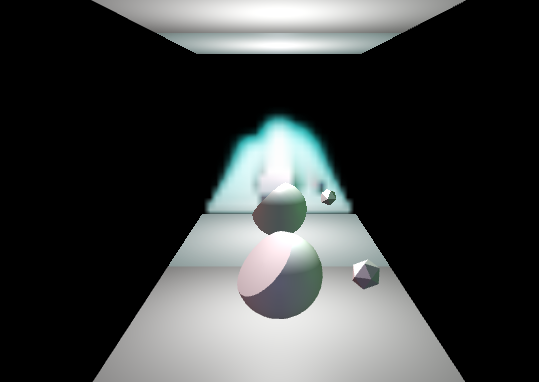
In fact I tried with the following, but the wall resulted in a blurry image.
if(recursion > 0)
{
  recursion = recursion - 1;
  scope.visible = true;
}
else
{
  scope.visible = false;
}
dvdvideo1234
on 3 Jan 2019
In the example above: https://jsfiddle.net/f2Lommf5/16908/
The recursed reflectors appear to be squashed in the direction of the reflection.
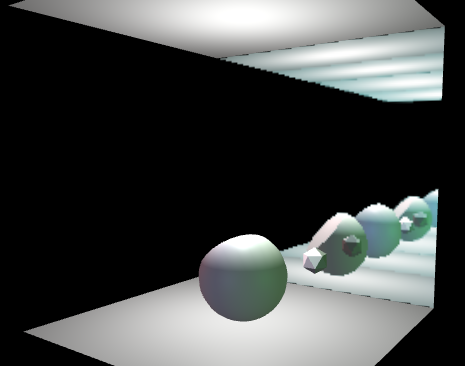
When I try the following looks kinda correct, though when I make a dedicated variable for a recursion depth counter, nothing is rendered and I get a black screen:
// Render comment where scope.visible = false; is located
  if(recursion > 0)
  {
    recursion = recursion - 1;
    scope.visible = true;
  }
  else
  {
    scope.visible = false;
  }
// Bottom code where scope.visible = true; is located ( above "getRenderTarget" )
  if(recursion <= 0)
  {
    scope.visible = true;
    recursion = 10;
  }
dvdvideo1234
on 3 Jan 2019
Is there any progress on this ?
dvdvideo1234
on 10 Jan 2020
Not yet, sorry.
Mugen87
on 10 Jan 2020
@dvdvideo1234 I'm afraid your approach is not correct since it's definitely necessary that the reflector does not render itself when it internally calls WebGLRenderer.render(). Otherwise you try to use a render target as destination and source texture at the same time (which is invalid).
I've revisited this issue today and it seems that recursion never worked as intended. When I change the above fiddle to use the version of Mirror where the parameter was added (ff961a729822f17376ddcd931a6310711e2a5137), I get the same number of renderings: https://jsfiddle.net/0mxb5pnh/1/
That happens because the mirror has to make itself invisible in onBeforeRender() which will remove it from the render list in the subsequent render call. Hence, I vote to remove the recursion related code from Reflector (in order to avoid wrong expectations) and mark this issue as Won't fix.
Mugen87
on 30 Mar 2020
Hence, I vote to remove the
recursionrelated code fromReflector(in order to avoid wrong expectations) and mark this issue asWon't fix.
You mean to not support recursion in Reflector?
mrdoob
on 3 Apr 2020
Yes. Considering how onBeforeRender() and render lists work right now, I don't think this can be properly implemented.
Mugen87
on 3 Apr 2020
Related issues
 donmccurdy
·
3Comments
donmccurdy
·
3Comments
 filharvey
·
3Comments
filharvey
·
3Comments
 fuzihaofzh
·
3Comments
fuzihaofzh
·
3Comments
 clawconduce
·
3Comments
clawconduce
·
3Comments
 alexprut
·
3Comments
alexprut
·
3Comments
Most helpful comment
@Mugen87 Thanks for investigating! I understand what that the issue is now.
I'll have to think about it... 🤔